





VelcroBP
Members
-
Joined
-
Last visited
Everything posted by VelcroBP
-
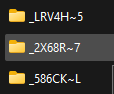
After the 4.4.0 update I also had my settings reverted to default. I have re-configured and got the incomplete downloads relocated back to the proper directory. However, I have noticed that one particular category (TV-SONARR) seems to be creating 3 subdirectories in the COMPLETED downloads directory. These are named strange (see pic). Only the most recent of the 3 contains ALL completed downloads for this Category (the other 2 are empty). Prior to the upgrade this Category behaved the same as the others and simply moved the completed downloads to the COMPLETE directory as expected.
-
Apparently my binhex-qbitorrent docker restarted early this a.m. for some reason. After it seems that the default save path and COMPLETE save path settings were reverted to default. This has borked my Radarr/Sonarr configs also, and as such ALL of my pending downloads have been automatically moved into the COMPLETED directory. I'm at a loss as to how I get back to my original config and have these files moved back into the correct INCOMPLETE directory. I've updated the paths in QBT settings, but Radarr/Sonarr settings still display the error: "You are using docker; download client VueTorrent places downloads in /config/qBittorrent/downloads but this directory does not appear to exist inside the container. Review your remote path mappings and container volume settings." Please help! I've had this running since I set it up months back and don't want to have to re-learn and re-configure it all from scratch again.
-
That did the trick! Thanks a million!
-
awesome thanks for pointing me to the network config file! I'll try that ASAP! Sent from my Pixel 5 using Tapatalk
-
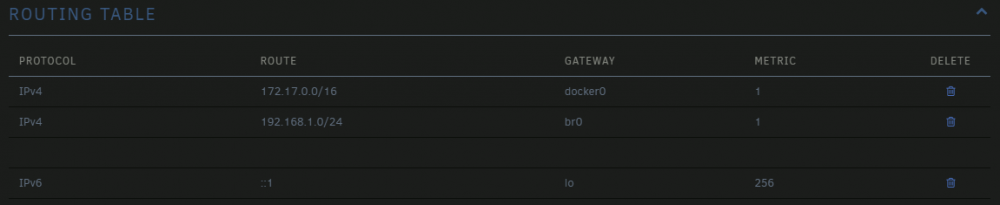
Basically looking for any help reverting to default network settings at this point. Sent from my Pixel 5 using TapatalkI have recently moved. I have setup my server with the same networking gear as before (modem, router) with the exception of a new dumb switch between it and the router. I can access the main Unraid and Docker UIs fine locally, but have no internet access from the server. This happened once before due to an incorrectly configured 2nd NIC. That time it was resolved by simply porting down the unused NIC, as Unraid seemed to be defaulting to it. I have tried that again this time with no luck. I cannot ping any external address or DNS, but I CAN ping the local router/default gateway (192.168.1.1). I'm attaching diagnostics, as well as a screen of the routing table from Settings>Networking. Please let me know of any other screens to capture or logs to generate. mootower-diagnostics-20211213-1853.zip
 I have installed this Docker with default config and the server is running according to Unraid logs and UI is up. I have configured port forwarding via CloudFlare CNAME and corresponding NGinx proxy host. When I try to connect from a Steam client on another PC, the game hangs on the "Connecting To ..." message.{SOLVED} So I had previously attempted to setup a Docker network routing over my 2nd NIC (eth1). For this I created a VLAN on my router. However that project was abandoned and the VLAN deleted. It seems that for whatever reason after this reboot, the server was defaulting to eth1 and trying to resolve the gateway from the VLAN that no longer existed. I ported down eth1 and all is well now.No. I can't ping anything outside my networkDiagnostics attached Unraid-diagnostics-20211107-1708.zipI did with no luck Sent from my Pixel 5 using TapatalkJust to be safe I re-copied my API key from Cloudlare and no dice. I think there is a larger issue preventing any internet access from this server at all Sent from my Pixel 5 using TapatalkHere is the error displayed by "Fix Common Problems" plugin:
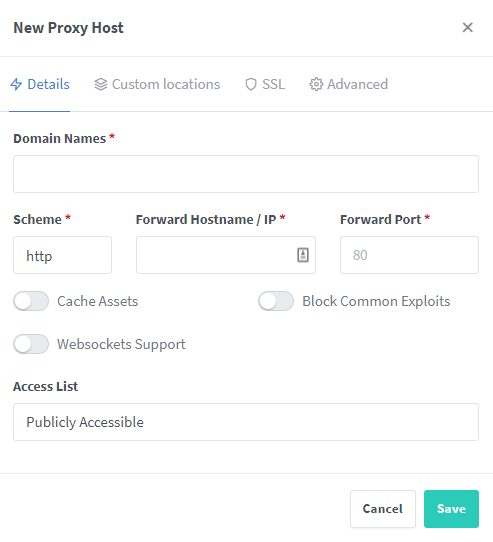
 I checked that first. yet was no change. I appear to be having a larger issue, as there's no internet access to either of my wired connections, but wifi is running fine? this doesn't make sense to me as the wifi access point is using the same switch as the desktop and unRAID. D'oh! This was due to NordVPN killswitch being engaged on my Win11 tower. However UnRaid box still has no internet...?All of a sudden, my Plex server is reporting the error: "*** server is unclaimed and not secure". There is an option then in Settings to "Claim This Server". If I click that it times out. It also shows an update available, however trying to check updates via Docker also seems to hang. There I noticed that the Cloudflare-DDNS docker isn't started, and fails when I start it manually (see log below). I'm stumped as all was working normally right up until it wasn't, meaning that I have been actively moving files just fine this morning until this happened and interrupted my workflow. I did perform a clean reboot earlier, but have been able to access on my network and transfer files since without a problem. [s6-init] making user provided files available at /var/run/s6/etc...exited 0. [s6-init] ensuring user provided files have correct perms...exited 0. [fix-attrs.d] applying ownership & permissions fixes... [fix-attrs.d] done. [cont-init.d] executing container initialization scripts... [cont-init.d] 30-cloudflare-setup: executing... curl: (7) Failed to connect to api.cloudflare.com port 443: Host is unreachable ---------------------------------------------------------------- ERROR: Invalid CloudFlare Credentials - 000 ---------------------------------------------------------------- Make sure the EMAIL and API_KEY variables are correct. You can get your CloudFlare API Key here: https://www.cloudflare.com/a/profile If you are using a zone token please remove the EMAIL variable from this container. ---------------------------------------------------------------- [cont-init.d] 30-cloudflare-setup: exited 1. [cont-finish.d] executing container finish scripts... [cont-finish.d] 50-remove-record: executing... Not going to delete zone record. Deleting the zone record on container stop is disable by default. [cont-finish.d] 50-remove-record: exited 0. [cont-finish.d] done. [s6-finish] waiting for services. [s6-finish] sending all processes the TERM signal. [s6-finish] sending all processes the KILL signal and exiting.Found an app called "FilesToFolders" that does it natively from my Windows PC directly in the share foldersI'm trying to execute a .BAT file in my shares. It creates a new folder for each file in the directory, renames it after the file, then moves the file into the folder. I'm trying to avoid moving the entire contents of these folders onto my Win11 box over the network, running the script there, then moving all the resulting folders back. I don't know how to execute it on the server. Can I do this and, if so, what is the way? If I can't, can it be converted into a compatible script format and run via SSH ? The script is below: @echo off for %%i in (*) do ( if not "%%~ni" == "organize" ( md "%%~ni" && move "%%~i" "%%~ni" ) )Also, I have downloaded the diagnostic .ZIP if that will help?Ok, so I found IBRACORP's tutorial video and followed it. I purchased a Domain, transferred it to Cloudflare, forwarded the ports for Nginx on my router, and set up a DNS CNAME on Cloudflare for KOMGA.notreal.XYZ. Now when I try to create a proxy server in Nginx as below, I get an error that the domain is already in use ?? How? Ok the above error seems to just have been that the screen didn't refresh and it did in fact create the proxy server. However, I get a Cloudflare timeout when trying to access it remotely. I also get an "Internal Error" in Nginx when trying to get an SSL cert for the domain?I want to reverse-proxy my services running on Unraid. For that it seems that NPM is the go-to option. However, I'm not understanding any of the configuration/setup instructions on the NPM website. I'm using the "Nginx-Proxy-Manager-Official" docker from CA. I have it installed with all defaults, and am able to log in to the UI and changed my u/n nad p/w. No I'm at a loss. I believe I need to setup a Proxy Host but am clueless as to how to proceed. On the screen below, I haven't the foggiest what to fill in to these fields. Can someone explain or point me towards a tutorial or guide that's useful to a beginner?
 also I've read that it's best practice to have all externally accessible Dockers or UIs connect behind a VPN. can someone explain how i set up a shared VPN connection? or point new towards a proper tutorial? Sent from my Pixel 5 using Tapatalkcan someone explain the simplest way to cover my dockers via reverse proxy? is there a specific docker that handles this best or is it a server level configuration? also what route does having something like DuckDNS play in the setup? Sent from my Pixel 5 using Tapatalkok I've been told elsewhere that the VLANs are probably unnecessary for my desired environment and that reverse proxy is enough. that said i still need a better understanding\explainer of how to properly set up and configure the docker network. for example, when i set static IPs for dockers, gateways, dns, etc., what IPs need to match? what ip range should i use? ideally all traffic in this interface would be behind VPN also. Sent from my Pixel 5 using Tapatalkmy server has two NICs. until now I've only been using the one because I've just been running a basic Plex docker. lately I've been adding many more and am running into port forwarding and collision hell as my knowledge of networking is cursory at best. until now I've just been using the UI defaults when spinning up Dockers. my goal is to configure one nic as the default unRAID connection and segregate dockers behind the second and manually assign static ips for them to avoid port conflicts. i would like the docker network to be the only one exposed to www. i also intend to utilize reverse proxy, SSO, and VPN to secure access to the docker network. problem is I'm finding many different configuration tutorials on here as well as Reddit and YouTube that all seem to vary in method. they also assume a basic working knowledge of DHCP, VLAN, interface, etc. terminology and configuration, which i fall short of it seems. can anyone ELI5 what steps need taken in what order, basic VLAN setup on the router level, and any other steps I'm messing up our misunderstanding, including examples? i can export a diagnostic.zip or screenshots if needed. i also have Visio if a visual diagram would suffice to simplify and visualize the topography needed to support this config? I'm also willing to go scorched earth if need be and do a fresh install of all dockers one by one of the a best practice order of setup that needs followed. Sent from my Pixel 5 using Tapatalk


