






SuberSeb
Members
-
Joined
Everything posted by SuberSeb
-
Yes, WD External is share on router. But I don't have that share at all, it's renamed to WDEX. Also I don't have any mounts to WD External share in Unraid.
-
r7unraid-diagnostics-20201101-1238.zip
-
Recently I deleted old share but now I have this in logs every 4 seconds: kernel: CIFS VFS: BAD_NETWORK_NAME: \\192.168.1.1\WD External Maybe old config somewhere?
-
After updating to version 2020.10.24 I can't mount one of my shares. Logs: Oct 25 07:55:34 R7UNRAID unassigned.devices: Mount SMB share '//192.168.1.1/WD_External' using SMB3 protocol. Oct 25 07:55:34 R7UNRAID unassigned.devices: Mount SMB command: /sbin/mount -t cifs -o rw,nounix,iocharset=utf8,file_mode=0777,dir_mode=0777,uid=99,gid=100,vers=3.0,credentials='/tmp/unassigned.devices/credentials_WD_External' '//192.168.1.1/WD_External' '/mnt/disks/KeeneticGiga' Oct 25 07:55:34 R7UNRAID kernel: CIFS VFS: BAD_NETWORK_NAME: \\192.168.1.1\WD_External Oct 25 07:55:34 R7UNRAID kernel: CIFS VFS: cifs_mount failed w/return code = -2 Oct 25 07:55:34 R7UNRAID unassigned.devices: SMB3 mount failed: mount error(2): No such file or directory Refer to the mount.cifs(8) manual page (e.g. man mount.cifs) and kernel log messages (dmesg) . Oct 25 07:55:34 R7UNRAID unassigned.devices: Mount SMB share '//192.168.1.1/WD_External' using SMB2 protocol. Oct 25 07:55:34 R7UNRAID unassigned.devices: Mount SMB command: /sbin/mount -t cifs -o rw,nounix,iocharset=utf8,file_mode=0777,dir_mode=0777,uid=99,gid=100,vers=2.0,credentials='/tmp/unassigned.devices/credentials_WD_External' '//192.168.1.1/WD_External' '/mnt/disks/KeeneticGiga' Oct 25 07:55:34 R7UNRAID kernel: CIFS VFS: BAD_NETWORK_NAME: \\192.168.1.1\WD_External Oct 25 07:55:34 R7UNRAID kernel: CIFS VFS: cifs_mount failed w/return code = -2 Oct 25 07:55:34 R7UNRAID unassigned.devices: Mount of '//192.168.1.1/WD_External' failed. Error message: 'mount error(2): No such file or directory Refer to the mount.cifs(8) manual page (e.g. man mount.cifs) and kernel log messages (dmesg) '. I have space symbol in my share name "WD External", seems that plugin replaces it with underscore.
-
Do you solve that issue? I'm also have 3.5Gbps speeds instead of 10Gbps.
-
Cache disabled and I don't have cache at all.
-
Have this issue with Unraid 6.8.3. I have 2 servers: J3455Unraid and R7Unraid. I have mounted on J3455Unraid share from R7Unraid. Sometimes I got this error "stale file handle" so I need manully unmount and mount this share. How can I fix that? SMB1 is not an option. Also I tried disable hard links in Global Share Settings.
-
Really need help here. Same problem again.
-
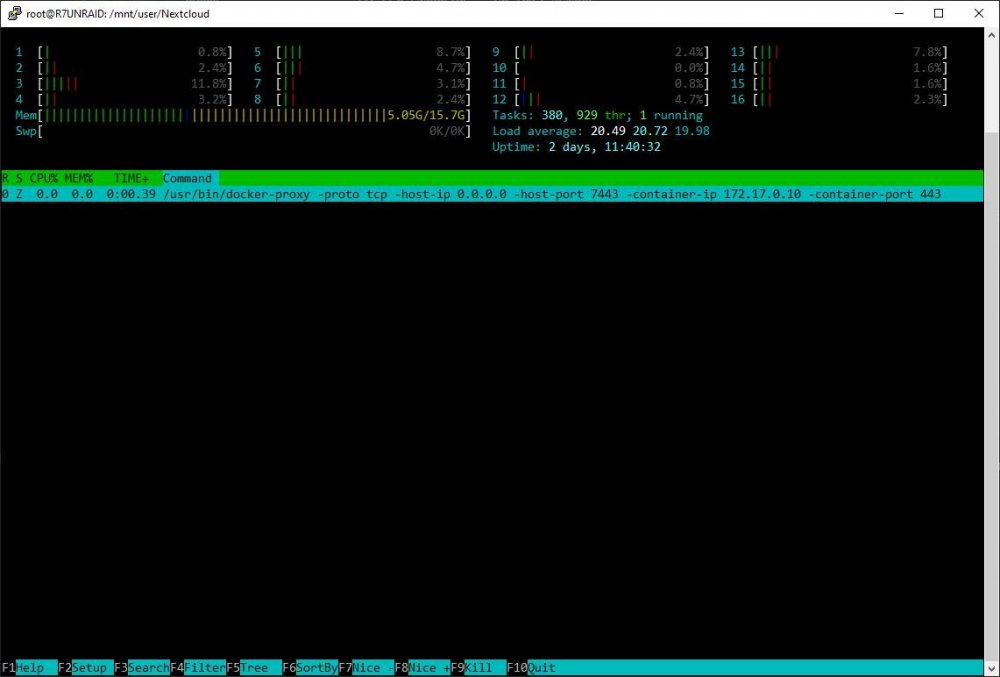
Hello. A few days ago I ran into problem - can't stop Nextcloud (linuxserver) docker container. So I tried to reboot the whole system - fail again, Unraid is stuck, it's can't reboot. Next I tried "powerdown -r" command, on the second time it worked and system rebooted (after boot parity check started). A few hours later this bug appeared again. Nextcloud container stuck as well as the system. I tried "diagnostics" command - failed, endless waiting. This bug appears after trying to update content in the Nextcloud android app. Bug occurred 4 times now, always after refreshing mobile app. Also I tried "docker kill nextcloud" - command don't work, endless waiting. Next I tried to stop the whole docker from GUI. "Enable Docker - no", but Docker status is running. After reboot I nuked docker.img, set up all dockers again and Nextcloud worked well until today - same problem happened. I nuked docker.img again, it helps. But it's not a solution nuking docker.img every 3-4 days... I found out that docker-proxy process related to nextcloud is <defunct>. It looks like the problem is with network. Syslog and nextcloud logs, docker-proxy stuck process: syslog: https://pastebin.com/Uc5yuYx5 (after problem appeared) nextcloud logs: https://pastebin.com/hBm9uE8b (after problem appeared) stuck docker-proxy process: My hardware: Ryzen 2700, 16 Gb ECC, ASUS TUF B450M-PRO PLUS. Dockers installed on Samsung NVMe drive (unassigned device, not cache). I ask for help in solving this problem
-
Only this: VENDOR=nvidia I fixed that. For some reason plugin don't detect my GPU. I just pressed "Default" button and all works. Config after that: VENDOR="nvidia" GPUID="0" TEMPFORMAT="C"
-
Quadro P400, empty after latest update


