






SuberSeb
Members
-
Joined
Everything posted by SuberSeb
-
After updating to 6.10 fan detection doesn't work. It recognizes randomly 0-2 fans out of 6. Motherboard ASRock X470D4U. On 6.9 it worked correctly. Also Reading page not opening from the plugin but I can open it through tools.
-
I have strange errors after update to 6.10.0 (6.10.1 too). It happens every time when VMBackup script running. But backup itself seems to be completed successfully because VM image and all files was copied to the destination. 2022-05-23 21:30:03 failure: copy of /mnt/remotes/192.168.2.45_Backups/WINDOWS/Windows 10/20220522_2130_vdisk1.img to /mnt/remotes/192.168.2.45_Backups/WINDOWS/Windows 10/20220523_2130_vdisk1.img failed. This is confusing, why script tries to copy old image file to a new one? Why this error happening? Also I'm not sure why this is got failed, because SMB share where I'm copying backups is 100% working fine and reliable. Is this issue with file permission? All files got 0666 rights and share user as a owner.
-
Added this into custom options: -vf yadif=1:-1:1 -rc:v vbr -cq:v 28 -b:v 8000k -maxrate:v 10000k
-
Exactly. Nov 19 09:08:39 R7UNRAID emhttpd: spinning down /dev/sdi Nov 19 09:08:39 R7UNRAID SAS Assist v0.86: Spinning down device /dev/sdi Nov 19 09:08:45 R7UNRAID emhttpd: read SMART /dev/sdi Seems that is my case... Also this happening on 6.10-rc2.
-
I have 4xHUS726060AL5210 HGST SAS drives on LSI 9200-8i HBA. On 6.9.2 they are can't be spin down. On 6.9.1 it works perfect but for a couple of reasons I can't downgrade to 6.9.1. It there a fix for this? Is this Unraid issue or plugin issue? UPD: Same issue on 6.10-rc2.
-
You can check file size in cache dir.
-
Yadif is a deinterlacing filter. I think this is just bug in unmanic. It stucks only at the time when it tries to transfer file from cache to the destination directory. So I think that unmanic transfer entire file to RAM for no reason. Ffmpeg can't waste so much of RAM, so it's an issue in unmanic itself.
-
Are you using custom ffmpeg options or yadif?
-
This is just limit RAM usage by service but this will not fix problem with converting. If I limit RAM usage then I got this error: kernel: Memory cgroup out of memory: Killed process 2733 (unmanic-service) total-vm:15112168kB, anon-rss:4151332kB, file-rss:7820kB, shmem-rss:3832kB, UID:99 pgtables:8324kB oom_score_adj:0 After this unmanic can't transfer converted file from cache to library directory. Seems that unmanic tries to load full video file in RAM which is awful (tmp folder NOT IN RAM).
-
I have some really bad OOM errors while using Unmanic. Cache dir set to share, not to RAM. While I'm converting .ts H264 video file to H265 using nvenc, it goes above 100% to 200% and after this entire server get stuck. Almost about 32 gigabytes of RAM is used by Unmanic, so I can't convert this file at all. It happens not on every content. What should I do? I have tried all versions of Unmanic, also I'm using custom ffmpeg options - yadif enabled and vbr.
-
Because of stale file handles I switched to NFS. SMB have this issue too. The only way is to disable cache on that shares or disable hard links. I described it here:
-
I think this is a problem for specific users if they don't have enough knowledge But custom options will be very useful. Now I need to change lib.php to mount my shares with needed params.
-
Is there a way to run custom nfs mount command? Noac option is very slow in my case, I'd like to remove it. I think it's a quiet simple to add an option to specify custom params for NFS. In lib.php.
-
I have mounted NFS private shares but for some reason plugin don't ask me for password. How this can happen?
-
Hello. I have 2 Unraid servers with 6.9.2. When I mount SMB share from one server to another I have that really annoying error "Stale file handle". So I simply can't mount my shares. Need support for this or fix.
-
Same issue for me. Is there any solution of this? SMBv1, turning off hard links or turning off cache is not an option for me.
-
/mnt/remotes is a good plan but it has a couple of disadvantages. I have a lot of my own rsync scripts which uses /mnt/disks shares, so I need to change paths in all of them and it's quite a long operation. Maybe you should add a option, so users can choose where they want to see their remote shares? Or just leave as it is. It's not a big deal in fact, /mnt/disks or /mnt/remotes, it's just a path, it does not introduce new functionality.
-
UPDATE: I have rebooted my whole network: both server, router, third backup NAS. It stops flooding. I don't know what happened but for about 3-4 mins there are no errors in log.
-
This is diagnostics from another server with the same issue after reboot. Maybe it can help. j3455unraid-diagnostics-20201101-1828.zip
-
No, keeps flooding. Every 4 seconds. Maybe there old config from previous version of plugin or similar issue? I can't see any mounts to \\192.168.1.1\WD External in configs, UD or /boot. But something tries to mount it.
-
Yes, you can see it on the screenshot above.
-
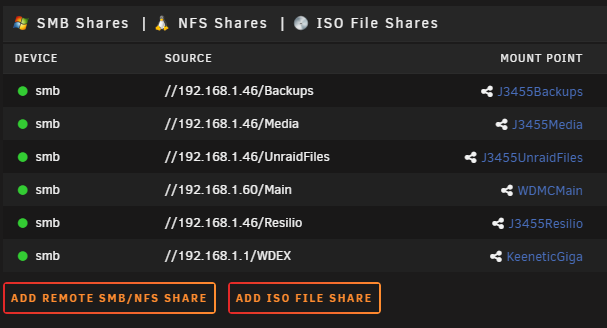
There are no reference to WD External. [//192.168.1.46/Backups] protocol = "SMB" ip = "192.168.1.46" path = "Backups" domain = "" share = "Backups" mountpoint = "/mnt/disks/J3455Backups" smb_share = "no" [//192.168.1.46/Media] protocol = "SMB" ip = "192.168.1.46" path = "Media" domain = "" share = "Media" mountpoint = "/mnt/disks/J3455Media" smb_share = "no" [//192.168.1.46/UnraidFiles] protocol = "SMB" ip = "192.168.1.46" path = "UnraidFiles" domain = "" share = "UnraidFiles" mountpoint = "/mnt/disks/J3455UnraidFiles" smb_share = "no" [//192.168.1.60/Main] protocol = "SMB" ip = "192.168.1.60" path = "Main" domain = "" share = "Main" mountpoint = "/mnt/disks/WDMCMain" smb_share = "no" [//192.168.1.46/Resilio] protocol = "SMB" ip = "192.168.1.46" path = "Resilio" domain = "" share = "Resilio" mountpoint = "/mnt/disks/J3455Resilio" smb_share = "no" [//192.168.1.1/WDEX] protocol = "SMB" ip = "192.168.1.1" path = "WDEX" domain = "" share = "WDEX" mountpoint = "/mnt/disks/KeeneticGiga"
-
As you can see, there are no \\192.168.1.1\WD External. But logs keep flooding.
-
I recreated this share long ago. I don't have any mount to //192.168.1.1/WD External in my system but logs keeps flooding.
-
Local path is /mnt/disks/KeeneticGiga, share is //192.168.1.1/WDEX, not WD External.

