





WizADSL
Members
-
Joined
-
Last visited
Everything posted by WizADSL
-
Have you tried a different power supply? I had an issue like this (although in my case the system freeze was every few days IIRC). Same as you capturing the syslog didn't help because the server would just silently freeze. I don't recall if I had the same symptom where holding down the power button didn't work.
-
To add to what @JorgeB said, I've also had unexpected reboots when my power supply was dying and I've also had it happen because the battery in my UPS needed to be replaced.
-
I'm aware of that. My current UPS uses that cable and it is carrying a USB signal. However, the documentation for the UPS mentioned here clearly states it's a serial interface with a separate port for USB. If the UPS doesn't match that Port layout then that's another story. But the documentation is very clear.
-
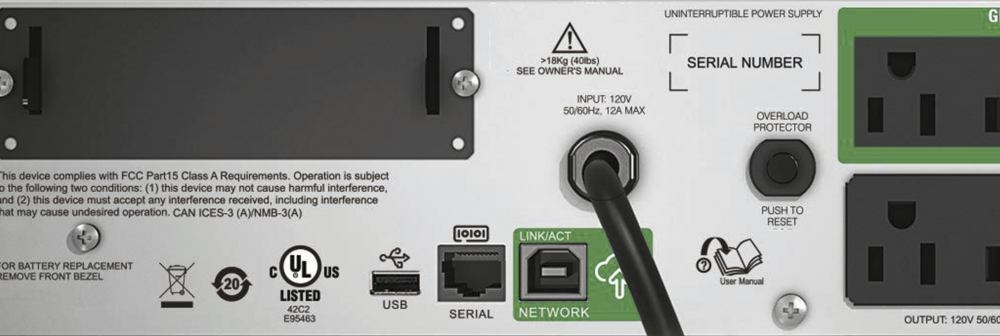
If this is accurate to what the back of your unit looks like: then @Vr2Io is right and what you want is the USB port, hopefully the cable is included because they are doing a VERY non-standard thing by putting a USB-A plug at both ends. The RJ45 connector is clearly labeled as serial so you don't want to use that (if, as you describe the cable is RJ45 at one end and USB on the other, it most likely contains a serial-to-USB converter and is not what you want to use).
-
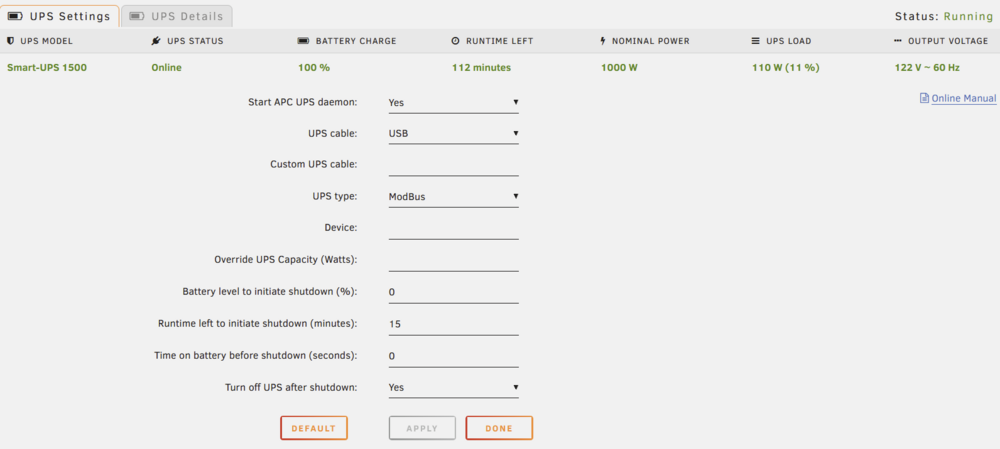
If it helps at all, this is what my settings page looks like: Yours should look very similar, would you mind posting a screenshot?
-
Do you mean that the settings in unraid, after you save them, aren't overwriting the previous settings? Also, you're using a USB cable I assume, if the new UPS came with one use that one rather the the old one (it shouldn't matter but I've had issues with cables)
-
Not sure I understand your issue, but I'm going to assume you are connecting the USB cable like you had before with the 1000 and it's not reading anything from the UPS? If that is the case, go into the menu on the APC UPS and go to the configuration menu, there you will find an option called "Menu Type", if that is set to "Standard", change it to "Advanced". Now you will have additional options in the configuration menu. One of the new options on the configuration menu will be an item to enable ModBus, this is a protocol that is used over the USB connection from the UPS. Once that is enabled, in UnRaid, go to the UPS settings and set the "UPS cable" to "USB" and the "UPS type" to "ModBus". See if that helps. You may notice that among other things, once the menu is set to advanced you can also modify the voltages that the UPS will switch at, in case you need it.
-
On the parity topic, I personally run dual parity (I added a second parity drive as soon as the feature was available). I like that if I have a drive failure, the extra parity protects my data while I replace the failed disk. All if the data on my array is also "replaceable", but my time has value and if paying for an extra drive keeps me from having to spend the time to rebuild everything, then it's very cheap insurance. If you lose data (especially 10s of terrabytes), just figuring out what you lost can be a tall order. A few hundred bucks for an extra drive will seem very cheap at that point. Speaking of failure, another array feature that I don't think was mentioned is that because unraid uses dedicated parity and the individual drives just contain standard filesystems, if you lose a data drive (and don't have parity to rebuild it) then you lose ONLY what was on that one drive since the data isn't stripped. On a conventional stripped array you would lose everything.
-
Version 7.1.2 (and maybe 7.1.0+, I didn't install those and I upgraded directly to 7.1.2) of UnRaid add the "nchan_max_reserved_memory" directive the the nginx configuration file. If (like me) you were adding that in the go file for previous versions, nginx will not start after the update to 7.1.2 and you will not be able to get to the web interface. If this happens to you it's because the "nchan_max_reserved_memory" is in the nginx config file twice and that will cause nginx to not start.
-
There have been a few requests for the ability to disable the Docker update check (Jan 25, 2025, Oct 6, 2024, Oct 15, 2024). I'm also interested in being able to disable this. Maybe a broader feature request would be for the ability to see a list of all of the checks that are available in Fix Common Problems with the ability to disable/ignore them. This would be especially useful because the way it works now, you have to wait for a problem to occur before you can ignore it. Also, it SEEMS that the ignore mechanism uses the exact wording of the notification which for something like Docker updates would be a real game of Whack-a-Mole as the message would vary depending on the name of the container.
-
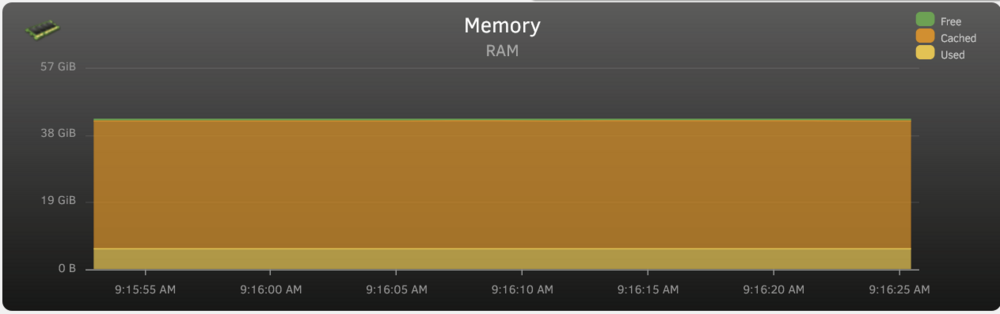
I would hold off on adding any more RAM for now. As you may know RAM isn't just consumed by processes that need it, but is also used for caching (which will be released when needed), from the OS's point of view, "unused RAM is useless RAM" it's just a matter of how it's allocated. Here is a graph from my 64 GB system: As you can see about 40 of 64 GB of the RAM is in use but the vast majority is cache. If you want to see a graph like this on your system, install the "Dynamix System Statistics" plugin.
-
@Jazer, you may want to post the URL you have open and what browser and version you are using. Also, whether that's the only tab you have open that's pointed at your unraid server.
-
This is probably not the issue but do you have your server connected to a UPS? If so can you verify that the UPS is working and able to keep the connected load powered if the utility power fails?
-
There is a "Legacy License" section in the FAQ on the unraid.net site where the upgrade pricing for legacy licenses is spelled out. Upgrading a legacy license to another legacy license does not sound like it affects upgrade rights.
-
There is the unlikely possibility that a plugin in your browser could be interfering. Could you try to make a trivial change from the browser on your phone and see if that works?
-
The great thing about the way Unraid does parity is that since it uses 1 (like RAID 5) or 2 (like RAID 6 where you can lose 2 disks) dedicated disks for parity you still get the same "lose any disk" protection (as JorgeB stated) but because there is no parity or data striping involved all of your data disks are just regular disks formatted with XFS. This means that if you took one of your data disks and put it in another Linux system (or any system capable of reading XFS) then you could read it just fine. If you were to loose more than one disk in a RAID 5 setup you would lose all of your data. In Unraid since the data disks are just normally formatted disks you would still be able to read any disk that did not fail. Another advantage to not striping the data is that when you read the array you only need to spin up the disk that contains the files you are reading and not every disk like you would with RAID 5. The downside is that you don't get the throughput of reading from all of your disks at the same time like you do in RAID 5. For me this is a perfectly acceptable trade-off because I don't need super high throughput for my use case (meda server). I hope this helps.
-
I'm adding the "nchan_shared_memory_size 512M;" line to the nginx.conf file using sed in the go file (before emhttp is run). Is that early enough or is nginx already running by then?
-
I've been keeping an eye on the log and so far the error only seems to happen if a manual spin up is performed. If the drive spins up due to a data read it does not happen and I haven't seen it happen when a spin down takes place. I may have noticed it because I usually do a manual "spin up all" when bringing down the array and due to the disk errors I've had recently (in another thread) I've been doing that a lot more than usual. I'm going to keep watching it for a while to see if the behavior holds.
-
For your movies you want "top two". Do you need help with your TV share too? If so, what are you trying to keep together?
-
See if this helps: https://forums.unraid.net/topic/59589-solved-v635-advice-please-on-shares-settings/#comment-584558
-
One more question, I've had the same LSI controllers and the two affected drives for many years. This behavior seems to be very recent, is it tied to the unraid version? The other topic you had linked seems to make it a problem between the controller and the disc but if that were the case I should have seen this a long time ago. To be fair it's not like I watch the unraid log for errors I typically only look if something else points me in that direction. But the affected disc doesn't spin down anymore based on the unraid rules, that I would have noticed. The spin down problem just started happening recently. I guess my question is could this be caused by anything else? Could I have any bad hardware? Is it worth replacing the disc? Thank you so much for all of your help.
-
The eliminate the PC altogether, have you tried from your phone?
-
I did what was advised in the post and I disabled EPC and low power spinup on the 2 disks that were having the issue. I completely powered down and restarted. At the moment I don't see the issue on sdo but still see it on sdh. I did verify that the settings applied before the shutdown and rechecked that they were still active now before posting. In case it means something if I click the spindown button (green ball) on the individual disk it will briefly show the rotating arrows but no spindown takes place. To be clear other disks spin down as expected. I can see the request is being sent by the browser in dev tools but I also don't see an entry in the unraid log showing that a spindown was sent to the disk. Any ideas? tower-diagnostics-20240809-1805.zip
-
I'm seeing the errors below when pressing the "Spin Up" button in array operation. It does not happen every time but I'd like to know if it's something I need to be concerned about. Aug 9 10:03:51 Tower emhttpd: spinning up /dev/sdm Aug 9 10:03:51 Tower emhttpd: spinning up /dev/sdj Aug 9 10:03:51 Tower emhttpd: spinning up /dev/sdh Aug 9 10:03:51 Tower emhttpd: spinning up /dev/sdn Aug 9 10:03:51 Tower emhttpd: spinning up /dev/sdo Aug 9 10:04:06 Tower kernel: sd 8:0:3:0: attempting task abort!scmd(0x0000000005360bfc), outstanding for 15189 ms & timeout 15000 ms Aug 9 10:04:06 Tower kernel: sd 8:0:3:0: [sdo] tag#154 CDB: opcode=0x85 85 06 20 00 00 00 00 00 00 00 00 00 00 40 e3 00 Aug 9 10:04:06 Tower kernel: scsi target8:0:3: handle(0x000a), sas_address(0x4433221102000000), phy(2) Aug 9 10:04:06 Tower kernel: scsi target8:0:3: enclosure logical id(0x500605b00154ee80), slot(1) Aug 9 10:04:06 Tower kernel: sd 1:0:4:0: attempting task abort!scmd(0x000000006154ea74), outstanding for 15187 ms & timeout 15000 ms Aug 9 10:04:06 Tower kernel: sd 1:0:4:0: [sdh] tag#141 CDB: opcode=0x85 85 06 20 00 00 00 00 00 00 00 00 00 00 40 e3 00 Aug 9 10:04:06 Tower kernel: scsi target1:0:4: handle(0x000b), sas_address(0x4433221104000000), phy(4) Aug 9 10:04:06 Tower kernel: scsi target1:0:4: enclosure logical id(0x500605b001550580), slot(7) Aug 9 10:04:07 Tower emhttpd: sdspin /dev/sdh up: 22 Aug 9 10:04:07 Tower kernel: sd 1:0:4:0: task abort: SUCCESS scmd(0x000000006154ea74) Aug 9 10:04:07 Tower kernel: sd 8:0:3:0: task abort: SUCCESS scmd(0x0000000005360bfc) Aug 9 10:04:07 Tower emhttpd: sdspin /dev/sdo up: 22 Aug 9 10:04:07 Tower emhttpd: read SMART /dev/sdm Aug 9 10:04:07 Tower emhttpd: read SMART /dev/sdj Aug 9 10:04:07 Tower emhttpd: read SMART /dev/sdk Aug 9 10:04:07 Tower emhttpd: read SMART /dev/sdh Aug 9 10:04:07 Tower emhttpd: read SMART /dev/sdg Aug 9 10:04:07 Tower emhttpd: read SMART /dev/sdd Aug 9 10:04:07 Tower emhttpd: read SMART /dev/sde Aug 9 10:04:07 Tower emhttpd: read SMART /dev/sdb Aug 9 10:04:07 Tower emhttpd: read SMART /dev/sdf Aug 9 10:04:07 Tower emhttpd: read SMART /dev/sdc Aug 9 10:04:07 Tower emhttpd: read SMART /dev/sdn Aug 9 10:04:07 Tower emhttpd: read SMART /dev/sdo Aug 9 10:04:07 Tower emhttpd: read SMART /dev/sdl Aug 9 10:04:07 Tower emhttpd: read SMART /dev/sdi Aug 9 10:04:07 Tower emhttpd: read SMART /dev/sdp Aug 9 10:04:07 Tower kernel: sd 8:0:3:0: Power-on or device reset occurred Aug 9 10:04:07 Tower emhttpd: read SMART /dev/sda Aug 9 10:04:30 Tower kernel: sd 8:0:3:0: Power-on or device reset occurred Aug 9 10:05:39 Tower kernel: sd 1:0:4:0: Power-on or device reset occurred On a separate note but also spin related, my daily status notifications always show my parity disks (sdp, sdg) as active although the web interface shows them as spun down. tower-diagnostics-20240809-1005.zip
-
Is this still happening with 6.12.11? I believe I'm seeing this to but not to the degree others have posted.



