





SirKelsALot
Members
-
Joined
-
Last visited
-
Has anyone successfully updated to 2026.2.1? I'm still on 2026.1.0 currently. When I "Check for Updates" in application, I get the following error: The server encountered an error! (#500) Please try again later. If the error persists, please request assistance from the site's administrator. I did try to download the the update file and do an offline update via the link below: https://f.filerun.com/#%2FWL?highlight=FileRun-2026.2.1-PHP-8.3.zip But when doing that Cleaning after previous update...Done Extracting update...Done (17.74 seconds) Running update: ------------------------------------- Update script not found!
-
Well certainly. This server is about 8 years old and just recently began having issues that coincided with switching my cache pool to ZFS. So only recently having stability issues was a surprise to find 3/4 sticks with errors (1 of them is particularly bad, but that one is less than a year old and starting an RMA process for the set).
-
Thanks for the tip. It seems 3 out of 4 of my 16GB sticks are failing. Good thing RAM is so cheap now....
-
I've had a rash of file system access issues recently where files become inaccessible, usually resolved by a restart or messing around. I have a pair of Samsung SSD 970 EVO Plus 1TBs mirrored as my cache pool in ZFS (recently switched from BTRFS to experiment with). Other than installing ZFS Master, I have not configured automatic snapshots or any other additional setup for ZFS specifically. Diagnostics and smart reports attached. I presume it's a hardware issue, but I'm unsure on exact next steps to troubleshoot/triage. Perhaps remove one of the cache drives. Errors in ZFS pool root@UNRAID:/mnt/user/Scratch# zpool status -v pool: cache state: ONLINE status: One or more devices has experienced an error resulting in data corruption. Applications may be affected. action: Restore the file in question if possible. Otherwise restore the entire pool from backup. see: https://openzfs.github.io/openzfs-docs/msg/ZFS-8000-8A scan: scrub repaired 0B in 00:09:21 with 16 errors on Mon Feb 2 11:03:53 2026 config: NAME STATE READ WRITE CKSUM cache ONLINE 0 0 0 mirror-0 ONLINE 0 0 0 nvme1n1p1 ONLINE 0 0 27.1K nvme0n1p1 ONLINE 0 0 27.1K errors: Permanent errors have been detected in the following files: /mnt/cache/Scratch/vm/isos/haos_ova-13.2.qcow2 /mnt/cache/Scratch/docker/duplicacy/bin/duplicacy_linux_x64_3.2.5 /mnt/cache/Scratch/docker/containers/overlay2/89b8086d04d95fd0f21f9937170ae437b3287cd9bdaef19a60ba7728d7d339ed/diff/app/radarr/bin/Radarr.Core.pdb /mnt/cache/Scratch/docker/containers/overlay2/59fc7b9bf7f256b860a21f55c080c242ede729a1426482d8e250b2ed86678ee4/diff/app/sonarr/bin/Sonarr.Core.pdb /mnt/cache/Scratch/docker/containers/overlay2/8e7e76832d6dc8145f04dcbaf143fb7fa07bbf092a861d7f2e7d2cb1d95daab1/diff/lib/ld-musl-x86_64.so.1 /mnt/cache/Scratch/docker/containers/overlay2/1e6272eee2a99e4e6e1c44367080fad9cdbc4e85e15a2b03d274f222e2cef33a/diff/ffmpeg/lib/libavformat.so.59 /mnt/cache/Scratch/docker/containers/overlay2/567a58c5ce269d7b47c3a2fb6feeefa5439f5967713a6d7e2b70ff7ecbb60f24/diff/usr/local/bin/duplicacy_web /mnt/cache/Scratch/docker/containers/overlay2/1d414267a5606678ba2e5e1b07b9f90758de45e4af5cf35414add951a77a8658/diff/usr/local/bin/gosu /mnt/cache/Scratch/docker/profilarr/db/.git/objects/pack/pack-18d9e5ff64883fdd7223068fa2c8356d0866cd90.pack /mnt/cache/Scratch/docker/containers/overlay2/aaa312ab84c321ccb41621197c069613bfc182270621dd1864e5f053ae6a4b04/diff/app/prowlarr/bin/System.Private.Xml.dll /mnt/cache/Scratch/docker/containers/overlay2/89b8086d04d95fd0f21f9937170ae437b3287cd9bdaef19a60ba7728d7d339ed/diff/app/radarr/bin/System.Private.CoreLib.dllCache 1 Smart smartctl 7.5 2025-04-30 r5714 [x86_64-linux-6.12.54-Unraid] (local build) Copyright (C) 2002-25, Bruce Allen, Christian Franke, www.smartmontools.org === START OF INFORMATION SECTION === Model Number: Samsung SSD 970 EVO Plus 1TB Serial Number: S59ANM0R546074E Firmware Version: 2B2QEXM7 PCI Vendor/Subsystem ID: 0x144d IEEE OUI Identifier: 0x002538 Total NVM Capacity: 1,000,204,886,016 [1.00 TB] Unallocated NVM Capacity: 0 Controller ID: 4 NVMe Version: 1.3 Number of Namespaces: 1 Namespace 1 Size/Capacity: 1,000,204,886,016 [1.00 TB] Namespace 1 Utilization: 544,146,423,808 [544 GB] Namespace 1 Formatted LBA Size: 512 Namespace 1 IEEE EUI-64: 002538 551191b229 Local Time is: Mon Feb 2 13:14:22 2026 EST Firmware Updates (0x16): 3 Slots, no Reset required Optional Admin Commands (0x0017): Security Format Frmw_DL Self_Test Optional NVM Commands (0x005f): Comp Wr_Unc DS_Mngmt Wr_Zero Sav/Sel_Feat Timestmp Log Page Attributes (0x03): S/H_per_NS Cmd_Eff_Lg Maximum Data Transfer Size: 512 Pages Warning Comp. Temp. Threshold: 85 Celsius Critical Comp. Temp. Threshold: 85 Celsius Supported Power States St Op Max Active Idle RL RT WL WT Ent_Lat Ex_Lat 0 + 7.80W - - 0 0 0 0 0 0 1 + 6.00W - - 1 1 1 1 0 0 2 + 3.40W - - 2 2 2 2 0 0 3 - 0.0700W - - 3 3 3 3 210 1200 4 - 0.0100W - - 4 4 4 4 2000 8000 Supported LBA Sizes (NSID 0x1) Id Fmt Data Metadt Rel_Perf 0 + 512 0 0 === START OF SMART DATA SECTION === SMART overall-health self-assessment test result: PASSED SMART/Health Information (NVMe Log 0x02, NSID 0xffffffff) Critical Warning: 0x00 Temperature: 46 Celsius Available Spare: 100% Available Spare Threshold: 10% Percentage Used: 22% Data Units Read: 298,745,209 [152 TB] Data Units Written: 843,580,978 [431 TB] Host Read Commands: 1,829,510,180 Host Write Commands: 6,662,348,226 Controller Busy Time: 45,227 Power Cycles: 53 Power On Hours: 26,285 Unsafe Shutdowns: 16 Media and Data Integrity Errors: 0 Error Information Log Entries: 159 Warning Comp. Temperature Time: 0 Critical Comp. Temperature Time: 0 Temperature Sensor 1: 46 Celsius Temperature Sensor 2: 60 Celsius Error Information (NVMe Log 0x01, 16 of 64 entries) Num ErrCount SQId CmdId Status PELoc LBA NSID VS Message 0 159 0 0x0018 0x4004 - 0 0 - Invalid Field in Command Self-test Log (NVMe Log 0x06, NSID 0xffffffff) Self-test status: No self-test in progress Num Test_Description Status Power_on_Hours Failing_LBA NSID Seg SCT Code 0 Extended Completed without error 26285 - - - - - Cache 2 Smart smartctl 7.5 2025-04-30 r5714 [x86_64-linux-6.12.54-Unraid] (local build) Copyright (C) 2002-25, Bruce Allen, Christian Franke, www.smartmontools.org === START OF INFORMATION SECTION === Model Number: Samsung SSD 970 EVO Plus 1TB Serial Number: S4P4NF0M600551L Firmware Version: 2B2QEXM7 PCI Vendor/Subsystem ID: 0x144d IEEE OUI Identifier: 0x002538 Total NVM Capacity: 1,000,204,886,016 [1.00 TB] Unallocated NVM Capacity: 0 Controller ID: 4 NVMe Version: 1.3 Number of Namespaces: 1 Namespace 1 Size/Capacity: 1,000,204,886,016 [1.00 TB] Namespace 1 Utilization: 544,159,617,024 [544 GB] Namespace 1 Formatted LBA Size: 512 Namespace 1 IEEE EUI-64: 002538 5691b3268d Local Time is: Mon Feb 2 13:14:33 2026 EST Firmware Updates (0x16): 3 Slots, no Reset required Optional Admin Commands (0x0017): Security Format Frmw_DL Self_Test Optional NVM Commands (0x005f): Comp Wr_Unc DS_Mngmt Wr_Zero Sav/Sel_Feat Timestmp Log Page Attributes (0x03): S/H_per_NS Cmd_Eff_Lg Maximum Data Transfer Size: 512 Pages Warning Comp. Temp. Threshold: 85 Celsius Critical Comp. Temp. Threshold: 85 Celsius Supported Power States St Op Max Active Idle RL RT WL WT Ent_Lat Ex_Lat 0 + 7.80W - - 0 0 0 0 0 0 1 + 6.00W - - 1 1 1 1 0 0 2 + 3.40W - - 2 2 2 2 0 0 3 - 0.0700W - - 3 3 3 3 210 1200 4 - 0.0100W - - 4 4 4 4 2000 8000 Supported LBA Sizes (NSID 0x1) Id Fmt Data Metadt Rel_Perf 0 + 512 0 0 === START OF SMART DATA SECTION === SMART overall-health self-assessment test result: PASSED SMART/Health Information (NVMe Log 0x02, NSID 0xffffffff) Critical Warning: 0x00 Temperature: 38 Celsius Available Spare: 100% Available Spare Threshold: 10% Percentage Used: 22% Data Units Read: 332,652,519 [170 TB] Data Units Written: 837,685,747 [428 TB] Host Read Commands: 1,982,650,828 Host Write Commands: 6,638,082,258 Controller Busy Time: 42,500 Power Cycles: 49 Power On Hours: 25,973 Unsafe Shutdowns: 16 Media and Data Integrity Errors: 0 Error Information Log Entries: 149 Warning Comp. Temperature Time: 0 Critical Comp. Temperature Time: 0 Temperature Sensor 1: 38 Celsius Temperature Sensor 2: 41 Celsius Error Information (NVMe Log 0x01, 16 of 64 entries) Num ErrCount SQId CmdId Status PELoc LBA NSID VS Message 0 149 0 0x0008 0x4004 - 0 0 - Invalid Field in Command Self-test Log (NVMe Log 0x06, NSID 0xffffffff) Self-test status: No self-test in progress Num Test_Description Status Power_on_Hours Failing_LBA NSID Seg SCT Code 0 Extended Completed without error 25972 - - - - - unraid-diagnostics-20260202-1107.zip unraid-smart-20260202-1314-cache2.zip unraid-smart-20260202-1313-cache1.zip
-
Is this still a bit of a challenge? I had used it years ago and liked it. Thinking of picking it up on half off sale now.
-
Has anyone tried to use Pocket-ID with this app? In trying to follow their guide for Paperless-NGX, this container fails when adding the two variables as instructed. https://pocket-id.org/docs/client-examples/paperless-ngx PAPERLESS_APPS=allauth.socialaccount.providers.openid_connect PAPERLESS_SOCIALACCOUNT_PROVIDERS='{"openid_connect":{"SCOPE":["openid","profile","email"],"OAUTH_PKCE_ENABLED":true,"APPS":[{"provider_id":"pocket-id","name":"Pocket-ID","client_id":"Place the Client ID","secret":"Place the Client Secret","settings":{"server_url":"https://pocketid.example.com"}}]}}'
-
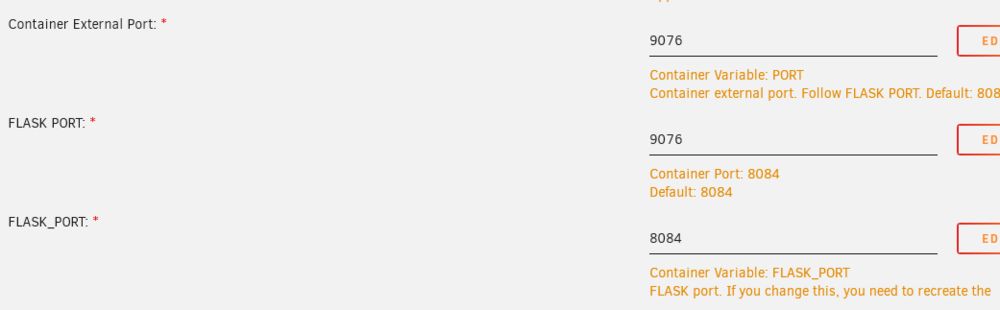
This appears to work for me, I can access on 9076 on my LAN.
-
Thank you for that explanation. I will look into those commands. What about the quantity of subvolumes? I had assumed it would be 1 to 1 with the containers. As it stands, I have 62 images but 739 subvolume directories. Are these still just extraneous subvolumes as referenced in the older posts above? No way to prune those or clean them up, even if it's not consuming extraneous actual storage space?
-
Is there not really a solution for this still? Or this is something I'm still misunderstanding? I ran the linked script below, which doesn't seem to capture the subvolumes. Qdirstat shows the containers taking up almost 400GB, almost all of which is the btrfs subvolumes directory. https://github.com/SpaceinvaderOne/Unraid_check_docker_script ################################################################################## List of Image, Container and docker volume size. ################################################################################## There are 63 Images taking up ......57.34GB There are 62 Containers taking up ......2.044GB There are 0 Local Volumes taking up ......0B There are 0 Build Cache taking up ......0B
-
Was there a change log available? I'm a new duplicacy user as of the BF sale for the web client. I setup email notification without issue. That quit working mid-December and perhaps is related to this container update. There have been no duplicacy web/CLI releases in December that I can see. More details here: https://forum.duplicacy.com/t/web-ui-docker-email-on-port-465-failing-i-o-timeout/8956/3
-
Same issue here. No updates for the My Servers plug-in show available, that is on 2023.03.09.1140 and I am on OS version 6.11.5. unraid-diagnostics-20230323-1652.zip
-
No luck for me with pooled 1TB 970 Evo Plus either. Both are on firmware 2B2QEXM7. Downloaded the 4B2QEXM7 iso, but no supported SSDs supported per the tool.
