





Geck0
Members
-
Joined
-
Last visited
Everything posted by Geck0
-
Pass. The result is all that matters. When I've had this issue, the upgrade has t updated the apps properly. For some reason the app won't upgrade either through the GUI. I especially have issue with Elastic. My go to is the occ app upgrade, never seems to fail that way.
-
Quickest way is to remove them and add them via CLI, assuming there are new versions for the apps you're referring to. Don't worry about whiteboard etc. They're suggestions, not must haves.
-
That was fortunate, it doesn't always work.
-
Sometimes it's not worth the hassle. It's only if you're relying on NC for Deck, Task Lists and Calendar that makes it more difficult to start again. My household runs off it.
-
It sounds like you're digging deeper. If NC doesn't have anything crucial, I would drop the database and reinstall NC from scratch, using the latest version. Then,moving forward, ensure you have good backups. The fear is, you make all these changes, manage to get NC running, but the changes could cause issues with future upgrades.
-
You cannot roll back NC, without rolling back the database as well. The database tables have been updated for the latest version of NC. I've written about steps to take when you roll back within the last couple of pages. To me, what appears to be common amongst you guys with the same issue is using the lastest version of MariaDB, which is above what NC states is supported (if I recall correctly, I don't have time to review it). I'm using the latest version of v10, with absolutely no issues and I've only recently upgraded it.
-
So, you're running a version of MariaDB that is higher than recommended. You've also not run the occ commands neccesary for Nextcloud's database after upgrading. I can't guarentee this will remove the red bang sign in your admin, telling you that you have errors because it may keep reporting that you're using an unsupported version of MariaDB, but there is no reason your instance won't run after resolving the issues. Sometimes going to the latest version of MariaDB is the bad choice, if its not supported and there has been a change in PHP, etc. The results that you've sent actually tell you what to do. I've listed them below to help you out. Go to your CLI in unRaid and type with the occ commands below at the end ie. docker exec -it mynextcloudinstance occ db:add-missing-indices Those are the two main main issues that you have. You have others, but not sufficient to cause you problems. Like this: You should probably sort those out, but they can wait for now. I suggest you try those commands and check it works. You may still get the error message, because it will flag that you are using an unsupported version of MariaDB, but you can probably ignore that if everything is working. I would do this first before rebuilding MariaDB.
-
Yeah, you're right. I'm out, let us know hie you get on.
-
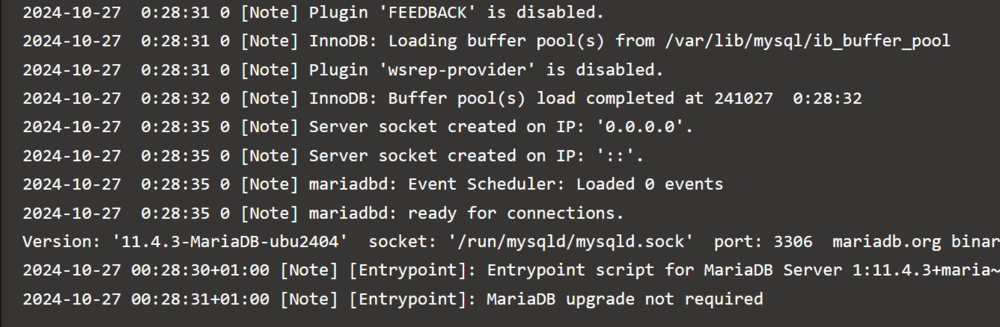
Its 12am here, I'm clocking out but I've had a quick look. Your config looks okay to me. Your MariaDb didn't look right in your last post. Server socket created on ip 0.0.0.0 is the line I was referring to. Sorry, wasn't able to circle it and was rushing to the door. It doesn't look like its receiving its IP. I may be wrong, but that may be worth looking at. If this has happened before without reason, perhaps there is an ip conflict on your network.
-
See here: Can you post your config.php (remove private data). I'm wondering if you're values are set incorrectly. Update: And your MariaDB config page from the container. Just noticed this. There is an issue with your MariaDB config.
-
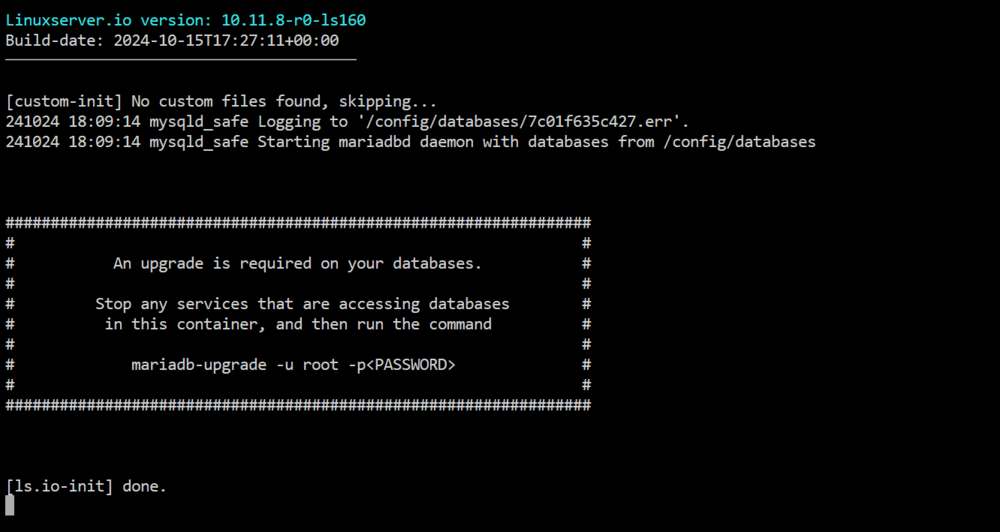
I'm guessing you upgraded MariaDB, but not the database itself. Can you restart your MariaDB and open the container log, it may state something like this: Additionally, this is the latest that you need linuxserver/mariadb:10.11.8-r0-ls160. I've literally upgraded my NC and MariaDB over the weekend and I only upgraded MariaDB because NC recommended it. Try this and post the results if it looks like this is the problem. Otherwise continue below this line. Say thanks if I helped 😀 ------------------------------------------------------------------------------------------------------------------------------------------------------------------------------------- I wrote this, before what's above, as I only just thought that this is likely to be your problem. Again, if you want help you need to give more information. You'll notice that there aren't a lot of people throwing ideas around, its because they don't have enough to work with and can't be bothered to pull the information out of the OP. Its difficult to diagnose the issue without logs, etc. One also has to assume that you're proficient in diagnosing network issues, etc. Personally, I think its your MariaDB version. I've recently upgraded to Nextcloud 30 and then again to 30.01. NC recommended to upgrade MariaDB, so I upgraded it to linuxserver/mariadb:10.11.8-r0-ls160 My personal thoughts, without logs and more information is to do the following: 1. Roll back, using your backups to an earlier version of NC for both MariaDB and Nextcloud. 2. After roll back follow the process I've outlined for upgrades, etc. using occ commands. I've outlined this recently. 3. Then upgrade MariaDB 4. Upgrade Nextcloud, going through main version upgrades and iterative ones (iterative you don't have to do all of them, you can skip a couple). If you don't have appdata backups of your NC and MariaDB then you're likely stuck. At this point, ask yourself what are you losing by starting again? Remember that NC preserves your data between upgrades, etc. I'm guessing your Nextcloud is not mission critical. I would do this: Start again 1. Backup your data folder, appdata and database (phpmyadmin backup). 2. Remove your NC and MariaDB docker 3. Remove the NC and MariaDB folder from your appdata folder. 4. Install MariaDB version linuxserver/mariadb:10.11.8-r0-ls160 (This is the latest version). 5. Install NC 30.01. 6. In future keep decent backups, you can see the headache of resolving issues when you don't (trust me, I know from my own experience).
-
Run these two commands and report back. I've just upgraded from 29 to 30.01 with no issues. After upgrading, it suggested I updated my MariaDB. Again, no issues. I have a feeling that you've probably messed up your database along the way, or fiddled with some permissions when you don't have to and its causing you errors. I also don't use the Nextcloud AIO features. My Nextcloud links to Elasticsearch, Redis and Collabora dockers. Linuxserver.io's Nextcloud version is top notch and makes it as simple as possible, but its probably also the most complicated docker that I have on my unRaid. If anything is going to break it'll be this. I also find that their versions will have plenty of bugs, despite RC releases. Hence, I don't upgrade to major versions early. I let other people go through the frustration of bugs and upgrade later on, after the next releases have fixed the bug. I'll then upgrade to the major version, even if it has the bug and then upgrade to the fixed version. This keeps everything clean. I also don't use Linuxserver.io's recommended nginx.conf and mine is a mess, but its stable and doesn't need changing. Its a mess, because of all of the comments I've made in it, but its stable and gets on with it.
-
This could be a number of things and you really need to provide more info. What was the NC version and what version did you upgrade to? Same question for MariaDB? I'm going with incompatibility between NC and MariaDB version. It's possible the NC upgrade failed, so you have a partially updated NC database. Are you able to roll back your MariaDB upgrade?
-
This doesn't happen for no reason. Did you change something recently? Eg. Did you upgrade recently?
-
If you've upgraded Nextcloud to 28. You can try changing the label to the same version, or as close to the higher version available. If that works then continue to use the label version. Again, read my posts, they're written for others that have similar issues. NC is not as simple as other dockers.
-
You're trying to upgrade NC within the container, instead of upgrading the container and NC itself. You also shouldn't have to chmod, despite what it says. I suggest you occ maintenance:off and then upgrade using the label method, which is the correct method for this container.
-
JonathanM is correct. If you look st my previous posts, you'll see how to change versions using labels. There should be several recent ones precisely on this topic. I suggest you fix your appdata backup process first. This should be done before each backup. Secondly, I suggest you look at my posts in this thread and learn the basic commands to run after each restore or upgrade. Otherwise, you'll have further perceived issues. Thirdly, if you're upgrading through multiple versions, you're likely to see errors in the logs. Some will be issues that are resolved in later upgrades, so I wouldn't stress over them. Fourth. If you can replicate your current setup easily. You could always bypass the headache of upgrading multiple versions and just clean install the latest version and start to keep it updated moving forward. Your data will still be preserved but Calendar, tasks and anything thst is database driven will need to be recreated. If you're appdata isn't being backed up and your multiple versions behind on Nextcloud, then this could be your shortcut. Your photos, documents etc will still be there, provided you don't do something odd. 🤪 I suggest you figure out a good backup process. My NC backs syncs our family devices automatically. If we all lost our phones today, it would be a pain, and expensive to replace but everything is back to normal within the day once we've restored the settings from backup and Nextcloud syncs.
-
I'm away, so I can't give you exact commands. Use occ to generate a one off code for login.
-
For some reason, I can't quote. Your NC docker has disappeared, because it's orphaned. You can open the advanced view of the docker page and remove it. As for the main issue at hand, particularly if your existing version is generations out of date. Personally, I would roll this back using an app data restore of your database and your NC. Install the NC docker from previous apps (make sure you have the right version, by modifying the label). Then upgrade NC by increasing the label versions. Look back through this thread of posts I've made if you're still stuck. This issue of jumping versions and breaking NC is common.
-
You haven't provided sufficient detail to help with this. However, I would try again. It could simply be a partial upgrade failure, since you mentioned how slow it was to upgrade. You should always post your config.php and nginx conf file and explain if there are reverse proxy, etc. Otherwise, any answers you get are not going to pinpoint the issue.
-
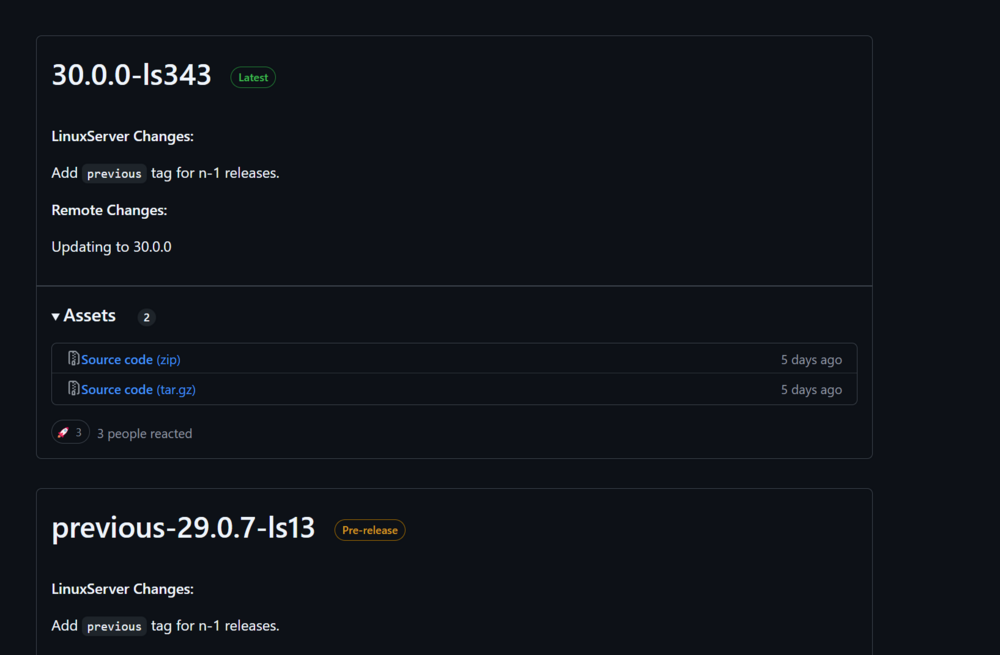
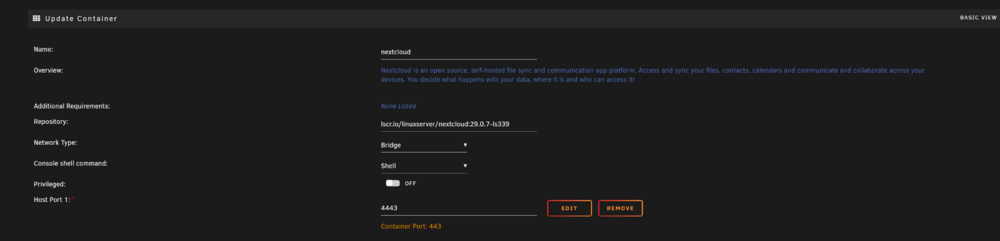
Like this..... 1. Go to linuxserver.io 2. Find the tag of the version you want, ie. 3. Open your Nextcloud docker and copy / paste the tag onto the end of lscr.io/linuxserver/(paste here) Proceed to update. Make sure you backup your appdata first. If the upgrade fails or has too many errors, it will save you time to roll back than deal with the issues. Make sure its your NC and Database folder that are backed up properly. If NC won't upgrade, but the database has, as part of the upgrade. You ideally should roll back both. As a minimum, if you're jumping to new main versions, I would do at least the middle and last upgrade before jumping. ie. v. 28 to 30. I would be doing 28.03, 28.05, 28.09 then go to v29 up until its latest version before jumping to the v.30 stable version available. Hope that helps.
-
I still think its early days to upgrade to NC30. I normally wait for bug fixes like this to be sorted before upgrading, so I don't have to patch. Its issues like this that should be caught in early RC versions. I'll likely not upgrade until at least 3 stable versions in. It also gives 3rd party app developers time to work on their upgrades. The alternative is that you start losing support (temporarily) of the apps you depend upon (I don't use AIO and have separate dockers).
-
Post your config.php from Nextcloud and default.conf from its nginx config.
-
Hi JorgeB, Thanks, I think I've resolved this. I actually returned and deleted this post. Apologies for taking up your time.
-
Hi, I use a Samsung T7 to sync important files and retain a backup of deleted files for manual inspection, which is easier to take off site with me, owing to portability. Drive is formatted in XFS. This morning, I upgraded to the latest version of unRaid. As the machine was rebooting, I saw a notification flash up in green that the /dev2 device's reallocated sectors had returned to normal, there were several messages flashing up. Obviously, I can't access logs to see what was going on, after the server came back online. How do I test the drive? I've tried Googling this and can't find a decent answer. I need to figure out if this drive is failing.





