





randomninjaatk
Members
-
Joined
-
Last visited
Everything posted by randomninjaatk
-
+1 I want docker-compose to automate setting up a new system... I just started messing with it, and it would be way easier to have a yaml file with all the configurations to completely setup a new machine automatically....
-
The latest script implementation uses a caching engine, so if no changes need to be made to the existing cache, your technically only re-searching the existing cache. It's not likely to be possible to just skip checking them entirely, but caching does make that faster... Edit: In the config settings, you can control how many it attempts to process at a time, but you cannot change the order, so that means the first 100 in your case will always be re-checked. The setting to adjust from the default is "LAD: Missing/Cutoff Amount", by default its set to the maximum
-
Docker: Lidarr (Nightly) with Lidarr Automated Downloader (LAD) script included! Script: https://github.com/RandomNinjaAtk/lidarr-automated-downloader Documentation can be found here: https://github.com/RandomNinjaAtk/docker-lidarr-lad IMPORTANT: I will be discontinuing this container sometime soon, its already removed from the app store. Please use: AMD and AMVD in the app store as replacements Documentation found here: https://github.com/RandomNinjaAtk/docker-amvd https://github.com/RandomNinjaAtk/docker-amd
-
It auto installs on mine during the initial setup.... Did you skip the default app installation?
-
Option 2 seems easiest, created the following script below and set it to run every 5 min using the "Users Scripts" plugin #!/bin/bash docker exec -u www-data Nextcloud php -f /var/www/html/cron.php exit 0 Thanks!
-
So I got this working and I'm digging it because it was easier to setup then other nextcloud options. However, would it be possible for you to adjust the container so it can use cron for "background jobs"? Some extended apps like "News" requires it and it seems like it is usually recommended to use cron over the other 2 methods. Thanks in advance!
-
Just tried setting this up, is there no way to change the data directory location? IE: have the application on cache drive (database, configs, etc) and have the user data stored on a array share... Right now it does not look possible to change the data directory to use a different location without putting everything in the same place. I have nextcloudpi instance already running on an odroid hc2 and its possible on that to set/change the directory. Maybe the docker version is slightly different, but I'd rather run it on unraid so I can protect the data better..
-
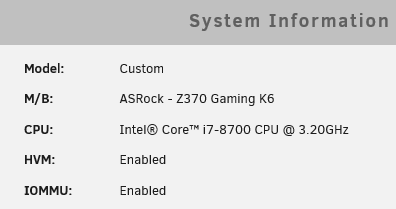
@gabestover Your "Go" file should look like this (the one below is mine): #!/bin/bash #Setup drivers for hardware transcoding in Plex modprobe i915 chmod -R 777 /dev/dri # Start the Management Utility /usr/local/sbin/emhttp & And your plex docker config should have this added under advance settings "Extra Parameters": --device /dev/dri:/dev/dri For reference, here is my system details: Hope that helps some! EDIT: Also, since Unraid 6.5+, you do not need to modify the boot file "/boot/syslinux/syslinux.cfg" that is mentioned above. This was only applicable in the older versions of Unraid that was using an older kernel that did not support Coffeelake iGPU natively....
-
NVM, I figured it out For reference, my file looks like this: default menu.c32 menu title Lime Technology, Inc. prompt 0 timeout 50 label unRAID OS menu default kernel /bzimage append initrd=/bzroot i915.alpha_support=1 label unRAID OS GUI Mode kernel /bzimage append initrd=/bzroot,/bzroot-gui label unRAID OS Safe Mode (no plugins, no GUI) kernel /bzimage append initrd=/bzroot unraidsafemode label unRAID OS GUI Safe Mode (no plugins) kernel /bzimage append initrd=/bzroot,/bzroot-gui unraidsafemode label Memtest86+ kernel /memtest
-
Can you post your syslinux.cfg file as an example? I'm looking through the wiki, but I'm not entirely sure where to add it... Should it look like this? label unRAID OS menu default kernel /bzimage i915.alpha_support=1 append initrd=/bzroot I really want to activate HW transcoding for Plex, but I seem to be stuck because it's not seeing the iGPU, for reference, I have ASRock z370 Gaming K6 with i7-8700 Thanks for the help in advance!
-
I created a Github pull request for the changes that I'm talking about in my last post...
-
Hey, just stumbled across your docker for Ripper!!! I was wondering if you were interested in any suggestions? I modified your Rip script slightly to add MKV profiles, which would allowed myself to adjust the default Audio/Subtitle/Track selections. The reason for doing this, is because by default it does not select the HD audio tracks. I was wondering if I could help you possibly incorporate the change to improve the usage. I've added the files below that I'm using (currently testing it). Basically I added the default profile (I customized it already for my needs, distributing the default would be preferred), which can be customized and then added this to the makemkvcon command: --profile=/config/default.mmcp.xml default.mmcp.xml ripper.sh



