





robobub
Members
-
Joined
-
Last visited
Everything posted by robobub
-
Ah, thanks for giving it a shot. It's certainly possible any number of things could've happened. I wouldn't spend much more time trying to reproduce it until I get actual logs which should tell us what really happened
-
This doesn't appear to be working correctly. My parity check just finished, but next month I can get some DEBUG/TESTING level logs, but as I mentioned I resumed a check outside of the increment hours and then manually paused it, but it automatically resumed. I can confirm again as before that it did automatic pause/resume between manually resuming and manually pausing which is nice. Plugin version: 2021.09.17 (appeared on older versions, but I manually updated and it still occurred) Increment frequency: Daily Increment Resume time: 4:00 am Increment pause time: 12:00 pm Manually resumed at ~1pm. Manually paused at ~3pm. Resumed shortly thereafter, unsure of the drive temperatures at that time.
-
So I have my daily schedule set for increment resume/pause parity so it never disrupts server use, but I'm curious if it's possible to manually resume when I know it will be unused outside of the daily schedule? Right now if I click resume and after the increment pause time, if I hit pause again, it will resume in the next 5(?) minute interval. The good thing is that when I hit resume manually outside of the scheduled time, it will pause if there is overheating, which could be tricky to implement correctly if the my requested feature is added. For context, during summer here the top drive heats up beyond the threshold frequently during the increment resume period (overnight) because I don't run the AC much at night, and thus it can take weeks to finish a check. While I'll be addressing the cooling likely, it'd still be nice manually continue parity checking at will. I have not tried adjusting the increment pause time to, say, 1 minute after I want to stop my manual run, but ideally I would just keep my normal increment pause time and not have to adjust it for ad-hoc sessions.
-
Anyone familiar with this cert renewal error? I set it up how I interpreted spaceinvaderone's video, which had subdomains as the separate variable from the dns provider that I don't own. The description though seems to imply putting the subdomain.provider.com as one variable under domain name. Which is correct? Despite this error, the reverse proxy still ended up working, with a cert error.
-
Does anyone have an issue with public access / downloads not showing up in the activity tab? I have a public password protected photo share set up using reverse proxy with swag and nothing shows up under activity (or under individual file activity). I can however look at swag's nginx logs, though it's difficult to find out what url represents what file. Using the latest linuxserver/nextcloud docker nexcloud 19.0.4 activity 2.12.1 unraid 6.8.3
-
My parity check isn't resuming with all drives classified as cool. Any ideas? Sep 5 16:45:01 tower parity.check.tuning.php: DEBUG: -----------MONITOR start------ Sep 5 16:45:01 tower parity.check.tuning.php: DEBUG: Parity check appears to be paused Sep 5 16:45:01 tower parity.check.tuning.php: TESTING: parity temp=43 (settings are: hot=47, cool=43)) Sep 5 16:45:01 tower parity.check.tuning.php: TESTING: disk1 temp=42 (settings are: hot=47, cool=43)) Sep 5 16:45:01 tower parity.check.tuning.php: TESTING: disk2 temp=39 (settings are: hot=47, cool=43)) Sep 5 16:45:01 tower parity.check.tuning.php: TESTING: disk3 temp=38 (settings are: hot=47, cool=43)) Sep 5 16:45:01 tower parity.check.tuning.php: TESTING: disk4 temp=38 (settings are: hot=47, cool=43)) Sep 5 16:45:01 tower parity.check.tuning.php: DEBUG: array drives=5, hot=0, warm=0, cool=5 Sep 5 16:45:01 tower parity.check.tuning.php: DEBUG: Array operation paused but drives not cooled enough to resume Sep 5 16:45:01 tower parity.check.tuning.php: DEBUG: -----------MONITOR end-------
-
I never realized I could change this, I did have this left at the default 24. Not a problem at all, it's a low priority issue and the plugin otherwise works great. Thanks!
-
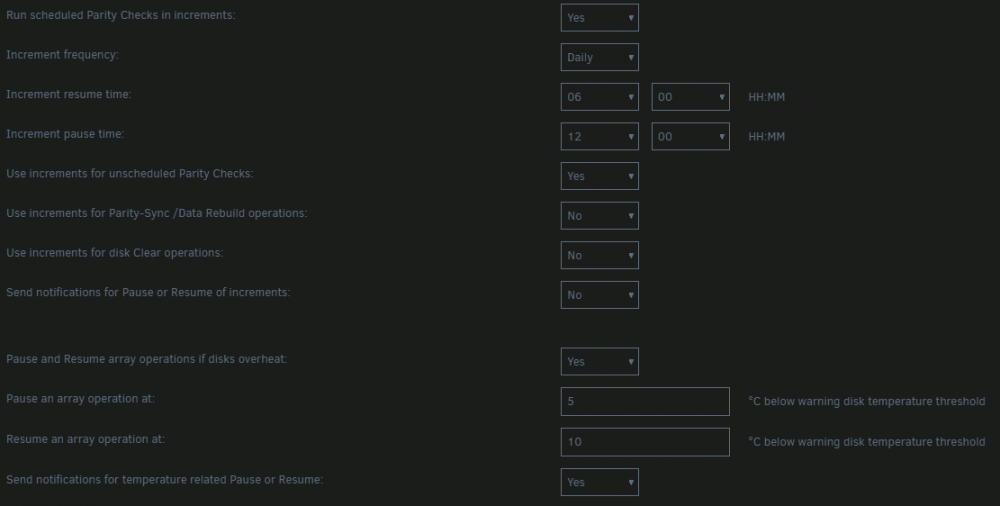
How is the temperature-based pausing and resuming of the parity check supposed to work? It seems like it ran through the entire time without pausing even though the debug messages clearly show drives were hot. It does appear that the scheduled resume happened with all drives already hot/warm, does it only pause if a cool drive transitions to warm/hot? Perhaps there should be a check whether to start in the first place with the current temperature: some days are hot and it pushes them into the warm zone and the check shouldn't run at all. Here is a log with the scheduled start time is 6am and end time is noon, but 2 drives are already hot, 3 warm. It appears to have run the whole way, repeating the message "drives=24, hot=2, warm=3, cool=19. Correcting Parity Check with all drives below temperature threshold for a Pause" every 5 minutes but not pausing. Highlights from the attached log: Also, I have 5 drives (2 hot, 3 warm), not 24. All 19 cool drives do not exist. Unraid 6.8.3 Parity Tuning 2019.10.23 20200703_parity_tuning_temperature.log
-
Using android here, might be a different issue in my case? Also, for me, it works without letsencrypt reverse proxy (on LAN) and fails with letsencrypt reverse proxy (still on LAN, same upload speed)
-
Having an issue uploading large files to nextcloud only using letsencrypt reverse proxy, works fine without letsencrypt. Even just a 2.3 GB file: the file completes uploading on the client, and I see that it's processing and copying the file into the final location on nextcloud/<user>/files/<path>. However, this only lasts for around 1 minute then stops writing the file, and tells the client that it timed out. Watching the file get written, it's in the range of 800~1200 MB. If I turn reverse proxy off and revert those settings, it works fine and the "processing" of copying into the final location runs for longer than that minute. All the guides I've seen about configuring letsencrypt are removing client_max_body_size, but that was already removed back on 01/21/2019. I'm on the latest nextcloud docker and letsencrypt docker. There were some timeout settings in letsencrypt/nginx/proxy.conf: send_timeout, proxy_*_timeout, increasing those significantly and restarting yielded the same result. Same with modifying proxy_max_temp_file_size in letsencrypt/nginx/proxy-confs/nextcloud.*.conf I'm not really seeing anything in letsencrypt/nextcloud's log/[nginx,php]/*.log either. Is there a loglevel I should be changing?
-
My BIOS has a legacy boot mode option, but it's called CSM (Compatibility Support Module). Google your motherboard model and some combination of Legacy, UEFI, CSM, etc. Also go through your manual page by page. I suppose it could be possible that you don't have that option, but it's unlikely. That should only be necessary when using the unRAID usb. There should be a way to run UEFI if you make your own. Perhaps try passmark's memtest86 v8 https://www.memtest86.com/download.htm ? wiki says v5 should support UEFI, and also confirms it was sold to passmark. Free version is limited to 4 passes or something. https://en.wikipedia.org/wiki/Memtest86
-
Previous title: write "not supported" on cache=yes shares - only 1 level of directory made each write request For a $share that has cache=yes and a directory that doesn't exist on /mnt/cache/$share, when a write request is given, instead of making all the parent directories to the request, only the first non-existant directory is made. So for /mnt/cache/$share/1/2/3/file, 4 write requests are required. The directory is made instantly, and no more directories are made no longer how much time passes. Until then, both on the server and via SMB, errors are given: Explicit setup instructions to reproduce: Create a new share, test. Set cache=yes. Execute these commands ## no compression, no issue root@Tower:/mnt/user/test# rm -rf /mnt/user/test/1; root@Tower:/mnt/user/test# rm -rf /mnt/cache/test/1 # should be no-op, but just in case root@Tower:/mnt/user/test# cd /mnt/disk1/test root@Tower:/mnt/disk1/test# v total 0 root@Tower:/mnt/disk1/test# btrfs property get . root@Tower:/mnt/disk1/test# ## no compression, no issue root@Tower:/mnt/disk1/test# mkdir -p 1/2/3 root@Tower:/mnt/disk1/test# cd /mnt/user/test/1/2/3/ root@Tower:/mnt/user/test/1/2/3# touch a root@Tower:/mnt/user/test/1/2/3# v /mnt/cache/test/1/2/3/a -rw-rw-rw- 1 root root 0 Jan 31 18:13 /mnt/cache/test/1/2/3/a root@Tower:/mnt/user/test/1/2/3# cd /mnt/user/test ## re-do test with compression root@Tower:/mnt/user/test# rm -rf /mnt/user/test/1; root@Tower:/mnt/user/test# rm -rf /mnt/cache/test/1 # should be no-op, but just in case root@Tower:/mnt/user/test# cd /mnt/disk1/test root@Tower:/mnt/disk1/test# btrfs property get . root@Tower:/mnt/disk1/test# btrfs property set . compression zstd root@t1000:/mnt/disk1/test# btrfs property get . compression=zlib root@Tower:/mnt/disk1/test# mkdir -p 1/2/3 root@Tower:/mnt/disk1/test# cd /mnt/user/test/1/2/3/ root@Tower:/mnt/user/test/1/2/3# touch a touch: cannot touch 'a': Operation not supported root@Tower:/mnt/user/test/1/2/3# tree /mnt/cache/test/ /mnt/cache/test/ └── 1 1 directory, 0 files root@Tower:/mnt/user/test/1/2/3# touch a touch: cannot touch 'a': Operation not supported root@Tower:/mnt/user/test/1/2/3# tree /mnt/cache/test/ /mnt/cache/test/ └── 1 └── 2 2 directories, 0 files Occurs with zlib, std, lzo. Workaround: Does NOT occur with mount -o remount,compress-force, updating this to annoyance Outdated Test command: output: 20200119_unraid_cache_write_issue.log Occurs on any share with cache=yes on any directory that does not exist on /mnt/cache Occurs in safe mode Array disks are Btrfs-encrypted cache is xfs-encrypted ample free space drives spun up Docker Safe New Permissions has no effect. This was not necessarily introduced in 6.8.1, this is my first unRAID setup, starting in 6.8.0, and only added a cache drive with 6.8.1 occurs on 6.8.2, 6.10.3, 6.11.5, potentially worked on 6.9.0-beta as per this comment Diagnostics from safe mode: tower-diagnostics-20200119-2337.zip Diagnostics from 6.11.5: t1000-diagnostics-20230211-1611.zip Previous Post in General Support
-
So while it was a conscious decision to exclude cache, but me and many others like to store some data longer term on cache. Is it possible to have an option to check cache disks for integrity? It happens to be my only disk without Btrfs, so no scrub is available either
-
I have an issue where the vpn goes down but the watchdog doesn't detect it. I've attached by supervisord.log with debug turned on. From looking at watchdog.sh it seems that I still technically have a vpn connection (port, ip address), it's just I can no longer access anything (e.g. pinging google or anything else doesn't work). Since I know it's likely just my VPN provider is poor and has a unique failure case, what's the best way to add / modify a script to the docker (e.g. checking ping and then touching /tmp/portclosed) to check this yet still get any updates from binhex's upstream docker? I could do this externally with a user.script and docker exec -d, but I'm not seeing a way around having to run this regularly and checking if the script is running as there's no way to synchronize with docker starting the container or restarting it. 20200116_vpn_notresponding_supervisord.zip
-
I had similar symptoms, using an older Samsung 830 SSD as a single Btrfs LUKS-encrypted cache. When copying very large file, iowait would hit the 80's and then at some point the system became unresponsive, and write speeds were around 80 MB/s. Howerver, moving to XFS LUKS-encrypted did not help things at all. In my case, it had to do with LUKS-encryption. Moving to non-encrypted cache, either Btrfs or XFS, iowait would be much lower, and write speeds at 200. However, I'm on an i7-3770 which has AES acceleration and have barely any CPU utilization One guess is that the 830 controller doesn't handle incompressible data as well, but looking at reviews, that's where it shined compared to Sandforce controllers. Some searching lead me to this post: Setting the IO Scheduler to none for my cache drive helped a bit, but lowering nr_requests with any IO scheduler helped more, at least in my case.
-
Unraid has redundancy, it's just distributed differently. And yes, the idea is parity would not be synced in this scenario because the first read after bitrot occurs, the individual disk filesystem notices a different checksum. Unraid would then need to read all the corresponding sections from other disks to figure out which exact bits changed in the extent. Yes, literally rebuilding from parity, but automatically and just that one corrupted extent. Now, this would require more synchronization between a checksumming filesystem and Unraid and maybe that is not easily achievable.
-
I see where the misunderstanding is coming from. You've missed an important part of my feature request: integration with checksumming. That is what both BTRFS and Dynamix File Integrity that I mention offer for detecting errors. That tells you which drive has the error, and where. Then it's a matter of using parity to determine which bit(s) are corrupted. This is essentially how BTRFS and ZFS can do that silent corruption repair when they have parity. Does that make sense?
-
Please help me understand how that statement is incorrect. Unless you're being pedantic and would prefer "the data can be reconstructed from parity and the other drives"
-
I would love to see silent corruption detection natively integrated with parity checking for automatic repairing of the corruption. BTRFS only supports determining if there is corruption with a single drive, but the data exists in parity. Shouldn't have to go dig up a backup for this. Same with the Dynamix File Integrity plugin, from what I understand.

