






pish180
Members
-
Joined
-
Last visited
-
Thanks that was very helpful mod and if it was also you with the quick license change thanks for that as well! Almost everything was recovered since I had the cache drives with all the appdata stored there and I was able to identify which drives were the parity drives. I also solved another issue that I was having with Radarr and got confirmed the backups are running with Unraid Connect. The Unraid Connect backup feature is really nice! Great feature! Highly recommend getting that setup ASAP! I do wish you could move you license manually but it was a pretty quick turn around after I posted here and sent in the email. Thanks! One thing to note for anyone who searches in the future. You can "pause" the parity rebuild but you can't "stop" the array and think it will pickup where it left off. I did this while reconfiguring Unraid and it had to start all over again. Just let it rebuild. It would be nice if the rebuild had a state file when it is restarted to continue where it left off. Overall off one of the easiest systems to recover from and I've had many RAIDs and severs go bad on me in the past. Good stuff!
-
Yup this sucks. I swear I had setup backups to the Unraid connect but it doesn't seem to be there. So I need to get my license transferred to my new GUID USB drive. I sent support an email already. I do not know which drives went where. I had 2 parity, 8 data drives, 2 cache drives (1 was no present, being replaced at the time of failure), 1 unassigned drive. How am I am able to figure out assignments? Can I mount the drives via console and see what is on them? I think I read the parity drives won't mount or something. Not sure. Any help would be appreciated.
-
I have a similar question on this topic. I am running Dual Parity with 10TB drives and all my data drives are 10TB. One of my data drives needs to be replaced but I only have 2 x 16 TB drives for replacement. Do I have to replace BOTH parity drives before I can start upgrading the capacity of the data drives to 16TB drives? OR can I upgrade 1 parity drives with the 16TB drive and then upgrade the failing data drive with the other 16TB drive? What would be the recommended procedure in my case?
-
Amazing job! App works amazing and is so much better to use than the ones in Sonarr and Radarr!
-
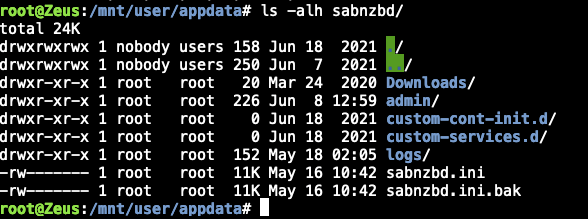
If anyone is having this issue I think I resolved it. Not very hard but did require time and tinkering. You will need to open a console to the UnRaid server and everything will be done under /mnt/user/appdata/ First try and get Sab to boot so you can get to the config settings menu screen. I had to chmod 655 the sabnzbd.ini file. Do this from the console (mentioned above). This file will be sabnzbd/sabnzbd.ini Restart the container once you do this from the Unraid UI. Go to the settings menu within Sab and backup your Sab settings. It's at the bottom and says "download backup". You should now have a sabnzbd-config.zip file on your local computer. Stop the Sab container From the console mv the sabnzbd folder to sabnzbd2 (just so you have the orig) (basically just renaming it). Start Sab container (This is going to cause the container to rebuild the files). If you had https it likely won't work so navigate to your http port. Mine was 8080. You should see a Sab setup wizard screen with an option at the bottom to import a config. Import the config. Save settings, Restart Docker. Test to ensure everything works. (Mine changed internal docker IP so I had to update Radarr, Sonarr, Lidarr, etc). Once I did this no more errors in my Sab docker logs. I noticed that after docker rebuild everything that nothing is root anymore in the sab folders. Confirmed this with an ls -al in both sabnzbd (after this process) and compared it to sabnzbd2 (folder that I backedup). Everything is set to nobody users. I'd image another fix would be to just reset all the perms from root root to nobody users may fix the issue. However I think having it fix it all was a better option. Hopefully this helps someone.
-
Messing with it a bit. I had to set the sabnzbd.ini to 655 to get it working. I was watching the log and there were other permissions issues. I had to change the admin/rss_data.sab to 666 Then it complained about can't Write to "History database" Which is (also at the default) set to 644. I'm guessing there is going to be more with the current trend. I recently upgraded both the SAB container and Unraid to 6.10.2 from 6.9.2 so I'm not sure what update broke it/updated perms. Anyone else having this issue?
-
After upgrading to Unraid 6.10 I am getting permissions errors on the docker config file. If I need to change this, what should it be set to? Perms on config. I assume it means this config file (/mnt/user/appdata/sabnzbd/sabnzbd.ini)
-
Prefect that worked! Had to restart FF after I applied the changes though.
-
Weird. I got some new monitors... the problem is gone. I'm guessing it more windows display setting issue than the actual monitors but still very weird. Anyways, looking forward to the 6.10 and hope the problem doesn't come back. As an FYI - Old Monitors were MSI MPG27CQ and the new ones are Samsung Odyssey G7s
-
Outstanding thanks. I'm on Unraid 6.9.2, any ideas on when 6.10 is going GA?
-
Bump, This is still an issue for Chrome on a Windows machine. This is the most widely used Web Browser out, really need to resolve this, thanks! Confirmed still broken with Chrome 95.0.4638
-
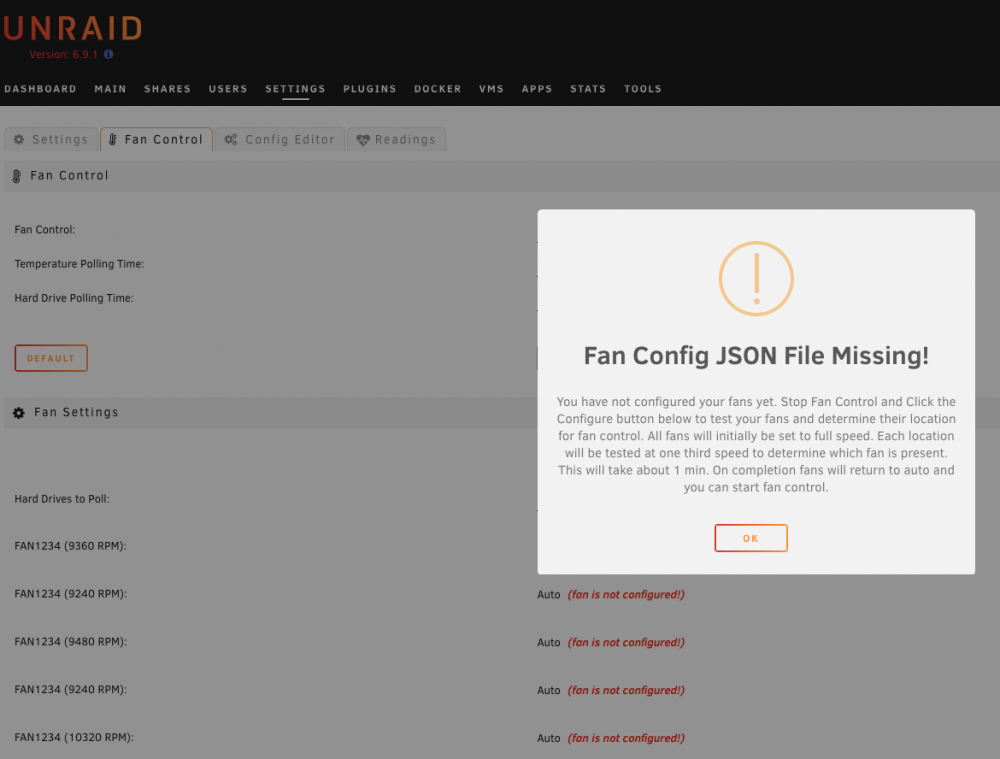
Any idea if you can use the configurator on a Dell PowerEdge R730XD? I have the 10G NIC installed and the fans go absolutely ballistic. I've ran the manual ipmitools command which drops them down to 9,500 RPM (ish) which is still VERY loud. I was rather hoping that I could use this tool to set the speeds lower to say like 7-8k RPM. I always Get this message when I go to Fan Control Tab. It tells me to click on configure button but there is no configure button. Any ideas?
-
Any of the devs consider looking at this? Maybe something like Anchore, Clair, etc or another docker file that we can add to Unraid that would scan all the docker images we have in our Local Docker Repo and provide a report for UnRaid users? I think this would be really valuable for the community so they know of the images they are running, if there are any vulnerability and let them determine if its an acceptable risk. Thanks!
-
Maybe a second look for an interested container expert to get this working for the community? Please.
-
Did anyone figure out the umask setting or how to get Qbit to write files with different permissions so that someone other than nobody/users can access the files? Currently all files are written with 755. I would also be even more happy if I could change the user from nobody to a set user that I already have set. The one post I read claims that the following works: set -e UMASK_SET=000 It however breaks the image and makes you have to redeploy the container using the "Add Container" at the bottom and choosing the template and then removing the extra line (that you just added). -- FYI for those who had the issue. Not sure if someone here is a bit more advanced with this container and/or permissions but it would be very much appreciated if you could provide some insight to this issue. Thanks!


