





shwa87
Members
-
Joined
-
Last visited
Everything posted by shwa87
-
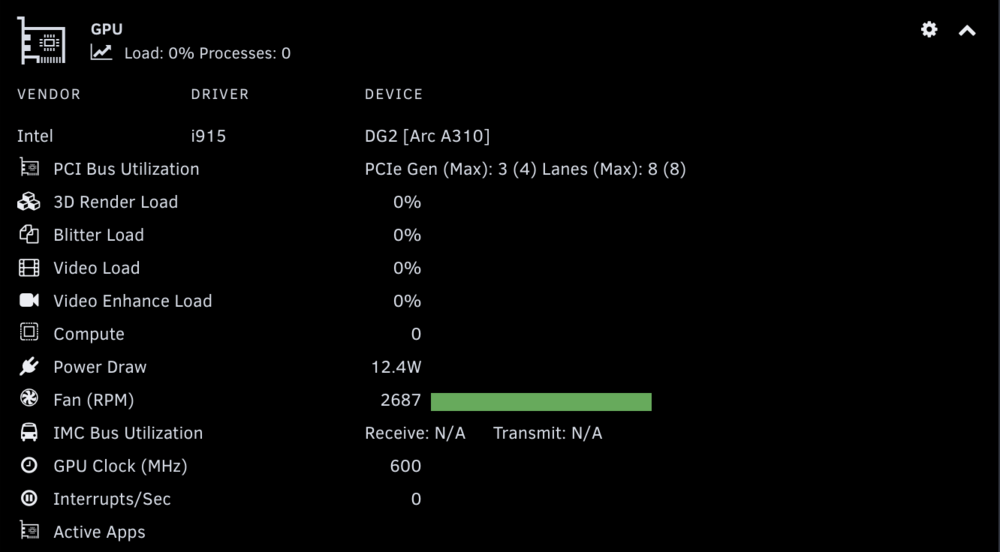
I'm having the issue with an ARC A310 where it isn't showing anything but fan usage and power draw. I've set it to top + qmassa... I've got tdarr almost constantly running GPU transcodes and I did confirm it is running when I did the requested support commands/documentation: 1&2: root@[redacted]:~# timeout -k .500 .400 intel_gpu_top -J -s 250 root@[redacted]:~# cd /usr/local/emhttp/plugins/gpustat/ && php ./gpustatus.php Could not open input file: ./gpustatus.php 3): 4) the contents of '/boot/config/plugins/gpustat/gpustat.cfg': MULTIGPU = "85:00.0" TEMPFORMAT = "F" UIREFRESH = 1 UIREFRESHINT = 2000 DEBUGLOG = 0 DISPCLOCKS = 1 DISPPCIUTIL = 1 DISPPWRDRAW = 1 DISPPWRSTATE = 1 DISPMEMUTIL = 0 DISPTEMP = 0 DISPFAN = 1 DISPSESSIONS = 1 DISPENCDEC = 0 DISPTHROTTLE = 0 INTELBACKEND = "top_qmassa" DISP3DRENDER = 1 DISPBLITTER = 1 DISPVIDEO = 1 DISPVIDENH = 1 DISPCOMPUTE = 1 DISPINTERRUPT = 1 DISPPWRDRWSEL = "GPU" DISPEVENT = 0 DISPVERTEX = 0 DISPTEXTURE = 0 DISPSHADEREXP = 0 DISPSEQUENCER = 0 DISPSHADERINTER = 0 DISPSCANCON = 0 DISPPRIMASSEM = 0 DISPDEPTHBLK = 0 DISPCOLORBLK = 0 DISPGFXTRANS = 0 MULTIGPUJSON = "%7B%2285%3A00.0%22%3A%7B%22id%22%3A%2285%3A00.0%22%2C%22model%22%3A%22DG2+%5BArc+A310%5D%22%2C%22vendor%22%3A%22i>
-
Love this plugin and overall how it displays data - Might I suggest though for each group (Array, Cache Pools, etc) that the total storage be displayed differently based on how its setup. For Example, I have 2 PARITY drives, the first one lists my total storage, the 2nd one is identified as PARITY. It would be better to display the total size of the array in a row above the PARITY disks. Similarly, I have two cache pools. The first row displays the total storage if they were striped volumes, but I have them setup as ZFS pools. How it is now, is the first row for each one displays the total capacity of the disks, the 2nd row displays the capacity in the ZFS pool setup, and each subsequent row is the remaining individual disks after the first one. It would be better to omit the first row that displays the total size of all drives in the pool combined unless they are setup as a true striped pool, and then a header row that displays the total usable pool size, and then a row for each disk member.
-
It is 100% related to zfs cache pools. I have 3 of them, and my solution was to reassign one of my shares to one of the other pools - something I had been meaning to do anyway. Another work around would be to add a userscript which executes "zfs mount -a" periodically or, if you want to get advanced, after the mover executes.
-
I'm sure that is the issue thinking back to when I've noticed it happening now - is there some tweaking that needs to be done with the mover to account for this when running or some scripting that could be added to run after the mover finishes?
-
I ran into this today and also had to do this. What is causing this? I couldn't create directories (mkdir) in several shares which all use a zfs cache pool. What alerted me to this problem is that suddenly all my nzbget downloads failed because it couldn't create subdirs.
-
Was a solution ever discovered for this issue? I'm experiencing it for several containers
-
For the longest time I haven't been able to use adminer versions greater than 5.1 but this week that stopped working too. Usually what has happened after awhile is i start the container and it stops right away with an error in the logs sudo: /usr/bin/sudo must be owned by uid 0 and have the setuid bit set. Deleting and recreating the container usually fixes this, but its not doing so this time, but after doing so the error isn't logged - in fact there are no logs at all and the webui doesn't work. I'm not sure if this is a template or image issue. Thoughts?
-
Bingo - that did it. Will re-add all of my allocations and report back if any issues arise. Thank You!
-
No joy. I think my issue may be dual in nature - because of my dual actuator SAS drives - is this workaround only accounting for devices with duplicated linux dev addresses, or is it also accounting for the dual actuator drives which have a duplicated first portion of the LUN? Ex: ST14000NM0001_ZKL2680Z0000C23684XU_36000c500d963a0130001000000000000 (sdv) ST14000NM0001_ZKL2680Z0000C23684XU_36000c500d963a0130000000000000000 (sdu) These two devs are one physical 14TB SAS drive presented to the system as 2 7TB drives. The only difference in ID being the 0 and 1 identifier in the string of 0's in the latter portion of the ID (bolded for emphasis)
-
Debug file attached. I've got a single SAS cable, but several drives which are dual actuator so they've got 2 LUNs each. Is this the issue? What I'm not quite understanding is why I can allocate drives to trays but they won't display in the dashboard. disklocation-2025-09-20.log
-
It should also be noted that I've tried updating to the 7.2 beta and the beta of the plugin AND completely resetting it, and still having the same issue.
-
I tried finding this issue via search but was unsuccessful. My apoligies if this has already been asked and answered. I am stuck on the message to "Go to System and initialize a "Force SMART+DB"", I've done it several times and still the dashboard is displaying this. I have disks allocated to trays and it seems like other functions work - just not the dashboard - both the page/tab as well as the panel on the Dashboard page of Unraid.
-
I just posted this over in the connect plugin support thread.
-
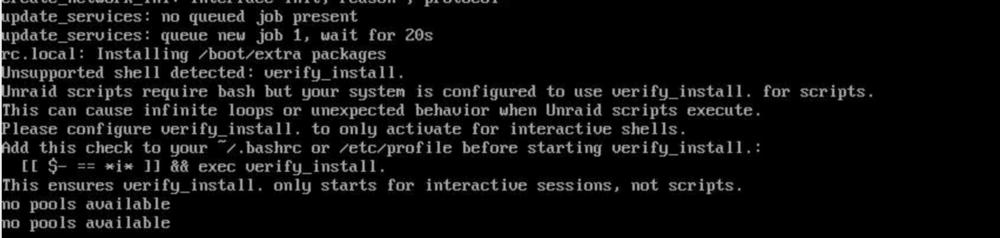
I'm not sure what version introduced this issue, but after a recent update (in the last few days), during boot the following error appears during bootup: a grep shows that only this plugin contains any reference to verify_install dynamix.unraid.net.plg:if [ -x "$SCRIPTS_DIR/verify_install.sh" ]; then dynamix.unraid.net.plg: echo "Running verify_install.sh" dynamix.unraid.net.plg: "$SCRIPTS_DIR/verify_install.sh" dynamix.unraid.net.plg: echo "ERROR: verify_install.sh not found or not executable" dynamix.unraid.net.plg: echo "ERROR: verify_install.sh not found or not executable" I'm not quite sure how to fix this - please advise if I do need to do something to eliminate this error.
-
I started getting a similar error during boot today, but it eventually loads it just takes a really really long time. I really want to know how to fix this as well.
-
Hello - thank you for this excellent plugin - I'm wondering if this is only a cosmetic issue or how I could confirm for sure this detail: PCI Bus UtilizationPCIe Gen (Max): 1 (1)Lanes (Max): 1 (1) My system is Gen 3, and its an Intel x8 card in an x16 slot. I believe this might be related to the previous couple of posts as its an Arc310 as well.
-
This is still an issue, does anyone have any ideas? VPD access failed. This is likely a firmware bug on this device. Contact the card vendor for a firmware update. There aren't any updates available that I've been able to find.
-
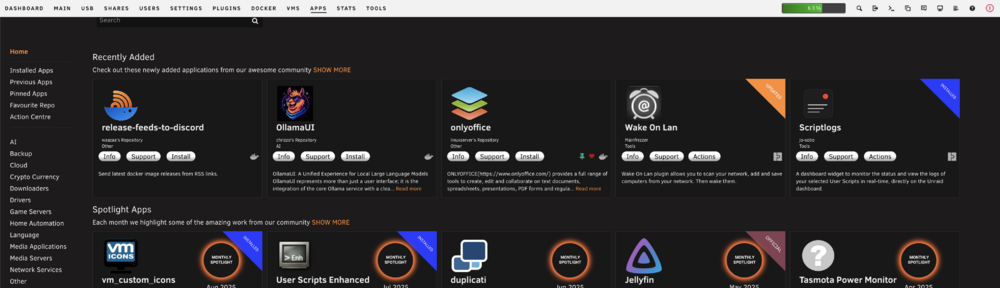
Is the search box being cutoff just me? I tried clearing cache. Been this way for the last several CA updates on UR 7.1.4
-
Has anyone had success with these Seagate EXOS "dual actuator" drives? I've got my hands on a few of the EXOS 2X14 Mach.2 - when I preclear LUN0, LUN1 goes grey and I cannot preclear LUN1 after LUN0 is successful. Does the preclear do both LUN's even though it seems to only show on one of them?
-
I adjusted the frequency settings and saved and I haven't had this error since. Hopefully it sticks!
-
You should try updating the main OS and see if that resolves it. I recall a similar issue in the 6.x branch when I had been holding off on updating - CA had an update but it failed and wouldn't reinstall even after I cleared the package off the flash drive and rebooting. Updating to the latest OS resolved my issue then.
-
Just an FYI for anyone with similar issues, try deleting your docker image and/or directory after disabling docker and then go into CA Previous Apps and reinstall everything. This solved the permissions issues I was seeing.
-
I have an HPE DL380 gen9 running the latest 7.1.4 of unraid and I've discovered what I believe to be ultimately (somehow) causing some docker issues, specifically certain containers unable to start. I use the directory option for dockers and last night I deleted it as I was seeing some corruption and permissions issues on top of this VPD error. I reinstalled all my containers and the corruption/permission issues seem to be resolved (at least for now). However, when I try to start certain containers (opencloud and snipe-it are two examples), I get an Execution Error / Server Error popup and the VPD error shows up in my syslog for all 4 ports using the tg3 driver. I have the most recent firmware available from HPE updated to the LOM (v 5.2.6.0). Diagnostics are attached. catan-diagnostics-20250705-1138.zip
-
I've been getting a periodic cron error in my syslog, wondering if this needs an update or if I need to manually fix this? crond[3363]: failed parsing crontab for user root: Invalid frequency setting of /usr/local/emhttp/plugins/ca.update.applications/scripts/updateApplications.php >/dev/null 2>&1
-
I've been getting a periodic cron error in my syslog, wondering if this needs an update or if I need to manually fix this? crond[3363]: failed parsing crontab for user root: Invalid frequency setting of /usr/local/emhttp/plugins/ca.update.applications/scripts/updateApplications.php >/dev/null 2>&1





