





shiftylilbastrd
Members
-
Joined
-
Last visited
-
Did you ever identify the problem here? I just recently started having the same issue with incorrect HHD temps being displayed.
-
The plugin is showing the PSU type twice in the description Could we also get a minimize button on the next update.

-
Exactly what I envisioned. Thanks for the update.
-
I would also like to throw in a vote for container update delay like plugins has.
-
Was wondering what you thought about or if it would even be possible to have the the icons for unstarted apps greyscale and started in full color like in the picture. Or perhaps just a red and green dot to indicate the current state.

-
I agree. I don't care at all about ZFS and this naming restriction has totally thrown off my shares and now my pools since the same rules apply there.
-
If you're running Fix Common Problems you will 100% be getting a notification that the original is depreciated, it also directs you over to this one. If you don't have FCP I would suggest adding it. If you don't want to believe that then just search CA for "Cleanup Appdata" and see what's available, the original is not.
-
And to add to my previous suggestion, quarantine visibility could be selectively switched just like the ignore list is.
-
Thanks. I just feel this would fulfill the desire to be "safe" without having to make it a convoluted, multistep process to delete things.
-
Oh I see. It should apply the purge timer automatically, I shouldn't have to do another step. That's the idea behind having a default purge time.
-
No it doesn't
-
These do nothing

-
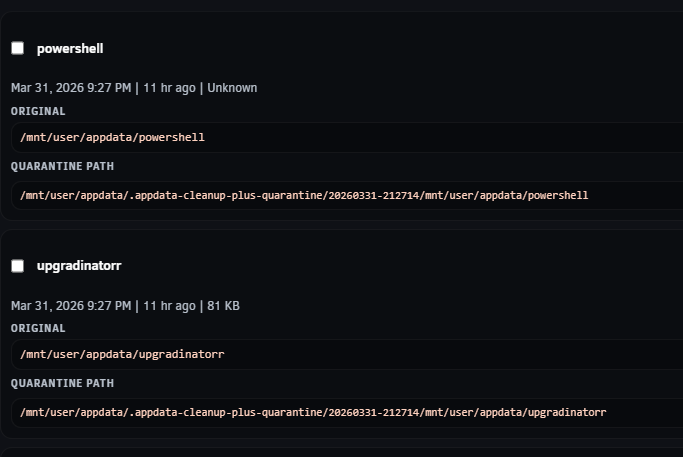
Clicking done doesn't save the change to purge days, have to hit enter of click out of box before hitting done to save. Quarantine shows time added but not scheduled deletion time.
-
Running 2026.04.01.09 and those changes are good. I have a couple more if you're interested Remove this If you want to continue to include the mode notification just put it at the top right above the Controls block since that space is empty anyways. Have quarantined items in a separate visible table like ignored items are and show their scheduled deletion timestamp, Place the history button at the bottom of that block

-
That addressed the issue but I have two comments. The done button at the bottom in my opinion is misplaced, I tried clicking that after selecting what I wanted cleaned just to be booted to the Settings page then have to go back in and try again. I get having the ability to exit the plugin but I think it should either be labeled Exit or moved elsewhere. There should be a settable duration that items are held in quarantine if that's going to be the default.


