





SpuddyUK
Members
-
Joined
-
Last visited
Everything posted by SpuddyUK
-
thanks. I'm going to run memtest86 for a few hours first. I've noted that most unraid gui issues mentioned on reddit are due to faulty ram. If results come back clean, I'll try safe mode. My concern is that the issue is so sporadic; sometimes weeks in-between that safe mode may avoid it all together.
-
I was on the UI this morning (18/12) GMT, then an hour or less later it was gone.
-
I'm still having an annoying issue where every few weeks, my unraid UI stops responding. All my docker containers (and their UIs) still respond. I can access SMB shares and SSH into the server during this time. I've tried reloading nginx and php-fpm. I attach my diags. Any ideas? buzz-diagnostics-20241218-1122.zip
-
no, I hit ctrl-alt-del and it said it'd wait a maximum of 90 seconds for a graceful shutdown. but it exceeded that and I needed to hold the power button the end.
-
Hi. So I managed to configure so that previous syslog was available. I was updating a number of plugins and docker containers and bam, all my services went dark. I tried logging in via SSH but that timed out. I put a monitor on the server and tried logging in locally and that also timed out. In the end I needed to hard reboot. syslog attached; any assistance would be great. thanks. buzz-syslog-previous-20240917-1827.zip
-
My server has hung a few times now whereby I can ping it but I cannot connect to any of the docker services, cannot connect to the UI and cannot SSH in as it times out. It's headless. Will the logs be helpful after a reboot?
-
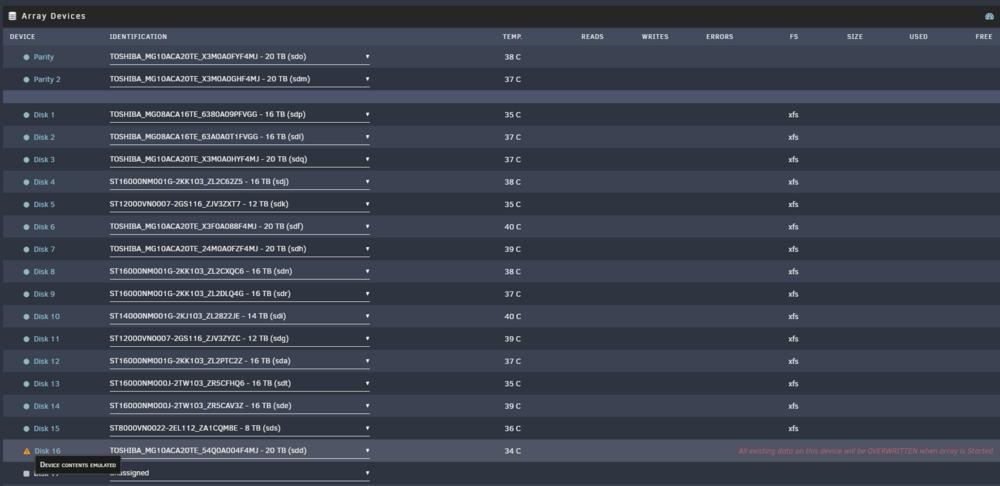
What is the best course of action (DIsk 16) in this scenario? I had a power issue, disk was rebuilding. Server was rebooted. I haven't started the array. Thank in advance.
-
This looks promising. I'll give this a go! Thank you @JorgeB.
-
I wasn't quite sure where to post this support request, here or in the support group for the docker container I believe is causing the issue. Every month or so, binhex-qbittorrentvpn causes problems and completely freezes my unraid web ui. Meaning I can no longer get into the unraid web ui at all. I can get into the CLI via SSH, but there are even some really strange things happening there too (htop wont load being one, diagnostics not being able to be collected being another). As soon as I send a command "docker stop binhex-qbittorrentvpn" the unraid webui will load. However, now binhex-qbittorrentvpn container continues to show running (docker stats, and unraid ui) but I cannot access the UI for the qbit application. If I try to kill the container in any way (unraid UI, cli, PID, pkill etc), it throws an error. The only way to return to a fully functioning server, with working qbittorrentvpn container for another ~month, is to hard reboot the server (server will not gracefully shutdown as it believes binhex-qbittorrentvpn is running, and it cannot end it). I even have a script to restart the qbit container every night at 12PM which I thought may help. Any ideas, diags attached. Thanks! buzz-diagnostics-20231127-1117.zip
-
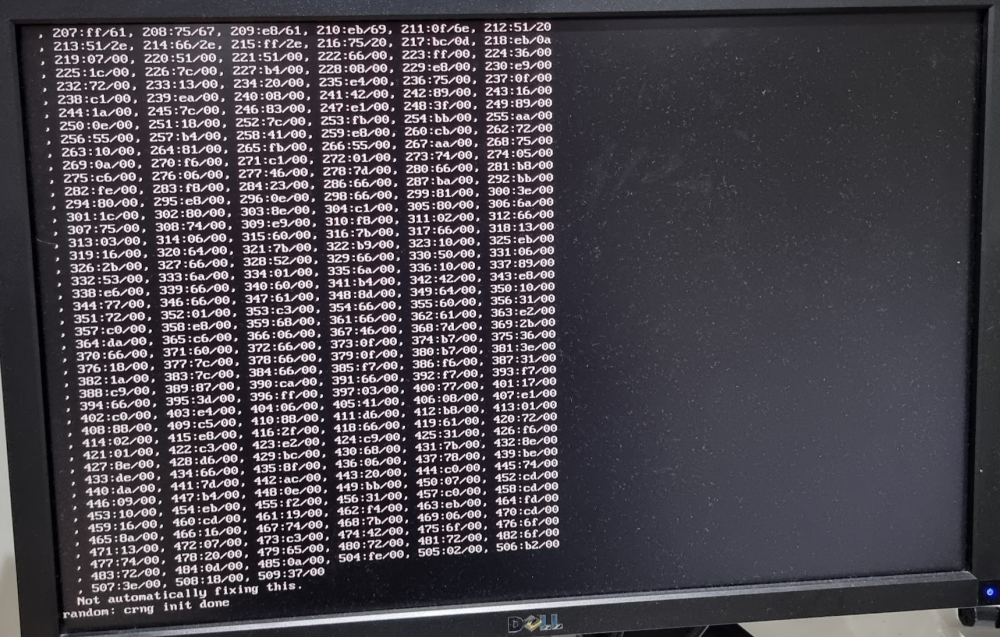
Getting a strange fullscreen set of syntax coming up during boot. Boot completes and nothing seems to be untoward during operation? Any ideas if I have anything to worry about? buzz-diagnostics-20231031-1418.zip
-
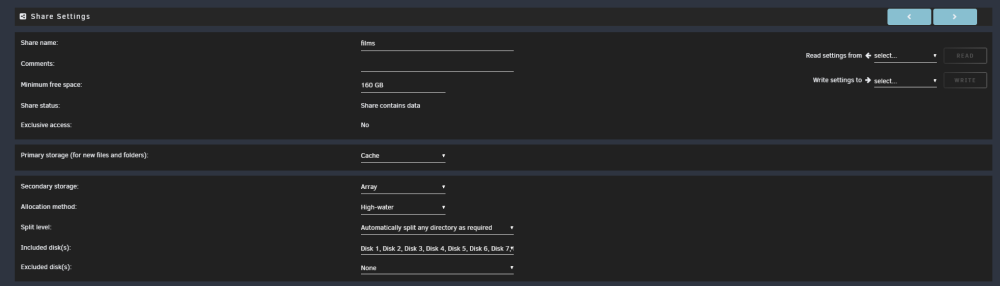
@JorgeB This seems to have resolved it! I don't remember ever manually selecting all the disks and wasn't aware that unselecting all the tickboxes would mean they'd all be apart of the share (if that makes sense? UI could be better in that regard). I realise this a corner case but would be great if a fix could creep into the next release.
-
I have a 16disk array (inc 2x parity). One of my disks (disk 7, sdi) has been showing errors for about a week. I did the short smart test which came back fine and took the disk out, connected to PC and ran Seagate diagnostics which came back fine. I think it's probably on it's way out but any way I be a bit more confident? Could it be something else like the connection from HBA to Backplane or similar? Thanks, buzz-diagnostics-20231006-1347.zip
-
Thanks. I'll give this a go and report back!
-
@JorgeB Unfortunately issue has started again. Attached fresh diags. Same message in syslog "No Space left on device". 2 disks have 7TB free. buzz-diagnostics-20230924-2137.zip
-
thanks. EDIT: So I changed the minimum space on the share from 50GB to 160GB and that seems to have solved the issue. buzz-diagnostics-20230919-1611.zip
-
Thanks for the info. I have changed all shares split levels to "automatically split any directory" and allocation to "most-free". unraid is still trying to move to disks with 50GB free instead of disks with 8TB free. Anything else I should check? Syslog still showing "No space left on device" during move process.
-
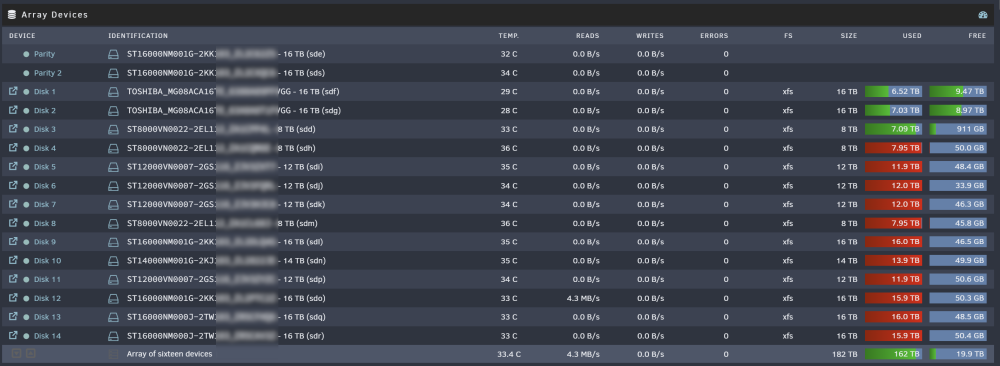
As per title, mover is saying disks are full (log) but I have disks with available space? Why is mover trying to copy to full disks instead of those with available space? Diag attached. Appreciate any assistance. buzz-diagnostics-20230917-1351.zip
-
Hi, I'm struggling with high CPU load and server becoming unresponsive occasionally. Any ideas? I do have Sab do direct unpack (unpacking whilst download etc), might I need to CPU pin certain applications to prevent them making the system sluggish? Nothing writes to the array directly (Mover runs daily at 11AM), everything writes to 4TB NVME. buzz-diagnostics-20230724-1625.zip

-
My USB key was failing. I replaced it (followed official guide) and got the same "SyntaxError: Unexpected number in JSON at position 1" error when trying to replace the key. I have logged a support case. My NAS is unusable for an indeterminate amount of time. Poor process that needs improving.
-
Seems to be fine now. Thanks for resolving.
-
Same issue here. @bonienl
-
I'm running a LSI 9201 16i without issues here. Not QNAP though. 6.9.1
-
Thanks for the considered response and for being open about it. Happy to take anything offline where helpful. Rate-limiting a great tool to employ as part of a wider security hardening toolkit. Unfortunately, with botnets the above will do little to prevent a brute-force of root on a specific server. All those hundreds of thousands if not millions of IoT devices that have been compromised will do their business for them from individual IP addresses. Fail2Ban suffers similarly. This is why layers are so important. Let me be clear, I am a paid customer and enthusiast of unraid. I even quite like the features this offers in principle. However, my fear is that savvy users whom require remote access have already arranged it with something like VPN, WireGuard the like. We might be sweeping the rest along here into remote access with root and "rootpassword". Additionally, I would suggest some security auditing of the code/api if you haven't already done so. Better to pay someone to find potential routes to compromise than being held over a barrel. Bug bounty could be beneficial, free license/$500/xyz for each vulnerability rated x or above. I will keep an eye on this to see how it develops. Thanks for engaging.
-
Opinions differ but consensus is generally at least 12 characters to include all of the four categories of lower-case, upper-case, number(s) and symbol(s). Of course you can lead a horse to water but not make them drink, so there is a risk of Password01!!, so any logic around preventing those type of passwords would probably be helpful too. There are countless lists online of the 100 most used passwords that you might be able to reference and prevent being used/saved.
-
As I see it, 2FA is not required if you directly access https://yourhash.unraid.net, only if you login via the forum.





