





TekDRu
Members
-
Joined
-
Last visited
Everything posted by TekDRu
-
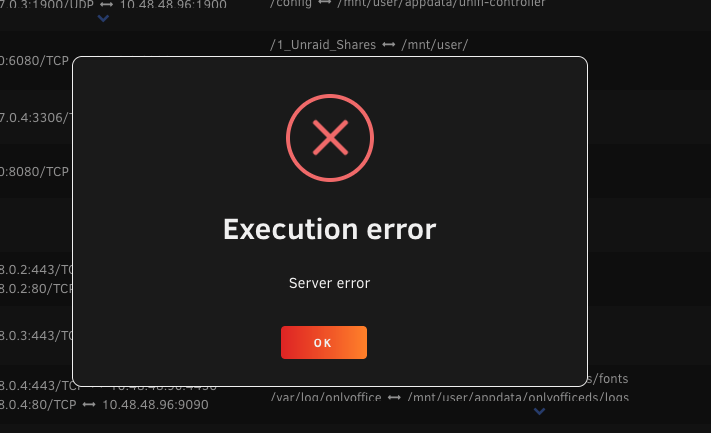
Hello @Mihai, After I updated Unraid to version 6.12.3 I realized the invoiceninja is not starting. I get an "execution error" "server error" whenever I try to start the container. If I try to pull the container again, I get the following error: docker: Error response from daemon: driver failed programming external connectivity on endpoint invoiceninja-v5 (e23929c8306f014445db778e1d5f00d6064fad93a957c18c6d6b0f2bf4e86424): Error starting userland proxy: listen tcp4 0.0.0.0:8443: bind: address already in use. Please help
-
Hey @taifleh, @b0m541 and @knex666, I'm interested in trying mopidy3. but from going through these posts, I'm not sure if its working properly. Can you let me know if any of you have mopidy3 working well with these extensions: Mopidy-Iris Mopidy-Muse Mopidy-SomaFM Mopidy-SoundCloud Mopidy-Tunein Mopidy-Jellyfin Mopidy-Youtube Thanks
-
The container Setup Account should be set to false. Make that change and run the php artisan install command again and see if that gets you to the setup wizard. Is the screenshot from portainer? I haven't used portainer before so I can't help there. I've only used the docker with mariadb and use adminer to access my databases.
-
What errors or problems are you running into? I am using the app. I do not apply any updates to the container to avoid breaking it. I was able to update to 3.0.12 from within the app itself. If and when I decide to update the container, there is a process I go through to restore my existing database and avoid loosing everything. Below is a quick list of steps from memory. I can give more detail if needed. Backup the current database before making container updates Apply container updates and go through install process from scratch (with php artisan install commands etc.) until I have a running app Open the backed-up sql file in a text editor, and change the first three initials of all tables in to match the first three letters in new table names from new database Delete all tables from new database Import sql file from existing database (with new table names) to replace the new database
-
Hey @Domotics, just wanted to come back and say thanks for this. It solved my problem after an update to nextcloud 25. I don't know what happened but it seems like my config file got overwritten after the update and the log file was saved to the array again. I think this fix should work for future updates. Thanks!
-
@blue8lucian Does the email and the password that you used in the php command match what you have in your container settings?
-
Yeah. It's best to turn off auto updates, and don't apply any updates for now. I realize that it breaks after each update.
-
@blue8lucian you can find some help here:
-
@dredgeon Can you take a look at my screenshot and let me know what I have wrong.
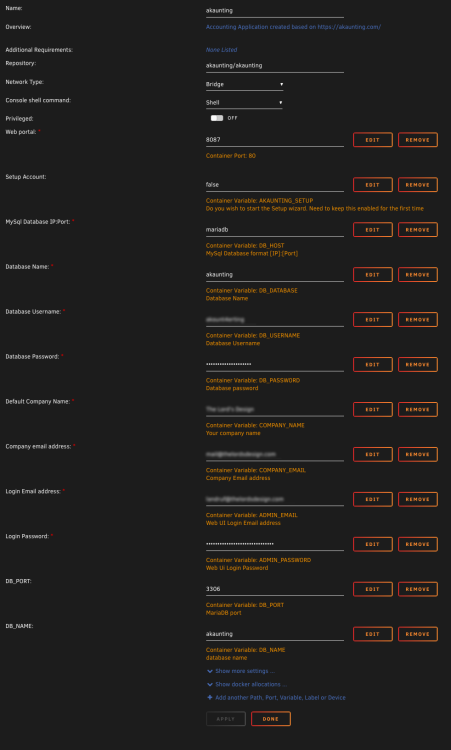
-
@dredgeon did you have to run the setup wizard after your changes? I tried adding the new variables for DB_PORT and DB_NAME but now I can't log in anymore.
-
That makes sense. I see that the php artisan install code defines the host ip and port separately. I'll give that a try and then run a pending update to see if it breaks after the update. Thanks!
-
After starting all over again from scratch with a new database (last week), I was able to log in again. Today, I attempted to log in and saw that the login issue returned. I did notice that there were some updates to the container recently, so I'm not sure if it's the updates that are breaking the container. This is what I see in the log: AH00558: apache2: Could not reliably determine the server's fully qualified domain name, using 172.17.0.6. Set the 'ServerName' directive globally to suppress this message AH00558: apache2: Could not reliably determine the server's fully qualified domain name, using 172.17.0.6. Set the 'ServerName' directive globally to suppress this message [Tue Nov 08 14:06:01.103850 2022] [mpm_prefork:notice] [pid 1] AH00163: Apache/2.4.54 (Debian) PHP/8.1.12 configured -- resuming normal operations [Tue Nov 08 14:06:01.103870 2022] [core:notice] [pid 1] AH00094: Command line: 'apache2 -D FOREGROUND' Enabling module rewrite. To activate the new configuration, you need to run: service apache2 restart 192.168.50.137 - - [08/Nov/2022:14:06:18 -0500] "GET / HTTP/1.1" 302 1670 "-" "Mozilla/5.0 (Macintosh; Intel Mac OS X 10_15_7) AppleWebKit/605.1.15 (KHTML, like Gecko) Version/15.2 Safari/605.1.15" 127.0.0.1 - - [08/Nov/2022:14:06:24 -0500] "OPTIONS * HTTP/1.0" 200 126 "-" "Apache/2.4.54 (Debian) PHP/8.1.12 (internal dummy connection)" 127.0.0.1 - - [08/Nov/2022:14:06:25 -0500] "OPTIONS * HTTP/1.0" 200 126 "-" "Apache/2.4.54 (Debian) PHP/8.1.12 (internal dummy connection)" 192.168.50.137 - - [08/Nov/2022:14:06:33 -0500] "POST /auth/login HTTP/1.1" 500 1230 "http://192.168.50.145:8087/auth/login" "Mozilla/5.0 (Macintosh; Intel Mac OS X 10_15_7) AppleWebKit/605.1.15 (KHTML, like Gecko) Version/15.2 Safari/605.1.15" This is what I see flashing rapidly when I try going into the app's console: OCI runtime exec failed: exec failed: unable to start container process: open /dev/ptmx: no space left on device: unknown Hope this can be fixed so that I won't have to keep going through the process of starting all over again.
-
Is there anyone that has this app working? After initial install and setup 2 weeks ago, the app was working fine. But recently I've been trying to login and I can't get passed the login screen. It just hangs after entering login info. I do not see any errors in logs and don't know where to go from here. Any help is appreciated. This is the apps log: AH00558: apache2: Could not reliably determine the server's fully qualified domain name, using 172.17.0.2. Set the 'ServerName' directive globally to suppress this message AH00558: apache2: Could not reliably determine the server's fully qualified domain name, using 172.17.0.2. Set the 'ServerName' directive globally to suppress this message [Wed Sep 28 21:21:22.597968 2022] [mpm_prefork:notice] [pid 1] AH00163: Apache/2.4.54 (Debian) PHP/8.1.10 configured -- resuming normal operations [Wed Sep 28 21:21:22.597988 2022] [core:notice] [pid 1] AH00094: Command line: 'apache2 -D FOREGROUND' [Wed Sep 28 21:22:25.014405 2022] [mpm_prefork:notice] [pid 1] AH00170: caught SIGWINCH, shutting down gracefully AH00558: apache2: Could not reliably determine the server's fully qualified domain name, using 172.17.0.2. Set the 'ServerName' directive globally to suppress this message AH00558: apache2: Could not reliably determine the server's fully qualified domain name, using 172.17.0.2. Set the 'ServerName' directive globally to suppress this message [Thu Sep 29 13:55:59.399673 2022] [mpm_prefork:notice] [pid 1] AH00163: Apache/2.4.54 (Debian) PHP/8.1.10 configured -- resuming normal operations [Thu Sep 29 13:55:59.399692 2022] [core:notice] [pid 1] AH00094: Command line: 'apache2 -D FOREGROUND' [Thu Sep 29 13:58:56.208050 2022] [mpm_prefork:notice] [pid 1] AH00169: caught SIGTERM, shutting down AH00558: apache2: Could not reliably determine the server's fully qualified domain name, using 172.17.0.2. Set the 'ServerName' directive globally to suppress this message AH00558: apache2: Could not reliably determine the server's fully qualified domain name, using 172.17.0.2. Set the 'ServerName' directive globally to suppress this message [Thu Sep 29 14:00:01.473216 2022] [mpm_prefork:notice] [pid 1] AH00163: Apache/2.4.54 (Debian) PHP/8.1.10 configured -- resuming normal operations [Thu Sep 29 14:00:01.473236 2022] [core:notice] [pid 1] AH00094: Command line: 'apache2 -D FOREGROUND' [Thu Sep 29 14:01:51.570443 2022] [mpm_prefork:notice] [pid 1] AH00170: caught SIGWINCH, shutting down gracefully Enabling module rewrite. To activate the new configuration, you need to run: service apache2 restart [28/Sep/2022:21:21:34 -0400] "GET / HTTP/1.1" 302 1651 "-" "Mozilla/5.0 (Macintosh; Intel Mac OS X 10_15_7) AppleWebKit/605.1.15 (KHTML, like Gecko) Version/15.2 Safari/605.1.15" [28/Sep/2022:21:21:34 -0400] "GET /auth/login HTTP/1.1" 200 4753 "-" "Mozilla/5.0 (Macintosh; Intel Mac OS X 10_15_7) AppleWebKit/605.1.15 (KHTML, like Gecko) Version/15.2 Safari/605.1.15" [28/Sep/2022:21:21:50 -0400] "POST /auth/login HTTP/1.1" 500 1211 "http://192.168.50.145:8087/auth/login" "Mozilla/5.0 (Macintosh; Intel Mac OS X 10_15_7) AppleWebKit/605.1.15 (KHTML, like Gecko) Version/15.2 Safari/605.1.15" Module rewrite already enabled [29/Sep/2022:13:56:49 -0400] "GET / HTTP/1.1" 302 1651 "-" "Mozilla/5.0 (Macintosh; Intel Mac OS X 10_15_7) AppleWebKit/605.1.15 (KHTML, like Gecko) Version/15.2 Safari/605.1.15" [29/Sep/2022:13:56:49 -0400] "GET /auth/login HTTP/1.1" 200 4755 "-" "Mozilla/5.0 (Macintosh; Intel Mac OS X 10_15_7) AppleWebKit/605.1.15 (KHTML, like Gecko) Version/15.2 Safari/605.1.15" [29/Sep/2022:13:57:28 -0400] "POST /auth/login HTTP/1.1" 500 1211 "http://192.168.50.145:8087/auth/login" "Mozilla/5.0 (Macintosh; Intel Mac OS X 10_15_7) AppleWebKit/605.1.15 (KHTML, like Gecko) Version/15.2 Safari/605.1.15" Module rewrite already enabled [29/Sep/2022:14:00:07 -0400] "GET / HTTP/1.1" 302 1651 "-" "Mozilla/5.0 (Macintosh; Intel Mac OS X 10_15_7) AppleWebKit/605.1.15 (KHTML, like Gecko) Version/15.2 Safari/605.1.15" [29/Sep/2022:14:00:07 -0400] "GET /auth/login HTTP/1.1" 200 4755 "-" "Mozilla/5.0 (Macintosh; Intel Mac OS X 10_15_7) AppleWebKit/605.1.15 (KHTML, like Gecko) Version/15.2 Safari/605.1.15" [29/Sep/2022:14:00:33 -0400] "GET / HTTP/1.1" 302 1651 "-" "Mozilla/5.0 (Macintosh; Intel Mac OS X 10_15_7) AppleWebKit/605.1.15 (KHTML, like Gecko) Version/15.2 Safari/605.1.15" [29/Sep/2022:14:00:33 -0400] "GET /auth/login HTTP/1.1" 200 4755 "-" "Mozilla/5.0 (Macintosh; Intel Mac OS X 10_15_7) AppleWebKit/605.1.15 (KHTML, like Gecko) Version/15.2 Safari/605.1.15" [29/Sep/2022:14:00:46 -0400] "POST /auth/login HTTP/1.1" 500 1211 "http://192.168.50.145:8087/auth/login" "Mozilla/5.0 (Macintosh; Intel Mac OS X 10_15_7) AppleWebKit/605.1.15 (KHTML, like Gecko) Version/15.2 Safari/605.1.15" ** Press ANY KEY to close this window ** Thanks

-
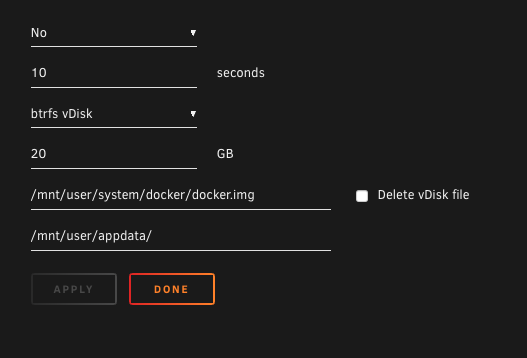
Thanks @JonathanM. Sometime over the weekend I'll try the 3rd option to delete and recreate the image. According to my setup, diagnostics and screenshots, does anything look odd or would cause it to fill up excessively? I wanted to make sure that there isn't anything wrong before I continue to try to remedy the issue. Can you explain "Change to a directory instead of an vdisk image" a little more. I thought the docker image would always be a vdisk.
-
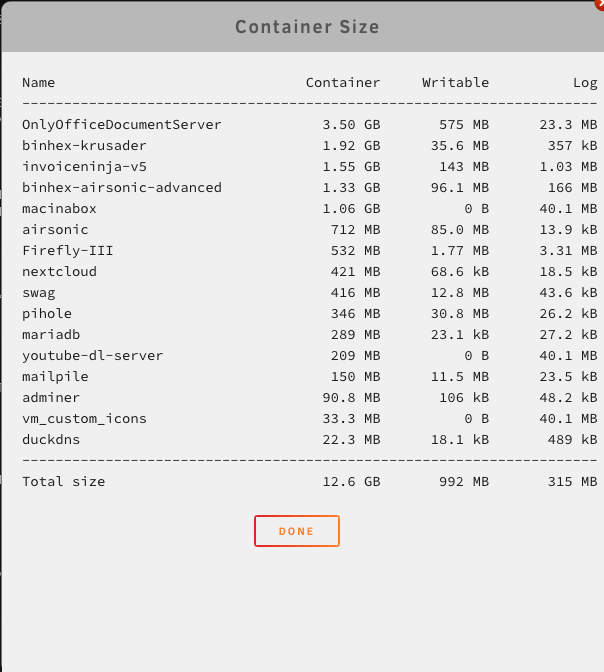
Iv'e been getting these notifications about the docker disk image in the recent 2 weeks: Docker image disk utilization of 70% Docker image disk utilization returned to normal level Docker image disk utilization of 74% Docker image disk utilization returned to normal level Iv'e also noticed that I sometimes get these warnings when I apply updates to containers as well. How can I resolve this? Screenshots and Diagnostics are attached. tower-diagnostics-20220906-1916.zip
-
Thanks @Mihai
-
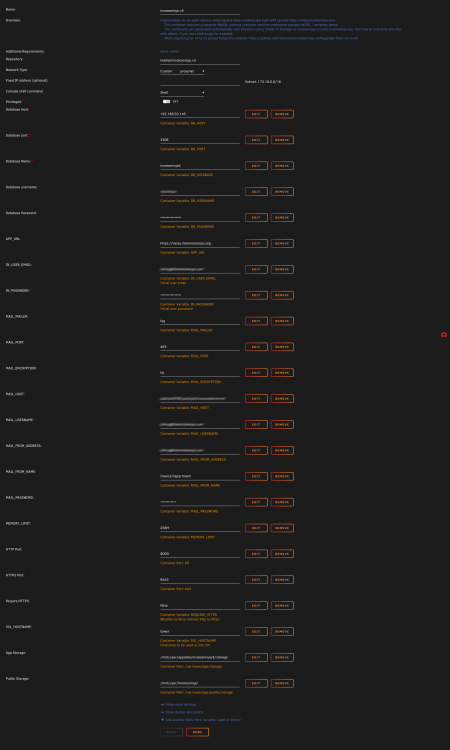
I finally got invoiceninja-v5 to work with domain name via swag. Now PDFs are finally working. It's working with desktop app as well. The only part that I'm not sure yet if it's working or not is the email, but I don't need to email so it's not a problem for me. See nginx config I used below. Also attached is the screenshot of container settings. I'm not sure about the MAIL_MAILER variable, so that could be my email issue. I did change the default "Storage" label to "App Storage" and changed the default "Logo" label to "Public Storage" and used a path to a share instead of the path inside of appdata because I realized that this is the path that files, backups and pdfs are being saved/stored. Hope this helps anyone who may still be having issues with invoice ninja. server { listen 443 ssl; listen [::]:443 ssl; server_name ininja.*; include /config/nginx/ssl.conf; location / { include /config/nginx/proxy.conf; include /config/nginx/resolver.conf; set $upstream_app invoiceninja-v5; set $upstream_port 443; set $upstream_proto https; proxy_pass $upstream_proto://$upstream_app:$upstream_port; proxy_max_temp_file_size 2048m; } }
-
Thanks @Mihai ! I really appreciate it. I'll give it a try when I get a chance in the next few days. I'll respond privately if I run into any issues.
-
Thanks for the quick response @Mihai. It must be because of my little experience with working with dockers. It's not that clear for exact steps to follow but seems like I'll just have to give it try and see what happen and come back if I run into any issues. For now, these are the things that are not clear to me: What folder from SWAG am I copying the certificates from? The App URL, does that have to be a real working URL (since I want to access locally and not remotely)? In the section about SSL, "import the certificate in your browser as a CA", How exactly do I do this? The portion under SSL is not that clear to me: Is the portion from your instructions under SSL required if I'm accessing locally only? What directory will I find the fullchain.pem file? "Personally, I use SWAG, and I just copy over the certifcates daily by using User Scripts UnRAID plugin:" Do I need to copy the certs daily as well and if so, why? At first, I wasn't sure how this would be scheduled, but after looking at the user scripts plugin , I saw the "Add new script" and the schedule options. So I get that part. If I run into the memory limit issue, where exactly do I add in the Memery limit variable? is there a field already for this in the container settings? These questions are coming up because I haven't installed the docker container yet to see the options, but I just wanted to get a cleared understanding before I give it a try. And also if there any other items I need to setup before I begin. Thanks again, I appreciate it.
-
Hey @EricM I just logged back into this forum and noticed your post. I am currently using the latest version of nextcloud without any problems. It was a long time ago since I had that issue so I don't remember what the solution was off the top of my head. But let me know if you are still having issues and if so, I can try to track back to see what I did to solve the issue I had.
-
Hey @Mihai I'm looking to install this docker but have a couple question before I give it a try. I'm currently using MariaDB and Swag for my nextcloud docker. For those, I needed to follow some steps and videos to get them going. Since there isn't much info to follow for invoice ninja, I'm not sure If I fully understand what I'll need to do to get it to work properly. Is there any listed steps that I can follow so that I can make sure I'm setting it up in the right way? Do I need to create a database before installing the docker? Is it required to use swag with this docker or can I use only locally? Thanks
-
I ran fix common problem to check if there were any issue with server and found this error.: "Your server has run out of memory, and processes (potentially required) are being killed off." Diagnostics is attached. Any help please. Thanks tower-diagnostics-20220307-1703.zip

-
Thanks @JorgeB
-
Thanks @JorgeB, Last night I got another warning for the other Samsung SSD in the cache pool reallocated sector ct is 2 I just ran SMART test on that SSD. See attached. I only had these Samsung SSDs for 5 months. tower-smart-20220301-1225.zip
-
Recently I have been getting Warning notifications for one of the SSDs in a redundant cache pool. The warnings I'm getting are: reallocated sector ct is 5 reported uncorrect is 2 I have also gotten warning for one of the disks in my array: udma crc error count is 10 I would like to know at what point should I be concerned or do something about these warnings. Diagnostic is attached. Thanks! tower-diagnostics-20220228-1819.zip


