






Everything posted by GeekyGecko
-
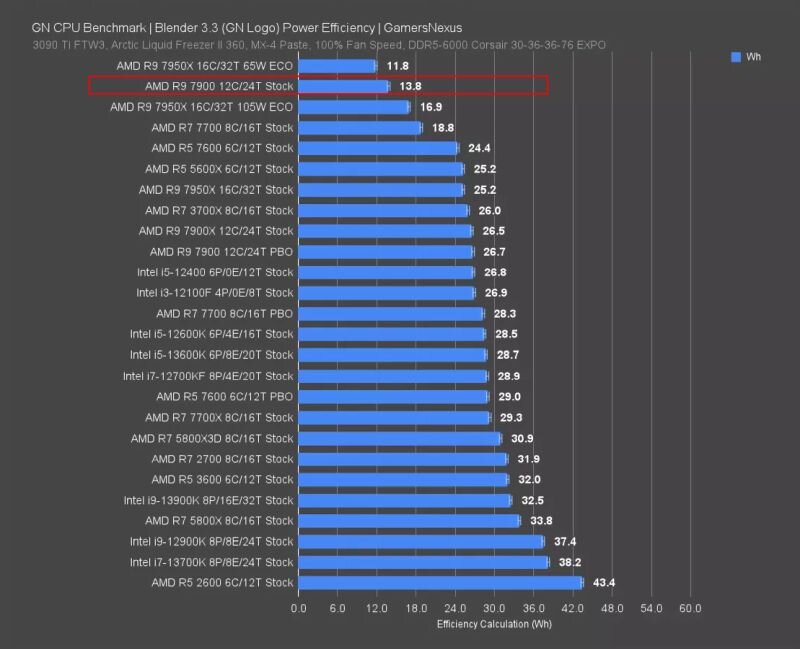
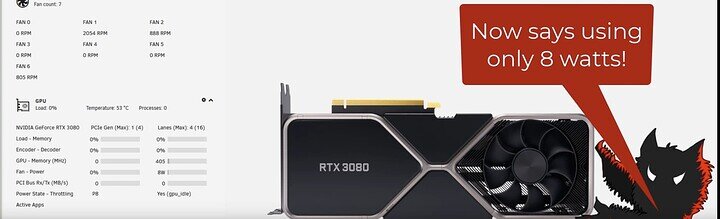
Yeah I've been agonizing over that, but a few things are swaying me: 1) I've been warned I could run into "fun and interesting" performance characteristics with Intel's P and E-cores, which aren't always handled well in schedulers other than Windows (for now at least). 2) The R9 7900 looks pretty power efficient : 3) Adding a GPU doesn't seem like it will add that much to my idle power draw. According to SpaceInvaderOne it's possible to get a GTX 3080 down to ~8 watts on idle: 4) The R9-7900 is a much faster CPU. My biggest hesitation is I assume the R9-7900 will have significantly higher idle power draw than a i5-14500 would. I can't find solid #s on that yet, but that will either solidify my decision or pull me back onto the fence. ----------------------------------------------- EDIT: Found this thread which concludes: They also mention: 🙁 Ugh I just don't know what to do. I wish Intel didn't have the microcode issues with their 13th/14th gen which limits me to the older/lower-end stuff if I want to avoid it. I wish the new Arrow Lake was more of a slam dunk regarding idle power efficiency. I wish AMD had better video transcoding. I wish ECC-capable motherboards were easier to find. Sorry to vent. I've spent too much time obsessing over this and need sleep.
-
I posted a thread over on level1techs and got some great feedback. Made the following changes per their suggestions: i5-14500 changed to Ryzen 9 7900 (They convinced me that a Ryzen 7900 + GPU is better bang for my buck and has more ECC mobo options.) Noctua DH-D12L changed to BeQuiet! Dark Rock Elite (Better cooling and quieter.) ASUS Pro WS W680-ACE changed to a ASUS ProArt X670E-CREATOR (AM5 Socket, ECC Support) Samsung SSDs changed to WD Black SSDs (Apparently Samsung has had some firmware issues with recent SSDs.) Seasonic TX 750 changed to FSP Hydro Ti Pro 1000W Titanium (Better efficiency in general, but particularly in the 20-80W range.) TRENDnet 10G SFP+ changed to Intel X710-DA2 Dual 10Gbps SFP+ (Better/newer NIC) This means I'll have to add a GPU for Plex transcoding. Looks like the RTX 3060 (w/ 12GB RAM) can handle ten 4K to 1080p transcodes, so that's currently my top contender.
-
Wow you aren't kidding, the Seasonic Prime 750 Titanium appears to have amazing efficiency! Looks like I can still get them new from eBay or refurbished from Newegg. Changed my PSU out to that on the build list. Smallest I can find in that family is this Intel X710-DA2 with dual ports. You think that would still be more power efficient than something like this (Intel 82599EN) with a single port? I'll look into the motherboard specs and consider that. Thanks for the tip!
-
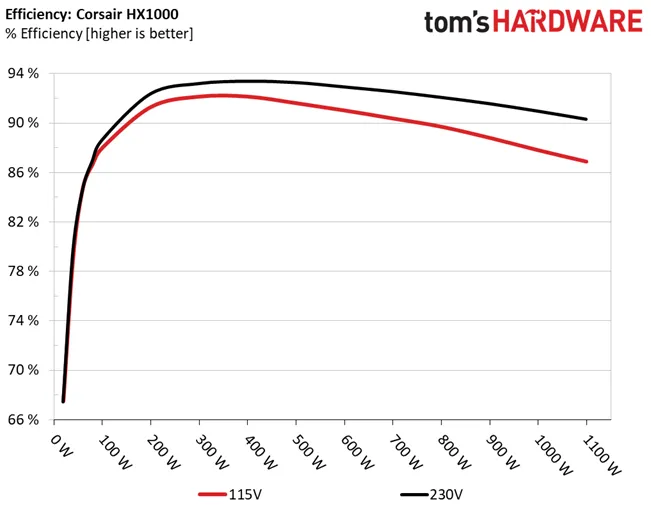
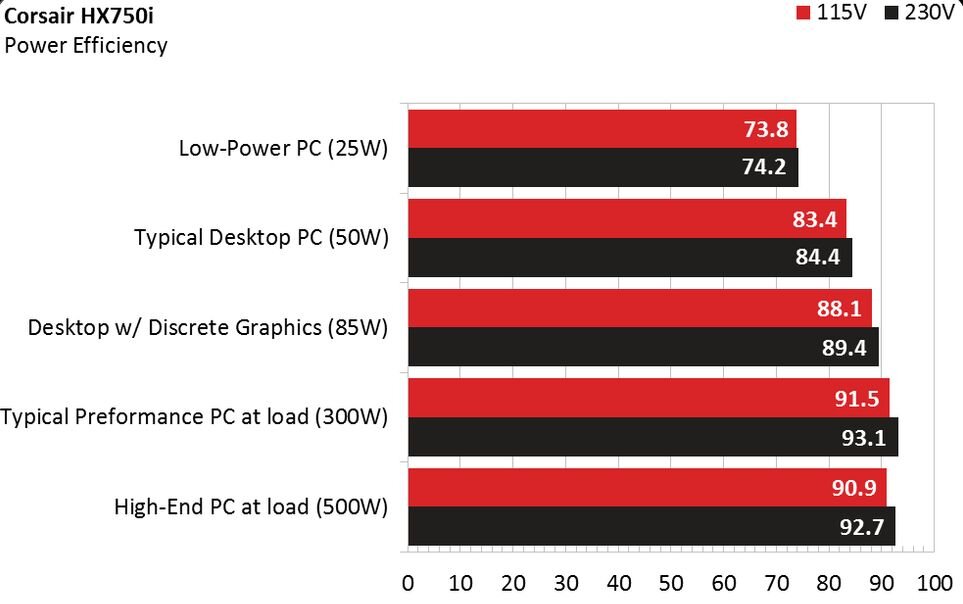
I did some reading and I understand what you mean here now. I've only ever built gaming PCs where I didn't give a shit about idle power use, so this is all sort of new territory for me. If I'm hoping to have the server idling around 50watts or so, then it would be down at like 78% efficiency most of the time on a 1000W PSU: Whereas if I went with a 750W PSU it would be around 83% efficiency at 50W: Although that only seems to go so far. The low-power efficiency of the RM550x looks equal to, if not worse, than the HX750i above at 50W: Anyway, now I see the reasoning behind going with a lower powered PSU and just upgrading it as needed if I ever do decide to add a GPU. I don't want to be running at a lower efficiency for potentially years and years on the off chance I might add a GPU someday. I ran another calculator and it looks like I could get away with a 550W PSU: But since the HX750i looks more efficient at low loads I think I'll go with that.
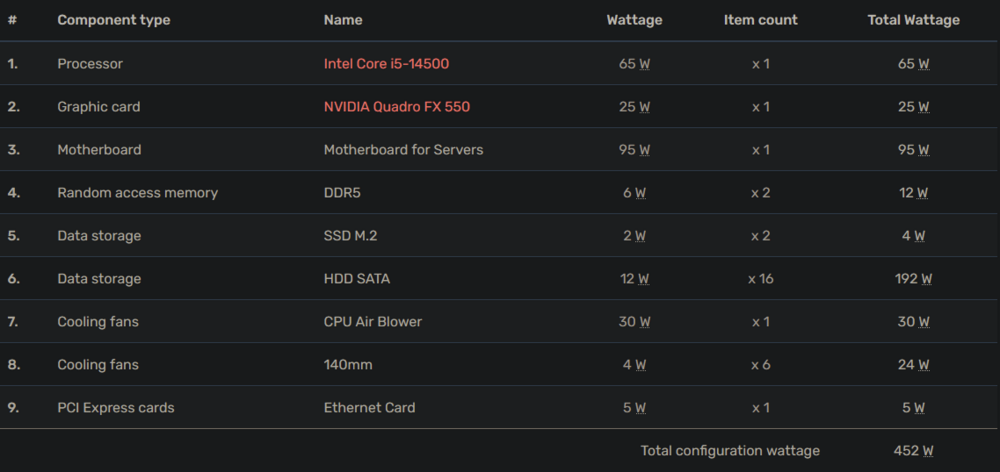
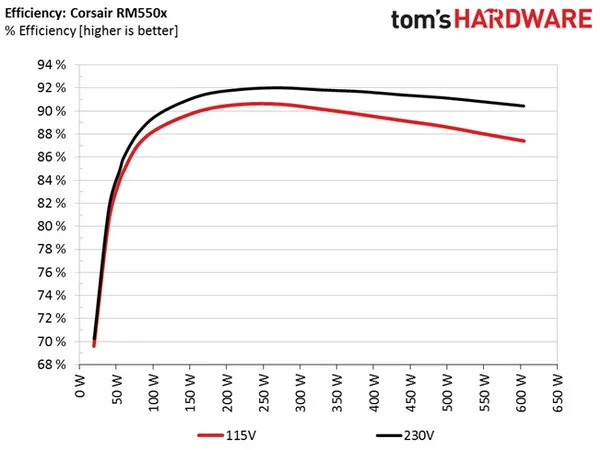
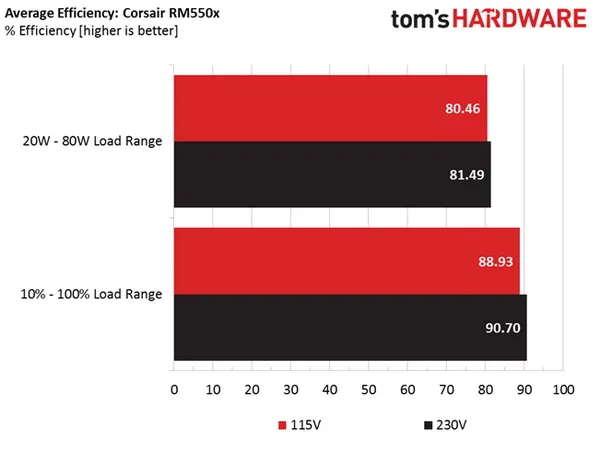
-
That PSU calculator is very helpful: Looks like 800W would be sufficient (assuming I add a GPU someday). I doubt there would ever be a scenario where all my HDDs are spinning AND I'm maxing out the CPU & GPU at the same time, so realistically I should never hit that max load. So I think 800W would be ok, especially if I don't add a GPU - although I may want to go with 1000W just to be safe, and give me headroom to add something like a RTX 3080 if I want to self-host an LLM or something someday. Either way you're right that 1200W seems to be overkill. Thank you again for taking the time to help!
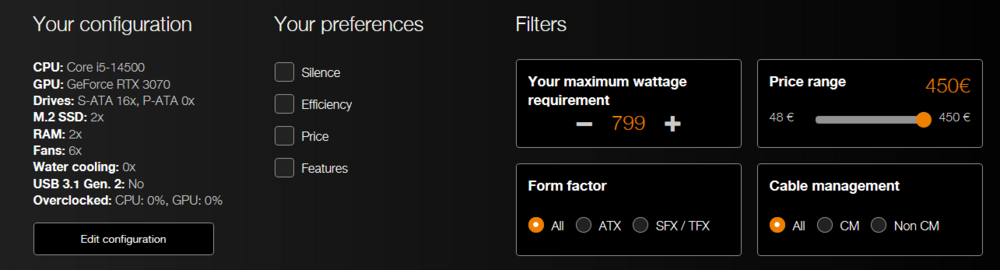
-
Thanks for the tip! I swapped that part onto my build list. Good to know! Apparently I need to stop relying so heavily on PCpartpicker, their database is missing a lot of this server-grade stuff. Changed to this RAM on my plan. I'm planning to fill the case out with 16 HDDs + 2 NVME SSDs. So I feel like I'm definitely going to want the 3 front fans to maximize airflow over the disks, and obviously I'll need at least 1 exhaust. I guess I could hold off on the 2 top fans until I see the temps, but I figured the power draw from 2 more fans would be negligible, and I'd rather err on the side of having too much cooling rather than not enough. Interesting, I'm loosely basing this off builds like this, and they all have at least 1000W PSUs (because of all the HDDs I assumed). I'm sure in Unraid it will be very rare for all the HDDs to be spun up at once, but I want to make sure that if that happens it can handle everything. I also wanted some overhead so that if I add a GPU or something in the future I don't need to swap the whole PSU. What PSU size would you recommend? You lost me here. What is C3? Going from my current system's 200W idle down to 50W, while also having a more powerful machine, would be amazing. Thank you for your input!
-
Hard to tell how good the currently available Arrow power data is but it looks like it's ~3x Alder, Raptor, and AMD APUs’ idle draw. Perf/watt is ok, but for my server what I care about is that idle power consumption. In light of that I'm not going to be waiting around for Arrow Lake. I'm going to build something around an i5-14500 (partly because it is a re-badged Alder Lake and doesn't suffer from the recent microcode issues). Just posted my build plan here. Really appreciate everyone's input.
-
I’m currently running Unraid on an old Supermicro X9DRi-LN4+ with dual Intel Xeon E5-2670 v2 CPUs. It’s served me well for years but this old Supermicro is loud, hot, and power-hungry. I’m ready for an upgrade, and I’m looking for something that sips power on idle but can unleash the beast when it needs to. The heaviest load on my server is usually Plex transcodes (up to 6 simultaneous), but I also run 20+ other docker containers including Immich, Nextcloud, Matrix, Home Assistant, Mealie, Vaultwarden, etc. Here is my current tentative plan: CPU: Intel Core i5-14500 2.6 GHz 14-Core Processor CPU Cooler: Noctua NH-D15 chromax.black 82.52 CFM CPU Cooler CPU Cooler: BeQuiet! Dark Rock Elite Motherboard: ASUS Pro WS W680-ACE Memory: 2 x Kingston KSM48E40BD8KM-32HM 32 GB (2 x 32 GB) DDR5-4800 CL40 ECC Memory Memory: 2 x Kingston KSM48E40BD8KI-32HA 32 GB (2 x 32 GB) DDR5-4800 CL40 ECC Memory Cache Storage: 2 x Samsung 990 Pro 4 TB M.2-2280 PCIe 4.0 X4 NVME Solid State Drive Cache Storage: 2 x WD Black SN850X 4 TB M.2-2280 PCIe 4.0 X4 NVME SSD Cache Storage: 2 x Crucial T700 4TB Gen5 NVMe M.2 SSD Case: Fractal Design Meshify 2 XL ATX Full Tower Case + 5 x HDD Tray Kits Power Supply: Corsair HX1200 Platinum 1200 W 80+ Platinum Certified Fully Modular ATX Power Supply Power Supply: FSP Hydro Ti Pro 1000W Titanium Power Supply: Seasonic Vertex PX-750 80+ Platinum Power Supply Case Fan: 5 x Noctua A14 PWM chromax.black.swap 82.52 CFM 140 mm Fan HBA: LSI 9400-16i HBA: LSI 9201-8i Network Card: TRENDnet 10 Gigabit PCIe SFP+ Network Adapter Network Card: Intel X710-DA2 Dual 10Gbps SFP+ Main array storage is 10 x 10TB Seagate Exos drives, and would be moved over from my current build. I picked the 14500 because it is a re-badged Alder Lake and doesn't suffer from the recent microcode issues, and that expensive W680-ACE motherboard for the ECC RAM support. My current Suprmicro server idles at 200W, so I imagine this would be quite a reduction on my power bill without compromising anything. I'd love to hear thoughts & suggestions.
-
Ah I see, I thought the "K" just meant it could be overclocked, I didn't realize that also meant a higher TDP than the non-K. In that case I'll definitely wait for the non-K SKUs and go with whatever the best 65W option is. I understand that, and I guess that's part of what I'm asking - is it worth waiting a couple months for Arrow Lake to roll out, or should I just go with an i5-14500? Apparently the i5-14500 (non-K) isn't affected by the Raptor Lake issues - but I'm leaning towards waiting because it looks like 15th gen is a big bump in efficiency, and presumably I'd be getting more bang for my buck.
-
I'm currently running an old Supermicro X9DRi-LN4+ with dual Intel Xeon E5-2670 v2 CPUs. It's served me well for years but this old Supermicro is loud, hot, and power-hungry. I've been planning a new build with an i5-14500, but I'm wary of the issues with Intel's 13th/14th gen. I just saw the news about the new 15th gen, and although it doesn't look like a huge performance boost over 13th/14th gen, it does look like it's a big leap in power efficiency, and presumably they'll have ironed out the issues that Raptor Lake recently had. What are your thoughts on Arrow Lake? Is the loss of hyperthreading a big negative? They say it's more power efficient than the previous gens but it looks like the "base power" of the Ultra 5 245K is 125W compared to the 65W on the i5-14500.... so does that mean the 245K would use more power for the same load as an i5-14500, or am I misunderstanding how that works? If you were rebuilding your server soon (and assuming long-term power efficiency & performance are more important to you than upfront cost) would you be looking at the 200S (Arrow Lake) series or would you get something different?
-
So far it's been staying up. I'll try to narrow down exactly which Docker it is. Is there some sort of Docker syslog that I can look at after a crash to see what's going wrong and report to the developer? Normally I'd just use the logs pop-up on the Docker tab, but that's not much good in this situation since everything goes down when the issue occurs.
-
Yeah the system seems to stay up just fine when the array isn't started. I also ran the Memtest for 30 min or so and didn't see any errors. Now I have the array started with all the Dockers stopped, and I've been starting them one at a time with a few minutes in between to see if one in particular is crashing everything. Is it possible for an individual Docker to crash the entire OS like this? I was running scrapers in the Stash docker at the time of the crashes. (Something I've done many times before without issue). If I get all my Dockers running and they stay stable for a few hours then I'll try running the scene scraper in Stash again to see if it triggers another crash.
-
This evening I noticed none of my docker services were working and I tried to go to the Unraid dashboard but it wasn't connectable. I had no choice but to hold the power button down on the server to force a shutdown, and turn it on again. This brings Unraid back, and everything seems ok immediately after mounting the array, but after a couple minutes I inexplicably lose connection to everything again. I don't see any error messages or anything on the server CLI. Just the standard "SERVERNAME Login:" (SSH doesn't work either at this point, I'm seeing this on the monitor plugged into the server). I did have enough time to get in there and grab the syslog which I've attached. I've been scrolling through it but I don't see anything obviously wrong. Any help would be really appreciated, my whole family relies on the services hosted on this thing! Please let me know what other info I can provide to better troubleshoot. syslog.txt
-
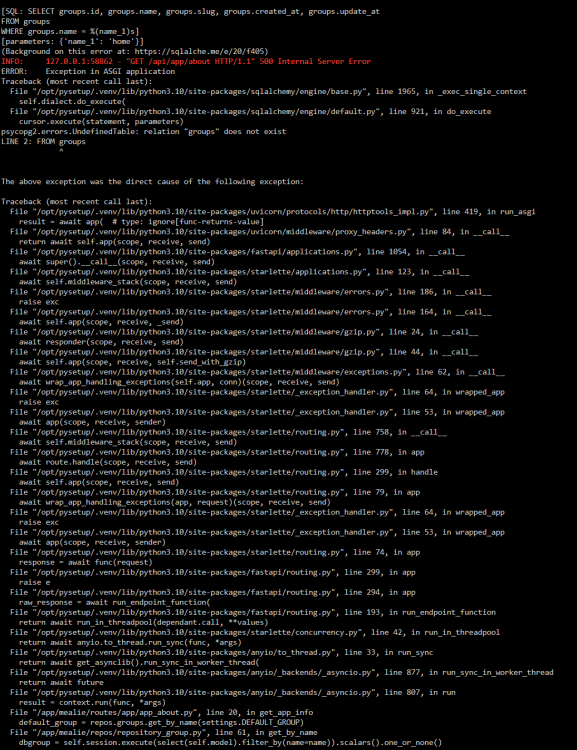
I'm just getting a blank page on my fresh install using postgres14. I see this error in the logs. Anyone know what I'm doing wrong?
-
I have FireflyIII accessible via subdomain through swag, and the site seems to load just fine, but when I type in my credentials and click the "Sign In" button nothing happens. Anyone know what the issue is? It works fine over LAN.
-
I'm having the same issue. I was completely stable on 6.11.5 and finally bit the bullet to upgrade to 6.12.4 Now my server is becoming unresponsive every day, and I'm forced to hold the power button down to shutdown. Diagnostics and Syslogs attached. Please help me. My family is becoming very annoyed that Plex/Chat/Mealie/HomeAssistant/etc keep going down for them. athena-syslog-20230913-1621.zip athena-diagnostics-20230913-0921.zip
-
Yeah this is an annoying one. Couldn't figure out why some of my Home Assistant integrations stopped working for quite a while until I found this thread. I had even double checked that Docker setting to make sure it was still enabled, and it was, so I had ruled this out completely. Hope this is something can be fixed in an update soon
-
I'm not aware of a way to do that from Synapse Admin, but you you can disable new user registration by adding this to your homerserver.yaml: enable_registration: false
-
Hi @strauberry, I seem to remember having a similar network issue and for me the magic solution was this setting in opnsense. Do you have something similar in pfsense and is it checked? Thank you for documenting your experience. I'm sorry it hasn't gone smoothly (I can relate) but if you manage to get all the kinks worked out I'll update the guide from your feedback. I've already added the part about generating a registration key.

-
Apparently the "--remote-debugging-address" flag only works for headless chromium. I'm guessing that's why I could connect to chromedp but not this. So I guess i'm stuck in a catch-22. I can have GUI chromium where I can login to the site I need, but can't connect to the session from another docker. Or I can have headless accessible from another docker, with no possible way to login to the site I need. 🤬 😭
-
Thank you! That got it installed. The remote debugging doesn't seem to work though. With chromedp/headless-shell I was able to reach IP:9222/json/version from other machines and dockers, and I can't with this so far. I can reach localhost:9222/json/version from withing the chromium instance itself, but it doesn't seem to be accessible from anything else.
-
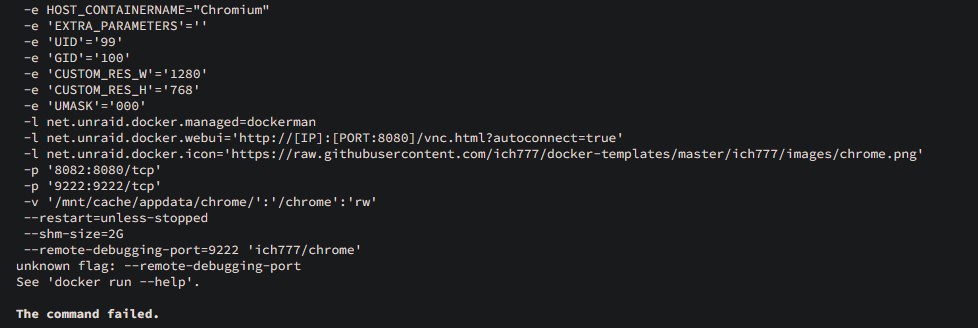
And yes I added a 9222 port in the template
-
For Chromium is there some way to enable remote debugging? I've tried using the flag: --remote-debugging-port=9222 but it says its not valid for some reason. I'm desperately trying to get something to work that requires a login and these are the only non-headless chromium dockers I can find. Help would be very appreciated.
-
@m1rc0 Did you censor that for this post or did you forget to plug in your IP here?
-
nginx proxy manager will work instead but I'm not familiar with it - couldn't tell you how to configure.




