





Simmer
Members
-
Joined
-
Last visited
-
Ah, I didn't know it was EOL already. Do you think this is why I'm having the issue? There's not anything else config-wise I could do?
-
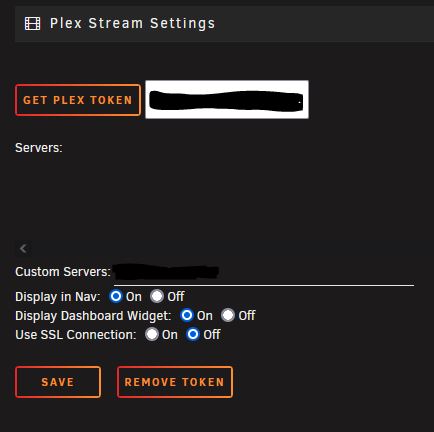
I'm on unraid 6.9.2 and here is the screenshot. It looks different than some settings pages I've seen in this thread, not sure why.
-
Hi - I'm receiving this error I've removed and reinstalled the plugin but it still populates. The plugin still functions and shows me the streams as they're occuring on the Plex Streams tab, however on the main dashboard it does not work. I'm running the latest version of the plugin at 2023.06.29 Let me know if I can provide additional logs or anything. Thank you!
-
Is this officially deprecated? I understand there's some difficulty because of the tmod devs changing things. Will there be any way to run tmodloader or not anymore? Thanks Ich
-
How can I disable the https requirement? I am putting this through nginx (swag) and it is balking at the http. I'm guessing this is an apache2 setting but I'm not sure how to access the right file to edit. I think I'm close with the index.php file within /www/ but don't want to break it. Thanks!
-
Dang, I saw some of this reading through this thread before posting even... Thank you for your time, this did fix it. Cheers!
-
10.0.0.40
-
Hello there! I recently lost the ability to access my UI on deluge. I have been wanting to switch to qbit anyway so I deployed binhex' qbit-vpn container but have the same exact issue. I am not sure if it was due to recent container update or not, as I haven't accessed container in a week or so but up until this point it was fine. Browser error states timeout/busy. Attached is my supervisord.log for deluge (did not attach qbit, since diff thread and maybe I can use solution for both) Thanks! EDIT: removed attachment, as issue solved. - LAN network definition
-
I'm having the same issue with Monterey, where did you delete this dir at? And does it fully work now?
-
This makes sense. I'm also having the issue with Monterey, I'll try Catalina or Big Sur tomorrow just to see but I get the "master var store" error.
-
This worked for me as well.
-
Please share! I would love to have this info as well, if you have the time. Thank you.
-
Just following up on this
-
I run c_connect("ip", 10890, "pw") With both ip and pw changed to reflect my actual ip and password, but keeping the quotes.
-
Yeah, triple checked my port forwarding and it also matches the other working ones. canyouseeme.org sees the port as open, as well. When I run the console command to connect with my credentials, it tries connecting for a bit then says server not responding.
