






AceRimmer
Members
-
Joined
-
Last visited
Everything posted by AceRimmer
-
I've only been using it for about a week so I've nothing to compare to. I'm not using an external db though.
-
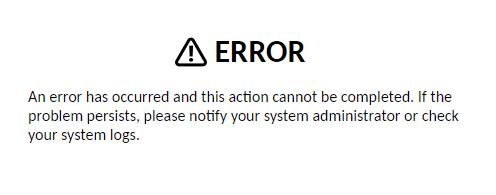
I have an ongoing issue with Apache Guacamole when logging in at work. I enter my username & password without any issues, then i enter my 2fa code and get presented with the attached error screenshot. When I turn off 2fa for Guacamole and log in i also receive the same error. The only way i can log in is to VPN into the server from my mobile, create a new user in Guacamole with 2fa turned on, then log in with the new user credentials on my work pc, scan barcode to google auth app to set it up, then i have access to guacamole. Once i navigate away from the Apache web interface and navigate back i get the above error once again and i need to delete the account over the vpn & repeat the new account setup to gain access again. Any advice?
-
I'll have a look at unassigned devices. Its more so for other USB devices im looking for this functionality, not the Unraid flash drive. Cheers for that
-
Not sure if something like this exists already but on my old ReadyNAS there was a feature to automatically back up any device plugged into the front USB ports on the NAS. I was able to plug in my SD card reader with the SD card from my camera and it would auto backup to the NAS. Anyone know of something like this for Unraid with the feature to specifiy a USB port to watch for new devices?
-
I am not using wireguard to connect to the virtual machine. I am only using DuckDNS. My virtual machine is forwarding to an outside port which points to my DuckDNS URL and this is how I login to home assistant outside of my LAN. It works perfectly. If you search on YouTube for "DuckDNS Letsencrypt Home Assistant" you can see how it is done.
-
Thank you for your help. The issue was resolved by doing as you suggested. Much appreciated
-
Not really sure where to start with this. I've uploaded the latest diag zip from the flash drive if anyone is feeling up to it. [UPDATE] Diagnostics Zip attachment deleted
-
Every time i reboot the machine it starts a parity check - Version: 6.9.0-rc2 I'm going to the dashboard and clicking the "reboot the system" icon. I'm not going to Main / Array Operation / Stop before rebooting... should i be doing this? I don't remember having to do this when i ran the stable release. So i am at a dilemma of do i allow it to parity check and tax my drives (the fact a parity check was triggered means an error flagged somewhere i guess) but the parity checks always come back without any errors. Any advice would be greatly appreciated.
-
I'm going to mark this topic as solved. If anyone ever finds this post and is wondering what my solution was it was to use DuckDNS + LetsEncrypt on the Home Assistant VM. I can access the HA server with the DuckDNS url on the mobile app and it signs in over SSL.
-
No. That doesn't fix it. I can reach my Docker containers just fine. Sonarr, Lidarr, Radarr, Emby etc no problem on either VPN type below remote tunneled access remote access to lan But i can't ping my Home Assistant Core VM server from my mobile over either of the above VPN types. On wireguard on the right side my screen is the below message: So my Dockers are getting around this with the Unraid Docker "macvlan" network but is there a work around or a "macvlan" style of config for a VM?
-
No, that doesn't work. "Unable to connect to Home Assistant. There was an error loading Home Assistant, please review the connection settings and try again."
-
I have Home Assistant Core running as a VM (192.168.0.37) and i also have WireGuard VPN running on the Unraid server. I can't get the HomeAssistant app that runs on my mobile to connect to my Home Assistant Core VM when away from home while im running WireGuard VPN on the phone. I presume this is a static route issue since WireGuard is running on 10.253.0.0 and my Home Network & HomeAssistant is on 192.168.0.0. My crappy home router doesn't have any option to set up static routes or vlans or anything advanced. Is there a way within Unraid to get these two networks talking to each other or is my only option a router upgrade or some kind of Frankenstein Pfsense Unraid VM setup. Bare with me, i am not a a network guy so some terminology may be incorrect.
-
<?xml version='1.0' encoding='UTF-8'?> <domain type='kvm' id='2' xmlns:qemu='http://libvirt.org/schemas/domain/qemu/1.0'> <name>MacinaboxCatalina</name> <uuid>a5f89fab-f17d-49ff-8481-6cfba407a4ce</uuid> <description>MacOS Catalina</description> <metadata> <vmtemplate xmlns="unraid" name="Windows 10" icon="/mnt/user/domains/MacinaboxCatalina/icon/catalina.png" os="Catalina"/> </metadata> <memory unit='KiB'>8388608</memory> <currentMemory unit='KiB'>8388608</currentMemory> <memoryBacking> <nosharepages/> </memoryBacking> <vcpu placement='static'>8</vcpu> <cputune> <vcpupin vcpu='0' cpuset='8'/> <vcpupin vcpu='1' cpuset='20'/> <vcpupin vcpu='2' cpuset='9'/> <vcpupin vcpu='3' cpuset='21'/> <vcpupin vcpu='4' cpuset='10'/> <vcpupin vcpu='5' cpuset='22'/> <vcpupin vcpu='6' cpuset='11'/> <vcpupin vcpu='7' cpuset='23'/> </cputune> <resource> <partition>/machine</partition> </resource> <os> <type arch='x86_64' machine='pc-q35-3.1'>hvm</type> <loader readonly='yes' type='pflash'>/usr/share/qemu/ovmf-x64/OVMF_CODE-pure-efi.fd</loader> <nvram>/etc/libvirt/qemu/nvram/a5f89fab-f17d-49ff-8481-6cfba407a4ce_VARS-pure-efi.fd</nvram> </os> <features> <acpi/> <apic/> </features> <cpu mode='host-passthrough' check='none'> <topology sockets='1' cores='4' threads='2'/> <cache mode='passthrough'/> <feature policy='require' name='topoext'/> </cpu> <clock offset='utc'> <timer name='rtc' tickpolicy='catchup'/> <timer name='pit' tickpolicy='delay'/> <timer name='hpet' present='no'/> </clock> <on_poweroff>destroy</on_poweroff> <on_reboot>restart</on_reboot> <on_crash>restart</on_crash> <devices> <emulator>/usr/local/sbin/qemu</emulator> <disk type='file' device='disk'> <driver name='qemu' type='qcow2' cache='writeback'/> <source file='/mnt/user/domains/MacinaboxCatalina/Clover.qcow2' index='3'/> <backingStore/> <target dev='hdc' bus='sata'/> <boot order='1'/> <alias name='sata0-0-2'/> <address type='drive' controller='0' bus='0' target='0' unit='2'/> </disk> <disk type='file' device='disk'> <driver name='qemu' type='raw' cache='writeback'/> <source file='/mnt/user/domains/MacinaboxCatalina/Catalina-install.img' index='2'/> <backingStore/> <target dev='hdd' bus='sata'/> <alias name='sata0-0-3'/> <address type='drive' controller='0' bus='0' target='0' unit='3'/> </disk> <disk type='file' device='disk'> <driver name='qemu' type='raw' cache='writeback'/> <source file='/mnt/user/domains/MacinaboxCatalina/macos_disk.img' index='1'/> <backingStore/> <target dev='hde' bus='sata'/> <alias name='sata0-0-4'/> <address type='drive' controller='0' bus='0' target='0' unit='4'/> </disk> <controller type='sata' index='0'> <alias name='ide'/> <address type='pci' domain='0x0000' bus='0x00' slot='0x1f' function='0x2'/> </controller> <controller type='pci' index='0' model='pcie-root'> <alias name='pcie.0'/> </controller> <controller type='pci' index='1' model='pcie-root-port'> <model name='pcie-root-port'/> <target chassis='1' port='0x10'/> <alias name='pci.1'/> <address type='pci' domain='0x0000' bus='0x00' slot='0x02' function='0x5' multifunction='on'/> </controller> <controller type='pci' index='2' model='pcie-root-port'> <model name='pcie-root-port'/> <target chassis='2' port='0x11'/> <alias name='pci.2'/> <address type='pci' domain='0x0000' bus='0x00' slot='0x02' function='0x1'/> </controller> <controller type='pci' index='3' model='pcie-root-port'> <model name='pcie-root-port'/> <target chassis='3' port='0x12'/> <alias name='pci.3'/> <address type='pci' domain='0x0000' bus='0x00' slot='0x02' function='0x2'/> </controller> <controller type='pci' index='4' model='pcie-root-port'> <model name='pcie-root-port'/> <target chassis='4' port='0x13'/> <alias name='pci.4'/> <address type='pci' domain='0x0000' bus='0x00' slot='0x02' function='0x3'/> </controller> <controller type='pci' index='5' model='pcie-root-port'> <model name='pcie-root-port'/> <target chassis='5' port='0x8'/> <alias name='pci.5'/> <address type='pci' domain='0x0000' bus='0x00' slot='0x01' function='0x0' multifunction='on'/> </controller> <controller type='pci' index='6' model='pcie-root-port'> <model name='pcie-root-port'/> <target chassis='6' port='0x9'/> <alias name='pci.6'/> <address type='pci' domain='0x0000' bus='0x00' slot='0x01' function='0x1'/> </controller> <controller type='pci' index='7' model='pcie-root-port'> <model name='pcie-root-port'/> <target chassis='7' port='0xa'/> <alias name='pci.7'/> <address type='pci' domain='0x0000' bus='0x00' slot='0x01' function='0x2'/> </controller> <controller type='pci' index='8' model='pcie-root-port'> <model name='pcie-root-port'/> <target chassis='8' port='0xb'/> <alias name='pci.8'/> <address type='pci' domain='0x0000' bus='0x00' slot='0x01' function='0x3'/> </controller> <controller type='virtio-serial' index='0'> <alias name='virtio-serial0'/> <address type='pci' domain='0x0000' bus='0x02' slot='0x00' function='0x0'/> </controller> <controller type='usb' index='0' model='ich9-ehci1'> <alias name='usb'/> <address type='pci' domain='0x0000' bus='0x00' slot='0x07' function='0x7'/> </controller> <controller type='usb' index='0' model='ich9-uhci1'> <alias name='usb'/> <master startport='0'/> <address type='pci' domain='0x0000' bus='0x00' slot='0x07' function='0x0' multifunction='on'/> </controller> <controller type='usb' index='0' model='ich9-uhci2'> <alias name='usb'/> <master startport='2'/> <address type='pci' domain='0x0000' bus='0x00' slot='0x07' function='0x1'/> </controller> <controller type='usb' index='0' model='ich9-uhci3'> <alias name='usb'/> <master startport='4'/> <address type='pci' domain='0x0000' bus='0x00' slot='0x07' function='0x2'/> </controller> <interface type='bridge'> <mac address='52:54:00:3d:ac:f0'/> <source bridge='br0'/> <target dev='vnet0'/> <model type='vmxnet3'/> <alias name='net0'/> <address type='pci' domain='0x0000' bus='0x01' slot='0x00' function='0x0'/> </interface> <serial type='pty'> <source path='/dev/pts/0'/> <target type='isa-serial' port='0'> <model name='isa-serial'/> </target> <alias name='serial0'/> </serial> <console type='pty' tty='/dev/pts/0'> <source path='/dev/pts/0'/> <target type='serial' port='0'/> <alias name='serial0'/> </console> <channel type='unix'> <source mode='bind' path='/var/lib/libvirt/qemu/channel/target/domain-2-MacinaboxCatalina/org.qemu.guest_agent.0'/> <target type='virtio' name='org.qemu.guest_agent.0' state='connected'/> <alias name='channel0'/> <address type='virtio-serial' controller='0' bus='0' port='1'/> </channel> <input type='tablet' bus='usb'> <alias name='input0'/> <address type='usb' bus='0' port='1'/> </input> <input type='mouse' bus='ps2'> <alias name='input1'/> </input> <input type='keyboard' bus='ps2'> <alias name='input2'/> </input> <hostdev mode='subsystem' type='pci' managed='yes'> <driver name='vfio'/> <source> <address domain='0x0000' bus='0x04' slot='0x00' function='0x0'/> </source> <alias name='hostdev0'/> <address type='pci' domain='0x0000' bus='0x03' slot='0x00' function='0x0' multifunction='on'/> </hostdev> <hostdev mode='subsystem' type='pci' managed='yes'> <driver name='vfio'/> <source> <address domain='0x0000' bus='0x04' slot='0x00' function='0x1'/> </source> <alias name='hostdev1'/> <address type='pci' domain='0x0000' bus='0x03' slot='0x00' function='0x1'/> </hostdev> <hostdev mode='subsystem' type='pci' managed='yes'> <driver name='vfio'/> <source> <address domain='0x0000' bus='0x0d' slot='0x00' function='0x4'/> </source> <alias name='hostdev2'/> <address type='pci' domain='0x0000' bus='0x00' slot='0x02' function='0x0'/> </hostdev> <hostdev mode='subsystem' type='pci' managed='yes'> <driver name='vfio'/> <source> <address domain='0x0000' bus='0x08' slot='0x00' function='0x0'/> </source> <alias name='hostdev3'/> <address type='pci' domain='0x0000' bus='0x06' slot='0x00' function='0x0'/> </hostdev> <hostdev mode='subsystem' type='pci' managed='yes'> <driver name='vfio'/> <source> <address domain='0x0000' bus='0x08' slot='0x00' function='0x1'/> </source> <alias name='hostdev4'/> <address type='pci' domain='0x0000' bus='0x07' slot='0x00' function='0x0'/> </hostdev> <hostdev mode='subsystem' type='pci' managed='yes'> <driver name='vfio'/> <source> <address domain='0x0000' bus='0x08' slot='0x00' function='0x3'/> </source> <alias name='hostdev5'/> <address type='pci' domain='0x0000' bus='0x08' slot='0x00' function='0x0'/> </hostdev> <memballoon model='none'/> </devices> <seclabel type='dynamic' model='dac' relabel='yes'> <label>+0:+100</label> <imagelabel>+0:+100</imagelabel> </seclabel> <qemu:commandline> <qemu:arg value='-usb'/> <qemu:arg value='-device'/> <qemu:arg value='usb-kbd,bus=usb-bus.0'/> <qemu:arg value='-device'/> <qemu:arg value='-smbios'/> <qemu:arg value='type=2'/> <qemu:arg value='-cpu'/> <qemu:arg value='Penryn,kvm=on,vendor=GenuineIntel,+invtsc,vmware-cpuid-freq=on,+pcid,+ssse3,+sse4.2,+popcnt,+avx,+aes,+xsave,+xsaveopt,check'/> </qemu:commandline> </domain> and this is my onboard audio where i have moved it to bus 0x00 , slot 0x02 and function 0x0 as mentioned in my first post. <hostdev mode='subsystem' type='pci' managed='yes'> <driver name='vfio'/> <source> <address domain='0x0000' bus='0x0d' slot='0x00' function='0x4'/> </source> <alias name='hostdev2'/> <address type='pci' domain='0x0000' bus='0x00' slot='0x02' function='0x0'/> </hostdev> and below is what i raised to function 5 to get unraid to build the xml when i gave function 0x0 to the above onboard audio. <controller type='pci' index='1' model='pcie-root-port'> <model name='pcie-root-port'/> <target chassis='1' port='0x10'/> <alias name='pci.1'/> <address type='pci' domain='0x0000' bus='0x00' slot='0x02' function='0x5' multifunction='on'/> </controller>
-
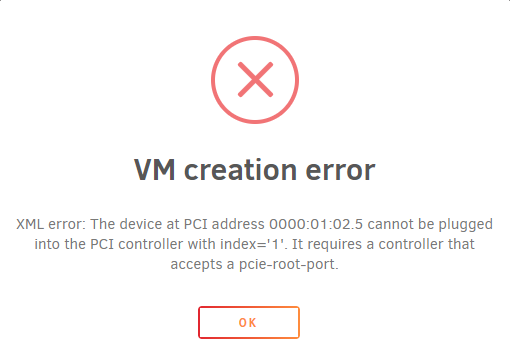
I can't change the bus on any of the usb controllers, when i try i get this error: Trying to change the bus from 0x00 to 0x01 (or higher values)
-
Could anyone please advise for onboard audio: In Leoyzen's first post he talks about changing the bus to: bus 0x00 and using slot 0x02. On my machine i already have about 6 or 7 devices (i am passing through usb controllers) assigned to bus 0x00 and using slot's 0x01, 0x02, 0x03 etc. I reconfigured my onboard audio to also use bus 0x00 and i gave it slot 0x02. When i tried to save the xml i got a conflict error since that bus and slot were already in use. My stubbed usb controllers are on bus 0x00 and several are on slot 0x02 (using different functions) I changed the function number on the offending usb controller (the one that had bus 0x00, slot 0x02 and function 0x0) from function 0x0 to function 0x5 and that allowed me to save the xml with bus 0x00, slot 0x02 and function 0x0 as my onboard audio. When i booted OSX did not detect my onboard audio. Do i need to change all those stubbed USB controller bus numbers to a higher value and reserve bus 0x00 for solely onboard audio? Or do i need to raise their slot's to a higher value but leave I can leave them on bus 0x00? If my post is confusing please let me know and i will explain it further with graphics and xml snippets.
-
Cant log in? Installed app, loaded main page, scrolled down to dashboard, got presented with a login page (missing an image by the way), tried to log in with admin/admin which google says is the default login and no joy. What am i missing here?
-
Yes so long as your disk count doesn't exceed the maximum amount of disks on your Unraid licence. I often run preclear on multiple disks at the same time. Licence Disk Allowances: Basic = 6 Plus = 12 Pro = Unlimited
-
I want to retrieve old pre-clear logs. Where are the logs stored on my server?
-
Works perfectly, thank you @jonathanm
-
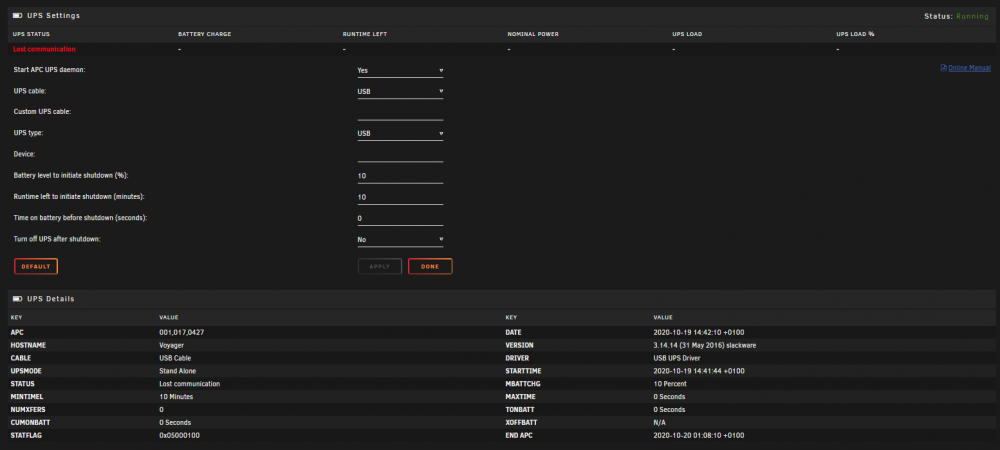
Hey Raiders, I got 2 UPS's out of work. They are both identical models, PowerWalker VI 2000 SC - data sheet here I don't know much about UPS devices so in wondering if someone can advise what i am doing wrong. The devices have the following: Ethernet in Ethernet out USB port I've tried plugging in the USB (tried 2 different cables to eliminate a faulty cable scenario and tried several USB ports on my motherboard) and i set "type" & "cable" to "USB" but it I keep getting a lost communication error (see reference image below). I also tried plugging in the "Ethernet out" into a spare gigabit Ethernet port on my motherboard. I set the type to "Ether" and i tried all the "UPS type" options but none of them detected the device either. I also tried rebooting the server with the USB plugged in to see if its something that needs to be detected during boot but it made no difference. When i plug it into Windows it detects the device immediately and proceeds to install a USB to Serial driver. Any advice would be greatly appreciated.
-
Feature suggestion (if it hasn't been suggested yet) Re-order VPN peers the same way i can re-order VM's (hold click, drag & drop).
-
Yea you are correct. I reverted back to normal size on Windows and my mobile browser stayed at huge 👍
-
Good to know, thanks Squid EDIT: actually that didn't work. I set font size to huge on Vivaldi mobile and my Vivaldi Windows browser font size increased. Its probably some Vivaldi sync thing with the browser causing it
-
I would like to see responsive CSS code for the Unraid GUI so it scales accordingly on my mobile device.
-
That has been driving me around the bend for weeks. Thank you!




