





Xcage
Members
-
Joined
-
Last visited
Everything posted by Xcage
-
Yep, I actually set it to 15 days, because it was wonky with 14 or 13 I don’t remember exactly , and it actually saves 3 copies for those which images “number of days to keep” doesn’t recognize , but the issue was that it counted from the day it started at 23:00 and sometimes took more than an hour which made it think it’s more days old than it actually was, sadly it was too long ago for me to remember exactly but you get the gist
-
same happens with my 7 VMs , some of them get backed up , some dont , and they are all win10 so its something to do with unraid being able to identify the images. I ended up opting for timing option tho , just set it to 14 days (in my case i do backups every week and want to keep 2 old copies) also one thing to consider: VMs that are backed up properly , and those that don't changed when i changed the name of the VM maybe that is something that could give ppl ideas on whats causing it.
-
Well , i would agree if that would be true for all the backups of all VMs , but it only happens to some therefore script does follow the correct logic , but not in all cases
-
Hello every1, First of all Giant thanks for the plug, its been serving me for almost a year on 3 different machines and does work. However i do have a strange issue on one of my heavyVM machines. There are 7 VMs there , all with their VMdisks in .img format, and all are working. for some reason tho SOME of them do not get their overhead copies of .img files deleted. for example i have 2 machines that are called "Askedfor1" and "Askedfor2" and they are completely similar in how they were created etc. the issue tho affects only one of them , where backup script DOESNT see the Vdisk backup file to delete. They are backed up at the same time and those are SSDs/NVME drives and i do have that issues with like 2 more of my VMs but those had spaces in the names , so i thought thats the reason so i changed the names , backup created new folder but still does the same with "did not find any Vdisk image files to remove" What would be the cause of that issue? 2022-03-05 00:38:23 information: AskedFor2 can be found on the system. attempting backup. 2022-03-05 00:38:23 information: creating local AskedFor2.xml to work with during backup. 2022-03-05 00:38:23 information: /mnt/user/VMsBackupShare/AskedFor2 exists. continuing. 2022-03-05 00:38:23 information: skip_vm_shutdown is false and use_snapshots is 1. skipping vm shutdown procedure. AskedFor2 is running. can_backup_vm set to y. 2022-03-05 00:38:23 information: actually_copy_files is 1. 2022-03-05 00:38:23 information: can_backup_vm flag is y. starting backup of AskedFor2 configuration, nvram, and vdisk(s). 2022-03-05 00:38:23 information: copy of AskedFor2.xml to /mnt/user/VMsBackupShare/AskedFor2/20220305_0000_AskedFor2.xml complete. 2022-03-05 00:38:23 information: copy of /etc/libvirt/qemu/nvram/232c1702-aff4-5622-15ff-9f3557867781_VARS-pure-efi.fd to /mnt/user/VMsBackupShare/AskedFor2/20220305_0000_232c1702-aff4-5622-15ff-9f3557867781_VARS-pure-efi.fd complete. 2022-03-05 00:38:23 information: able to perform snapshot for disk /mnt/disk4/Disk4SSD1TB/askedfor2.img on AskedFor2. use_snapshots is 1. vm_state is running. vdisk_type is raw 2022-03-05 00:38:23 information: qemu agent found. enabling quiesce on snapshot. 2022-03-05 00:38:25 information: snapshot command succeeded on askedfor2.snap for AskedFor2. 2022-03-05 00:44:51 information: copy of /mnt/disk4/Disk4SSD1TB/askedfor2.img to /mnt/user/VMsBackupShare/AskedFor2/20220305_0000_askedfor2.img complete. 2022-03-05 00:44:51 information: backup of /mnt/disk4/Disk4SSD1TB/askedfor2.img vdisk to /mnt/user/VMsBackupShare/AskedFor2/20220305_0000_askedfor2.img complete. 2022-03-05 00:44:57 information: commited changes from snapshot for /mnt/disk4/Disk4SSD1TB/askedfor2.img on AskedFor2. 2022-03-05 00:44:57 information: forcibly removed snapshot /mnt/disk4/Disk4SSD1TB/askedfor2.snap for AskedFor2. 2022-03-05 00:44:57 information: extension for /mnt/user/isos/virtio-win-0.1.190-1.iso on AskedFor2 was found in vdisks_extensions_to_skip. skipping disk. 2022-03-05 00:44:57 information: the extensions of the vdisks that were backed up are img. 2022-03-05 00:44:57 information: vm_state is running. vm_original_state is running. not starting AskedFor2. 2022-03-05 00:44:57 information: backup of AskedFor2 to /mnt/user/VMsBackupShare/AskedFor2 completed. 2022-03-05 00:44:57 information: number of days to keep backups set to indefinitely. 2022-03-05 00:44:57 information: cleaning out backups over 2 in location /mnt/user/VMsBackupShare/AskedFor2/ 2022-03-05 00:44:57 information: removed '/mnt/user/VMsBackupShare/AskedFor2/20220226_0000_AskedFor2.xml' config file. 2022-03-05 00:44:57 information: removed '/mnt/user/VMsBackupShare/AskedFor2/20220226_0000_232c1702-aff4-5622-15ff-9f3557867781_VARS-pure-efi.fd' nvram file. 2022-03-05 00:44:57 information: did not find any vdisk image files to remove. 2022-03-05 00:44:57 information: did not find any vm log files to remove. 2022-03-05 00:44:57 information: removing local AskedFor2.xml. 2022-03-05 00:44:57 information: AskedFor1 can be found on the system. attempting backup. 2022-03-05 00:44:57 information: creating local AskedFor1.xml to work with during backup. 2022-03-05 00:44:57 information: /mnt/user/VMsBackupShare/AskedFor1 exists. continuing. 2022-03-05 00:44:57 information: skip_vm_shutdown is false and use_snapshots is 1. skipping vm shutdown procedure. AskedFor1 is running. can_backup_vm set to y. 2022-03-05 00:44:57 information: actually_copy_files is 1. 2022-03-05 00:44:57 information: can_backup_vm flag is y. starting backup of AskedFor1 configuration, nvram, and vdisk(s). 2022-03-05 00:44:57 information: copy of AskedFor1.xml to /mnt/user/VMsBackupShare/AskedFor1/20220305_0000_AskedFor1.xml complete. 2022-03-05 00:44:57 information: copy of /etc/libvirt/qemu/nvram/1654e5f3-480a-e5c8-0a8e-f9922c315dc0_VARS-pure-efi.fd to /mnt/user/VMsBackupShare/AskedFor1/20220305_0000_1654e5f3-480a-e5c8-0a8e-f9922c315dc0_VARS-pure-efi.fd complete. 2022-03-05 00:44:57 information: able to perform snapshot for disk /mnt/disk4/Disk4SSD1TB/askedfor1.img on AskedFor1. use_snapshots is 1. vm_state is running. vdisk_type is raw 2022-03-05 00:44:57 information: qemu agent found. enabling quiesce on snapshot. 2022-03-05 00:44:58 information: snapshot command succeeded on askedfor1.snap for AskedFor1. 2022-03-05 00:53:02 information: copy of /mnt/disk4/Disk4SSD1TB/askedfor1.img to /mnt/user/VMsBackupShare/AskedFor1/20220305_0000_askedfor1.img complete. 2022-03-05 00:53:03 information: backup of /mnt/disk4/Disk4SSD1TB/askedfor1.img vdisk to /mnt/user/VMsBackupShare/AskedFor1/20220305_0000_askedfor1.img complete. 2022-03-05 00:53:08 information: commited changes from snapshot for /mnt/disk4/Disk4SSD1TB/askedfor1.img on AskedFor1. 2022-03-05 00:53:08 information: forcibly removed snapshot /mnt/disk4/Disk4SSD1TB/askedfor1.snap for AskedFor1. 2022-03-05 00:53:08 information: extension for /mnt/user/isos/virtio-win-0.1.190-1.iso on AskedFor1 was found in vdisks_extensions_to_skip. skipping disk. 2022-03-05 00:53:08 information: the extensions of the vdisks that were backed up are img. 2022-03-05 00:53:08 information: vm_state is running. vm_original_state is running. not starting AskedFor1. 2022-03-05 00:53:08 information: backup of AskedFor1 to /mnt/user/VMsBackupShare/AskedFor1 completed. 2022-03-05 00:53:08 information: number of days to keep backups set to indefinitely. 2022-03-05 00:53:08 information: cleaning out backups over 2 in location /mnt/user/VMsBackupShare/AskedFor1/ 2022-03-05 00:53:08 information: removed '/mnt/user/VMsBackupShare/AskedFor1/20220226_0000_AskedFor1.xml' config file. 2022-03-05 00:53:08 information: removed '/mnt/user/VMsBackupShare/AskedFor1/20220226_0000_1654e5f3-480a-e5c8-0a8e-f9922c315dc0_VARS-pure-efi.fd' nvram file. 2022-03-05 00:53:09 information: removed '/mnt/user/VMsBackupShare/AskedFor1/20220226_0000_askedfor1.img' vdisk image file. 2022-03-05 00:53:09 information: did not find any vm log files to remove. 2022-03-05 00:53:09 information: removing local AskedFor1.xml.
-
How would i limit the miner to only about 20% of each core ? or run only when the cpu core is idle? affinity settings work , but it loads the chosen cores 100% , and i would like it to mine only when cores arent used --cpu-priority=0 doesnt do anything , changing the value from 0 to anything up to 5 doesnt matter , it always loads the same cores to 100%
-
So I could have maximum network load of whatever my network is (up to 10gbit) and any modern Cpu will handle it? Say 11th gen at least 4 cores
-
Hi all, question is pretty simple , but I want to be sure that I am not missing something. what would be the maximum size for the array? I mean before I get hit on performance, of course not counting VMs or anything. something like a zerotier/tailscale couple of other small dockers and a big array. Currently planning on 20 16tb mechanical drives, 2 2tb NVME for cache, maybe some ssds for frequently changed data. what would be by CPU needs? Ram needs etc I do have 5 unraid servers, but all of those aren’t exceeding 10tb each exclude networking , got that figured out
-
Really bummed to read all that so I’ll try to set you on a troubleshooting mindset, you seem to be able to find a lot of hows and not a lot of what’s so I’ll try to toss some and hopefully help. my background: also new to unraid , have 0 understanding in diagnostic files, have 5 unraid production servers, some of them have ALOT of VMs, all configured ground up by me, and while I did had some issues never have they been totally blocking me from progressing at least a little bit each troubleshooting session. so how would I approach your issue. start with iso, check that it’s indeed bootable, be that legacy or uefi, check that with straight up barebones installation on your hardware. for legacy I always use sea bios with q3.5 for uefi ovmf with either 3.5 or the second option. and in my experience that’s where the most issues are. I usually don’t even touch Cpu pinning until after the installation, but I do change the ram straight up. Also I don’t isolate cores untill I get all the stuff I need installed and checked. as for hardware, Memtest is something I always run on a new system before anything, some Cpu stress tests via winpe as well. so assuming ur hardware is ok, and no progress from there , I’d get an .img file of windows that u know is working and try to boot it. that might be sad combination of Cpu and mobo and kvm features too , since I didn’t use 5k ryzen myself. ive 1 3600 and others are intel, 4th, 8th,10th and 11th gen cpus
-
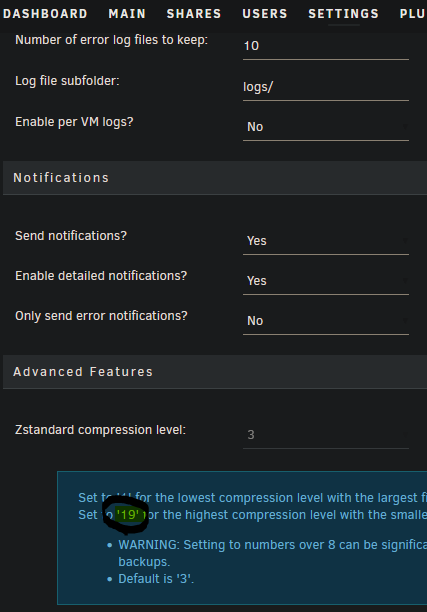
Hi all, First of all BIG Thanks for the plugin , real good thing , using it on 5 systems for months , no issues whatsoever - except VM states , i did think its plugin issues , but then after some playing and trial and error ALL the issues are related to VMs(mostly Windows being windows and settings after updates etc) Now i do have a question , how is it so fast? if i use anything using same disks (from NVME to NVME) be that duplicati or anything really i tried a lot , it takes around 20 minutes to backup up to 200GB (be that 1,2 or 4 VMs) But the plugin does it in 2 minutes, where can i read , or can some1 explain why the plugin is so fast and everything else is not? mainly asking because id like a restore option, in the meanwhile its not an issue, especially since i didn't even need it yet, but ill do it manually if needed. Also i assume that (attached screenshot) this is a mistyped value.
-
Hi all, Id like to change some lines in the template of notifications, change language of some of tem, where is the file located for it?
-
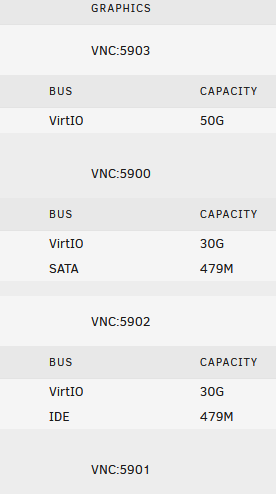
You could also use any VNC client and access the VM by using serverIP:VNCPort like its stated in the gui Each VM has its VNC port
-
Hi all, iIts been a year or so since i started with Unraid , it gave me an opening into linux OS which i couldnt for years and i am enjoying the learning curve. Now since then i have deployed a number of servers for different purposes(around 10 total), be that for VMs for monitoring , terminals for occasional access to some data , Just NAS, FTP server , VPN server etc. Now there came a time that i want to deploy a Beefy Windows VM for numerous users access via RDP for regular tasks like office and some browsing, and here is the goal and question: Goal: Having a Beefy VM that will be RDP server for number of concurrent connected users that will be backed up every week or so including VM image and everything , so incase anything happens to it , i can just deploy a clone of it in no time and it would be up and running. Question: I do have VMs now and i tried something similar , but the issue is disk speed, so i thought of passing through an NVME to a VM for faster IO, but then how would i easily automatically backup the whole VM and restore it incase something happens? since VM backup as i understood will backup images , and passed through disk is not that. Please help
-
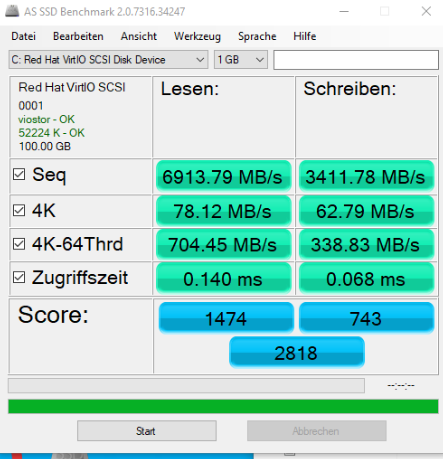
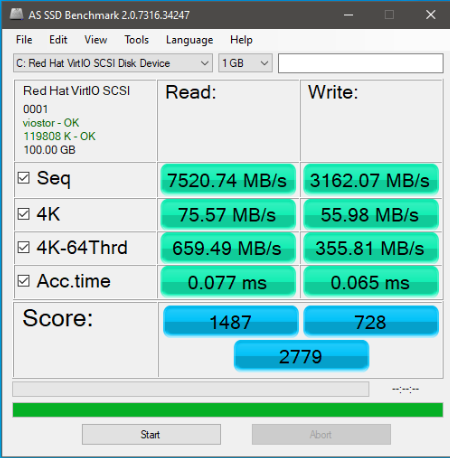
> What i did was add VirtIO 10G disk, > boot the VM > add the drivers manually (installed viostor.inf) then checked disks via disk management , and saw Uninitialized disk which would mean that windows sees it , but doesn't actually needs to use it , therefore permanent driver addition wouldn't be necessary( from my understanding of windows) > so i initialized the disk , so its now connected as UNallocated space. > Restart via regular windows restart, checked if the disk is there after restart (which would mean that the drivers are still loaded on boot by windows and it didn't discard them) and it was there. > Then i created a new VM with OVMF , i440 and the same disk i used , but this time with VirtIO bus. everything like u would regularly do. booted the VM and it "just" worked. Checked the performance (attached) and i was right , VirtIO drivers are much better for NVME disks performance (twice better from my testing) So its all working now , and thanks for tremendous help! took me half a day to sort it out but i learned alot in the process too hope it will help some1 who stumbles upon this maybe some time later. on my way there i learned how to resize disks, change formats, take snapshots , copy stuff using terminal commands, learned to shrink , fix Windows recovery partition, change MBR to GPT
-
First of all Thanks for the help , appreciate the time and effort regarding the backups - i have all of them, AND the original Windows machines, so that shouldn't be an issue. i did try to change to Virtio, also i tried to dism /image:f:\ /add-driver /driver:e:\viostor\w10\amd64\viostor.inf well i actually tried to dism /image:F:\ /add-driver /Driver:E:\ /Recurse for all drivers but dism didnt work , granted it was other VM image , but the principal stays the same, those VMs werent and will not be getting windows updates, those production machines with certain software installed that each windows update is a potential to break them. Going to try bcdedit be back with update
-
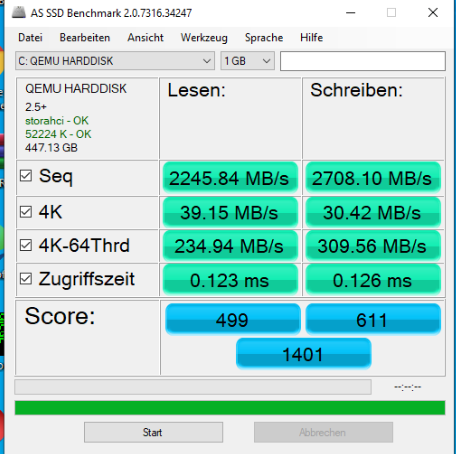
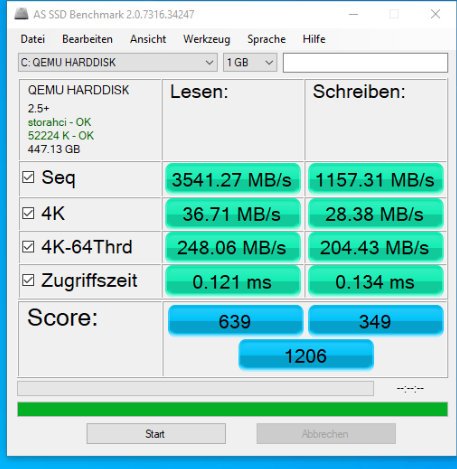
THX! now i know how to convert that. so i did that but the speed is the same, how would i convert that to use Virtio bus? would that even help? UEFI - Sata Vbus Seabios - Sata Vbus Fresh Install -OVMF Virtio
-
Hi all, I am experiencing real bad disk speeds on win10 VMs - AS SSD Benchmark even the sequential test stutters and is never above 80-90mbps. the VMs were originally copied from real WIN10 Machines using disk2VHD , then converted to qcow2 and those boot only with seabios with primaryVdisk bus set to SATA (ive 3 images like that , different sizes, all with performance issues) i tested them with separate disks be that SSD or NVME the performance is horrible. (i did install Virtio drivers) i did test and created new VM just now with OVMF and i440 and primary vdisk bus Virtio and the performance there is about 80-85% of bare metals speeds on NVME drive. attached 2 xmls one of freshly installed VM which works fine but doesnt help because i would need to rebuild the VM and its an issue and XML of a slow VM which i ran from the same Cache NVME but using seabios q3.5 and primary vdisk bus as SATA is there a way to fix the performance ? or maybe a way to convert them to work with OVMF and VirtIO because it feels like drivers issue Freshly installed fast XML.txt slow XML.txt 1ctower-diagnostics-20210820-1358.zip
-
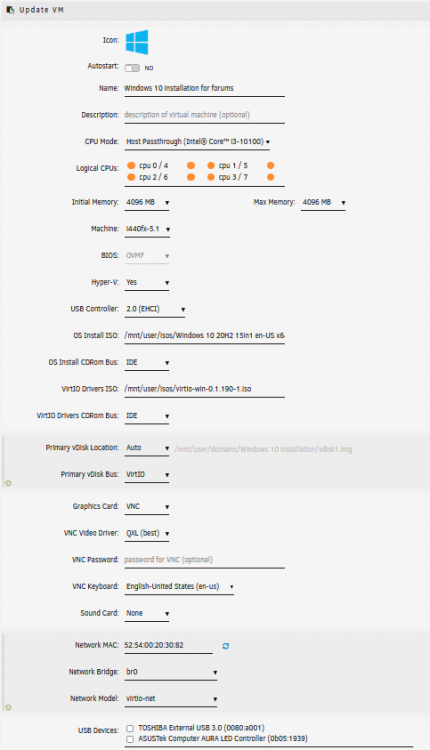
Heya , id like to help so i did a test and here are the settings i created new VM with. the only thing is i did NOT start VM after creation. After it was created , i clicked start then VNC and there was the boot from CD promt , i proceeded to windows installation choose virtio driver because windows install did not recognize the disk to install windows to hope it helps
-
ok so maybe some1 will stumble upon this post in the future with same or similar issues, ill briefly explain what i tried to do , what were the goals and how it was achieved. so i had 3 windows machines , each separate windows server machine for different purposes in different places. ling story short those needed to be in 1 place mainly for backup transfers (locally in the same network much faster then over internet) so i used disk2vhd to make vhd vdisk then converted it to qcow2, then mounted it now after wiggling with the settings i got it working , used Seabios , q3.5 machine , and the setting that finally worked for me is changing Primary vDisk Bus: to Sata Hope it helps some1
-
Had that issue with alot of VMs , i mostly made WIN VMS , win7 win10 , server etc some i created from a scratch some from vdisks etc and none of them worked properly from the GUI when pressed stop restart , except force stop which worked. So today when i finally got to the point when i want to setup a reliable VM backup, and make the VM backup script to work properly , i stumbled upon this post. My settings were proper tho , when pressing power button > shut down. so i changed the option to whatever , then back to shutdown , and now it works. TLDR - windows and its features
-
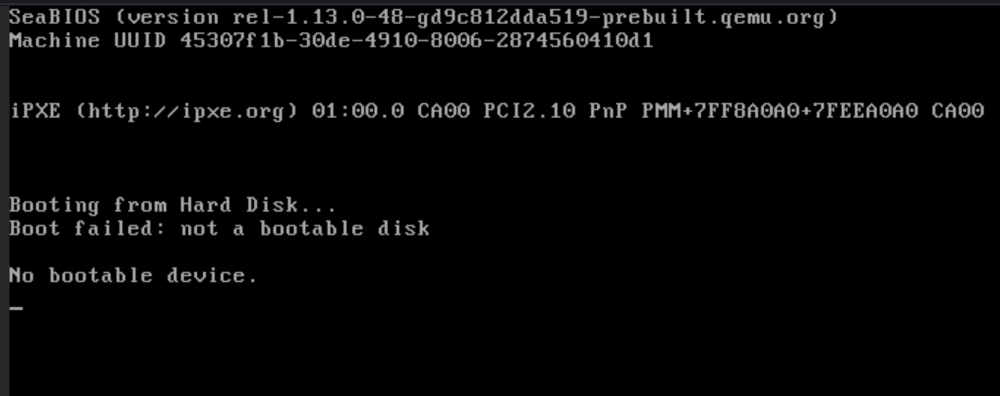
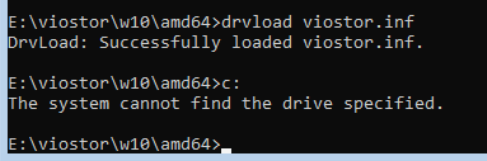
Hi ppl, The issue here is that i cant make the imported WIN10 OS to work as VM the OS was originally installed on 2 SSDs which were configured as Raid 1 , i then used Disk2VHD (https://www.veeam.com/blog/how-to-convert-physical-machine-hyper-v-virtual-machine-disk2vhd.html) to make a image of the OS, then i used qemu-img to convert the image to qcow2 now i need to make it work, ive tried OVMF Bios with i440, changing manually to qcow2 name and location. it goes to shell , and if i exit the shell and try boot options none of them seem to boot. tried to create a VM with auto disk with seabios and q35 5.1 with qcow type, then manually change the disk to qcow2 name and location screen attached please enlighten me on how to proceed. also tried to add the driver via cmd , still cant see C drive to boot
-
Thanks for the answer btw , looked through several posts , most of them being written by smart-asses who aren't for some reason interested in helping , instead teaching you to use search feature and waste their , and my time



