





Rysz
Community Developer
-
Joined
Everything posted by Rysz
-
There's some seemingly memory related kernel errors in the logfiles. Please run a memory test using either "Live Memory Tester" or memtest86 and report back.
-
I understand that data loss hurts, but there is literally a window that needs to be confirmed by the user saying: "A format is **NEVER** part of a data recovery or disk rebuild process and if done in such circumstances will normally lead to loss of all data on the disks being formatted" before the actual format is being done on the disk. These things have happened to all of us at some point (and there's no shame in it), but it's usually our reading comprehension that has failed us and very rarely the OS, so we keep our heads up and let this be a lesson well learned for the future. Still, I'm very sorry this happened to you - the takeaway lessons are two of the major mantras here on the forum for exactly that reason: "parity is not a backup" and "format is never part of a recovery operation".
-
You can rebuild the drive onto itself if you are certain that it's still good: https://docs.unraid.net/unraid-os/manual/storage-management/#rebuilding-a-drive-onto-itself Please post your diagnostics so we can also assess the health of the drive from that.
-
You lost everything on that disk, a reformat is never part of a recovery (there's like 50 warnings about this). By reformatting you updated the parity in a way that says disk 5 is supposed to be empty, not being able to rebuild.
-
I, for one, think it's great that Unraid uses Slackware and hope it continues to do so in the future. It's as close to Unix as can be without much of the distribution-specific bloat we see with more popular distributions. It's extremely stable and achieves that well without "hundreds of full-time paid developers and thousands of unpaid volunteer contributors". It's simple too, making sane packaging choices that time well with the general pace of Unraid's updates and putting stability over racing updates. Besides, Unraid performs really well on older machines and it's just not made for the end-user to tinker with the underlying OS... Running off of a more popular platform would increase support tenfold with users thinking "Hey, it's just Ubuntu, let me run that command". The platform that Unraid ships with is tailored to its very specific needs, not much more and certainly not less - I'd prefer to keep it that way. 🙂
-
Nothing there that says a shutdown was in fact triggered by anything. USB disconnects and related data staleness seems to occur relatively frequently but was recovered from within a few seconds in these visible cases. Longer lasting data staleness can cause either the NUT master or NUT slaves to consider a UPS as non-communicating and critical (resulting in a shutdown), but I'm not seeing that in the logs here either. We'll have to try with the SYSLOG server on Unraid to get more clarity on what is happening during such OB situations, unless you see anything in the RPi logs from around that time regarding NUT status changes or any shutdowns being initiated. NUT is usually very talkative, so it would write any such major events in the logs.
-
dmesg is just the kernel ring buffer, you won't find NUT's messages in there (just device-related ones). These connection messages are not worrying in particular, just some minor hiccups which are common. NUT would output the messages to /var/log/syslog - both on Unraid and the RPi. Can you check if the RPi has any NUT-related messages in /var/log/syslog from that time? On Unraid itself you'd need to turn on the SYSLOG server to preserve these messages over reboot.
-
Thanks, unfortunately there's no pre-shutdown logfiles anymore - so it's hard to say what happened exactly. In NUT slave mode it's however also dependent on the NUT master's shutdown criteria, because if the NUT master is configured any different and starts a shutdown, that will also take down the NUT slaves (even if the criteria on the slaves has not been met yet). Are there any different shutdown criteria set on the NUT master (the RPi) that would explain why a shutdown could have been initiated? Also, was it an unclean shutdown that triggered a parity check after booting up again or just a "regular" graceful shutdown as it should normally have been triggered by NUT (just it had been triggered prematurely)? The only real chance at finding the culprit would be that you set up the SYSLOG server so that the pre-shutdown logs do not get lost. Then we can work with those logs and will see messages from NUT saying why it decided to shutdown, everything else is just guesswork I'm afraid.
-
Please post the NUT Debug Package that can be found on NUT Settings page.
-
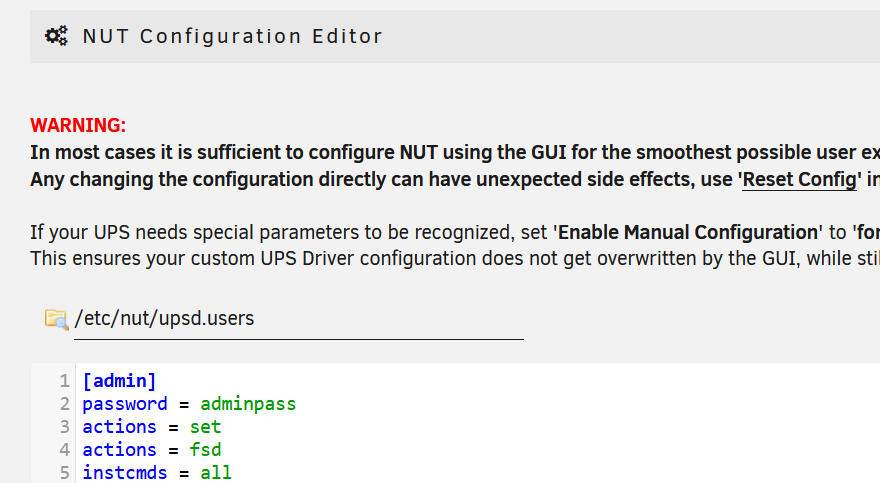
It's inside the upsd.users configuration file (see below - admin/adminpass): As outlined in the linked post it can be done using upscmd, if your UPS supports this. Otherwise it can usually be easier set directly on the UPS, either via physical button or LCD panel (check manual about this for your UPS).
-
Jul 14 12:52:23 T330 mergerfs-plugin: mergerFS error -- array_start_complete.sh has timed out after 20s and was stopped with SIGTERM. Jul 15 13:37:40 T330 mergerfs-plugin: mergerFS error -- array_start_complete.sh has timed out after 20s and was stopped with SIGTERM. You need to remove the -f flag from your command, otherwise mergerFS won't go into background mode: -f run mergerfs in foreground The startup mechanism kills mergerFS, because it expects it to go into background mode and it doesn't, so it thinks it's stuck and terminates it.
-
Please post your diagnostics. In which scripts do you put your commands? Did you change anything on the system recently (OS update, etc...) ?
-
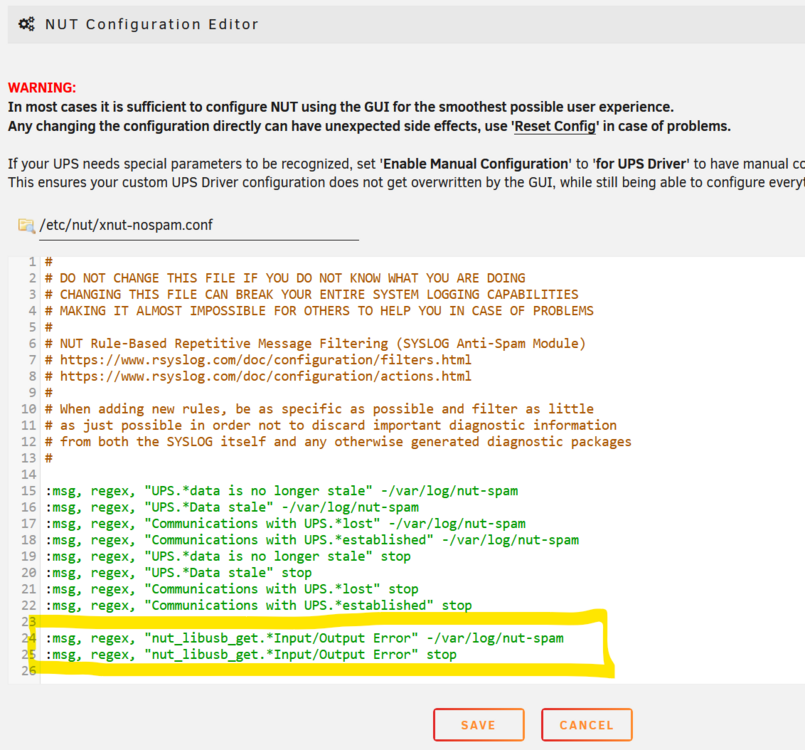
Hello! This is unfortunately the result of minor driver connection instabilities, nothing we can do about it. It's good that everything else works normally though, so you can just filter out these SYSLOG messages. 1) Put these lines at the end of xnut-nospam.conf using NUT Configuration Editor in GUI: :msg, regex, "nut_libusb_get.*Input/Output Error" -/var/log/nut-spam :msg, regex, "nut_libusb_get.*Input/Output Error" stop 2) So it will look like this - click "Save": 3) Set "Enable Rule-Based Syslog Filters:" to "Yes" in NUT Settings: 4) Click "Apply" and these messages should now no longer appear in your SYSLOG. Please note this will only be applied to new messages, the old ones will still be visible in SYSLOG. Please let me know if that worked for you! 🙂

-
Besides, I think it's bad practice for a plugin to install or update packages that are shipped with the OS. There's usually a reason that the OS is sticking to a specific package version, and it may impair stability.
-
Since both binaries and plugin files are already packaged into the dated .txz files (archive/ and packages/), it seems just an unnecessary extra step for me. I could picture myself using repository tags to "mark" a state of the repository with the release date, but the release feature really has no point for me. If I want to look at what was in a specific version, I'll just decompress that package from there and have the file tree of that release for inspection.
-
I'd also like to see multi arrays with a maximum level of 2 parities (to not further complicate matters). Alternatively, the possibility to create array-style pools (not backed by parity just yet) just for pooling of data, e.g. 20 HDDs w/ XFS.
-
Yes, just uninstall and reinstall the Sanoid plugin and the modification is gone. But that's definitely not related to your problems, the line just disables a package of the plugin and doesn't interact with the system at all, so it should in fact boot faster because it's one less package to be installed as part of the plugin installation.
-
Did you apply my fixes from above on the 7.0 machine and reboot it after?
-
Thanks for reporting back, I thought that might have been the case for you and I appreciate the feedback. To be fair, that previous limitation or rather requirement was not all that visible among the other information back then. I did address this in the latest update with some additional checks against malformed configurations, so it should be better visible in the future if something is misconfigured. That limitation itself has since also been resolved. I'm glad that everything works for you now, I've also used SnapRAID intensively on my backup server for these past few months this plugin has existed and although it does have a bit of a learning curve and some limitations, it has also worked exceptionally well for me throughout various recovery operations. 🙂
-
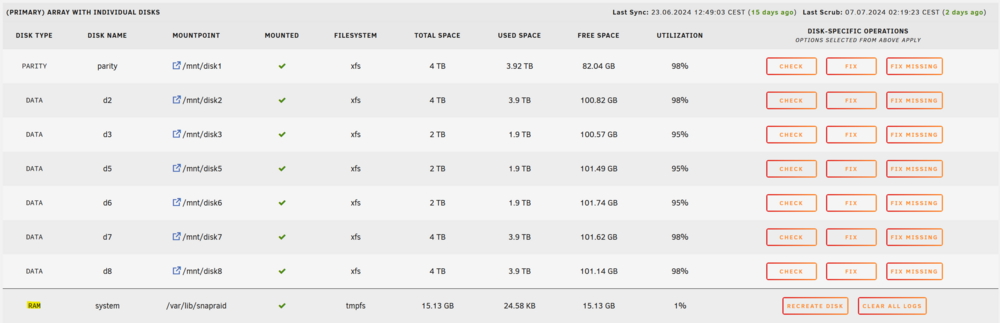
No problem, thanks for using the plugin - your parity and data disks should all show as XFS (see below for my primary array). 🙂 If your data disks do not show up, please make sure you used a trailing slash / at the end of the mount points ( e.g. /mnt/disk1/ ). The TMPFS disk shown at the end is the plugin's RAM disk, this is where all operational output will be written to (logfiles, etc.). It is a safeguard, so that a large amount of logfiles and/or exceptionally large logfiles cannot use up all your RAM and destabilize your operating system. The amount of total disk space shown for that disk is 30% of your total available RAM and is just the maximum possible RAM usage for the plugin, but the space is not in fact blocked when not in use.
-
Yes, it uses Unraid's notification system and settings.
-
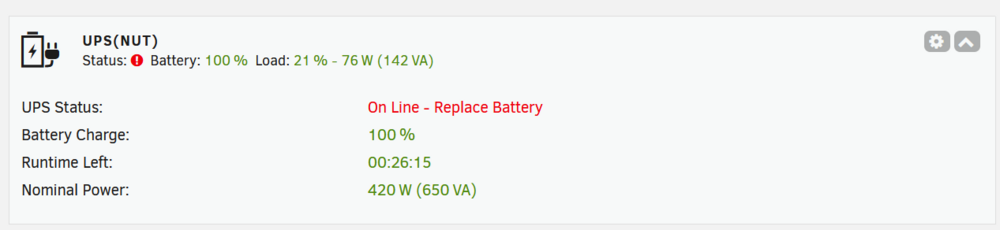
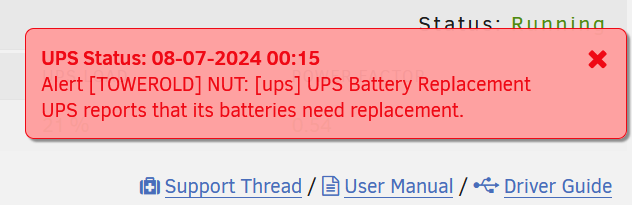
No, I'm saying there's no way to measure the battery health, just if the UPS considers it to be replaced or not. You can check and trigger commands for your UPS with upscmd (via command line): https://networkupstools.org/docs/man/upscmd.html But the UPS should always report a to be replaced battery via emitting a respective status and alert, at least as part of their periodic self-tests (and most do), which require no user interaction and need not be triggered manually. A to be replaced battery would hence be permanently visible in the GUI with a "RB" status, e.g. "OL RB", "OB RB": If you have battery replacement notifications enabled, you'll also receive this notification:
-
This seems not a mbuffer package problem, but an intermittent network connection instability during the transfer. If it were an mbuffer package problem the whole command chain would fail and no transfer would go through at all.
-
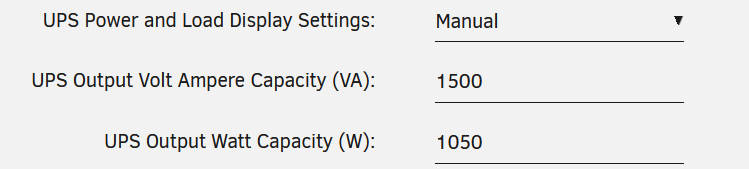
Great, those values will be enough for shutdown modes "Time on Battery" (recommended) and "Battery Level". If you set these settings in NUT Settings, you will also see the now missing power consumption in the dashboard: One word of caution about network connected UPS though, you need to make sure that any network equipment (switches, routers) between your UNRAID server and the UPS are also protected by the UPS, because NUT needs to stay connected to the UPS when there is a power failure. You can't really, only from the voltage, but a degraded battery can also show full voltage but not be able to hold it. For a broken or near EOL battery the UPS should emit a replace battery warning, which NUT would also show. You can only test it for sure by killing the power and see how fast the battery levels decrease under load.
-
It was always my understanding and use-case that Unraid is - first and foremost - a convenient file storage solution for use in a LAN. I bought it exactly for that what it provides, convenience for in-home file storage use at an acceptable and mostly basic degree of security for inside my local network. If you're worried about 'lateral movements of hackers that have gained access to the LAN' and if your risk assessment has really concluded that as a likely scenario to happen to you, you either seriously need to reconsider your network security so that doesn't happen (enterprise firewalls, air-gapping, compartmentalization etc.) or look into other more enterprise-oriented solutions. Unraid has always patched vulnerabilities as part of their regular update cycles, this is not something that was just recently changed or unknown to the majority of people. It seems to me you're comparing apples to oranges here. If you need a bulletproof vest because you are at risk of being shot at, invest in one and don't ask your t-shirt manufacturer to take your very personal risk scenario into consideration for everyone else wearing t-shirts. Considering this exploit was only proven on 32-bit systems and takes hours of serious effort to actually take advantage of, some of you are blowing this way out of proportion - in my humble and unofficial personal opinion.







