





DiscoverIt
Members
-
Joined
-
Last visited
Everything posted by DiscoverIt
-
It seems when a share is marked as exclusive and a new template is installed the default pathing is incorrect due to CA pulling the symlink target and not the symlink link_name. eg; exclusive access for appdata residing on a pool called cache; /mnt/cache/appdata vs the proper /mnt/user/appdata
-
vibr0 is used by libvirt to create NAT'd VM's on UnRaid. One drawback to this approach is that it ties up port 53 which is required by containers such as PiHole and AdGuard. I'd like to propose a toggle within VM Settings to disable vibr0 and to free up the key system port. It does not seem vibr0 is commonly used so I would further suggest disabling as default. In the meantime it seems brctl delbr virbr0 could suffice?
-
Generally speaking it seems 1/2 of available ram is used for creation of a rootfs with the other half being allocated for a tmpfs mounted to /dev/shm. Right now a suggested approach is to use /dev/shm for tmp tasks (media transcoding) as fully populating /dev/shm will not crash the system like populating /tmp will. However this isn't really a correct usage of /dev/shm which is designed as shared memory and not the temporary storage of files. I'd like to propose a more dynamic approach in that a default amount (say 2GB) plus zfs arc allocation, plus a slight overhead is used for the rootfs. The same value is also used for the creation of a tmpfs at /dev/shm. The balance is then allocated as a tmpfs mounted to /tmp or another dir marked for temporary file usage, maybe /mnt/volatile ?. Example breakdown of a system with 128GB ram with default arc allocation and 20% buffer. rootfs 21.6G / tmpfs 128M /run overlay 21.6G /lib overlay 21.6G /usr devtmpfs 8.0M /dev tmpfs 21.6G /dev/shm tmpfs 106.4G /tmp tmpfs 128M /var/lo
-
I'm not certain where you get there is an issue at hand. This is about preventing or addressing future potential problems and enhancing the core functionality of the unraid array. Possibly and we can probably agree that the most common being caused by a faulty cable from all communication problems. The dangers of losing another drive on neighboring communication channels are quite unsubstantiated in my experience here. If a backplane or breakout fails you will have an n+1 scenario where you will likely see 4+ drives fail of which this feature would not benefit from as you can only rebuild from at absolute most, a two drive failure. I would not be able to answer if all 4+ drop immediately or if a delay occurs. In either case the outcome would be the same and you would then have to take a different approach by forcing a new config, rebuilding parity, and lastly hoping no FS corruption occurred. However in a single or two drive failure the spare could be implemented and get the array operational while the user troubleshoots the communication problem.
-
:knock on wood: my configuration is rock stable but as they say; an ounce of prevention is worth a pound of cure. I have my own comments I'll keep to myself about ZFS but most converts from TN we see end up moving to the UnRaid model because it's far superior for their use-case
-
I'm not certain how the drive drops is relevant as a dropped drive regardless of cause must be rebuilt and cannot simply be re-added to the array. Yes it would be up to the user to determine if the drive is reusable or if the drive should be replaced. This proposal is simply to automate that process of being operational by using a known good drive and pause the urgency clock. I'm admittedly a little confused how a hot-spare concept increases risk. Can you explain an example where rolling out a hot spare in this scenario will negatively impact of harm the data integrity of the array? While ZFS does support spares it has two crucially detrimental annoyances; no single drive expansion and no mixed sized vdevs. I mean this in all positive respect but the core functionality of an UnRaid array has not been improved or enhanced in years. I think it's actually closer to a decade now since Dual Parity was introduced and since then I cannot recall a notable feature improvement? There's plenty of meat left (such as multiple arrays, larger device count arrays, multi-threaded parity calculation, etc.) in the UnRaid model that's being left on the bone imo.
-
That's understandable but I'd counter with the scenario that UnRaid auto emulates contents when a disk drops. The fact is that UnRaid already takes measures into it's own hands when a disk drops so providing an enhanced means of data continuity would be beneficial if access or means of repair involve extended lead times. Just like it's not mandatory to run parity disk(s) this wouldn't be a mandatory feature but rather an additional option for those who cannot access the system and want to maintain full operation. My scenario is this; I routinely find myself traveling for 16-32 hours without access due to being in an airplane. Within this 16-32 hrs if a drive fails I could be back at full operation by the time I land or reacquire internet access. For this reason I already keep a warm spare disassociated from the array. Dual parity simply allows two disks to fail simultaneously before data loss occurs. To remedy and bring the array back to fully operational the dead drives would need to be assessed and either re-built onto itself or replaced. I'm proposing eliminating the manual step so that the sense of urgency or emergency is mitigated.
-
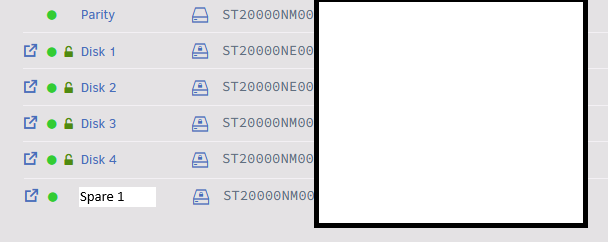
It's been discussed in a few threads but I don't see an actual FR thread for this. I'd like to propose the creation of a 3rd disk type for an UnRaid array. Presently there are data and parity disks but I'd like to see spare get added as a type. This would be a disk which must be equal to or less than parity and it would sit idle/spun down until needed. My request is a single Spare but I suspect the logic to do 2 x Spare wouldn't be vastly different. This would also coincide with the array supporting 2 x parity. Upon array drive failure within an UnRaid array: The system would perform two checks spare's capacity is equal to or greater than the failed disk spare's capacity is equal to or less than installed parity The system then modifies the array config to remove the failed drive and replace with the spare. This concept sort of already happens when a disk fails while array is up with emulation taking over automatically. The system begins a data disk rebuild and the user can now decide whether to replace the dead disk as new spare, reinstall the dead disk as spare, or do nothing.
-
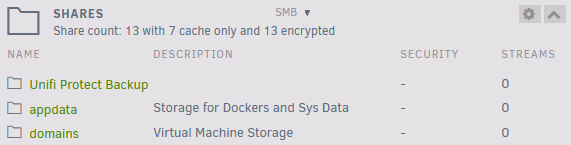
I'd like to suggest making the folder icon to the left of the share name a link to the file browser linked to the share.

-
Isn’t native zfs encryption abandoned and by extension considered insecure now? Last I recall there was basically no development team left on that facet of zfs.
-
I put other as it would be nice to have an LTS version, for example; LTS 7.0 (update X). This branch wouldn’t see feature improvements but rather security updates and critical bug fixes.
-
testing and it seems to function as expected. Interestingly the old shares labeled as remove and re-add are now functioning properly. thx again!
-
Probably related to (new MiscUD)->is_ip($server)) determining what is an IP and what is a hostname?

-
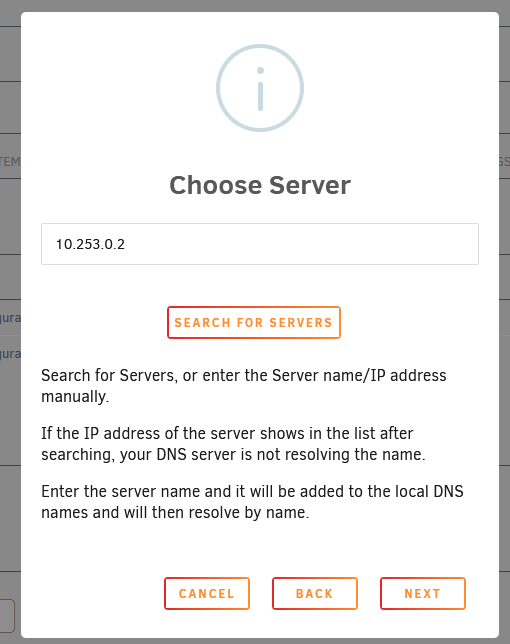
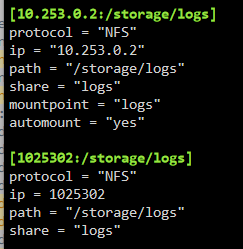
Call me curious, I don't follow what you mean with local host confusing UD? If I enter in 10.253.0.2 and it outputs into samba_mount.cfg without periods what portion of my system would cause the lack of periods in an IP?
-
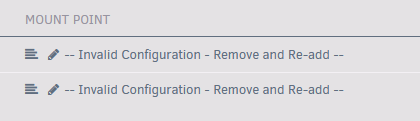
You can't because the dialog for adding a host is removing / not passing periods from the entered IP. old vs new
-
The new update isn't processing periods in a host? and all existing configurations are invalid?

-
Sorry missed the title suffix
-
I would have assumed the overall total disk size would have come from the disk level and not the filesystem level. XFS has similar metadata but unraid shows it as used space vs a reduction in capacity.
-
What could be the cause in which drives formatted with XFS-encrypted show the full capacity while ZFS-encrypted shows a slightly reduced value? All three disks also show the exact same partition size


-
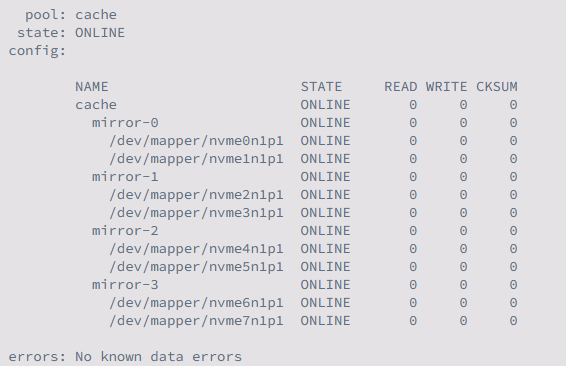
Looking into expanding my ZFS pool to larger capacity drives. ZFS allows autoexpand=on where ZFS takes up the full available filesystem. One complication I see is the LUKS encryption being implemented. Will there be an issue with LUKS being applied to the new drive to full maximize the added capacity?
-
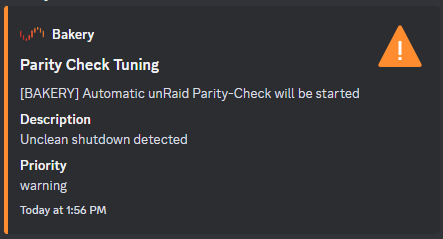
Sep 4 13:56:02 Bakery emhttpd: shcmd (142): touch /boot/config/forcesync Sep 4 13:56:02 Bakery Parity Check Tuning: Unclean shutdown detected What was introduced from 6.12.3 to 6.12.4 that drastically changed the start up? Seems like a wide ranging issue.
-
Thx Jorge, an interesting lead was given in Discord in that dd appears capped or restricted in some manner. Going to spin up a basic Ubuntu container and try a common benchmarking tool next.
-
I have a system that I just can't seem to get reads/writes to what they should be. I can usually saturate my 25Gbps NIC but with that MikroTik 100Gb switch tempting me daily...I want to make sure if I get a deal on it I'm prepared hardware-wise. Cache consists of 2 x 4 raidz1 zpool comprised of 8 x 1TB PCIe 3.0 NVME's in two ASUS Hyper M.2 carriers. System is an EPYC 7302p with 256GB of 2133 DDR4 memory and a 25Gbps NIC. LUKS encryption is enabled through UnRaid's implementation. root@UNRAID:/# zpool status pool: cache state: ONLINE scan: scrub repaired 0B in 00:03:48 with 0 errors on Sun Jul 9 04:03:49 2023 config: NAME STATE READ WRITE CKSUM cache ONLINE 0 0 0 raidz1-0 ONLINE 0 0 0 nvme2n1p1 ONLINE 0 0 0 nvme3n1p1 ONLINE 0 0 0 nvme1n1p1 ONLINE 0 0 0 nvme0n1p1 ONLINE 0 0 0 raidz1-1 ONLINE 0 0 0 nvme4n1p1 ONLINE 0 0 0 nvme5n1p1 ONLINE 0 0 0 nvme6n1p1 ONLINE 0 0 0 nvme7n1p1 ONLINE 0 0 0 errors: No known data errors Writing to Cache pool; root@UNRAID:/mnt/cache/appdata# dd if=/dev/zero of=test.img bs=1G count=10 oflag=dsync && rm test.img 10+0 records in 10+0 records out 10737418240 bytes (11 GB, 10 GiB) copied, 3.78222 s, 2.8 GB/s Writing to RAM; root@UNRAID:/tmp# dd if=/dev/zero of=test.img bs=1G count=10 oflag=dsync && rm test.img 10+0 records in 10+0 records out 10737418240 bytes (11 GB, 10 GiB) copied, 6.7859 s, 1.6 GB/s Possible culprits I feel it could be but I don't know what rock to turn over to find additional bandwidth. 1) Slow memory 2) PCIe 3.0 though I should theoretically be capable of 4 GB/s per drive 3) A slow NVME bringing down the pool 4) LUKS in some form as the culprit
-
Clicking the [X] to delete the template only deletes the associated .xml and not any associated .xml.bak. I would assume correct action would be to delete .xml and .xml.bak? If I had to guess and stab in the dark does this require an additional line for checking the presence of .bak? https://github.com/unraid/webgui/blob/master/emhttp/plugins/dynamix.docker.manager/include/CreateDocker.php#L200C1-L206C2
-
The orb tooltip says "REMOTE SHARE IS ONLINE", and it might be better if it was reworded slightly to say "REMOTE HOST IS ONLINE". I would suggest adding a status indication of yellow indicating that ping is responsive but its not successfully mounted.


