





ridley
Members
-
Joined
-
Last visited
Everything posted by ridley
-
There's an option in the ARC 1214/1224 bios for spindown so it seems that this one should, but I cannot get that option to work.
-
I am trying to set up a small UNRAID server using an old HP Microserver Gen 8. I was hoping to use some 3TB Hitachi SAS drives, via an Arc 1214 controller, that I have but couldn't get them to spindown, even with the SAS Spindown plugin. So I installed 4 SATA drives via the internal SATA controller and they Spindown just fine. But if I control those SATA drives using the ARC 1214 they too don't spindown. So presumably it's not an SAS drive problem but an ARC 1214/1224 problem either in it's setup or the way UNRAID handles it. Any ideas to a solution? microserver-diagnostics-20260118-2137.zip
-
This is a transfer directly to the ssd cache drive "Cache_main" It goes at full speed for about 5 minutes and then it starts doing this.
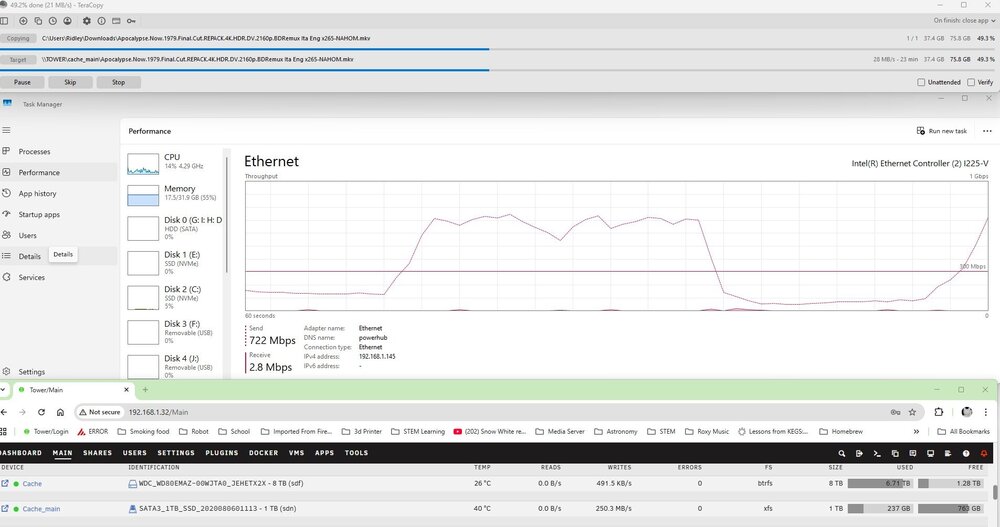
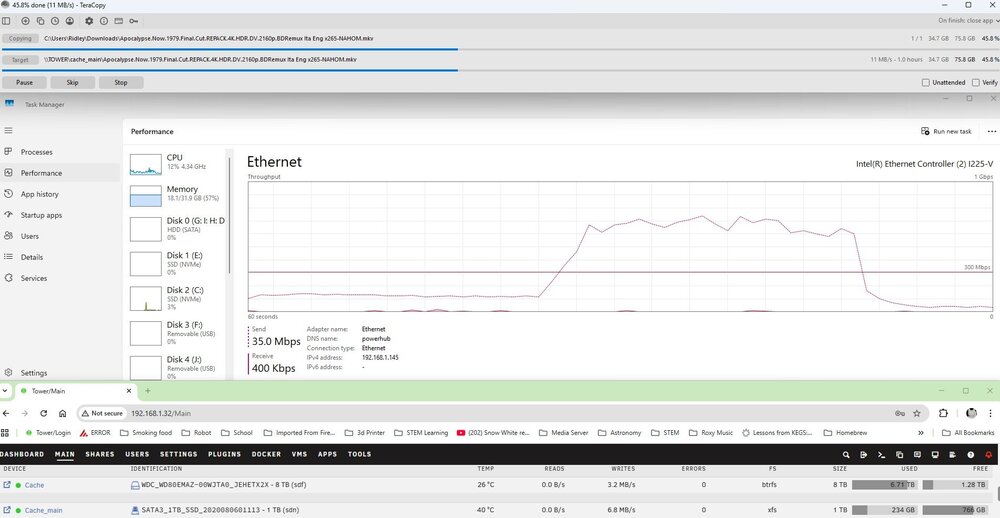
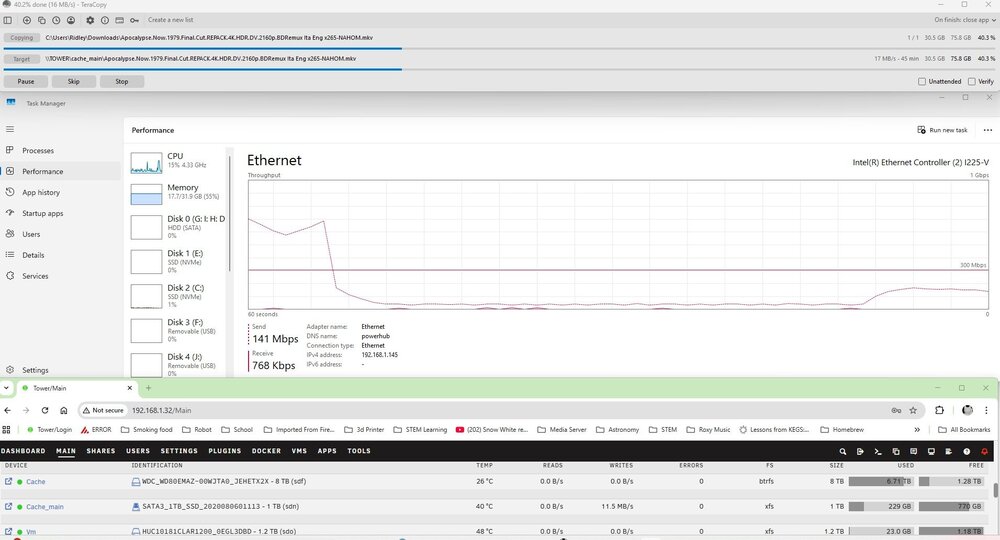 I have a 1Tb SSD setup as a cache drive to my media but the performance is not great, in fact it is a bottle neck now I have fibre. I am getting about 37MB/s to the cache drive when I tx a large 80GB file from my Windows PC to the cache drive, if I transfer the same file to a different drive on the array as a drive share on the array I was getting approx 77MB/s. Writing directly to the array gives me about 30MB/s I can see the SSD bursts up to 350+MB/s but then just falls to next to nothing, any ideas what is going wrong here? (this a Dell R730XP, Dual Xeon with 256GB of RAM, Perc 730) tower-diagnostics-20260101-2320.zipIs it really downloading a torrent though? You're downloading directly from real debrid servers, they download the torrent, you download directly from their server. Or at least that's the way I understand it. Besides, if I download from real debrid website I get 100MB/s and RDT gives me 10/MB/s and it is presumably downloading directly from real debrid as well.I have setup RDT-client, Prowlarr and integrated it into Sonarr to download to my unraid server. It works, but slowly and I cannot figure out why. If I download using RDT-client to my UNRAID server, I am getting ≈ 10MB/s, but if I download directly from Real-debrid to the same location on my unraid server I get 100MB/s and I cannot think why one is do much slower that the other. Any ideas?Hi, Can anyone see why my docker image failed to start this afternoon? Thanks tower-diagnostics-20251026-1802.zipI think my USB might be on the way out and is read only... So I think the docker failing is a symptom?Ok failed again, please find attached my diagnostics. Seems to be crashing pretty regularly. tower-diagnostics-20250907-2210.zipI had restarted, I'll catch it next time it failsAny idea why my docker has failed/failed to start a couple of times recently? tower-diagnostics-20250711-2239.zipI have just installed the docker and it says that it is running but I cannot access the WebGui or via VNC, any ideas what I am doing wrong here?I am in the process of transferring my setup from a Dell R720 + Diskshelf to an R730XD. In the R720 I had an GTX 1080 for transcoding but there not enough room in the R730 for that so I purchased an Intel Arc 310 for transcoding. Prior to moving drives etc I tested the Intel Arc in the R730 using a trial UNRAID setup and all worked fine. I have now put in my drives etc and the old UNRAID setup and that's working but when I try to set GPU statistics etc to the Intel Arc it's not there. IIRC I didn't load drivers before, so has it not been detected then? Where would I look in the logs? tower-diagnostics-20250711-2239.zipIs there anyway that I can create a txt file (csv file?) of requested shows rather than add them to the SHOWS Variable, at the moment I cannot really see what shows I have already asked to be monitored as only a few characters are visible, I can always copy and paste into a text editor or spreadsheet then edit and repast but it's not very "elegant" Nice app thoughActually, I am not sure why on the original "Unassigned devices" screen shot that it reported a different serial number. On this one the serial numbers reported in "preclear" match those on the drive labels, and they are reported on WD website as being 4Tb but as you can see UNRAID says 3Tb and they were sold to me as 3Tb, the vendor says it was a "manufacturing fault", are these "clipped"? and is there anyway to flash them etc to get back to 4Tb? So, serial numbers match those on the label and are serial numbers for 4Tb drives, but the system reports them as 3Tb. Whatever the cause this is weird. smartctl 7.4 2023-08-01 r5530 [x86_64-linux-6.12.24-Unraid] (local build) Copyright (C) 2002-23, Bruce Allen, Christian Franke, www.smartmontools.org === START OF INFORMATION SECTION === Vendor: HITACHI Product: HUS72604CLAR3000 Revision: N9C0 Compliance: SPC-4 User Capacity: 3,000,592,982,016 bytes [3.00 TB] Logical block size: 512 bytes LU is fully provisioned Rotation Rate: 7200 rpm Form Factor: 3.5 inches Logical Unit id: 0x5000cca25c4b9064 Serial number: K3HAK8UB Device type: disk Transport protocol: SAS (SPL-4) Local Time is: Sun Jun 22 14:47:32 2025 BST SMART support is: Available - device has SMART capability. SMART support is: Enabled Temperature Warning: Enabled Read Cache is: Enabled Writeback Cache is: Disabled === START OF READ SMART DATA SECTION === SMART Health Status: OK Current Drive Temperature: 40 C Drive Trip Temperature: 60 C Manufactured in week 38 of year 2018 Specified cycle count over device lifetime: 50000 Accumulated start-stop cycles: 58 Specified load-unload count over device lifetime: 600000 Accumulated load-unload cycles: 1559 Elements in grown defect list: 0 Vendor (Seagate Cache) information Blocks sent to initiator = 6388000976011264 Error counter log: Errors Corrected by Total Correction Gigabytes Total ECC rereads/ errors algorithm processed uncorrected fast | delayed rewrites corrected invocations [10^9 bytes] errors read: 0 106 0 106 25715027 646191.823 0 write: 0 48 0 48 359395 152320.552 0 verify: 0 5 0 5 48518 324.524 0 Non-medium error count: 0 SMART Self-test log Num Test Status segment LifeTime LBA_first_err [SK ASC ASQ] Description number (hours) # 1 Background short Completed - 46714 - [- - -] # 2 Background short Completed - 46713 - [- - -] # 3 Background short Completed - 46669 - [- - -] Long (extended) Self-test duration: 6 seconds [0.1 minutes] Background scan results log Status: scan is active Accumulated power on time, hours:minutes 46736:18 [2804178 minutes] Number of background scans performed: 120, scan progress: 5.75% Number of background medium scans performed: 120 General statistics and performance log page: General access statistics and performance: Number of read commands: 4922116038 Number of write commands: 380754529 number of logical blocks received: 297501077460 number of logical blocks transmitted: 1262093404755 read command processing intervals: 0 write command processing intervals: 0 weighted number of read commands plus write commands: 0 weighted read command processing plus write command processing: 0 Idle time: Idle time intervals: 2190971181 in seconds: 109548559.050 in hours: 30430.155 Protocol Specific port log page for SAS SSP relative target port id = 1 generation code = 3 number of phys = 1 phy identifier = 0 attached device type: expander device attached reason: SMP phy control function reason: unknown negotiated logical link rate: phy enabled; 12 Gbps attached initiator port: ssp=0 stp=0 smp=0 attached target port: ssp=0 stp=0 smp=1 SAS address = 0x5000cca25c4b9065 attached SAS address = 0x500056b3025d90ff attached phy identifier = 11 Invalid DWORD count = 0 Running disparity error count = 0 Loss of DWORD synchronization count = 0 Phy reset problem count = 0 relative target port id = 2 generation code = 3 number of phys = 1 phy identifier = 1 attached device type: no device attached attached reason: unknown reason: power on negotiated logical link rate: phy enabled; unknown attached initiator port: ssp=0 stp=0 smp=0 attached target port: ssp=0 stp=0 smp=0 SAS address = 0x5000cca25c4b9066 attached SAS address = 0x0 attached phy identifier = 0 Invalid DWORD count = 0 Running disparity error count = 0 Loss of DWORD synchronization count = 0 Phy reset problem count = 0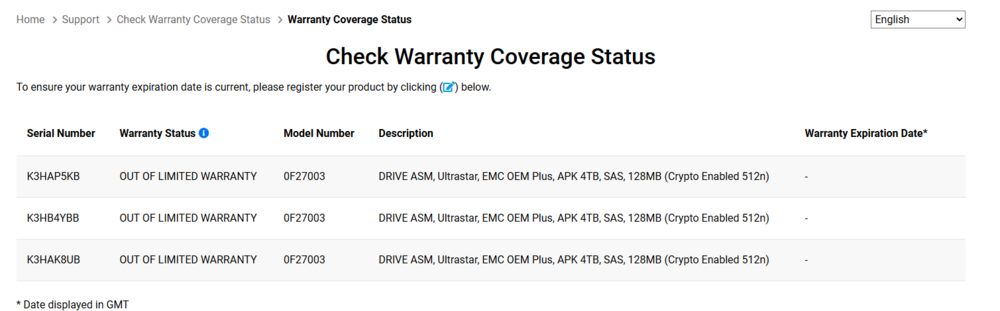
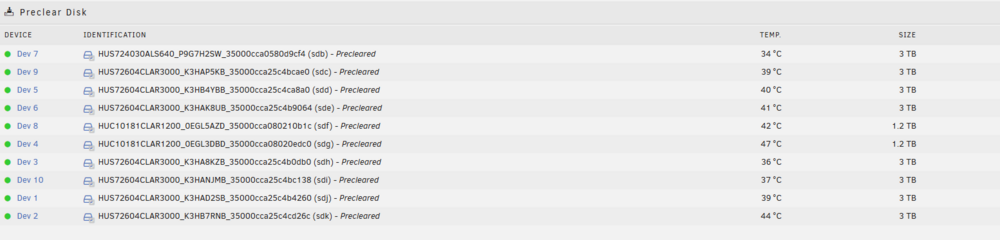 Here you go. tower-diagnostics-20250618-1945.zipHi I have just added two 4Tb drives into my array in a Dell r720 server. One has formatted fine to 4tb the other to 2.2tb. I see several people have had similar problems and that being down to the controller but these are attached to the same controller and the array contains 4-18Tb drives all working fine. Just not this one. Any ideasThanks. I had read that thread before asking here. I cannot see why a clipped drive would report a different serial number though. The serial number returned by the drive is a 3Tb drive and the serial number on the label is for a 4Tb one. So unless the serial number was changed during a firmware flash, which seems unlikely I really don't know what's going on. Thanks for that. I read that before asking here, it's the closest thing that I could find alsomCopyright (C) 2002-23, Bruce Allen, Christian Franke, www.smartmontools.org === START OF INFORMATION SECTION === Vendor: HITACHI Product: HUS72604CLAR3000 Revision: N9C0 Compliance: SPC-4 User Capacity: 3,000,592,982,016 bytes [3.00 TB] Logical block size: 512 bytes LU is fully provisioned Rotation Rate: 7200 rpm Form Factor: 3.5 inches Logical Unit id: 0x5000cca25c3f08fc Serial number: K3H3NP2L Device type: disk Transport protocol: SAS (SPL-4) Local Time is: Tue Jun 17 23:52:35 2025 BST SMART support is: Available - device has SMART capability. SMART support is: Enabled Temperature Warning: Disabled or Not Supported Read Cache is: Enabled Writeback Cache is: Disabled === START OF READ SMART DATA SECTION === SMART Health Status: OK Current Drive Temperature: 39 C Drive Trip Temperature: 60 C Manufactured in week 38 of year 2018 Specified cycle count over device lifetime: 50000 Accumulated start-stop cycles: 46 Specified load-unload count over device lifetime: 600000 Accumulated load-unload cycles: 1995 Elements in grown defect list: 0 Vendor (Seagate Cache) information Blocks sent to initiator = 39210350280704 Error counter log: Errors Corrected by Total Correction Gigabytes Total ECC rereads/ errors algorithm processed uncorrected fast | delayed rewrites corrected invocations [10^9 bytes] errors read: 0 0 0 0 5847 416.687 0 write: 0 0 0 0 70643 3316.168 0 verify: 0 0 0 0 142824 332.254 0 Non-medium error count: 0 SMART Self-test log Num Test Status segment LifeTime LBA_first_err [SK ASC ASQ] Description number (hours) # 1 Background short Completed - 46716 - [- - -] # 2 Background short Completed - 46714 - [- - -] # 3 Background short Completed - 46714 - [- - -] # 4 Background short Completed - 46669 - [- - -] Long (extended) Self-test duration: 6 seconds [0.1 minutes] Background scan results log Status: scan is active Accumulated power on time, hours:minutes 46716:23 [2802983 minutes] Number of background scans performed: 652, scan progress: 18.08% Number of background medium scans performed: 652 General statistics and performance log page: General access statistics and performance: Number of read commands: 2408620 Number of write commands: 2337119 number of logical blocks received: 6476890766 number of logical blocks transmitted: 813841561 read command processing intervals: 0 write command processing intervals: 0 weighted number of read commands plus write commands: 0 weighted read command processing plus write command processing: 0 Idle time: Idle time intervals: 3359026124 in seconds: 167951306.200 in hours: 46653.140 Protocol Specific port log page for SAS SSP relative target port id = 1 generation code = 3 number of phys = 1 phy identifier = 0 attached device type: SAS or SATA device attached reason: unknown reason: unknown negotiated logical link rate: phy enabled; 6 Gbps attached initiator port: ssp=1 stp=1 smp=1 attached target port: ssp=0 stp=0 smp=0 SAS address = 0x5000cca25c3f08fd attached SAS address = 0x544a8420246b8e06 attached phy identifier = 5 Invalid DWORD count = 0 Running disparity error count = 0 Loss of DWORD synchronization count = 0 Phy reset problem count = 0 relative target port id = 2 generation code = 3 number of phys = 1 phy identifier = 1 attached device type: no device attached attached reason: unknown reason: power on negotiated logical link rate: phy enabled; unknown attached initiator port: ssp=0 stp=0 smp=0 attached target port: ssp=0 stp=0 smp=0 SAS address = 0x5000cca25c3f08fe attached SAS address = 0x0 attached phy identifier = 0 Invalid DWORD count = 0 Running disparity error count = 0 Loss of DWORD synchronization count = 0 Phy reset problem count = 0Could it be anything to do with these being SAS drives. I know HDPARM doesn't work properly with SAS drives so maybe UNRAID likewise cannot read them properly?Hi, I have just picked up a old R730XD server and it has 16 x 3.5" HGST 0F27003 4Tb drives, but when I add it to my Unraid server it reports as being a HITACHI HUS72604CLAR3000 3Tb drive. There is some wrinting on the drive in marker pen saying 3Tb. What's going on here?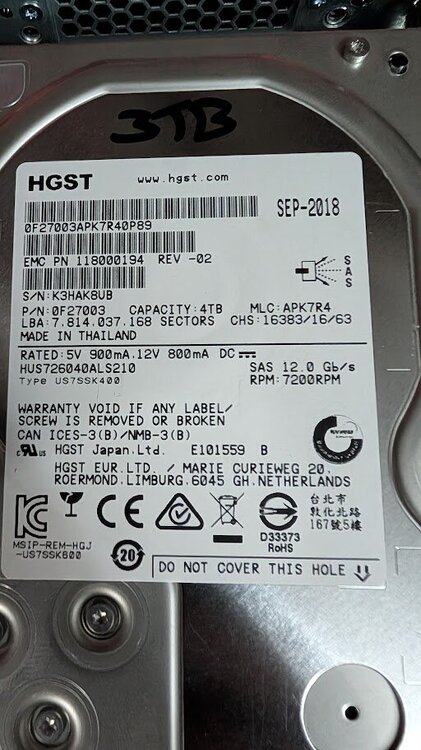
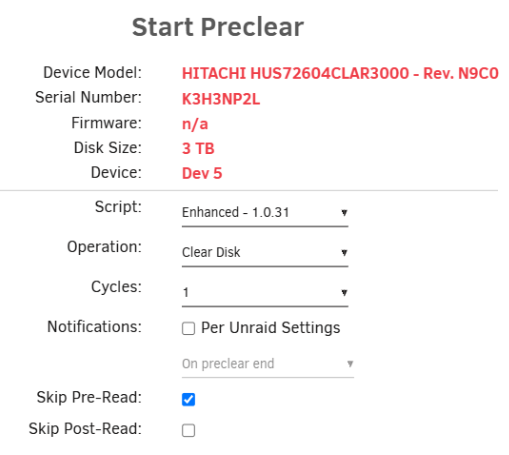 Notice that one of my drives is showing as disabled this morning. Can someone please advise should I try a rebuild or does it look more serious? tower-diagnostics-20240319-0556.zipJust noticed that my main media share says that it has files that are not protected, but I cannot see what they are or why it is saying it. Can you help/see why? tower-diagnostics-20230508-1653.zipMy parity drive is showing a red X and I am wondering if it is genuinely failing or needs a new cable and rebuild? Sorry but I am not good at reading these diagnostics, could someone have a look and see if a rebuild or replacement is the way forward, thanks. tower-diagnostics-20230311-2009.zip


