





dmacias
Community Developer
-
Joined
-
Last visited
Everything posted by dmacias
-
Can you run from the command line this: ls -la /boot/config/plugins/NerdPack/packages/6.5/ And if you have perl there you can run installpkg /boot/config/plugins/NerdPack/packages/6.5/perl*.txz
-
What board? You could try setting a 169 static ip. But then you could only access it from a running OS.
-
Sorry about that. I'll switch it to one of those.
-
What version of unRAID? It should say something like this perl-5.26.1-x86_64-4.txz package download sucessful! Installing perl-5.26.1 package...
-
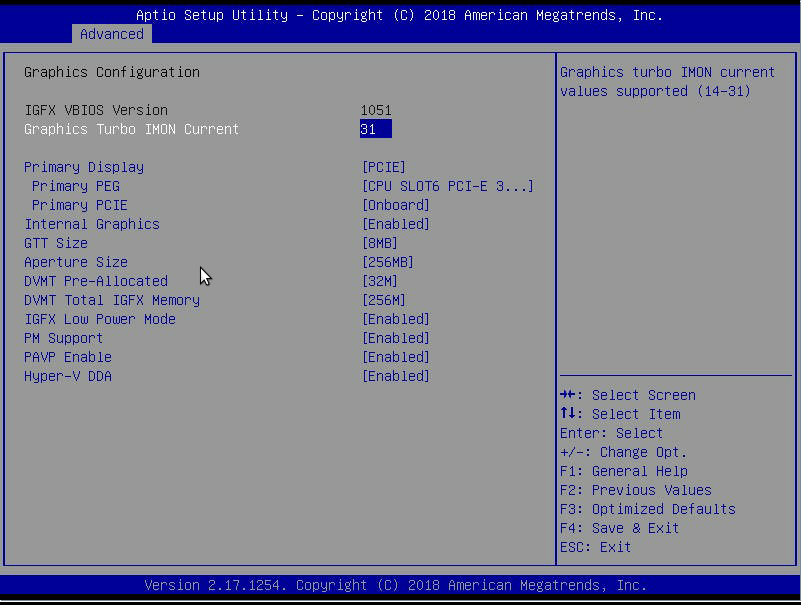
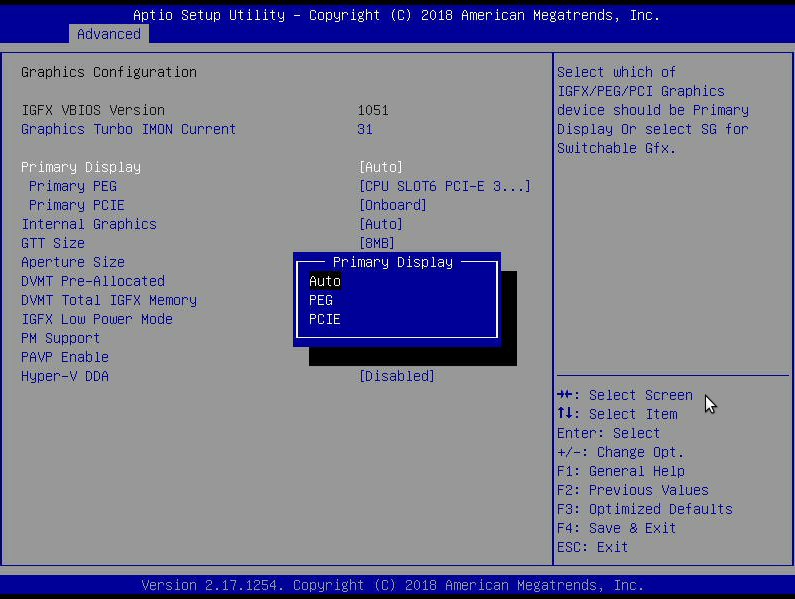
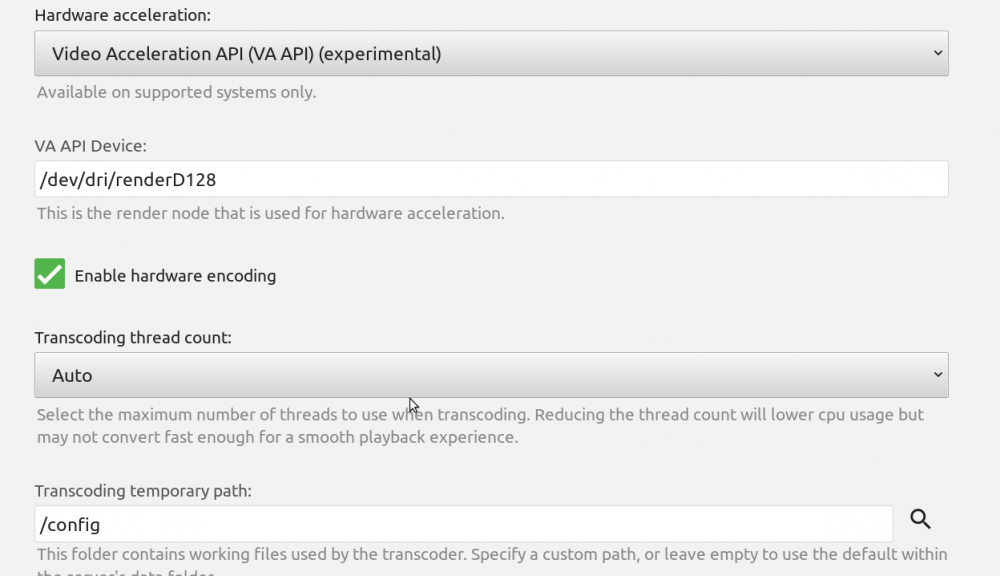
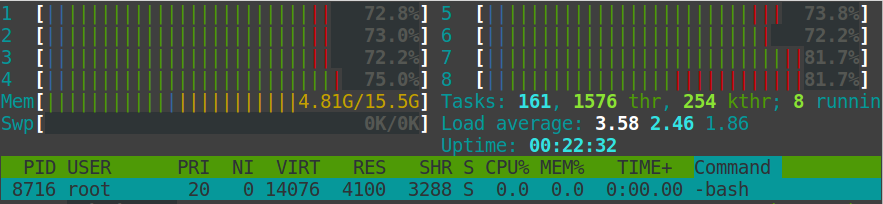
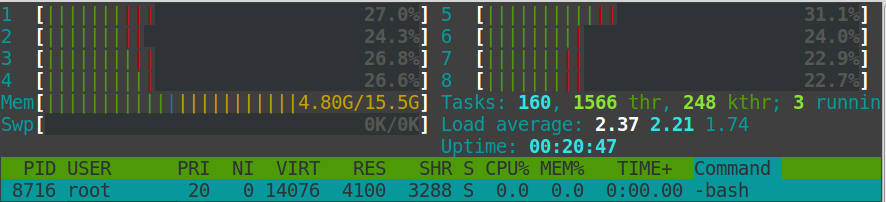
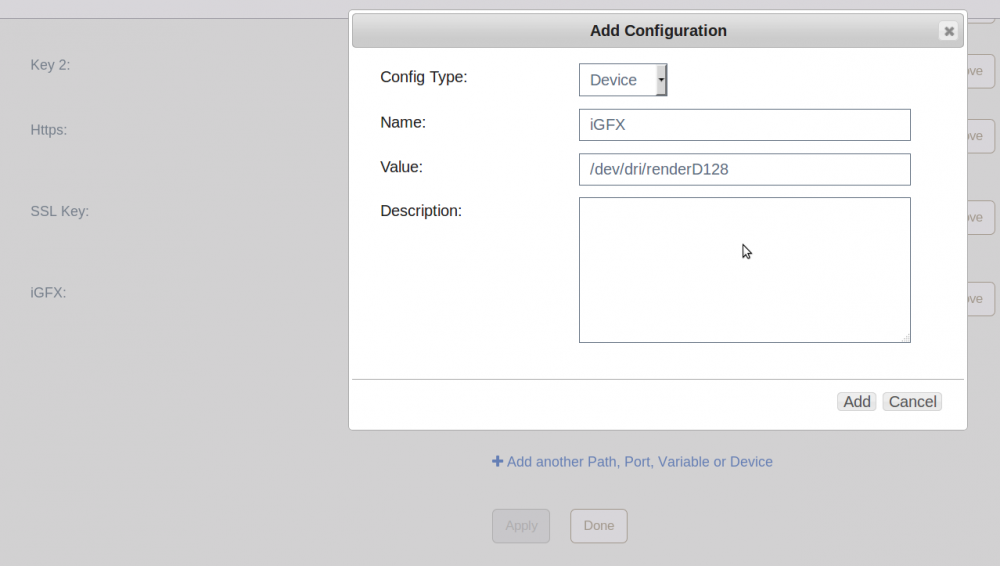
I can confirm this works with a Supermicro X11SSH-F c236 chipset and an Intel Xeon CPU E3-1245 v6 on unRAID 6.5.1-rc3. Initially I had trouble getting /dev/dri to show up but removed nomodeset from the syslinux append line and no need for i915.alpha_support=1. My BIOS is Version: 2.1a which is needed for the Xeon v6: BIOS lies as there is no IGFX option but here's my current config below: In my go file I added this: #enable module for iGPU and perms for the render device modprobe i915 chown -R nobody:users /dev/dri chmod -R 777 /dev/dri I'm not sure if this is the proper way to do it but in my EmbyServer docker I added the device /dev/dri/renderD128 with +Add another Path, Port, Variable or Device And in the Emby transcoding section I have it setup like this: And this is is what htop looks like before and after. This is transcoding a 1080p to 720@1Mbps and also one movie was direct playing since someone started a movie. without hardware acceleration: with hardware acceleration: Also console redirection may not work with the iGFX as the main graphics in unRAID but will work up until unRAID loads plus all other IPMI functions do work. I think other c236 boards will work like the X11SSA-F, X11SSI or X11SSM-F. I was looking at the X10SLH-F also which is a c226. Also Emby does have a Quicksync option. I tried just adding the/dev/dri to the docker but I couldn't get that to work. I was able to get VAAPI to work as shown above. So if anyone knows a better way let me know.
-
Did you ever try the speedtest docker? This isn't a problem with the plugin itself. It's a problem with the speedtest-cli script running on unRAID natively. I cannot get consistent results anymore with the script. I can with the docker running the same script, same python. My point was there may be a problem with 1000 upload speeds and the speedtest-cli which would have to be taken up with author of the script on his github.
-
Is that 1GB up and down?
-
Maybe it's the 1000 up.
-
The speedtest cli script doesn't seem to do well with gigabit speeds. It's been talked about before. If I could find a better solution I'd use it.
-
That would require more packages than this plugin is intended for. Any media apps require tons of packages. This is more of a one or two package repo. You might look at a docker or a music docker like libresonic. Thats what I use for mobile devices and I believe it will transcode flac.
-
I don't really add the newer requests to the older versions of unRAID. I added a version of ddrescue to the older repos. Let me know if it works. You could also try the one from 6.3+ manually and I will update if it works https://github.com/dmacias72/unRAID-NerdPack/raw/master/packages/6.3/ddrescue-1.21-x86_64-1.txz
-
Added dry
-
Added sdparm
-
If you put it in the root of your flash drive then run upgradepkg /boot/nut-2.7.4-x86_64-2_slonly.txz from the command line
-
Here's the previous driver.https://github.com/dmacias72/NUT-unRAID/raw/master/packages/nut-2.7.4-x86_64-2_slonly.txz Try installing v2 plugin. Make sure it's stopped. Then install this nut version. Then try it out. Also what settings are you using to shutdown (your Nut settings from the settings page)? What method are you using to shutdown? Battery level, runtime left or Time on Battery?
-
I may be able to point you to some older version. I'll have to check if it's compatible with the plugin now
-
Did you try Reset Filters and Check for Updates? Refresh browser cache? What browser? And what do you mean by A and h?
-
Yes. That's partly why there's an exclusion setting
-
The ± 10% is for max speed with low nose adapter. PWM is ± 20% min speed. There's also rounding since the fan speed % is based on 1-64. So for instance 31% & 32% would be the same value of 20. Then there's also some rounding in the actual calculation because of temp reading fluctuations. A rough example, temp readings can flip back and forth from 39° to 40° if you run ipmi-sensors every sec. So I implemented some rounding so it might not send a command till it differs ± 2°. This is so it's not constantly sending ipmi commands for virtually no change.
-
Try setting fan mode to Full Speed so the fans aren't controlled by the bmc at all. The pulsing along with the event logs is definitely a threshold problem. What exactly is the message from the event log? For my hard drives I have 2 Noctuas connected with their splitter set to 200/200/200 for FANA and fancontrol set 25/45@28%/100%. If it gets stuck again try using the Reset BMC button on the first page of settings. Maybe look back through the thread for X11 specific issue. I seem to remember some others having issues but don't remember if they solved them. Also you can try running the ipmi fan commands manually on FANA or FAN1234 and see if they stay or pulse. I can give you the ipmi raw commands.
-
It's added
-
I forgot there is a button to reset the bmc on the settings page. It hard resets the ipmi. But unless you connected via network settings it wouldn't work since something locally was messed up between bios and bmc. At least you got it sorted out.
-
First I would check that sensors still work from the Supermicro web page. Remove the plugin. Then delete the whole /root/.freeipmi directory. Rename or delete the /boot/config/plugins/ipmi directory. Then reboot. Check the log for any ipmi errors. Reinstall the plugin. Also you could try connecting to ipmi through network settings if you can't get local working again.
-
This had been more of an issue since I don't know when during the 6.4 dev cycle. Something with the native unRAID network just throws this off. So what I may end up doing is creating a docker. Here's a link to my personal docker git which you can add to the Docker Repositories/Template Repositories. https://github.com/dmacias72/docker-templates There is a speedtest docker in there that seems to give me better consistent results. UnRAID gives me a 25-26 ms ping and the docker is half that. It's a run and stop docker and the results will be in the docker log.
-
I'm not really sure. Other than changing settings might help.



