





whipdancer
Members
-
Joined
-
Last visited
Everything posted by whipdancer
-
From what I've been learning about Proxmox, core count seems to be very important. I wouldn't count on the G8505 being sufficient to run everything you've mentioned virtually, but that's just IMO.
-
I have no idea if they are meant to be used sparingly or not - I've never heard that before. A stress test is used to help identify any immediate issues. The assumption is that if there is a weak link present, 300+ hours of constant use could/should find that weak link and cause it break, hopefully. Completely anecdotal at this point as I don't know of any large study done on the matter. Backblaze does a basic prep of a drive before it goes into service and they are the only group I'm aware of that both tracks and publishes their stats. I use any of a number of basic tools to do a surface test. Same with the DOD wipe. A google search can point you to a bunch of options. It mostly depends on what you have available to do the testing. I use an old windows desktop to do the surface test and DOD wipe because the wipe seems to tax system resources enough that it interferes with normal use. Plus it takes about a week to do, so I need something that I can leave alone for a while.
-
I rarely buy new drives unless they are a great deal. I primarily focus on used enterprise drives (just added 4x 26tb Sea Exos drives). They come with a 3 year warranty handled by AllState. I just had to RMA 3x 18tb WD Red Pro (bought new 3 years ago) and 3x Sea Exos 18tb drives (bought used 3 years ago). The WD are all being replaced by WD. The Exos were all refunded. I’m still waiting on WD as only 1 replacement drive has arrived so far (about 3 week turn-around at this time). The quick refund on the Exos is why I already have replaced them with the 26tb drives. I no longer do advanced replacement with WD, because they lost one of my RMAs a few years ago and it took over 6 months to get the full retail price charged to my card reversed because of their mistake.
-
I couldn’t find any scandal about Seagate selling used drives as new, but I did find a bunch of complaints about 3rd parties selling used drives as new. That’s got nothing to do with Seagate and everything to do with knowing who you are buying from. According to Forbes and USA Today articles - It’s foolish to think that only buying WD Gold or Red Pro guarantees anything. I bought 4 Red Pro. 3 were exchanged under warranty in the first 18 months. That’s why my bottom line is $/TB and mostly buy used enterprise drives.
-
I use a mix of enterprise drives, nas drives, consumer desktop drives. All have worked without issue. Examples from all categories have failed prematurely. There are specific types of drivers that are less performant or less optimal (SMR), but even those will still work. I have removed all SMR drivers from my system, but that was because I wanted to maintain a specific level of performance, not because it had to be done. Outside of your specific aesthetic requirements and tolerance for warranty requirements, I don’t think it actually matters that much. I shop based on my minimum size requirement and $/TB, which leads me to frequently buy used enterprise drives.
-
I use a Firewalla device to do this.
-
They should be fine. No. Unless I'm mistaken, they are manufactured by WD and sold with HP's private label on them. Some people swear by WD, others by Seagate or Toshiba. I buy which ever is the best deal based on my needs and my target HD size. Right now, any drive I buy needs to be at least 20TB for it to make sense for my setup (I'm after density, not drive count) - so whoever has the best deal on a drive of that size is where my money goes. I probably buy used drives from ServerPartDeals more than anything else - because they tend to be the best value. My anecedote on drive reliability - 4x new WD Red Pro - total use now going on 4 years, but 3 were replaced under warranty within the first 12 months 3x new Seagate Exos- coming up on 2 years no issues 4x used Dell (WD) HC drives - 1 replaced in the first 3 months - going on 4 years since with no issues 2x used Seagate Exos - going on 1.5 years no issues I'm currently stress testing 2x Seagate external 26TB drives that I plan to put into my system. Before that happens, they will have had a full surface test + DOD Mil spec 3 pass wipe done. If the smart reports are clean once all that is completed, I will shuck them and 1 will go into my system, the 2nd will become a ready spare drive.
-
My guess would be it's a fake based on the seller and price. I doubt the seller is knowledgeable enough to know how to determine authenticity, nor interested in doing so (assuming the seller has ever actually handled the merchandise) since they obviously do not special in computer related equipment. I also don't think equivocating over $100-150 when its something that should have a lifetime use of 7 to 10 years is worthwhile. All that said, doesn't mean it won't work.
-
That’s right snowflake, data is how I cope. Obviously, not something you’re comfortable with.
-
The data says otherwise. Statistically speaking, your drives all came from the factory with bad sectors. So, I won't be holding my breath because I'm prepared for drives to cause problems. But you do you. I'll continue to take a less binary approach to dealing with it. I'll happily take any of those bad drives off your hands (if they're not SMR and at least 8TB). BTW, my first HD was a 10MB 5.25" MFM drive - but I don't think that the fact that I'm old means anything here.
-
I disagree that it is, by definition, medium to high risk. That's only true if you leave it in active use. You pull the drive out of the live environment. Next steps would largely depend on whether you view it as a black & white/binary situation or if you have other constraints to consider. Most of the hardware folks I know would say it gets replaced. Period. But most of them live in corporate environments where that's been SOP their entire careers - and that carried over to how they view their personal projects. Some of the hardware folks I know are far more circumspect about it. Everything I read about bad sectors indicates that they are a normal and expected occurrence in the lifetime of a hard drive. It is an increasing bad sector count over a couple of weeks or a month that is the best indicator a drive needs to be replaced. You can accelerate that test period by pulling it out of service and running something like a preclear on it.
-
Sounds like someone who works in a data center or manages these things for an enterprise - where the cost of pulling and replacing isn't even on the level of a rounding error. Not to mention, that's not accurate. The drive has bad sectors. If there are no additional indicators that point to problems or unless the count continues to increase, there is no reason to assume the drive is bad. My oldest (current) drive is sitting at 17 reallocated sectors - like it has been for the last 4 years. If the drive is under warranty, I'm sending it back. If the drive is not under warranty, I'm not going to automatically assume the drive is now bad. The reason I have 2 parity drives and I always keep a spare drive that has already been precleared - so that I don't have to assume the worst about something that could simply be a 1 time issue. I will pull it out of my array and run a full preclear/dd against it to see if anything else pops up on the smart report. If nothing else comes up, it's going back into use.
-
I think so, but I've never tried to pass an iGPU, only a separate GPU (and it was always an NVIDIA GPU). Early on, I had to make sure the correct drivers were available both on my system and in my VM, but that was years ago - so I'm not sure anymore.
-
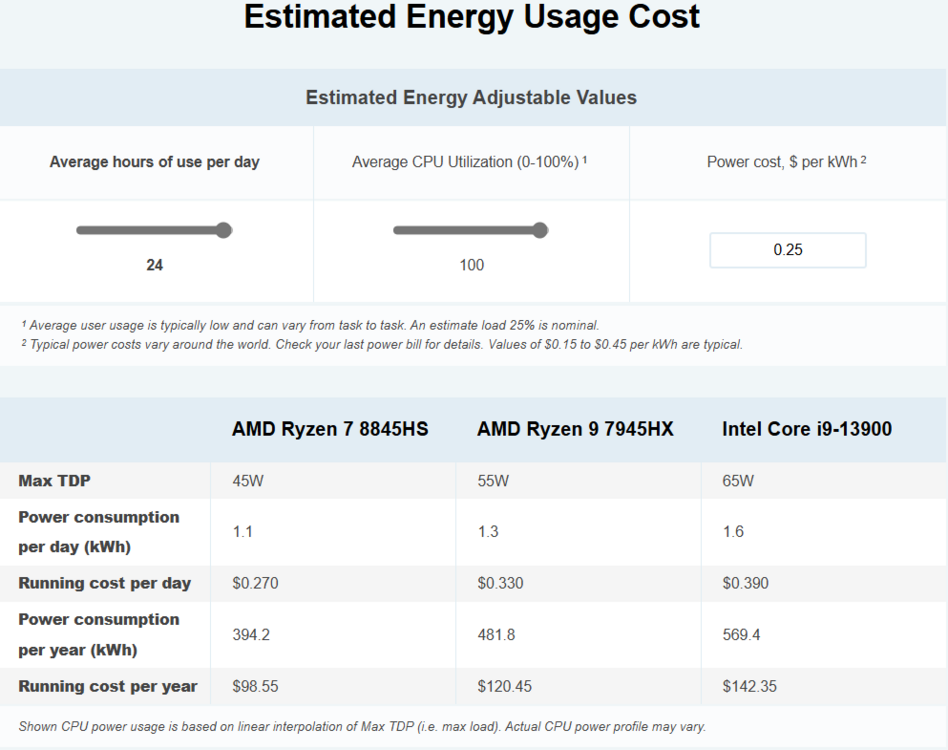
I looked at that Topton board as well. The 8845HS and 7940HS aren't remotely in the same league as the 7945HX (and that's really the issue with the mobile cpus - you have a to find a MB with them already on it). There are a few options with the i9-13900HX, which is pretty close to the 7945HX and also rated at 55W TDP. I don't need more than a couple of SATA connectors because I use a 9300-16i HBA for most of my drives. Once I finish paring down my array, the total drive count will be 16 - 12 in the array including 2x parity, all on the HBA; 1 spare HDD on the HBA; 1 optical drive on a sata connector. I would replace my 2x SATA pool drives with 2x nmve drives - leaving me 1 spare SATA and 3 spare HBA connections. The 8845 is rated at 45W and the 7945HX is rated at 55W TDP. The 13900 is 65W TDP. Any of the 3 CPUs will pull more than 65W under full load because TDP != actual usage. Even so, here's a projection assuming 24/7 usage at their max TDP for a year -
-
What motherboard are you using? Does the VM need drivers for a Radeon 610M?
-
The goal is to move to a smaller footprint - I'm downsizing from my Antec NineteenHundred full server case and reducing my array size from 19 drives to 12 drives - just removed drive #13 yesterday and the final (hopefully) parity rebuild is in progress. Will be moving to a physically smaller setup, but I still run 20 or so docker containers (no VM's at this time, but it is possible) including Plex, Jellyfin, Arrrs*, Nextcloud, VSCode, Traefik, Nginx, and others - so I want to keep as much of the muscle as I reasonably can. Looking for opinions on 2 ideas I have as the basis for my rebuild - Using the i9-13900 as the basis for the build Will work on mATX or ITX form-factor iGPU (HD770) included 65W TDP Impressive performance Plenty of cores Kinda pricey (~$550 for cpu + ~$250-$500 for mb + ~$250-$500 memory) Using the Ryzen 9 7945HX Minisforum BD795m is available, other options/makers have the 8845 and 7940 available iGPU included (Radeon M610) 55W TDP Impressive performance Plenty of cores Kinda a bargain (~$400 currently on Amazon + $250 memory) Need to buy new drives to take full advantage because I don't own 2x NVME These CPU's are only available as MB+CPU units Single PCIE-5 x16 slot Most of these have limited sata3 connectors on board (2 or 4 connectors) Most have a single RJ45 connector 2.5G
-
That's not true, but that's also not the point. (Don't expect a 4K transcode to look like the source did when using a GPU). An iGPU is a GPU and works extremely well for Plex. It has the advantage of being included with many a CPU.
-
That's a pretty nebulous ask. Best value is completely dependent on intended use. An i3 is a great option, unless it's not up for what you want to do.
-
FOMO is not a reason to switch. If you're happy with your current solution, then there is no reason to switch. If there are short-comings with your current solution, then maybe spell out what you don't like about your current solution and people here can offer feedback on how well Unraid addresses those.
-
How are you planning to transcode?
-
I don't see much value proposition in the off-the-shelf options unless "simple first" is your primary focus. You end up with a solution that requires full replacement when you reach it's current limits. I was able to piece-meal replace my system continuously for about 10 years - never having to shell out for a complete replacement until every component reached it's true end-of-life and replacements were now more expensive than a complete upgrade. Like all opinions, it's worth the gold-leaf embossed velum it's printed on - or not.
-
I'd have to go read the docs again. I set up Unraid in 2012 and last changed out my flash drive that same year. I've literally just moved the flash drive to new hardware each time I upgraded. Haven't "reinstalled" since I started.
-
Yes, I've always understood thumb drive & flash drive to mean essentially the same thing. I'm not aware of any specific recommendations and didn't find anything with a quick search - you could ask in the pre-sales forum - they're pretty good about responding.
-
I'm not familiar with DOK. Is that a thumb drive or flash drive?
-
I re-read that article. Where does it say that the original owners didn't know how to store or handle the drives? It mentions a few reasons - but only 1 of them is related to the drive itself - "Some arrive on hard drives that have already begun to fail..." Does this paragraph mean the original owners were mishandling the drives? I would put that on Iron Mountain - why would they offer long-term storage of a hard-drive when their storage methodology isn't actually promoting the longevity of the drive? Why would you expect any company that isn't involved in the technical details of hard drive operation to know that copying data onto a hard drive and then putting that hard drive into cold storage is a bad idea? My focus is primarily DevOps and DR/BC - and I have never had anyone bring up the fact that hard drives are not suitable for long term cold storage. Now that I've read about it, I get it. But why should I have known it was an issue previously?

