





whipdancer
Members
-
Joined
-
Last visited
Everything posted by whipdancer
-
That’s right snowflake, data is how I cope. Obviously, not something you’re comfortable with.
-
The data says otherwise. Statistically speaking, your drives all came from the factory with bad sectors. So, I won't be holding my breath because I'm prepared for drives to cause problems. But you do you. I'll continue to take a less binary approach to dealing with it. I'll happily take any of those bad drives off your hands (if they're not SMR and at least 8TB). BTW, my first HD was a 10MB 5.25" MFM drive - but I don't think that the fact that I'm old means anything here.
-
I disagree that it is, by definition, medium to high risk. That's only true if you leave it in active use. You pull the drive out of the live environment. Next steps would largely depend on whether you view it as a black & white/binary situation or if you have other constraints to consider. Most of the hardware folks I know would say it gets replaced. Period. But most of them live in corporate environments where that's been SOP their entire careers - and that carried over to how they view their personal projects. Some of the hardware folks I know are far more circumspect about it. Everything I read about bad sectors indicates that they are a normal and expected occurrence in the lifetime of a hard drive. It is an increasing bad sector count over a couple of weeks or a month that is the best indicator a drive needs to be replaced. You can accelerate that test period by pulling it out of service and running something like a preclear on it.
-
Sounds like someone who works in a data center or manages these things for an enterprise - where the cost of pulling and replacing isn't even on the level of a rounding error. Not to mention, that's not accurate. The drive has bad sectors. If there are no additional indicators that point to problems or unless the count continues to increase, there is no reason to assume the drive is bad. My oldest (current) drive is sitting at 17 reallocated sectors - like it has been for the last 4 years. If the drive is under warranty, I'm sending it back. If the drive is not under warranty, I'm not going to automatically assume the drive is now bad. The reason I have 2 parity drives and I always keep a spare drive that has already been precleared - so that I don't have to assume the worst about something that could simply be a 1 time issue. I will pull it out of my array and run a full preclear/dd against it to see if anything else pops up on the smart report. If nothing else comes up, it's going back into use.
-
I think so, but I've never tried to pass an iGPU, only a separate GPU (and it was always an NVIDIA GPU). Early on, I had to make sure the correct drivers were available both on my system and in my VM, but that was years ago - so I'm not sure anymore.
-
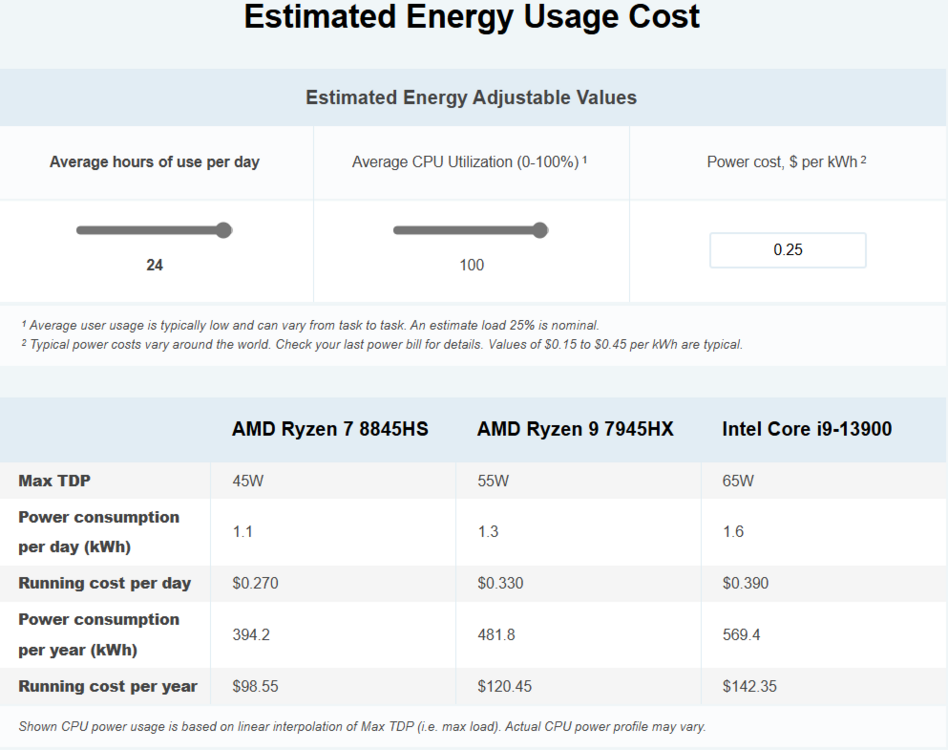
I looked at that Topton board as well. The 8845HS and 7940HS aren't remotely in the same league as the 7945HX (and that's really the issue with the mobile cpus - you have a to find a MB with them already on it). There are a few options with the i9-13900HX, which is pretty close to the 7945HX and also rated at 55W TDP. I don't need more than a couple of SATA connectors because I use a 9300-16i HBA for most of my drives. Once I finish paring down my array, the total drive count will be 16 - 12 in the array including 2x parity, all on the HBA; 1 spare HDD on the HBA; 1 optical drive on a sata connector. I would replace my 2x SATA pool drives with 2x nmve drives - leaving me 1 spare SATA and 3 spare HBA connections. The 8845 is rated at 45W and the 7945HX is rated at 55W TDP. The 13900 is 65W TDP. Any of the 3 CPUs will pull more than 65W under full load because TDP != actual usage. Even so, here's a projection assuming 24/7 usage at their max TDP for a year -
-
What motherboard are you using? Does the VM need drivers for a Radeon 610M?
-
The goal is to move to a smaller footprint - I'm downsizing from my Antec NineteenHundred full server case and reducing my array size from 19 drives to 12 drives - just removed drive #13 yesterday and the final (hopefully) parity rebuild is in progress. Will be moving to a physically smaller setup, but I still run 20 or so docker containers (no VM's at this time, but it is possible) including Plex, Jellyfin, Arrrs*, Nextcloud, VSCode, Traefik, Nginx, and others - so I want to keep as much of the muscle as I reasonably can. Looking for opinions on 2 ideas I have as the basis for my rebuild - Using the i9-13900 as the basis for the build Will work on mATX or ITX form-factor iGPU (HD770) included 65W TDP Impressive performance Plenty of cores Kinda pricey (~$550 for cpu + ~$250-$500 for mb + ~$250-$500 memory) Using the Ryzen 9 7945HX Minisforum BD795m is available, other options/makers have the 8845 and 7940 available iGPU included (Radeon M610) 55W TDP Impressive performance Plenty of cores Kinda a bargain (~$400 currently on Amazon + $250 memory) Need to buy new drives to take full advantage because I don't own 2x NVME These CPU's are only available as MB+CPU units Single PCIE-5 x16 slot Most of these have limited sata3 connectors on board (2 or 4 connectors) Most have a single RJ45 connector 2.5G
-
That's not true, but that's also not the point. (Don't expect a 4K transcode to look like the source did when using a GPU). An iGPU is a GPU and works extremely well for Plex. It has the advantage of being included with many a CPU.
-
That's a pretty nebulous ask. Best value is completely dependent on intended use. An i3 is a great option, unless it's not up for what you want to do.
-
FOMO is not a reason to switch. If you're happy with your current solution, then there is no reason to switch. If there are short-comings with your current solution, then maybe spell out what you don't like about your current solution and people here can offer feedback on how well Unraid addresses those.
-
How are you planning to transcode?
-
I don't see much value proposition in the off-the-shelf options unless "simple first" is your primary focus. You end up with a solution that requires full replacement when you reach it's current limits. I was able to piece-meal replace my system continuously for about 10 years - never having to shell out for a complete replacement until every component reached it's true end-of-life and replacements were now more expensive than a complete upgrade. Like all opinions, it's worth the gold-leaf embossed velum it's printed on - or not.
-
I'd have to go read the docs again. I set up Unraid in 2012 and last changed out my flash drive that same year. I've literally just moved the flash drive to new hardware each time I upgraded. Haven't "reinstalled" since I started.
-
Yes, I've always understood thumb drive & flash drive to mean essentially the same thing. I'm not aware of any specific recommendations and didn't find anything with a quick search - you could ask in the pre-sales forum - they're pretty good about responding.
-
I'm not familiar with DOK. Is that a thumb drive or flash drive?
-
I re-read that article. Where does it say that the original owners didn't know how to store or handle the drives? It mentions a few reasons - but only 1 of them is related to the drive itself - "Some arrive on hard drives that have already begun to fail..." Does this paragraph mean the original owners were mishandling the drives? I would put that on Iron Mountain - why would they offer long-term storage of a hard-drive when their storage methodology isn't actually promoting the longevity of the drive? Why would you expect any company that isn't involved in the technical details of hard drive operation to know that copying data onto a hard drive and then putting that hard drive into cold storage is a bad idea? My focus is primarily DevOps and DR/BC - and I have never had anyone bring up the fact that hard drives are not suitable for long term cold storage. Now that I've read about it, I get it. But why should I have known it was an issue previously?
-
I didn't think it would work, but I didn't know why. This clears it up in my head, at least.
-
I don't think that's what OP is asking about. Conceptually - someone has 16TB of space. If that space is comprised of a single 16TB disk, OP argues that should take 2x as long because the process has to go from 1 to 16 on a single disk. If that space is comprised of 2x 8TB disks, then OP wants to run a parity check against both disks at the same time. In theory, simultaneously running the parity check against 1-8 (disk 1) and 9 - 16 (disk 2), in parallel. Colloquially, starting both at the beginning and in the middle of your data at the same time. I've no horse in this race, just trying to make sure I understand OP correctly.
-
Which article are you referring to?
-
Is your container set to use quicksync (I think that's what it's called with the igpu)?
-
Doh, yes. I'll fix it.
-
Go with the largest you can afford, replace your cache parity drive, and then use the old cache parity drive to replace your smallest data drive. At $9.17/TB vs $9.29/TB, the Utrastar 12TB and 14TB, respectively, are the best options. For that small of a price difference, I will always pick the larger size. Unless I can get 2 of the smaller size... I usually set a hard budget when I go looking. Early on, when I was moving from 4-6-8TB drives to 14TB+ sizes, I sometimes opted to get 2x 12TB or 2x10TB because I could make a larger impact on my overall system (replacing 2 substantially smaller drives) for the $ I had in my budget at that time.
-
No, the standard was always there, but not all drives supported it (it previously only found on enterprise class drives). For some reason, that feature seems to be making its way down to retail class drives, but not consistently across brands/models (anecdotally speaking). I ran into it because I started buy enterprise class drives. Just an FYI if you run into the 3.3v problem: My solution was to modify my power cables. My sata power cables were not flat, wide, stranded cables, but were 5 separate wires (like this one), I clipped the 5th wire (the side that corresponds to pin 3) and that cleared up the issue for me. I used the wiring diagrams for sata power to understand what wires were doing what and it seemed like it should work. It has and no issues in the last 5-ish years with my solution.
-
I've never heard of that happening. I've added drives formatted in NTFS, Fat, ExFat (or whatever that is), whatever format an older Mac would have used, as well as a few different formats from *nix systems - the only time they didn't show up was the 3.3v issue or the drive was bad.

