





jmztaylor
Members
-
Joined
-
Last visited
Everything posted by jmztaylor
-
Dmesg shows nothing at all when plugging the hub in. Or when plugging a device into the hub. But plugging the device into the same port the hub was plugged into, it shows up and functions normally.
-
I have a linux VM and passing through a USB controller. It is working fine with 1 USB hub. If I plug a second one in, nothing is detected. Either by the VM or Unraid. If I plug a device into that same port it is seen in the VM. Is this just a limitation with KVM or am I just missing something? tower-diagnostics-20240617-1932.zip
-
Yes please lock
-
Looking through my purchase history I was incorrect. Mine is a different chipset. This is the exact one I purchased and haven't had a single issue with it https://www.amazon.com/gp/product/B0BYXKPMBV/ref=ppx_yo_dt_b_search_asin_title?ie=UTF8&psc=1
-
I have this exact one and it works without issue. I do not know the tech specs of what is required. But I just checked and they do not show in my BIOS either. But they all show in Unraid without issue. I think I remember mine saying it cannot be used for boot devices. This is just my experience and it might not help you at all.
-
Sounds good. Thanks
-
Extended smart passed without issue and parity check ran without new errors. So I assume just a hiccup and good to go now? tower-diagnostics-20240302-1917.zip
-
Ok. I cancelled the one pending and started it from scratch. I will report back if anything new shows up
-
Parity never finished as its set to partially run overnight. Should I just continue it and see what happens at the end?
-
Parity check started and has some errors on the parity drive itself. Wanted to get input before doing anything. tower-diagnostics-20240301-0927.zip
-
I can confirm it is not showing like that anymore.
-
Why is this plugin showing up as blacklisted now?
-
Depends if you are using a controller presently or in the new server. Sometimes they modify the reported serial number. Take screenshot of current disk assignments with their serial numbers and slots. But in a perfect world yes, just swapping the drives over and the usb drive should just work. If Unraid detects anything strange with the drives in the new machine it won't start the array to prevent data loss. So it won't destroy anything if it doesn't detect the right drives.
-
This is deprecated in favor of @ich777 all in one solution.
-
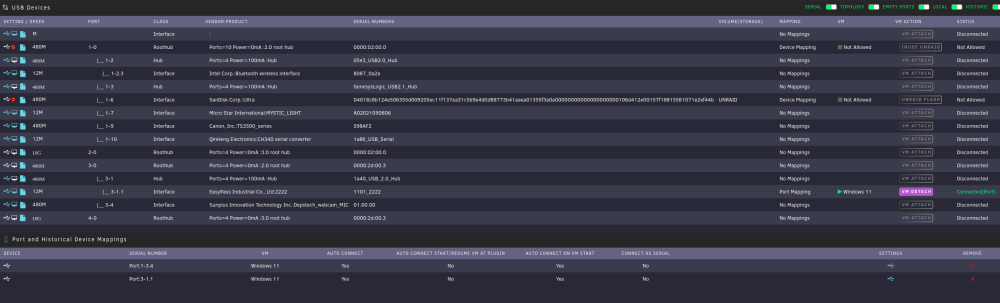
So I did the port instead and it will not show up in the VM unless I stop and start the VM. Not sure why this one thing is being so odd with USB.
-
What I have determined is the controller, when off shows up as the entry with IDLE. Turned on its the next line Even selecting both of them to pass through it doesn't work. Dec 4 17:48:21 Tower usb_manager: Info: rc.usb_manager usb_add 8BitDo_IDLE_E417D8F8FA8C /dev/bus/usb/001/024 001 024 Dec 4 17:48:21 Tower usb_manager: Info: rc.usb_manager usb_remove 8BitDo_8BitDo_Ultimate_wireless_Controller_for_PC_E417D8F8FA8C

-
Also seem to have a similar problem with the 8bitdo controller I have also. Using your USBM, doesn't seem to work at all for it.
-
no such file for usb.iniThat was it. As for the USB, its still changing IDs each time I switch on the KVM. So I'm going to just add each of them as they pop up. It actually seems like its cycling through 5 of them. Some chinese garbage Im sure. Thanks for the help!Thats what I started with doing. I assumed the Windows driver didn't like it for some reason. In the same context since I am running this with a drive passed through, if I boot the unraid server from that drive which is my windows install the bluetooth works without issue.
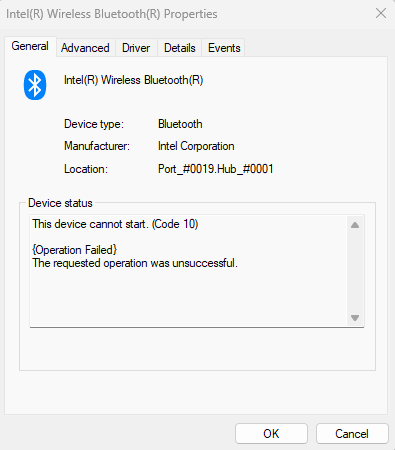 That sure fixed the issue with my KVM. Changing to usb 3 didn't do anything for my bluetooth issue though.So I am not sure what information is needed so diags are attached. I have a PCI wifi/bluetooth adapter trying to passthrough to a VM. The wifi portion is working but the bluetooth portion is stating unable to start in device manager in windows. The bluetooth module is showing as USB device as it plugs into a header on the motherboard. The other issue is, I have a 2-port KVM that I use to switch between my pc and the VM. Passthrough works just fine once. Then it seems after I switch it once or twice, the USB ID changes sequentially. So if I stop the VM and try to restart it, it fails since its tied to the wrong USB ID now. Is there anything I can do to fix this? tower-diagnostics-20231204-1527.zipI didnt mean anything negative towards you at all. I use a lot of yours so was the first that came across my mind. You are on top of your support thread like a hawk. But for someone that isn't on that thread all the time, its a lot of info to try and get through for things that might have already been asked or issues ran into. TBF, yes that would be a lot but admins could do a lot too more easily than you.So one of my biggest issues with the forum is developers that have a huge amount of CAs and single threads for all of them. Finding any specific information is nearly impossible. For the developer this is easier to maintain support, but for end users its a nightmare. Why not break these developers into their own subforum and have a thread for each app? Most people can agree repeating questions is an annoyance and the current setup encourages this without meaning to. In all reality how is any information supposed to be found for example in @ich777 support thread at 140 pages long. (Even though he is very active and quick to reply to posts) Search is average at best and for specific issues the wording might be different so impossible to find. And if searching fails users might start from the first page but that information might be out of date by the time they get to it. Just my .02. And it wouldn't be that hard to implement.




