Skip to content
View in the app

A better way to browse. Learn more.

Unraid

A full-screen app on your home screen with push notifications, badges and more.

To install this app on iOS and iPadOS
  1. Tap the Share icon in Safari
  2. Scroll the menu and tap Add to Home Screen.
  3. Tap Add in the top-right corner.
To install this app on Android
  1. Tap the 3-dot menu (⋮) in the top-right corner of the browser.
  2. Tap Add to Home screen or Install app.
  3. Confirm by tapping Install.

jmztaylor

Members
  • Joined

  • Last visited

Everything posted by jmztaylor

  1. Yeah I was doing some troubleshooting previously and guess I forgot to change it back. Probably last year sometime.
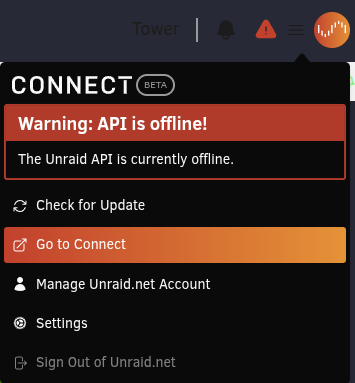
  2. Sorry, meant that all docker updates are working but if I pick any NEW app to install I get that error.
  3. So just adding more info, as I am unable to do all the switching stuff right this minute, but a couple reboots the unraid connect is working again and I realized that updates to docker apps are working too. Its just installing a new app
  4. Also just for the full picture this issue started the same time as this also
  5. I don't have a spare usb drive thats not blacklisted. But I do have a second unraid server setup and it doesn't have this issue. Same switch/router/network config
  6. Yeah already checked those. Everything is working correctly except this
  7. No matter what I try to install from Community Apps I get the same error docker: Error response from daemon: Head "https://ghcr.io/v2/zhliau/fika-spt-server-docker/manifests/3.11.3": denied: denied. Doesn't matter the repo or app. On another note I am getting Warning: API is offline! for Unraid connect. It is a red triangle on the dashboard tower-diagnostics-20250410-1731.zip
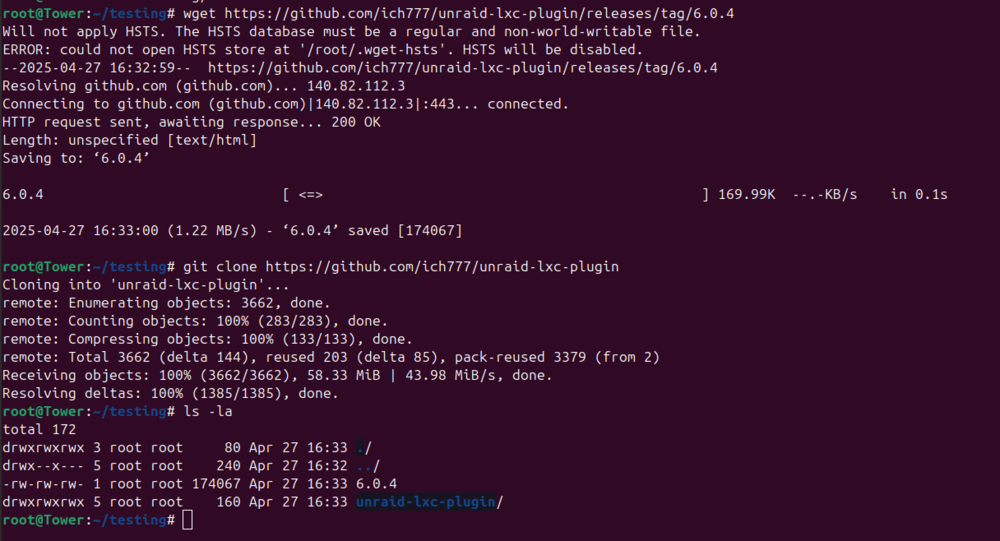
  8. After doing those steps, run the following command and attach a screenshot. ls -la
  9. Yeah I noticed disk6. Its an old laptop hard drive and figured it would slow everything down. So I pulled it. Rebuilding parity now and its writing at 173MB/s. So I think that drive might have just been screwing everything up finally and even when not being written to, causing problems.
  10. This is what it looks like with nothing else accessing the disks.
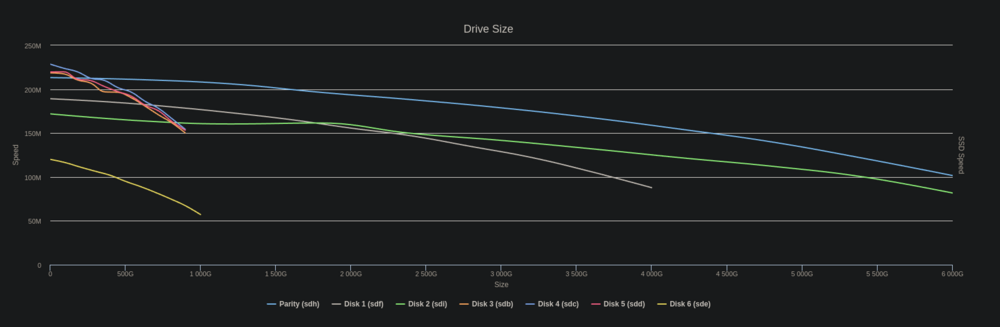
  11. So it seemed to help a little but still doesn't seem right. Each drive is writing about 60MB/s. This being parity and disk 1. Both of these are on the onboard sata ports.
  12. Been using this config for awhile now without issue and all of the sudden barely getting 20MB/s write speeds (10MB/s on parity and 10MB/s on drive being written to). Typically during mover or moving large files this would be around 100MB/s. There have been no hardware changes. Reboots don't fix the issue either. tower-diagnostics-20241126-0946.zip
  13. Support thread for Buggregator. I did not create this, only the Unraid template. https://github.com/buggregator/server
  14. I tested and one way to do this is run the script with sh script.sh Instead of trying to do ./script.sh I don't know if this is the "right" way to do it.
  15. /usr/local/emhttp/plugins/sas-spindown/drive_types #!/bin/bash # Automatically generated, Mon Sep 9 09:41:48 CDT 2024 declare -A DRIVE_TYPE DRIVE_TYPE[sda]=OTHER DRIVE_TYPE[sdb]=SAS DRIVE_TYPE[sdc]=SAS DRIVE_TYPE[sdd]=SAS DRIVE_TYPE[sde]=OTHER DRIVE_TYPE[sdf]=OTHER DRIVE_TYPE[sdg]=OTHER DRIVE_TYPE[sdh]=OTHER DRIVE_TYPE[sdi]=OTHER /usr/local/sbin/sdspin #!/bin/bash # # Deal with spin up/down status of HDDs # # This script is initiated from emhttpd, like so: # # sdspin <device> [up | down | status ] # # "device" is the HDD rdev name, such as "sdd". # # up == Spin the drive up # down == Spin the drive down # status == return the current status via rc # # Default (if no $2) is "status". # Exit code: # 0 - Success (if up/down), device spun up (if status) # 1 - Failure # 2 - Device spun down (if status) # Spin down/up SAS drives plugin # v2024.02.18 # # (c) 2019-2024 @doron - CC BY-SA 4.0 . /usr/local/emhttp/plugins/sas-spindown/functions RDEVNAME=/dev/${1#'/dev/'} # So that we can be called with either "sdk" or "/dev/sdk" Hdparm () { OUTPUT=$($HDPARM $1 $RDEVNAME 2>&1) if [[ $? != 0 || ${OUTPUT,,} =~ "bad/missing sense" ]] ; then RC=1 fi $DEBUG && { Log "debug: $HDPARM $1 $RDEVNAME" Log "debug: $OUTPUT" ; } } RC=0 case ${2,,} in "up") if IsSAS $RDEVNAME ; then $DEBUG && Log "debug: $SG_START -rp1 $RDEVNAME" $SG_START -rp1 $RDEVNAME > /dev/null || RC=1 else Hdparm -S0 fi ;; "down") if IsSAS $RDEVNAME ; then if ! IsExcluded $RDEVNAME ; then if IsRotational $RDEVNAME ; then Log "Spinning down device $RDEVNAME" $DEBUG && Log "debug: $SG_START -rp3 $RDEVNAME" $SG_START -rp3 $RDEVNAME > /dev/null || RC=1 fi else Log "Device $RDEVNAME cannot be spun down - excluded" RC=1 fi else # Not SAS Hdparm -y fi ;; "status" | "") if IsSAS $RDEVNAME ; then OUTPUT=$($SDPARM -C sense $RDEVNAME 2>&1) if [[ $? != 0 ]] ; then RC=1 elif [[ ${OUTPUT,,} =~ "standby condition activated" ]] ; then RC=2 fi $DEBUG && { Log "debug: $SDPARM -C sense $RDEVNAME" Log "debug: $OUTPUT" ; } else Hdparm -C if [[ $RC == 0 && ${OUTPUT,,} =~ "standby" && ! ${OUTPUT,,} =~ "bad/missing sense" ]] ; then RC=2 fi fi ;; *) Log "Invalid op code $2" RC=1 ;; esac $DEBUG && Log "debug: exit $RC" exit $RC /usr/local/emhttp/plugins/sas-spindown/sas-util SAS Spindown Utility (v20240218.01) sdb | HUC101890CSS200 | 1000:0073:1014:040d | n/a | sdc | HUC10189 CLAR900 | 1000:0073:1014:040d | n/a | sdd | HUC10189 CLAR900 | 1000:0073:1014:040d | n/a | Run completed. The output is at /tmp/sas-util-out. /tmp/sas-util-out { "utility-run": { "date": "20240910-09:27 CDT", "version": "20240218.01", "Unraid version": "7.0.0-beta.2", "message": "", "drives": [ { "drive": { "model": "HUC101890CSS200", "sdparm-i": "/dev/sdb: HGST HUC101890CSS200 A3F0|Device identification VPD page:| Addressed logical unit:| designator type: NAA, code set: Binary| 0x5000cca0360472b0| Target port:|designator type: NAA, code set: Binary| transport: Serial Attached SCSI Protocol (SPL-4)| 0x5000cca0360472b1| designator type: Relative target port, code set: Binary| transport: Serial Attached SCSI Protocol (SPL-4)| Relative target port: 0x1| Target device that contains addressed lu:| designator type: NAA, code set: Binary| transport: Serial Attached SCSI Protocol (SPL-4)| 0x5000cca0360472b3| designator type: SCSI name string, code set: UTF-8| SCSI name string:| naa.5000CCA0360472B3|RC=0", "controller-id": "1000:0073:1014:040d", "controller-slot": "02:00.2" } }, { "drive": { "model": "HUC10189 CLAR900", "sdparm-i": "/dev/sdc: HITACHI HUC10189 CLAR900 L7SS|Device identification VPD page:| Addressed logical unit:| designator type: NAA, code set: Binary| 0x5000cca07f0f8578| Target port:| designator type: NAA, code set: Binary| transport: Serial Attached SCSI Protocol (SPL-4)| 0x5000cca07f0f8579| designator type: Relative target port, code set: Binary| transport: Serial Attached SCSI Protocol (SPL-4)| Relative target port: 0x1| Target device that contains addressed lu:| designator type: NAA, code set: Binary| transport: Serial Attached SCSI Protocol (SPL-4)| 0x5000cca07f0f857b| designator type: SCSI name string, code set: UTF-8| SCSI name string:| naa.5000CCA07F0F857B|RC=0", "controller-id": "1000:0073:1014:040d", "controller-slot": "02:00.2" } }, { "drive": { "model": "HUC10189 CLAR900", "sdparm-i": "/dev/sdd: HITACHI HUC10189 CLAR900 L7SS|Device identification VPD page:| Addressed logical unit:| designator type: NAA, code set: Binary| 0x5000cca07f19124c| Target port:| designator type: NAA, code set: Binary| transport: Serial Attached SCSI Protocol (SPL-4)| 0x5000cca07f19124d| designator type: Relative target port, code set: Binary| transport: Serial Attached SCSI Protocol (SPL-4)| Relative target port: 0x1| Target device that contains addressed lu:| designator type: NAA, code set: Binary| transport: Serial Attached SCSI Protocol (SPL-4)| 0x5000cca07f19124f| designator type: SCSI name string, code set: UTF-8| SCSI name string:| naa.5000CCA07F19124F|RC=0", "controller-id": "1000:0073:1014:040d", "controller-slot": "02:00.2" } } ] } } { "controllers": [ { "controller": { "Slot": "02:00.2", "Class": "PCI bridge [0604]", "Vendor": "Advanced Micro Devices, Inc. [AMD] [1022]", "Device": "500 Series Chipset Switch Upstream Port [43e9]", "SVendor": "ASMedia Technology Inc. [1b21]", "SDevice": "Device [0201]", "ProgIf": "00", "IOMMUGroup": "16" } } ] }
  16. I added a controller and sas drives to my server. Installed the plugin but the sas drives still refuse to spin down. I don't see anything in syslog unless I missed something. Attached is diagnostics. tower-diagnostics-20240909-1033.zip
  17. If this is a docker container then on the docker tab you should see an apply update button like in the screenshot here. If not then you will just need to wait till the container is updated.
  18. Dang. I knew that is an issue sometimes and just didn't think about it. Thanks
  19. Sorry should have included a screenshot. No matter how many times I hit connect.
  20. Console is not working on any VM. Whether its one known to have worked previously or a newly created VM. tower-diagnostics-20240824-1103.zip
  21. root@Tower:~# xfs_repair -v /dev/md2p1 Phase 1 - find and verify superblock... - block cache size set to 1489408 entries Phase 2 - using internal log - zero log... zero_log: head block 2213927 tail block 2213927 - scan filesystem freespace and inode maps... - found root inode chunk Phase 3 - for each AG... - scan and clear agi unlinked lists... - process known inodes and perform inode discovery... - agno = 0 - agno = 1 - agno = 2 - agno = 3 - agno = 4 - agno = 5 - process newly discovered inodes... Phase 4 - check for duplicate blocks... - setting up duplicate extent list... - check for inodes claiming duplicate blocks... - agno = 0 - agno = 1 - agno = 3 - agno = 5 - agno = 4 - agno = 2 Phase 5 - rebuild AG headers and trees... - agno = 0 - agno = 1 - agno = 2 - agno = 3 - agno = 4 - agno = 5 - reset superblock... Phase 6 - check inode connectivity... - resetting contents of realtime bitmap and summary inodes - traversing filesystem ... - agno = 0 - agno = 1 - agno = 2 - agno = 3 - agno = 4 - agno = 5 - traversal finished ... - moving disconnected inodes to lost+found ... Phase 7 - verify and correct link counts... XFS_REPAIR Summary Wed Aug 21 07:31:41 2024 Phase Start End Duration Phase 1: 08/21 07:30:59 08/21 07:30:59 Phase 2: 08/21 07:30:59 08/21 07:31:00 1 second Phase 3: 08/21 07:31:00 08/21 07:31:21 21 seconds Phase 4: 08/21 07:31:21 08/21 07:31:21 Phase 5: 08/21 07:31:21 08/21 07:31:21 Phase 6: 08/21 07:31:21 08/21 07:31:40 19 seconds Phase 7: 08/21 07:31:40 08/21 07:31:40 Total run time: 41 seconds done
  22. Yeah I swapped to another CPU and it seems to have fixed it. At least for now. Usually it would happen within an hour or so. Is that the same disk from this thread?
  23. Disabled c-states and still getting same thing. Attached is what I am seeing occasionally on the display output when its locked up.
  24. Yesterday I swapped the CPU, removed half the RAM, and removed a video card from the Unraid server. Since then, the server hard freezes. The display output changes to just blinking cursor in top left and all services are down including SSH. Attached is from syslog server and diags after system hard reboot. syslog-previous tower-diagnostics-20240820-0737.zip
  25. I checked that but the files I am using only have one audio stream and direct streaming.

Account

Navigation

Search

Search

Configure browser push notifications

Chrome (Android)
  1. Tap the lock icon next to the address bar.
  2. Tap Permissions → Notifications.
  3. Adjust your preference.
Chrome (Desktop)
  1. Click the padlock icon in the address bar.
  2. Select Site settings.
  3. Find Notifications and adjust your preference.