jmztaylor
Members
-
Joined
-
Last visited
Everything posted by jmztaylor
-
Do you get the same results using incognito mode?
-
Plex usage seems about normal. As for sabnzbd, are you doing anything with the completed downloads? If you are then sab folder should not be that large. You can check completed and incomplete folders for sab and delete what you don't need. Pihole seems quite large. Might be log files. Can safely delete those if not needed. Unifi might be log files again. I would poke around that appdata folder and see what is making it so large.
-
Set Use cache pool to yes for that step
-
You need to have the same path within the containers. My setup is similar. For example, for Bazarr instead of mounting /movies and /tv separately, only mount /mnt/user/Media to something like /media inside the container. Then just point Bazarr to /media/Movies for that and /media/TV Shows for tv. Do that for the rest also.
-
I have a IBM tower server and see something similar. But I don't even get the boot menu. I have it set to boot to GUI by default, so I just wait till I see the GUI from the server output. Since I got this server I have not once seen the boot process from the output of the integrated video. But through IPMI I can see the entire boot process. Its quite strange but it ultimately works.
-
Is there no USB drive in the computer? Unraid is not installed on a physical disc and only boots from the USB. Also, all drives are technically independent. So plugging them into another linux computer will allow you to see the data on the drives individually as a last resort
-
So not sure if this a bug or not but I did the procedure without issue and everything was fine. Decided to just to do 2 pools, and named them both differently. Specifically not "cache". After starting the array I went to the shares tab to update my shares. All shares defaulted to the first pool and I changed a couple to use the new pool. The problem lies that these shares that say they are using the first pool are not actually using that first pool which can be confirmed by the share cfg file which still had "cache" as the pool the share was using. So my thought is, that if the config file doesn't have a valid cache pool then in the GUI it shows the first available. But this isn't correct. I had to in the GUI, switch to a different pool then the first one to get the save button to not be greyed out. And I assume I could have manually edited the cfg files to use the right pool. This is obviously probably an edge case and not sure of a solution to propose since shares only show up after array is started. But IMO, the config and GUI should match even though it might be incorrect. Because the way it was I almost assumed those shares were going to use the new pool without issue but there was a lot of issues.
-
I am looking at replacing my cache pool. Currently, I have 3 drive cache pool and going to replace all with a single drive. My steps that I think will work are Create new cache pool Stop docker and VM services Copy everything from old cache to new cache Stop array Remove old cache Rename new cache to old cache name Start array If I am thinking of this correctly, then this will not force me to change the paths for appdata for all my containers. Just looking at confirmation before doing this.
-
I'm sure that's it. Pretty sure that was on your advice too and just forgot about it. Thanks
-
Well it seems it isn't resolved. Or else its just from when it had errors, but keep getting notifications that cache pool has errors. I have rebooted assuming it was still seeing it in the syslog. Scrub comes back clean for real this time. New diags attached UUID: ff2068d2-14f4-4d27-88ad-f856b2147c23 Scrub started: Tue Oct 11 09:47:34 2022 Status: finished Duration: 0:03:18 Total to scrub: 136.41GiB Rate: 705.47MiB/s Error summary: no errors found tower-diagnostics-20221011-1026.zip
-
Meh, I can't read I guess. Verify=388 means that many errors. After running correcting scrub everything is fine now it seems.
-
I shut down the server to install another drive. Upon boot, server was barely responsive and cpu was pegged at 100%. The only way I could shut it down was pull the plug. I rechecked all cabling for the drives. Turned it back on and getting btrfs errors. Scrub went without error, and shown below. All data on cache device seems to be intact. Any advice would be appreciated. UUID: ff2068d2-14f4-4d27-88ad-f856b2147c23 Scrub started: Mon Oct 10 17:37:15 2022 Status: finished Duration: 0:03:11 Total to scrub: 136.21GiB Rate: 730.28MiB/s Error summary: verify=388 Corrected: 0 Uncorrectable: 0 Unverified: 0 tower-diagnostics-20221010-1744.zip
-
Try running the command manually. Open console for sonarr or radarr and run mediainfo /home/(removed)/files/completed/<file>.mkv Obviously with a proper file. This might give you more info.
-
My plex container is set to host network. I do not remember if I had a specific reason to do that or not. But it won't hurt to try that. It should at least force it to use the same IP as the unraid server. I am thinking that its just a network config issue.
-
What network is plex container using?
-
Please post diagnostics. What does the plex docker log say?
-
Is this a public facing server? Do you have issues with other plugins updating or installing? I ask this because that IP returns a hostname and visting that IP in the browser returns a NGINX page. You mentioned china. I am not completely sure how they handle NAT and proxying but is it possible you are sharing that IP with multiple households and that might be why you are getting that error. But if both those questions are no then that assumption is wrong.
-
To add to this I have this happen every time I reboot my server. It fails the first time but ALWAYS works the second time. Same USB boots on another computer without issue. I don't really care too much about it, so I just let it do its thing. Everything else I have tried on the server boots first time without fail. I have never put enough effort into figuring out why because it always boots the second time. I know this doesn't help you, but thought I would add my experience
-
Unless you are doing stuff with putting services behind VPN bridge is the best way to go by default
-
Are your sonarr/radarr containers also on bridge?
-
Once you get array up and functioning the My servers plugin update will fix that error
-
edit the file /boot/config/go and above the /usr/local/sbin/emhttp & line, add the touch command like below. This will cause it to create the file every boot. #!/bin/bash # Start the Management Utility touch /usr/local/emhttp/state/flashbackup.ini /usr/local/sbin/emhttp &
-
Please post diagnostics.
-
This was enough to get rid of the error touch /usr/local/emhttp/state/flashbackup.ini
-
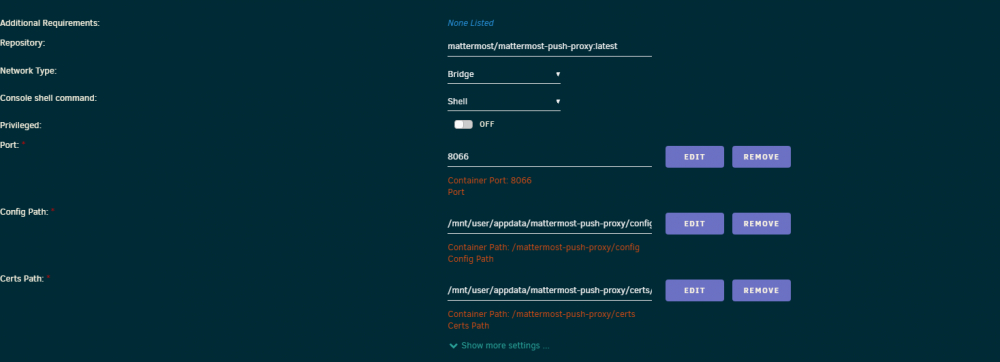
Template is setup wrong. You will need to edit the paths like the screenshot below. Delete the first one that is pointing to /mattermost-push-proxy and change the 2 others.