





ramair02
Members
-
Joined
-
Last visited
Everything posted by ramair02
-
Yeah Tailscale has been crushing my logs ever since I switched from the Docker Container to the Plugin. disk14 is new -- I just finished a clear yesterday. I think the buffer i/o errors during a clear are normal and I haven't had any issues since the clear finished, but I'll keep my eye on it.
-
Diagnostics attached. I had an out of memory error at 4:40 AM last night. I'm trying to figure out the cause. I'm guessing it is some scheduled task, but need help narrowing it down. Any assistance is much appreciated! homegrown-diagnostics-20230611-0758.zip
-
Diagnostics attached I woke up this morning to an "Out Of Memory errors detected on your server" error. I've never had this error before. I did upgrade to 6.11.5 yesterday -- not sure if that is related. I believe the error occurred around the same time as my Mover is scheduled. Please let me know if you can identify the issue with my diagnostics. Thank you homegrown-diagnostics-20221122-0813.zip
-
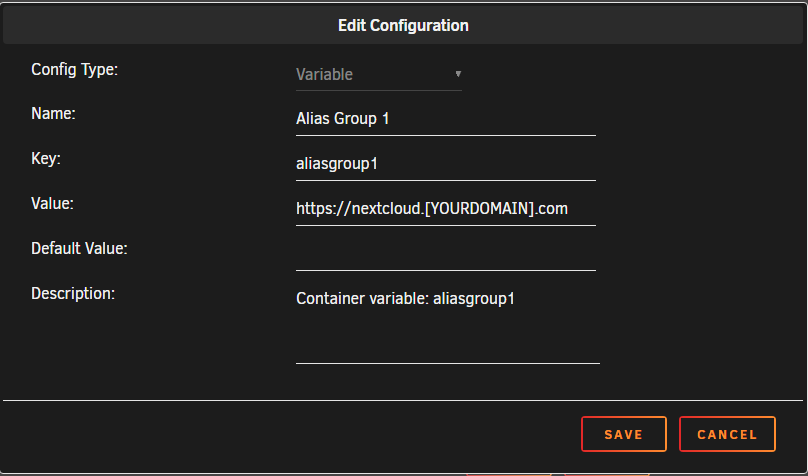
I was having a heck of a time figuring out the correct collabora subdomain proxy config for SWAG. I came across this site which helped me successfully get Nextcloud, SWAG & Collabora working. The config at that link worked for me -- I only changed line 37 to my Unraid IP. Sharing here in case it helps anyone else. My current `collabora.subdomain.conf` ## Version 2022/09/08 # make sure that your dns has a cname set for collabora and that your collabora container is named collabora server { listen 443 ssl; listen [::]:443 ssl; server_name collabora.*; include /config/nginx/ssl.conf; client_max_body_size 0; # enable for ldap auth (requires ldap-location.conf in the location block) #include /config/nginx/ldap-server.conf; # enable for Authelia (requires authelia-location.conf in the location block) #include /config/nginx/authelia-server.conf; location / { # enable the next two lines for http auth #auth_basic "Restricted"; #auth_basic_user_file /config/nginx/.htpasswd; # enable for ldap auth (requires ldap-server.conf in the server block) #include /config/nginx/ldap-location.conf; # enable for Authelia (requires authelia-server.conf in the server block) #include /config/nginx/authelia-location.conf; include /config/nginx/proxy.conf; include /config/nginx/resolver.conf; set $upstream_app XX.XX.XX.XX; set $upstream_port 9980; set $upstream_proto https; proxy_pass $upstream_proto://$upstream_app:$upstream_port; } } Set your server IP in line 37 -- Unraid specific info that is not included in the above link... Edit the collabora container in unraid, remove domain, add new variable as below
-
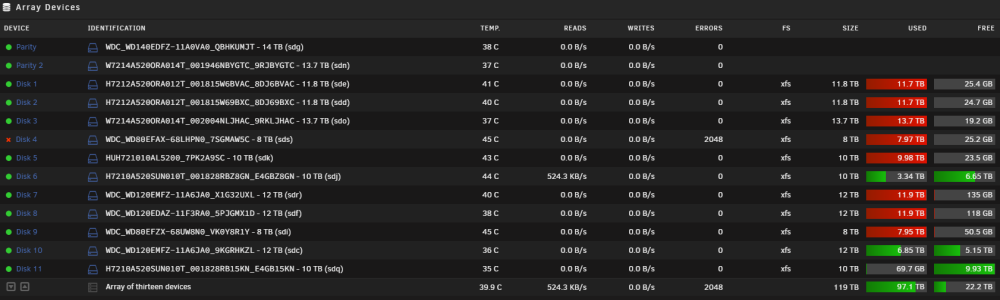
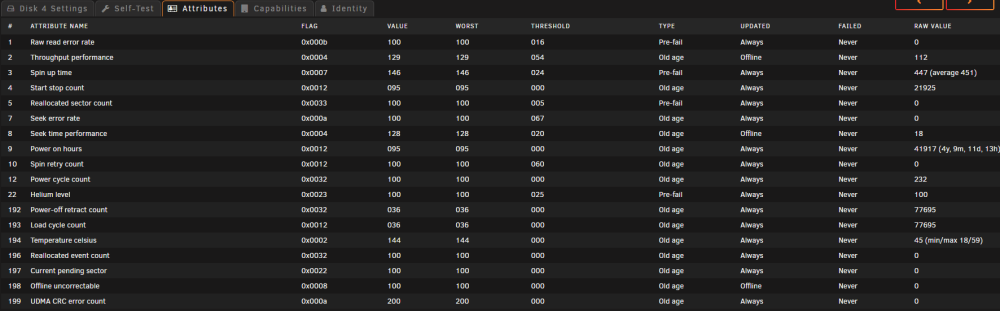
Thanks. I will let the SMART self-test complete. Is there a way to figure out what the 2048 errors showing on the Main tab are related to? I would expect to see something relevant in the Disk's Attributes tab, but that looks clean -- as you noted, it's not logged as a disk problem. So what are the 2048 errors then and why was the disk disabled?
-
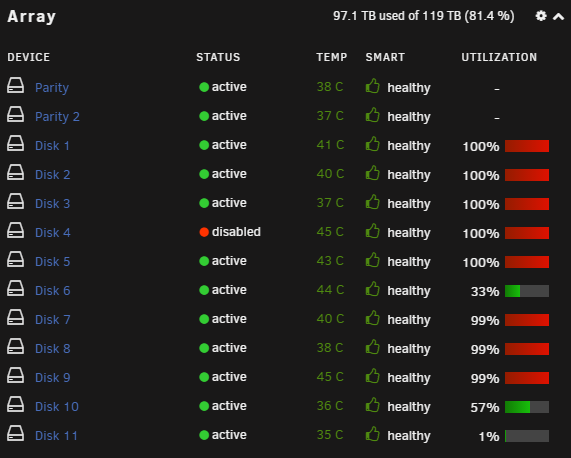
Disk 4 disabled yesterday and the Unraid Main tab shows 2048 errors. Log shows multiple write errors. SMART self-test has been going 12+ hours. It's at 80%, so progress is being made, but terribly slow. Attributes tab of Disk 4 does not show any issues. Dashboard tab shows 'Healthy' Diagnostics attached. homegrown-diagnostics-20221006-1011.zip
-
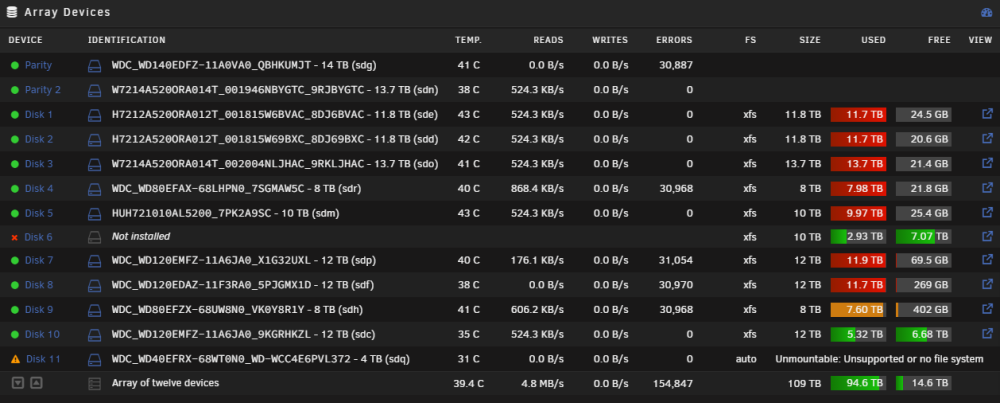
Please help. I had a drive failure the other day, put in a new drive, but that new drive is bad. I'm waiting for a replacement drive to be delivered. I had an extra 4 TB drive that I figured I'd add to the array for now. Added it in a new slot (disk 11, not disk 6 which was the drive failure). It cleared fine, but said unmountable: missing file system. So I removed that drive from the array and formatted it to xfs in unassigned devices then added it back to the array. It kicked off a data rebuild and that drive is still unmountable. I'm not sure what the data rebuild is for, but I don't want to stop the array while that's running. Now I'm seeing errors across multiple drives and I fear I may lose data. I have no idea what's going on. Would appreciate your insight. Thank you. homegrown-diagnostics-20220927-2205.zip
-
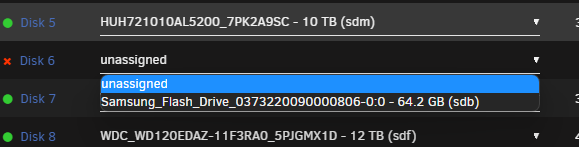
I think you're right. When I shut down Unraid and try to add the drive to the array, it won't take and sends it back to Unassigned Devices grayed out. Then it won't show in the dropdown to add to Array.

-
I had a drive failure and installed a new 10 TB SAS3 drive. Currently preclearing which seems to be going smoothly (Currently Zeroing: 19% @ 487 MB/s), but the Unraid log is showing errors constantly. Getting I/O error, dev sdi, sector ********** op 0x1:(WRITE) flags 0x104000 phys_seg 128 prio class 0 and Buffer I/O error on dev sdi, logical block XXXXXXXXX, lost async page write Is this a bad / failing disk? Something else? Thank you homegrown-diagnostics-20220926-1428.zip
-
Perfect! Thank you.
-
I'm on 6.11 now -- didn't realize NerdPack wasn't compatible until after I upgraded. How can I see which NerdPack plugins I had installed? When I look in Flash > /boot/config, I see three plugins folders: plugins plugins-error plugins-removed
-
Hey there! I'm going to revive this thread instead of creating a new one since I seem to be facing the same exact issue. My log is full of: ``` Jan 8 20:00:08 homegrown smbd[32720]: [2022/01/08 20:00:08.732461, 0] ../../source3/lib/sysquotas.c:565(sys_get_quota) Jan 8 20:00:08 homegrown smbd[32720]: sys_path_to_bdev() failed for path [.]! Jan 8 20:00:08 homegrown smbd[32720]: [2022/01/08 20:00:08.732497, 0] ../../source3/lib/sysquotas.c:565(sys_get_quota) Jan 8 20:00:08 homegrown smbd[32720]: sys_path_to_bdev() failed for path [.]! Jan 8 20:00:08 homegrown smbd[32720]: [2022/01/08 20:00:08.732528, 0] ../../source3/lib/sysquotas.c:565(sys_get_quota) Jan 8 20:00:08 homegrown smbd[32720]: sys_path_to_bdev() failed for path [.]! Jan 8 20:00:08 homegrown smbd[32720]: [2022/01/08 20:00:08.733236, 0] ../../source3/lib/sysquotas.c:565(sys_get_quota) Jan 8 20:00:08 homegrown smbd[32720]: sys_path_to_bdev() failed for path [.]! Jan 8 20:00:08 homegrown smbd[32720]: [2022/01/08 20:00:08.733277, 0] ../../source3/lib/sysquotas.c:565(sys_get_quota) Jan 8 20:00:08 homegrown smbd[32720]: sys_path_to_bdev() failed for path [.]! Jan 8 20:00:08 homegrown smbd[32720]: [2022/01/08 20:00:08.733317, 0] ../../source3/lib/sysquotas.c:565(sys_get_quota) Jan 8 20:00:08 homegrown smbd[32720]: sys_path_to_bdev() failed for path [.]! Jan 8 20:00:08 homegrown smbd[32720]: [2022/01/08 20:00:08.733365, 0] ../../source3/lib/sysquotas.c:565(sys_get_quota) Jan 8 20:00:08 homegrown smbd[32720]: sys_path_to_bdev() failed for path [.]! ``` I've attached Diagnostics to this post homegrown-diagnostics-20220108-2000.zip
-
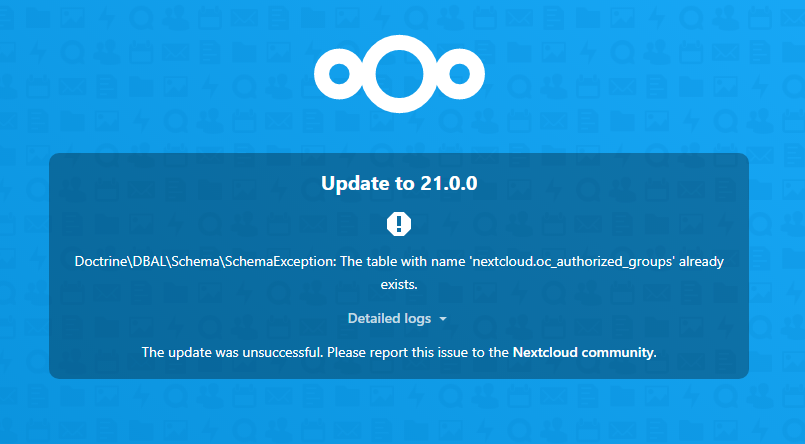
Having an issue with upgrading following the instructions in post 1. It may have to do with the fact that I reinstalled Nextcloud, so there is an existing user & files. I restored from backup, but if seems unsuccessfully. When I run `docker exec -it nextcloud occ upgrade`, the step `Updating database schema` gives an error message Doctrine\DBAL\Schema\SchemaException: The table with name `nextcloud.oc_authorized_groups` already exists. Update failed I get the same message when I go to the WebUI
-
Thank you. This was the issue. I must have pulled the LSi Controller out of the PCIe slot ever so slightly when plugging in a new cable. I reseated it and everything is recognized again. Easy fix. Thanks.
-
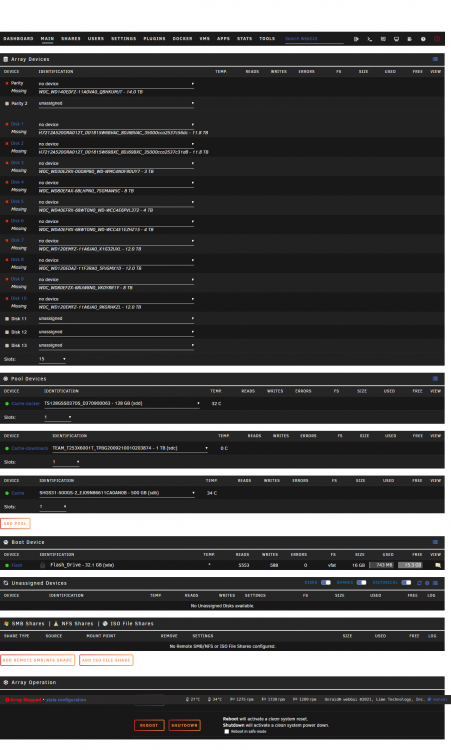
Diagnostics file attached. My server has been running great for months. I shut it down this morning to remove a 3 TB drive and add 2 14 TB drives, one for additional storage and the other as a second parity drive. However, upon rebooting the server, I've run into a stale configuration error and no devices detected. To get the server back up and running, I removed the 2 new 14 TB drives and put the 3 TB drive back in, but I am seeing the same thing upon reboot. I'm not sure what could have changed. Perhaps it is related to my LSi controller or HP expander, but I'm confused since everything was working perfectly before I fiddled with it (of course!). The SSDs are detected, but none of the HDDs. homegrown-diagnostics-20211118-0909.zip
-
Oh, interesting. Is there a resource or guide you know of to help me set up something like that?
-
Ok, so a separate machine is the best way to use VMs running on Unraid. That's fine. Was just asking since my server lives right by my desk, so I thought maybe I could run VMs directly (other than through the built-in VNC Remote). I was able to get Apache Guacamole setup to SSH into Unraid which is cool. Not helpful when I'm on my local network, but I could see it being useful when I'm not.
-
Thank you. I will look into this. I'm aware of Apache Guacamole, but haven't looked too deeply into how to get it setup. So I'll do some research. I'm surprised there isn't a Nomachine or similar server side plugin or Docker container for Unraid. Or at least I haven't seen one yet.
-
Hi there. I'm looking for the best way to remote into a Windows VM from the local unraid machine. Is the only optino the built-in VNC Remote? Or is there a docker / plugin I can install on Unraid? I've been using Nomachine to access from my other devices, but am also looking for a solution to access the VM from the local unraid machine attached to a monitor. Thanks!
-
Having issues getting reverse proxy working on my end. I followed spaceinvader's video, but no dice. The Overseerr webUI works fine and I can port forward to access from outside the network with `PUBLICIP:5055`, but that defeats the purpose of reverse proxy. Here's what I've done: I have my own domain name through namecheap I'm using Cloudflare's nameservers I've created `customsubdomain.duckdns.org` In Cloudflare, I've created a subdomain by adding CNAME - `requests` and pointed it to `custumsubdomain.duckdns.org` I've created a custom docker proxynet and pointed both the SWAG docker and the Overseerr docker to that I've edited the nginx proxy config for Overseer to `server_name requests.*; In SWAG docker config I've set Host Port: 180 for Container Port: 80 and Host Port 1443 for Container Port: 443 In Overseerr, I've added Application URL `https://requests.customdomain.com` and ticked the box for Enable Proxy Support I'm not sure where to go from here. Any help is greatly appreciated EDIT: Fixed it. This was an issue on Cloudflare. I needed to change the Proxy Status from Proxied to DNS only



