





Elmojo
Members
-
Joined
-
Last visited
Everything posted by Elmojo
-
I don't think I did. Please take a look at the screenshots I posted, if you have a moment. Do they look correct to you? This whole thing is just baffling, and super frustrating. It was all working so well, and now it's a hot mess.
-
Nope, they're brand new. I keep a pretty close eye on my drives. They didn't exist until we made those changes today, then they started popping up. Some have downloaded files in them, some are empty. It's weird, and a mess. lol
-
Yeah, my qBT config file looks like the example you posted. I'm not sure that it's Radarr causing it, since I'm pretty sure I saw the funky nested folders popping up before I edited the paths in Radarr. I might be wrong about that, but I don't think so. Also, I believe I see the folders where Radarr is dropping stuff, and it's not those, it's elsewhere.
-
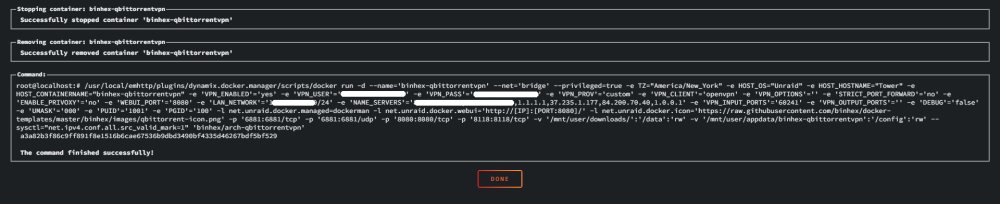
This?

-
Okay, I'll let it sit and see if it sorts itself out, thanks. I've tried manual importing, and it just tells me there's no file in that folder to import. There's no option to browse. By the way, now that we've changed the paths to the /data/ scheme, things have gone a bit wonky on the host side. It's nesting the folders for some reason. My download folder (where it's actually dumping completed files) for qBT is now /user/appdata/binhex-qbittorrentvpn/qBittorrent/downloads/data/downloads/. There are also "/data/finished" and "data/incomplete" folders in the root of the user/appdata folder, which I presume were created by Radarr, since there aren't any files inside either of those folders. it's really a mess. I don't know how to clean this up.
-
So I added a new series in Sonarr to test, and it successfully downloaded and imported the show - yay! Thanks for the help in getting me back up and running. However, now I'm left will a queue full of stalled/errored torrents, a bunch of shows that have missing episodes, and junk on my drive(s) I assume. What's my best path forward for cleaning all this up and getting these shows to download the missing files? Is it as easy as deleting everything from the qBT side, and letting Sonarr sort itself out? I feel like that's a bad idea, and will cause issues. Please advise. Also, once the above is cleaned up, what's the safest way to find and clean up all the partial mess that's hanging out in the temp folders on my drive? From hunting around, I see there are downloaded files here and there that never got imported. I'd like to move them manually where they go, but doubt Sonarr would find them. Is it best to just dump them and let them re-download?
-
I am and they do. Ok, I've changed both Sonarr and Radarr to match as you suggested. Now what...? I've run a refresh on my Sonarr queue, and forced a recheck on everything in qBT. I don't see any change...
-
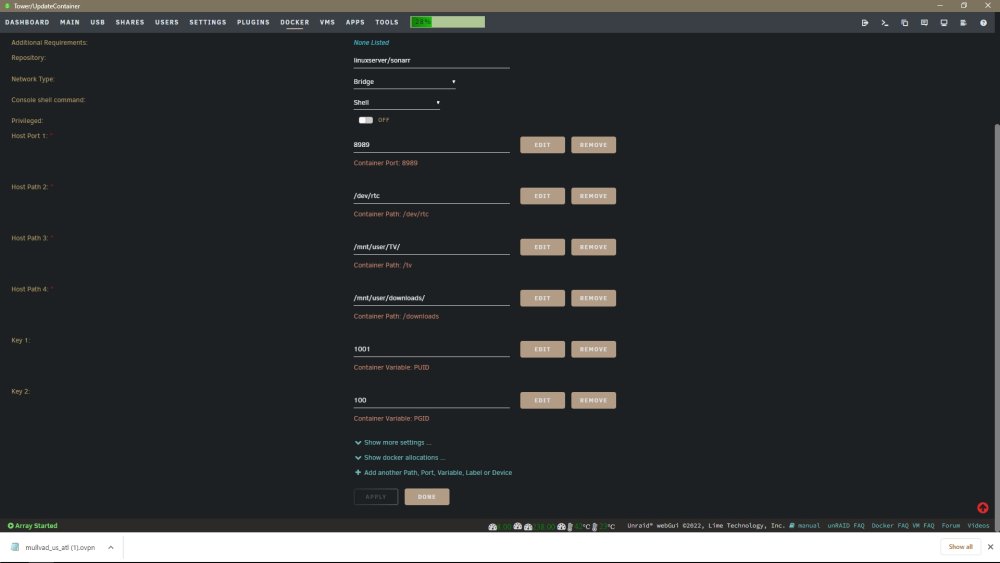
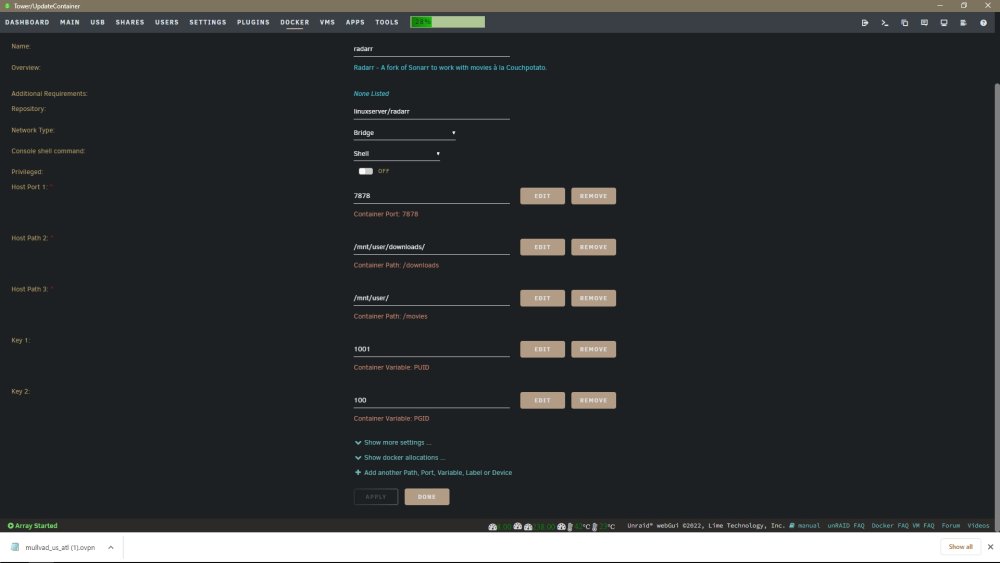
I did. Radarr and Sonarr don't have a "/data" field, so I'm not sure which host path you mean, sorry. Like I said, I'm a bit slow... lol I hate to keep harping on this, but all of this was working perfectly just as you see it until recently, so it can't have been messed up too badly. I know it probably wasn't set up the most cleanly, but it was functional.
-
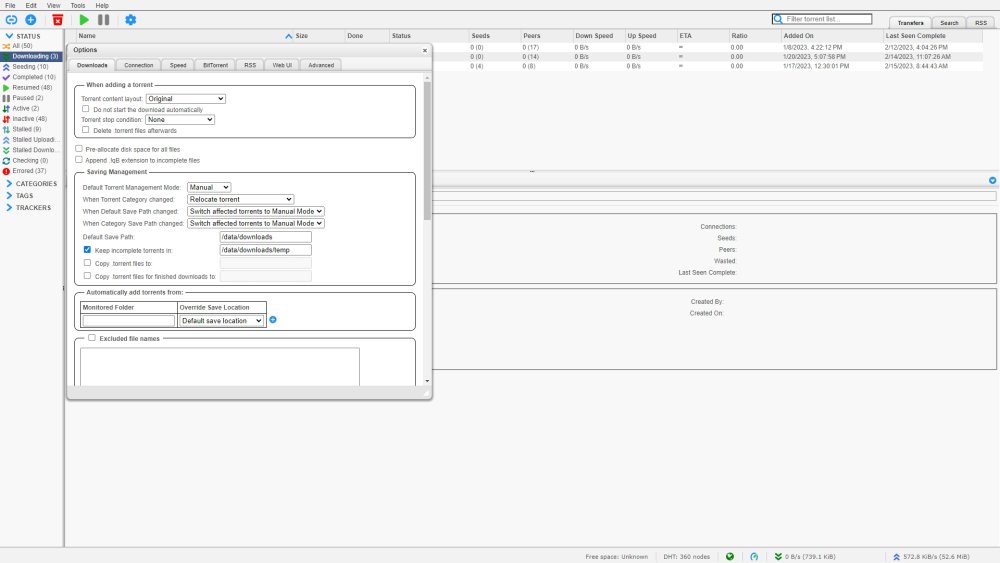
I set it to the values in the screenshot after you posted your images. Nothing has changed, it's still broken. Those may not be the correct path values, but if not, I wouldn't know what to put there.
-
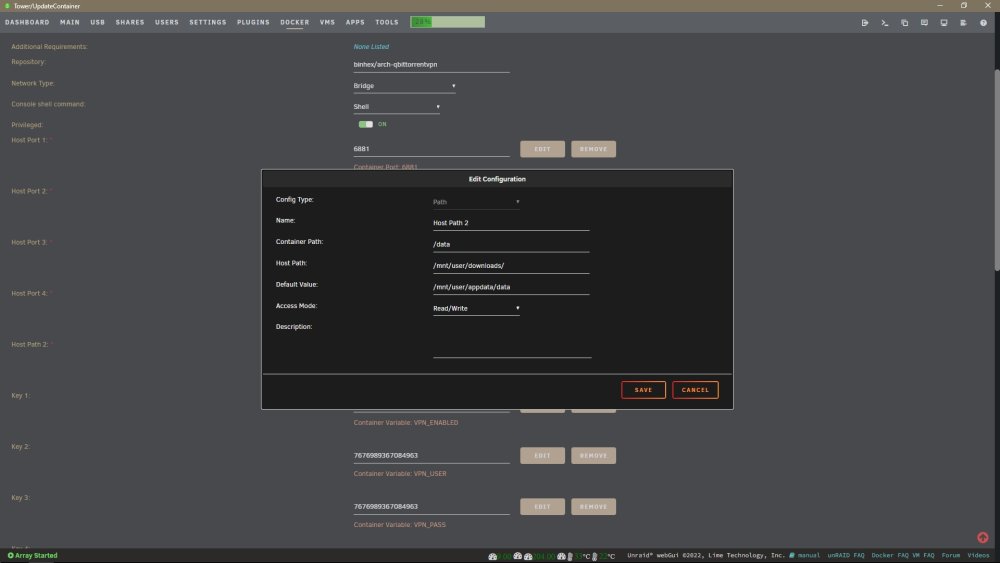
Like this? This is how it's been all along. Not sure why it's not working, then. EDIT: What really baffles me is why i can't seem to get any sort of additional info about the actual error. Sonarr just says "there's a problem with qBT". When I try to turn up the logging to trace, nothing happens. Literally nothing. When I open the log for qBT, it looks like everything is fine. I don't see any errors, but I also don't see it really reporting any traffic or anything either, so maybe that not the right place to look?
-
Ok, so how does the app get mapped to the 'outside' location, which in your case is the mnt/user/* path? There has to be some translation there, and I'm not seeing how it happens. That seems to be the step everyone skips, and I think maybe it's where this is all failing...maybe. Somehow, qBT has got to be able to access my mnt/user/downloads path, since that's where all the files should be saved, and where both Sonarr and Radarr are looking for new files, or at least they were until recently. I'm trying to figure out what one little thing changed that broke this whole house of cards. It was all working so well, that I didn't think to document every little step. I never thought I'd have to rebuild it all after a simple update. My fault. I'm sorry if I sound frustrated. It's because I am. Very. I truly appreciate your patience and help. I know this is all probably really obvious and simple to you guys who have been doing it a while, but for me it's like trying to do math in the dark with a broken pencil and no calculator. lol
-
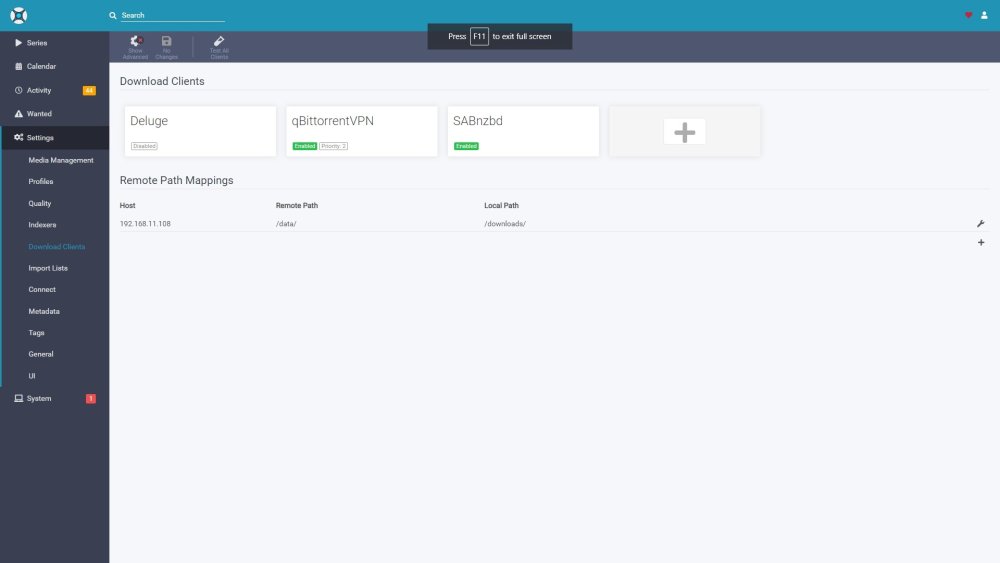
Sorry for the delay, got called away for work. Thanks for the screenshots! So I'm confused... no big surprise. All along, you guys have been saying that I can't use mnt/user/downloads as my download target, because the container can't see that location. However, in the screenshot above, that seems to be exactly what you're doing, except that instead of "downloads", you're calling it "qbit". What's the difference? I don't see what I'm missing... I've edited my qBT settings to be /data/downloads and /data/downloads/temp, but i don't know what those correspond to, since they don't appear to be mapped to anywhere on the host.
-
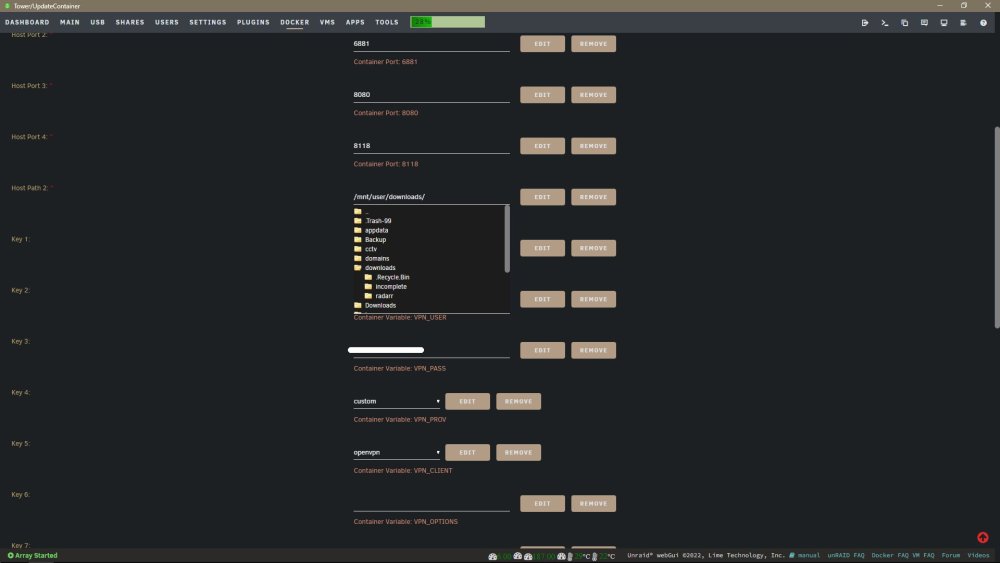
My first SS showed mnt/user/downloads! You're killin' me Smalls! 😆 I have no idea what it should be set to. Check the screenshots I edited into the post a couple back. They show that my mnt/user/downloads location is directly available to the container. I think I'm misunderstanding how this all works, since by your description I didn't think I should be able to see that location. I still have no idea how or what the /data/ path is, since I didn't create it, and can't find any such path anywhere on my system. Your last reply about how container and host paths are separate does help some, thanks.
-
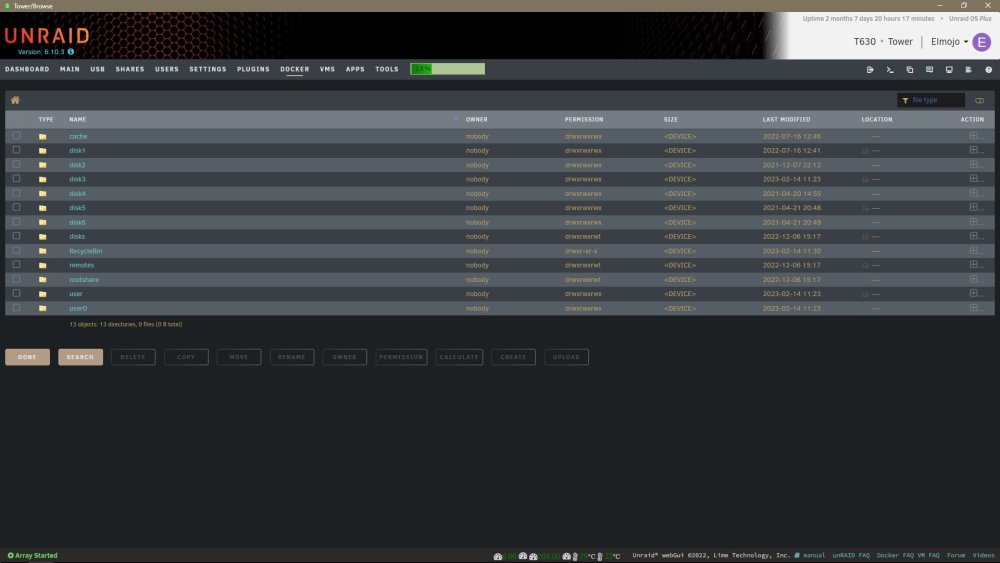
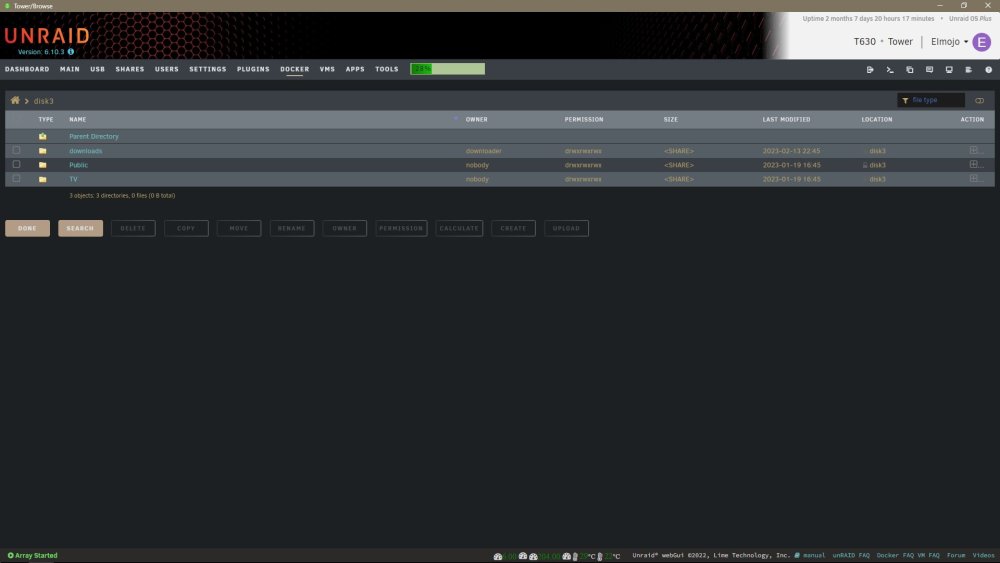
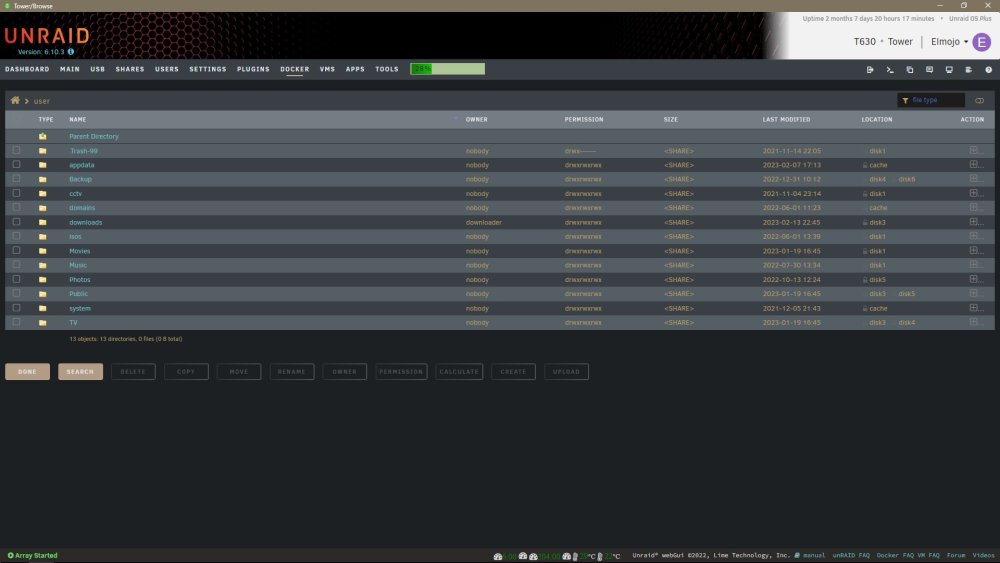
You're assuming I'm way smarter than I really am... lol If I leave the Host 2 field blank (using the default), it says I must fill out that field. I'm not sure what you mean by "use that container path"... what container path? Does this mean that I need to set up a new share called /data/downloads or something? This isn't at all how my system is set up. All my other dockers and shares are working perfectly, even Radarr, which uses the same mnt/user/downloads folder. I totally realize that I've probably borked something in the initial setup of my system due to now understanding the fundamentals, but I'd really like to not have to rebuild the structure from scratch if I can help it. EDIT: Do these screenshots help any? They just show what I see when I go looking for the "physical" location of that downloads folder in my file browser. i really only have one option, and it's mnt/user/downloads
-
I do? The screenshot I posted before shows /mnt/user/downloads, or are we talking about 2 different locations? For some reason my brain refuses to wrap around the concepts of dockers and how they interact with the other elements that make all this work. I've read countless tutorials and watched as many videos, and it just never clicks. 🤦♂️ Okay, so I've deleted the remote path mapping from Sonarr. If I wipe out the Host Path 2 field in the qBT docker settings, then click on it to browse for a new folder, my options are as shown below. The previously selected "/mnt/user/downloads" location seems like the obvious choice. That's where Sonarr and Radarr are looking, and they seem to be working. I don't know where else to point it. Did I mention I'm confused...? lol EDIT: What should I have my download location set to in the qBT webUI?
-
Oh wow. So I don't recall ever using any pathing except for what's shown in these screenshots. So these are wrong? What should they be? Please help me get this sorted out. Maybe I've been doing it wrong all along. lol No idea why it's been working until recently, but regardless, I'd like to get it fixed. I had to use the remote mapping in Sonarr for... some reason. I can't recall why off hand, but I know it flat didn't work until I added that line, then it worked perfectly.
.thumb.jpg.ef4ed20317bac85862e65768899858c1.jpg)
.thumb.jpg.aa23e848c8dddead8473ab899fde4f39.jpg)
-
So suddenly Sonnarr is reporting "Download warning: qBittorrent is reporting an error" for lots of my queued downloads (through qBT), but there's no info about what error qBT might be reporting, or where. Whatever it is, it's preventing the files from downloading, so it's fairly serious. I feel like this has to be related to a recent Sonarr or maybe qBT update, since everything was working smoothly up until recently. I've looked in qBT options, and it's set for downloads to go to "/mnt/user/downloads". For some reason, the error seems to be indicating that it's looking /config/qBittorrent/downloads/. However, files are actually being downloading into /user/appdata/binhex-qbittorrentvpn/qBittorrent/downloads. I have no idea where that path came from, or why it's ignoring my selected save path now. It worked perfectly for many months, but it seems that a recent update to either Sonarr or qBT (more likely, I think) has broken something, but I can't figure out what, or even where to start looking, since the errors are so vague. I've tried to dial up the logging in Sonarr to 'Trace' to see if it will give me more info, but that's not working for some reason. Any ideas where to start looking? Please keep in mind that I'm fairly new to all this, so I'm going to require a bit of handholding if it's not a real obvious solution. screenshots for context: https://ibb.co/Y0MzCNV https://ibb.co/jbvDwsk
-
AWESOME!!!! Thanks so much for listening to the community! This is one of the many things that makes Unraid so vastly superior to other competing platforms in my opinion. I just love the involvement of the Devs.
-
It's probably just me, most things are. I'm not aware of any browser settings/addons that would affect how pages render. Certainly not anything that is installed on all 3, since I rarely use chrome and NEVER use Edge. I didn't see anything in the display settings to "try". It just looked like they were set on recommended scaling and resolution. I'm reluctant to set my display scale to 150%, as that would screw up my desktop icons, and it would take a while to get them back right. I'll just assume that the problem is me until others chime in, or not.
-
I'm sorry, perhaps I'm not being clear, but I just don't know any other way to say it. I'll paste what I said above, but only speak for myself this time. "My point is that if the dashboard worked for me like it seems to for you and a few others, then there would have been no need for me to start this thread in the first place". That indeed doesn't have anything directly to do with the number of columns, but rather the dashboard experience as a whole, and that not being able to move and arrange items freely is making it difficult to keep up with all the data. The fact that for some of us (such as yourself) the dashboard seems to be resizing itself and adding/removing columns dynamically goes a long way towards addressing the issue I was complaining about in the first post.
-
Hahah yeah, I started the thread, I know. My point is that if the dashboard worked for me (and all the other +1s) like it seems to for you and a few others, then there would have been no need for me to start this thread in the first place. I would have just arranged my columns vertically as best as I could, then sized the browser to spill or stack the 2nd/3rd column until I got it as good as possible. It probably wouldn't have been perfect, but it certainly would be better than what I'm dealing with now. Granted, it wouldn't have fixed the frustration of having most of the important stuff stuck in the left column, but it would likely have been below the "I have to get some help with this" threshold.
-
Well that's just nuts. So it appears that for some of us, it's working fairly well, and resizing columns to fit the available window space, pretty much as you'd expect. For the rest of us (all those who have added their +1's to this thread), the columns are fixed at 3, and don't resize at all. Changing the browser window size only adds scroll bars, as though the page layout was fixed, and not responsive at all. Really odd. I don't have a clue how to explain that. Hopefully one of the devs will eventually see this and can perhaps explain why it happens and more importantly, can proposed a solution for those of us whose dashboards are not operating "as designed". This has just gone from a feature request to a bug report, I think.
-
Well I just don't know what to tell you then. Mine absolutely does not do that, on any browser. I'm on Windows 10 x64. If mine did as shown in your gif, I would never have created this thread, since I often run my dashboard in a non-maximized window and would have noticed that behavior right away. Really strange. I'll be interested to hear from others as to whether theirs acts as yours, or more like mine. I can't imagine what sort of environmental variable or system configuration could account for the difference.
-
That's very interesting, as mine does not display that behavior. I would assume that it doesn't work that way for others either, or there wouldn't be so much support for this issue to be resolved. Are you both @JonathanM and @Hoopster accessing the dashboard through a standard url? I mean, there's not an app or anything, is there? I have to assume this is on a desktop PC, right? I can't imagine how you'd be able to resize the window otherwise. Are you using some sort of dashboard plugin perhaps that adds that functionality? I don't know how to create and post a gif like that, or I could demonstrate that mine doesn't work the way shown above.
-
I have never observed this behavior. I've tried Chrome, Firefox and Edge. Can you provide an example of how to make it do this? If the dashboard would work this way, I doubt we all would be complaining so much, since that would provide at least a workaround for how to get things into a bit more balanced view. When I resize my browser, all that happens is it cuts off the right column and adds a horizontal scroll. Please tell me I'm missing something, this would be awesome!


.jpg.687b07640795fc593cf86ad068116069.jpg)
.jpg.853a8a0b0de3b92d6ef51c4996ae1d41.jpg)

