





Elmojo
Members
-
Joined
-
Last visited
Everything posted by Elmojo
-
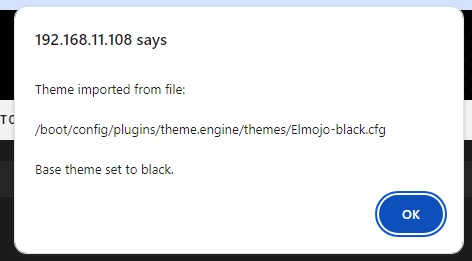
Has anyone had their current theme just revert to the default "Black"? I suddenly (as of this morning) can't apply any theme, including my custom one. When I try, I get a message as shown in the attached screenshot. That doesn't really appear to be an error, per se, but my settings are not applied. Any ideas?
-
So I feel like I'm having a similar issue to some others, but I'm just not smart enough to figure it out... lol Everything has been working perfectly up until maybe a couple weeks ago, although I'm just realizing that I have a problem today. Nothing in my config has changed, other than various dockers updating along the way, as they do. like most others, I have Radarr, Sonarr, Jackett and Plex all working together, along with SabNZB and qBit handling the downloading. As I said, everything has been great, until recently. Today, I ran a manual search for a certain show. The results came back as usual, and I selected one for download. It was an NZB. A few minutes later, I saw that it was complete, but not showing up in Sonarr. I looked in the unraid file manager, and the file is there, but it's not being moved or acknowledged in any way by Sonarr, as best as I can tell. The odd thing is that there are no errors in Sonarr. This is a key difference from previous times I've had trouble. Before, it's always been that Sonarr saw the file, but had some permissions or mapping issue. This time, it's like it doesn't knw the file exists, even though it was the one that initiated the download request. As I said, now that I look, I see that I have lots of files backing up in the downloads folder, waiting to be imported, but Sonarr doesn't seem to know they are there. I'm not even sure where to begin looking. I'm not good at parsing logs, or even finding them always. I'm happy to provide info, if anyone can tell me what you need to see.... I saw a mention above about there being an update from v3 to v4, and custom preference tags causing some issue? How can I tell what version I'm on? I do use preference tags, in an attempt to get Sonarr to pull smaller x264/x265 files, rather than huge 1080p rips. Could that be part of the issue? EDIT/SOLUTION: So I found the solution, at least for my specific issue. Maybe this is your problem as well. It seems that in the update to Sonarr v4, it's now aggressively enforcing the "Category" thing, whatever that is. I've never needed, cared or wanted to know anything about "Categories", but without assigning one, Sonarr just refused to import my files. I found this out by digging through my settings, looking for what I thought was maybe a bad mapping, based on the comments above. Everything looked okay, though, and had been working just fine for many months. On the Settings > Download Clients > SABnzbd screen, I tried to run a [test] and got a warning. It said "Adding a category specific to Sonarr avoids conflicts with unrelated non-Sonarr downloads. Using a category is optional, but strongly recommended. A category is recommended". In this case "recommended" means, 100% will not work until you assign one. I knew nothing about what it wanted for input, so I tried "Sonarr", which it rejected, since it didn't exist in SAB already. Okay... to I went over to SAB, checked the [Categories] tab, and noticed that they were more like {TV}, {Movies}, etc... Fine, I went back to Sonarr, put in "tv", and clicked [test]. I got a green check, so I manually ran the tasks, and lo and behold, all my files are importing! This really could be documented a bit better. Or better yet, just left alone! TL;DR - put "tv" into the [category] field of SABnzbd's settings (within Sonarr), and see if that fixes your import issues.
-
Oh weird, I just noticed that mine is gone as well! I wonder if it's because I recently upgraded to v6.12? Perhaps it's just not compatible?
-
That's what I'm looking for, but on the Shield Pro UI, I don't see any option for "off" as the default.
-
Thanks! So deleting the codecs folder did nothing. However, I found the issue, but not exactly how to fix it... It appears that Plex is choking on some sort of subtitle problem. I have 2 files that are identical in every way, except that the little media preview at the bottom of the screen (on the TV) before I click [play] shows that one of them has "off" subs, and the other shows "Unknown (Closed Captions)" subs. If I try to play the "unknown" one, it fails. The other one works fine. If I go to my PC and load up the web player, it does the same thing. If I change "unknown" to "off" for the subs before playing, then it works just fine, so it's some issue with the subs. The problem is that there's no quick way to turn off subs on the TV interface. I can do it, but it's a hassle, and my wife isn't gonna be happy with having to fiddle with that each time half her shows don't play right. Isn't there a way to have all subs default to "off" for every file, unless you manually turn them back on? I swear I've seen that, but just can't find it now... In any case, I kinda doubt this is the issue with all the files that won't play, unless Plex just really has trouble with subs (which doesn't seem likely), but this is the trouble with the specific show I'm looking at right now for sure.
-
I wish I knew how to fetch the logs. Any documentation on that process? Why is transcoding the "correct way"? The last time I had a similar problem, the first thing that everyone suggested was to turn off transcoding, since I'm only streaming locally over my LAN, and all my hardware should be strong enough to direct play. I'm confused... I've run Tdarr on a few shows, particularly the really old ones that just refused to play at all, but the ones that aren't working now are a mix of mp4 and mkv mostly, and aren't even that old, so I'm not sure that's the issue. As for deleting the codecs folder, I'd be happy to try that, if I had any idea where that was. lol Got a link to some instructions or a path to the folder? Is it a simple matter of just deleting the entire folder, or just its contents? What happens then? Are the codecs somehow automagically rebuilt or downloaded?
-
So my wife has reported to me that she's getting playback errors more and more, especially on older shows. Sometimes the error is something like "the server is not powerful enough to play this file", other times, it's simply "error: cannot play media". None of these make any sense, since my server is quite beefy, and my client-side device is an Nvidia shield Pro. Sometimes, the issue is with older media types, like old avi and mp4 files. I can "fix" these by simply obtaining versions that are encoded differently, or even just transcoding them myself using Tdarr into mkv, and they will work fine, which is kinda silly. Other times, though, the files are of older shows, which may not be available, or Tdarr may not allow me to transcode, since they are already in mkv format. I just can't figure out what's up with Plex. It seems like every time Plex updates, this issue gets just a little bit worse, and files that used to play just fine, suddenly don't. Any advice greatly appreciated, as long as it's not "buy better hardware", because I have about as good of gear as I can reasonably be expected to have. I mention this because that's exactly what I did to deal with this once before, and the Shield Pro helped for a while, but now it's getting worse again. BTW, transcoding is off (and has been off for a long time) in the server-side settings in Plex.
-
After I install the docker, there are some vague instructions about downloading a config.ini file, but no step-by-step instructions about how to actually do it, or how to configure anything to connect. Starting the docker fails with "Specified ini file /etc/mumble/config.ini could not be opened" in the log.
-
Okay, I'm super confused, need a little help here please... I'm trying to install Mumble so my wife and I can voice chat over LAN. This thread appears to be the support thread, but it's all over the map, and and I don't see any mention of Mumble here. Is there a simple setup guide somewhere for how to get it going on LAN for real basic voice comms, using this docker package? Or am I barking up the wrong tree entirely, and perhaps there's an easier solution that someone could suggest... Thanks in advance!
-
Indeed. I'm on 6.11.x because there's another plugin I rely on that doesn't play nice with 6.12 yet.
-
I can find no such plugin on CA. Do you have a link?
-
I'm not quite following you... You say in your previous post that it only backed up 'Gameserver', but in your last post, you say "It find GameServer and does the backup of UbuntuServer and WinAP". Which is it? Does it back up the Ubuntu and WinAP or no? Is that log you posted complete, or is there more to it? Check your settings and make sure [Backup all VMs?] is set to [Yes], or that you have a list of VMs specified below that line. What happens if you run the missing backups manually? Do they complete successfully, or is there an error? Sorry, I'm a novice at this myself, just throwing stuff out that I ran into in my setup.
-
What does your log report?
-
Anyone?
-
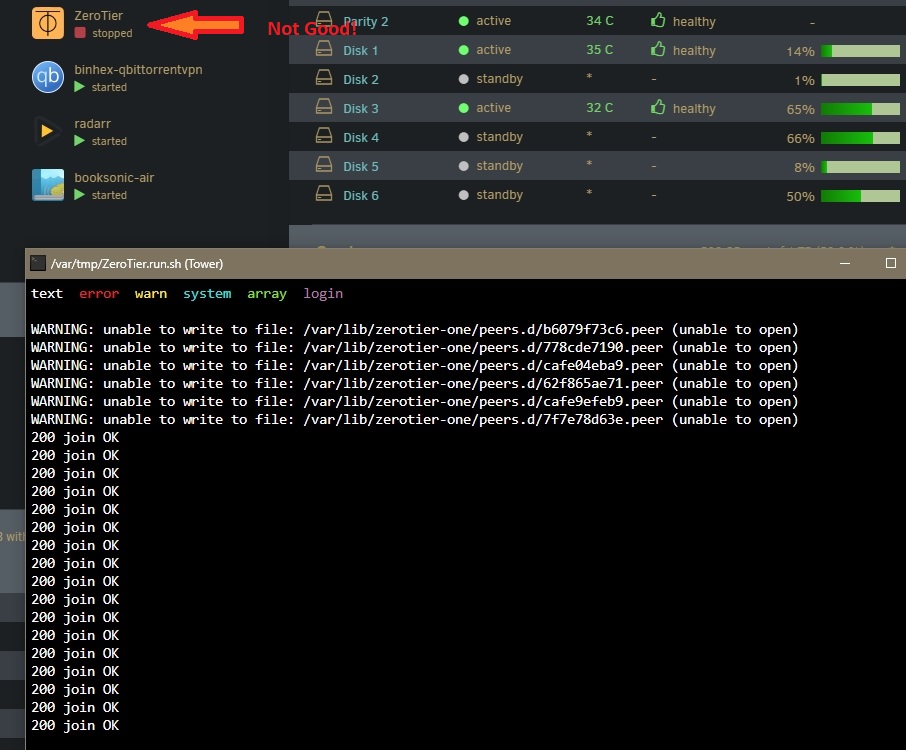
So my issue of this docker randomly stopping itself has returned. I'm still on unRAID 6.11.5, so I know it's not a version compatibility issue. I pulled the log, and the only thing I see is what's shown in the attached screenshot. Does that help anyone?
-
I know next to nothing about plugin development or installation, but it looks to me like, in the first case, it's trying to install the plugin, not run one that's already installed. This leads me back to my original guess of there being something fishy going on with compatibility (or lack thereof) with v6.12. I'd start there, and ask for general help (in another thread maybe?) where those who are familiar with how plugins act can perhaps help track down the specific issue. All I know is that mine works fine(ish), and I'm on 6.11.5. Sorry.
-
Is that the same as what @CodeGlitcher is experiencing? He said his is uninstalling itself. That doesn't sound like the same thing to me. What unRAID version are you both running? We need more info to troubleshoot this. If you're on 6.12.x, then that may be your problem right there. Quite a few dockers and plugins aren't playing nice with 6.12 yet. For example, I rely on ZeroTier for a connection to my files for work, but it's not quite reliable on 6.12 yet, so I can't upgrade. I'm still on 6.11.5 until they get that sorted out. You may be seeing something similar here.
-
Lots of us still use it, and I believe it's still in semi-active development. It indeed has some outstanding issues, but I've never heard of it getting uninstalled at reboot. That sounds like an issue on your server side. Sorry I don't have any suggestions for a specific solution, but you might want to do some research in general on plugins getting uninstalled when you reboot. Maybe that's happened to other plugins?
-
That does seem to be very similar, if not the same solution as outlined by @Vivent. Sorry you had to revert to get it working. I'd love to upgrade, but I just can't take the chance of losing ZT access. I rely on it for work.
-
Were you using @Vivent's trick on 6.12.2 or no?
-
That's great to hear, thanks for the additional info!
-
This is good news! More testing is required ... can anyone else confirm that this method works?
-
Thanks so much for this confirmation! I was on the fence about upgrading to 6.12, but this made up my mind to wait a bit longer. I just can't risk breaking compatibility with certain key containers I rely on, such as this one!
-
Maybe PM the author directly? He mentioned that he was willing to try to edit the script to include support for VM names with spaces way back when he released it. Perhaps he just forgot?
-
I don't know what that script is you are referring to, but all my VMs have spaces in the name, and just using this plugin, they back up just fine if I run them manually. I've been having trouble with them failing to run on the schedule for a while now, but I think that's a separate issue. EDIT: Oh, the restoration script! I had forgotten all about that! Hmm, that never got fixed?
