





Elmojo
Members
-
Joined
-
Last visited
Everything posted by Elmojo
-
Please explain what you did, for the benefit of future noobs who may run into the same issue. 😁
-
Thanks for that script link, I may give it a try on my T420! Please let me know if you get it working on your PE. I have mine running on a fixed level setting, and it's working okay so far, but I eventually intend to move my server to an unmonitored space, and I'd love to have it self-adjust the fan speed as necessary for the local temps.
-
I've been getting a similar error for a while. I posted about it a page or so back, but we never did get it resolved. Maybe you'll have better success? I'd love to hear the solution. It's really annoying to have those error messages pop up every time it tries to run. In my case, the job errors out, then completes successfully, which is rather confusing, to say the least.
-
This isn't something we should be expecting to be implemented any time real soon. I mean, it would be nice, but this thread is just the feature request. It means that we're asking the devs "Please can you consider this feature when you get time - please? 😁". As much as this bugs me, and I'd surely love to have it right now, I'm sure they have lots of other, more urgent things on the 'to do' list.
-
It was suggested way back (by you I believe) that we not use the default job, but create our own jobs. I can't recall why. Maybe it's in the documentation? It's been a while now, and my memory isn't so good these days... lol
-
I'd be happy to, but I have no idea how to access that file.
-
So I'm still getting these odd "cannot run" error messages, even though everything seems to be working correctly. Any update on how to make it stop throwing false errors? It's really disconcerting when I open the dashboard, and see an orange warning message. Makes me thing something has gone wrong. lol Here's my complete log file for the job that ran last night... 2022-02-15 02:00:01 Start logging to log file. 2022-02-15 02:00:01 information: send_notifications is 1. notifications will be sent. 2022-02-15 02:00:01 information: only_send_error_notifications is 0. normal notifications will be sent if send_notifications is enabled. 2022-02-15 02:00:01 information: keep_log_file is 1. log files will be kept. 2022-02-15 02:00:01 information: number_of_log_files_to_keep is 1. this is probably a sufficient number of log files to keep. 2022-02-15 02:00:01 information: enable_vm_log_file is 0. vm specific logs will not be created. 2022-02-15 02:00:01 information: backup_all_vms is 1. vms_to_backup will be ignored. all vms will be backed up. 2022-02-15 02:00:01 information: use_snapshots is 0. vms will not be backed up using snapshots. 2022-02-15 02:00:01 information: kill_vm_if_cant_shutdown is 0. vms will not be forced to shutdown if a clean shutdown can not be detected. 2022-02-15 02:00:01 information: set_vm_to_original_state is 1. vms will be set to their original state after backup. 2022-02-15 02:00:01 information: number_of_days_to_keep_backups is 0. backups will be kept indefinitely. be sure to set number_of_backups_to_keep to keep backups storage usage down. 2022-02-15 02:00:01 information: number_of_backups_to_keep is 2. this is probably a sufficient number of backups to keep. 2022-02-15 02:00:01 information: inline_zstd_compress is 1. vdisk images will be inline compressed but will not be compared afterwards or post compressed. 2022-02-15 02:00:01 information: zstd_level is 3. 2022-02-15 02:00:01 information: zstd_threads is 2. 2022-02-15 02:00:01 information: use_snapshots disabled, not adding snapshot_extension to vdisk_extensions_to_skip. 2022-02-15 02:00:01 information: snapshot_fallback is 0. snapshots will fallback to standard backups. 2022-02-15 02:00:01 information: pause_vms is 0. vms will be shutdown for standard backups. 2022-02-15 02:00:01 information: enable_reconstruct_write is 0. reconstruct write will not be enabled by this script. 2022-02-15 02:00:01 information: backup_xml is 1. vms will have their xml configurations backed up. 2022-02-15 02:00:01 information: backup_nvram is 1. vms will have their nvram backed up. 2022-02-15 02:00:01 information: backup_vdisks is 1. vms will have their vdisks backed up. 2022-02-15 02:00:01 information: start_vm_after_backup is 0. vms will not be started following successful backup. 2022-02-15 02:00:01 information: start_vm_after_failure is 0. vms will not be started following an unsuccessful backup. 2022-02-15 02:00:01 information: disable_delta_sync is 0. rsync will be used to perform delta sync backups. 2022-02-15 02:00:01 information: rsync_only is 0. cp will be used when applicable. 2022-02-15 02:00:01 information: actually_copy_files is 1. files will be copied. 2022-02-15 02:00:01 information: clean_shutdown_checks is 20. this is probably a sufficient number of shutdown checks. 2022-02-15 02:00:01 information: seconds_to_wait is 30. this is probably a sufficient number of seconds to wait between shutdown checks. 2022-02-15 02:00:01 information: keep_error_log_file is 1. error log files will be kept. 2022-02-15 02:00:01 information: number_of_error_log_files_to_keep is 10. this is probably a sufficient error number of log files to keep. 2022-02-15 02:00:01 information: started attempt to backup BlueIris Server (W10), Sandbox (W10 ), Windows 11 to /mnt/user/Backup/xVM Backups 2022-02-15 02:00:02 information: BlueIris Server (W10) can be found on the system. attempting backup. 2022-02-15 02:00:02 information: creating local BlueIris Server (W10).xml to work with during backup. 2022-02-15 02:00:02 information: /mnt/user/Backup/xVM Backups/BlueIris Server (W10) exists. continuing. 2022-02-15 02:00:02 information: skip_vm_shutdown is false. beginning vm shutdown procedure. 2022-02-15 02:00:02 infomration: BlueIris Server (W10) is running. vm desired state is shut off. 2022-02-15 02:00:03 information: performing 20 30 second cycles waiting for BlueIris Server (W10) to shutdown cleanly. 2022-02-15 02:00:03 information: cycle 1 of 20: waiting 30 seconds before checking if the vm has entered the desired state. 2022-02-15 02:00:33 information: BlueIris Server (W10) is shut off. vm desired state is shut off. can_backup_vm set to y. 2022-02-15 02:00:33 information: actually_copy_files is 1. 2022-02-15 02:00:33 information: can_backup_vm flag is y. starting backup of BlueIris Server (W10) configuration, nvram, and vdisk(s). 2022-02-15 02:00:33 information: copy of BlueIris Server (W10).xml to /mnt/user/Backup/xVM Backups/BlueIris Server (W10)/20220215_0200_BlueIris Server (W10).xml complete. 2022-02-15 02:00:33 information: copy of /etc/libvirt/qemu/nvram/1f335446-855e-7049-961e-043582ac2630_VARS-pure-efi.fd to /mnt/user/Backup/xVM Backups/BlueIris Server (W10)/20220215_0200_1f335446-855e-7049-961e-043582ac2630_VARS-pure-efi.fd complete. 2022-02-15 02:04:54 information: copy of /mnt/cache/domains/Windows 10/vdisk1.img to /mnt/user/Backup/xVM Backups/BlueIris Server (W10)/20220215_0200_vdisk1.img.zst complete. 2022-02-15 02:04:54 information: backup of /mnt/cache/domains/Windows 10/vdisk1.img vdisk to /mnt/user/Backup/xVM Backups/BlueIris Server (W10)/20220215_0200_vdisk1.img.zst complete. 2022-02-15 02:04:54 information: the extensions of the vdisks that were backed up are img. 2022-02-15 02:04:54 information: vm_state is shut off. vm_original_state is running. starting BlueIris Server (W10). 2022-02-15 02:04:55 information: backup of BlueIris Server (W10) to /mnt/user/Backup/xVM Backups/BlueIris Server (W10) completed. 2022-02-15 02:04:55 information: number of days to keep backups set to indefinitely. 2022-02-15 02:04:55 information: cleaning out backups over 2 in location /mnt/user/Backup/xVM Backups/BlueIris Server (W10)/ 2022-02-15 02:04:55 information: removed '/mnt/user/Backup/xVM Backups/BlueIris Server (W10)/20220125_1020_BlueIris Server (W10).xml' config file. 2022-02-15 02:04:55 information: removed '/mnt/user/Backup/xVM Backups/BlueIris Server (W10)/20220125_1020_1f335446-855e-7049-961e-043582ac2630_VARS-pure-efi.fd' nvram file. 2022-02-15 02:04:55 information: removed '/mnt/user/Backup/xVM Backups/BlueIris Server (W10)/20220125_1020_vdisk1.img.zst' vdisk image file. 2022-02-15 02:04:55 information: did not find any vm log files to remove. 2022-02-15 02:04:55 information: removing local BlueIris Server (W10).xml. 2022-02-15 02:04:55 information: Sandbox (W10 ) can be found on the system. attempting backup. 2022-02-15 02:04:55 information: creating local Sandbox (W10 ).xml to work with during backup. 2022-02-15 02:04:55 information: /mnt/user/Backup/xVM Backups/Sandbox (W10 ) exists. continuing. 2022-02-15 02:04:55 information: extension for /mnt/user/isos/ru-en_windows_10_20H2_x86-x64_28in1_HWID-act.iso on Sandbox (W10 ) was found in vdisks_extensions_to_skip. skipping disk. 2022-02-15 02:04:55 information: extension for /mnt/user/isos/virtio-win-0.1.208.iso on Sandbox (W10 ) was found in vdisks_extensions_to_skip. skipping disk. 2022-02-15 02:04:55 information: skip_vm_shutdown is false. beginning vm shutdown procedure. 2022-02-15 02:04:55 infomration: Sandbox (W10 ) is running. vm desired state is shut off. 2022-02-15 02:05:55 information: performing 20 30 second cycles waiting for Sandbox (W10 ) to shutdown cleanly. 2022-02-15 02:05:55 information: cycle 1 of 20: waiting 30 seconds before checking if the vm has entered the desired state. 2022-02-15 02:06:25 information: Sandbox (W10 ) is running. vm desired state is shut off. 2022-02-15 02:06:25 information: cycle 2 of 20: waiting 30 seconds before checking if the vm has entered the desired state. 2022-02-15 02:06:55 information: Sandbox (W10 ) is shut off. vm desired state is shut off. can_backup_vm set to y. 2022-02-15 02:06:55 information: actually_copy_files is 1. 2022-02-15 02:06:55 information: can_backup_vm flag is y. starting backup of Sandbox (W10 ) configuration, nvram, and vdisk(s). 2022-02-15 02:06:55 information: copy of Sandbox (W10 ).xml to /mnt/user/Backup/xVM Backups/Sandbox (W10 )/20220215_0200_Sandbox (W10 ).xml complete. 2022-02-15 02:06:55 information: copy of /etc/libvirt/qemu/nvram/6eee4b38-2964-616c-20e2-b7ce678ba076_VARS-pure-efi.fd to /mnt/user/Backup/xVM Backups/Sandbox (W10 )/20220215_0200_6eee4b38-2964-616c-20e2-b7ce678ba076_VARS-pure-efi.fd complete. 2022-02-15 02:10:15 information: copy of /mnt/cache/domains/Win10 Sandbox/vdisk1.img to /mnt/user/Backup/xVM Backups/Sandbox (W10 )/20220215_0200_vdisk1.img.zst complete. 2022-02-15 02:10:15 information: backup of /mnt/cache/domains/Win10 Sandbox/vdisk1.img vdisk to /mnt/user/Backup/xVM Backups/Sandbox (W10 )/20220215_0200_vdisk1.img.zst complete. 2022-02-15 02:10:15 information: extension for /mnt/user/isos/ru-en_windows_10_20H2_x86-x64_28in1_HWID-act.iso on Sandbox (W10 ) was found in vdisks_extensions_to_skip. skipping disk. 2022-02-15 02:10:15 information: extension for /mnt/user/isos/virtio-win-0.1.208.iso on Sandbox (W10 ) was found in vdisks_extensions_to_skip. skipping disk. 2022-02-15 02:10:15 information: the extensions of the vdisks that were backed up are img. 2022-02-15 02:10:15 information: vm_state is shut off. vm_original_state is running. starting Sandbox (W10 ). 2022-02-15 02:10:16 information: backup of Sandbox (W10 ) to /mnt/user/Backup/xVM Backups/Sandbox (W10 ) completed. 2022-02-15 02:10:16 information: number of days to keep backups set to indefinitely. 2022-02-15 02:10:16 information: cleaning out backups over 2 in location /mnt/user/Backup/xVM Backups/Sandbox (W10 )/ 2022-02-15 02:10:16 information: removed '/mnt/user/Backup/xVM Backups/Sandbox (W10 )/20220125_1020_Sandbox (W10 ).xml' config file. 2022-02-15 02:10:16 information: removed '/mnt/user/Backup/xVM Backups/Sandbox (W10 )/20220125_1020_6eee4b38-2964-616c-20e2-b7ce678ba076_VARS-pure-efi.fd' nvram file. 2022-02-15 02:10:16 information: removed '/mnt/user/Backup/xVM Backups/Sandbox (W10 )/20220125_1020_vdisk1.img.zst' vdisk image file. 2022-02-15 02:10:16 information: did not find any vm log files to remove. 2022-02-15 02:10:16 information: removing local Sandbox (W10 ).xml. 2022-02-15 02:10:16 information: Windows 11 can be found on the system. attempting backup. 2022-02-15 02:10:16 information: creating local Windows 11.xml to work with during backup. 2022-02-15 02:10:16 information: /mnt/user/Backup/xVM Backups/Windows 11 exists. continuing. 2022-02-15 02:10:16 information: skip_vm_shutdown is false. beginning vm shutdown procedure. 2022-02-15 02:10:16 information: Windows 11 is shut off. vm desired state is shut off. can_backup_vm set to y. 2022-02-15 02:10:16 information: actually_copy_files is 1. 2022-02-15 02:10:16 information: can_backup_vm flag is y. starting backup of Windows 11 configuration, nvram, and vdisk(s). 2022-02-15 02:10:16 information: copy of Windows 11.xml to /mnt/user/Backup/xVM Backups/Windows 11/20220215_0200_Windows 11.xml complete. 2022-02-15 02:10:16 information: copy of /etc/libvirt/qemu/nvram/985ce70c-f343-81f3-65e3-94e77b37d0e7_VARS-pure-efi.fd to /mnt/user/Backup/xVM Backups/Windows 11/20220215_0200_985ce70c-f343-81f3-65e3-94e77b37d0e7_VARS-pure-efi.fd complete. 2022-02-15 02:12:43 information: copy of /mnt/user/domains/Windows 11/vdisk1.img to /mnt/user/Backup/xVM Backups/Windows 11/20220215_0200_vdisk1.img.zst complete. 2022-02-15 02:12:43 information: backup of /mnt/user/domains/Windows 11/vdisk1.img vdisk to /mnt/user/Backup/xVM Backups/Windows 11/20220215_0200_vdisk1.img.zst complete. 2022-02-15 02:12:43 information: the extensions of the vdisks that were backed up are img. 2022-02-15 02:12:43 information: vm_state is shut off. vm_original_state is shut off. not starting Windows 11. 2022-02-15 02:12:43 information: backup of Windows 11 to /mnt/user/Backup/xVM Backups/Windows 11 completed. 2022-02-15 02:12:43 information: number of days to keep backups set to indefinitely. 2022-02-15 02:12:43 information: cleaning out backups over 2 in location /mnt/user/Backup/xVM Backups/Windows 11/ 2022-02-15 02:12:44 information: did not find any config files to remove. 2022-02-15 02:12:44 information: did not find any nvram files to remove. 2022-02-15 02:12:44 information: did not find any vdisk image files to remove. 2022-02-15 02:12:44 information: did not find any vm log files to remove. 2022-02-15 02:12:44 information: removing local Windows 11.xml. 2022-02-15 02:12:44 information: finished attempt to backup BlueIris Server (W10), Sandbox (W10 ), Windows 11 to /mnt/user/Backup/xVM Backups. 2022-02-15 02:12:44 information: cleaning out logs over 1. 2022-02-15 02:12:44 information: removed '/mnt/user/Backup/xVM Backups/logs/20220201_0200_unraid-vmbackup.log'. 2022-02-15 02:12:44 information: cleaning out error logs over 10. 2022-02-15 02:12:44 information: did not find any error log files to remove. 2022-02-15 02:12:44 Stop logging to log file. And here's what the message is saying on screen.... For reference, the "default" job is disabled completely, both by selecting Enable Backups? to 'No' and by setting Backup Frequency to 'Disabled'.
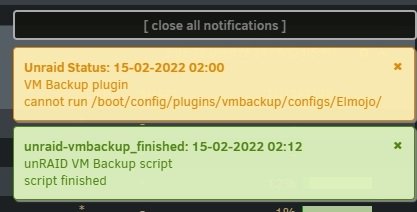
-
That's what this whole thread is about. Welcome to the club.
-
This sounds very useful @petchav! Perhaps if it can be tested and confirmed to work with all configurations, the dev might consider adding your work into the plugin as a feature?
-
I did not manually run it. That was the notification from overnight, when the scheduled task ran.
-
Good news/odd news? lol Good news: my backups completed successfully last night, as expected. Odd news: it reported the error "cannot run default" Umm...okay? Default is disabled, it's not supposed to run. Why am I getting this message now? I don't recall ever seeing it previously. Otherwise, the plugin seems to be running fine. No errors in the log.
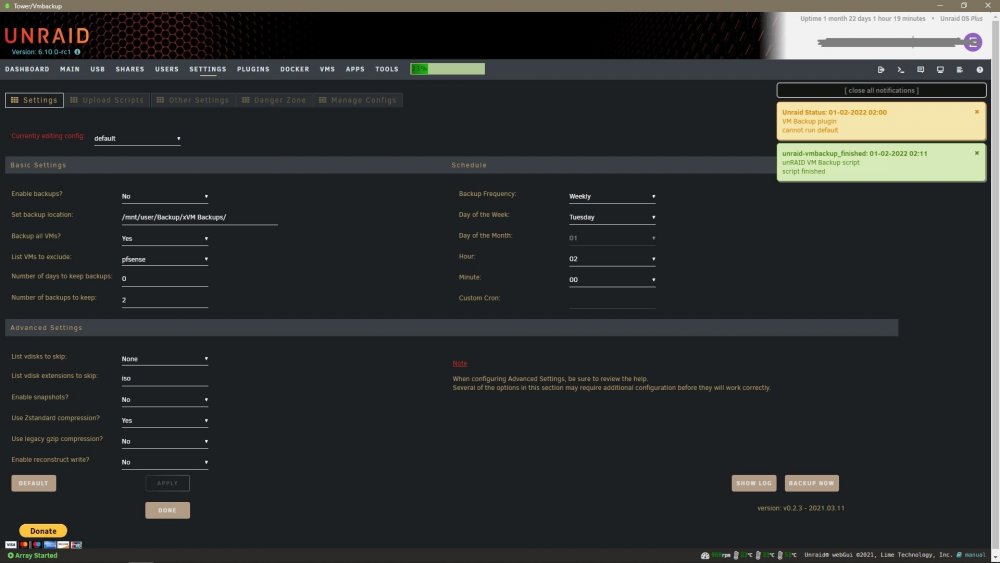
-
Ah, I was wondering where those logs were going, thanks! I have never been able to get snapshots to work correctly. When I first set this up, I had trouble with it, so you suggested that I disable that feature and just let it run full backups, which has been working fine up until recently. Looking at the logs, I think I see maybe the issue. It appears that if a machine is suspended, rather than running or shut down, it gets confused and doesn't know what to do, so it errors out. This isn't a problem, since I just have to not suspend my VMs, no biggie. My next backup is scheduled to run at 2am tomorrow morning, so we'll see how it goes with all machines running. I expect it'll work fine, since I ran a manual backup the other day and it didn't have any problem shutting down and restarting the VMs as needed. Great work on this plugin, BTW. It's giving me a little peace of mind that I won't mess around an break something too badly. lol Now, if we just had in-GUI snapshot management, like in VMWare, now THAT would be killer....
-
How do you use the plugin, if it doesn't shut down and restart running VMs? That's kinda one of the basic functions of it. If you have to manually shut down a VM in order for it to backup, then you would only be able to run manual backups, and never have them run on a schedule. I'm confused. Mine was working perfectly until recently. Was there an update? I can't recall. Now it fails on one of my VMs, but doesn't really say why, and I can't access the logs.
-
It seems like the developer of this plugin may have abandoned us. I posted about a similar issue a couple weeks ago, and haven't gotten any replies. It's a shame, since this was a really useful plugin!
-
So something is suddenly broken, and I don't know how to go about figuring out what. VM Backup has been running fine for a while, but in the past couple weeks, I've started getting a pop-up notification on the dashboard: "Unraid Status: 25-01-2022 02:00 VM Backup plugin cannot run <myprofilename>" If I go to the plugin page and try to open the logs, I just get a blank window. It never populates. If I run the job manually, it works just fine, except that it fails to backup one of my Windows VMs that is currently paused. Is that a known bug? What gives?
-
Oooh! I'd love that info for use with my Dell T420. I'm able to set fan speeds at will via IPMI. Maybe I could tweak this plugin with your help to work? That would be fantastic!
-
So I'm looking for an easy way to access my local LAN remotely. Is this OpenVPN AIO docker a way to accomplish this, or am I barking up the wrong tree entirely here?
-
Thanks SO MUCH for the help guys. Let's call this one SOLVED! I was able to use a modified version of the cmd string above to get everything whipped back into shape. For anyone finding this later, and being clueless like me, this is how it shook out... 1) Stop all VMs 2) Manually move (I used Krusader) the vdisk images for each of your VMs to some location that has space enough for them. If you have room for 2 copies of them on your cache drive, then you can omit this step. I also copied the entire folder (VM name) to help me keep track of which VM I was moving at the time. 3) Once the file(s) are moved, and you have some breathing room on your cache drive, open terminal, and use the following command (edited for your pathing of course): cp -n -r --sparse=always /mnt/disk#/Sourcefoldername /mnt/cache/domains Note: If you have any spaces in your VM names (like I did), then you have to use "\ " (backslash space) between the words [eg. "Windows 10 VM" would be "Windows\ 10\ VM"] 4) Wait for the copy to complete. Once the terminal is back to the ready prompt, you should be able to use your method of choice to confirm that the vdisk is back in your domains share where it belongs, and is now much smaller. I used QDirStat, but there are lots of other ways. 5) Before restarting the VM, edit its properties, flip over to XML mode (switch at top right corner), then add discard='unmap' to the location shown in this post. If you're running a fairly recent version of qemu, you won't need to jump through all those other hoops, and can just add that one bit of code and be done. 6) Start the VM(s). 7) If it's Windows 10, these next tasks may help. For any other OS, I can't say much... A. Go to This PC, right click Local Disk, select {Properties}, [General] tab, then [Disk Cleanup] button (next to the usage graph). Click [Clean up System Files] button, let it reload. Choose what you'd like to clean. Let it run. I recommend the Windows Update files for sure. They're likely to be large. When that's done (might take a bit)... B. Go to This PC, right click Local Disk, select {Properties}, [Tools] tab, then [Optimize] button. In that dialog, verify that "Media Type" is shown as "Thin provisioned drive". Click [Optimize] button. Wait some more... Rejoice! You have your space back, and your VMs should be working fine again. Thanks again to those who patiently lead me to the info I needed to get this sorted out. This really is a fantastic community!
-
Thanks for the links guys! I had actually seen that FAQ before, but it was so old, I assumed that it must be out of date, like most of the other information I find from around that time period. It's good to know that some of it is still valid, but just makes it harder for new-ish folks like myself to get up to speed. Oh well, I'll get here, with some help.
-
For the terminal cmd, does something like this look feasible? cp --sparse=always /mnt/disk2/Win10\ Sandbox /mnt/cache/domains If I understand the cp docs correctly, that should copy the folder "Win10 Sandbox" from disk2 (where I moved it temporarily), back to my cache drive, thinning it back down to size. I'd like a more knowledgeable pair of eyes on it before I invoke the cmd and break something, like my destination domains file, for example.
-
Ah, duh. Yeah, that'll work, thanks. Not sure what you mean about the rest... I'm not aware of any reason why the max disk size would be reached, unless I went all silly with activity inside the VMs. These had been running for a couple months previously without issue. Their respective sizes had been fairly stable. If there is information to the contrary, I'd love to know about it. Would you mind sharing the link(s) to what you were referring to that I need to read? I seem to have trouble finding what I'm looking for here sometimes. The search just seems to pull random word pairings, and I haven't found a way to search within a specific forum. That's beside the point, though. For now, I need to be schooled on proper VM management, if you're willing to help teach me.
-
Okay, so I'm really sorry to bug you with this, but something just occurred to me. If I use that command, and it works to "slim down" the vdisk. Won't it just blow right back up when I move it back to the cache drive? There's not enough room on the drive now for me to do the copy there, so I'll have to move it to the array, do the conversion, then move it back. I suspect I'll be shooting myself in the foot doing it that way. Is there a method of moving that won't blow it back up?
-
Ah, I see. I'll look into it, thanks. I'm afraid to monkey up these VMs, since they are in use, but I need to get these disk sizes under control. They're taking up all the space on my new cache drive, defeating the purpose of the upgrade.
-
So is that a direct command in the terminal? Does it act on all VMs automatically, or does it need to be pointed to a specific vdisk file? Also, I noted in the thread you linked that that command didn't seem to work for the OP. I'm game to give it a shot, I just want to be sure I'm using it correctly. My terminal-fu is really weak.
-
Thanks for that link, but I didn't see a solution in there... maybe I missed it?

