





Elmojo
Members
-
Joined
-
Last visited
Everything posted by Elmojo
-
Detected where, exactly? Where would I look? I do believe it's enabled in BIOS, but I can check if it doesn't show up. I try not to reboot unless I have to.
-
I have a Dell T630 tower server, which has a physical serial port. I would like to be able to use this port to communicate with my MD1200 disk shelf, for health monitoring and configuration of settings. Ideally, I'd like to be able to do this using the terminal (or a plugin, VM, whatever) from within unraid, which seems like it should be totally doable. However, I have thus far been unable to figure out how to get unraid to talk to my T630's serial port. I've done all sorts of searching, and found somewhat related posts (mostly old) that seem to be asking similar questions, but none are really ever resolved. I've seen suggestions for using a USB-to-serial adapter, but I'm not really interested in that option, since I already have a specialized (expensive) console cable for my MD1200 that's serial-only. Anyone have suggestions for method for enabling simple comms between the unraid OS and the serial port? I'd love to be able to eventually run automated scripts on a timer, but let's walk before we run.
-
So I've done some additional checking, and it appears that my spin-down failures are not due to this plugin, or anything to do with a file system, or even disk activity, but rather the fact that I'm running these Seagate 6TB SAS drives. I know I've seen something about these drives having a spin-down issue, but can't find it right now. Does anyone have info on that?
-
Good point. Sorry I can't help. I no longer use this plugin for a similar reason. I'm now using binhex-urBackup. If you get the issue resolved, you might want to look into it as a replacement, if you haven't already.
-
There should be no need to reboot after installing or uninstalling any plugins or dockers with unraid, unless they are VERY poorly coded. That's kind of one of the big "selling points" of server-type architectures; that they don't require constant reboots to apply updates and software changes, even system-level stuff. Looking at you, Mr. Windows... lol
-
Okay, got it, thanks. I'll see about switching over to ipvlan. The failure was entirely mine, not yours. I've always had difficulty understanding networking of all types. I'm not sure why, since other computer concepts I find easy to grasp, but networking is like black magic to me. Will do. Not totally sure I'll grasp the implications, but I'll certainly make the effort. Thanks for all the info. I'll wade through it as I can, and make corrections to my setup as you've outlined. I appreciate all your time in putting this together for me!
-
Yes and no. Yes, multiple NICs. No, not a blade server. It's a PowerEdge T630. It came to me that way. I've actually removed 2 NICs to free up slots for other things. No idea why they had/need so many. I'm currently only using 1 port on a single NIC, but I'd love to be able to "gang" multiple connections to increase overall speed, kinda like we used to do with the old shotgun modems. Is that what bonding does, or is it just for failover/redundancy? So I read this before upgrading, and understood about 10% of it. lol What's a call trace? I assume it's bad, but there's no explanation. I've never seen anything like it as an error or in my logs, so I assume I don't have that issue? You say you recommend using macvlan, but later you say that using ipvlan is fine. I'm confused. Can you give an example of what difference it would make either way, and what sort of consequences it would have leaving things as they are? I'm firmly in the "if it ain't broke..." camp. However, I'm also a believer in tweaking things if they can be improved. Yes, I hear the irony... lol I'm sorry to report that I comprehended essentially nothing below this line. I can certainly follow the steps outlined, but... why? What would be the benefit? I'm not doubting your skill or knowledge at all, I'm just wondering, what shortcoming is this addressing, or what positive feature would I be enabling by monkeying with settings that (as best as my ignorant self can tell) are working fairly okay at the moment? ELI5, por favor? lol EDIT: So I did install the Tips and tweaks plugin, thanks! Are there specific changes I should be making, using that plugin?
-
capacity is in the eye of the beholder...
-
Oh, if only mine was that easy. lol
-
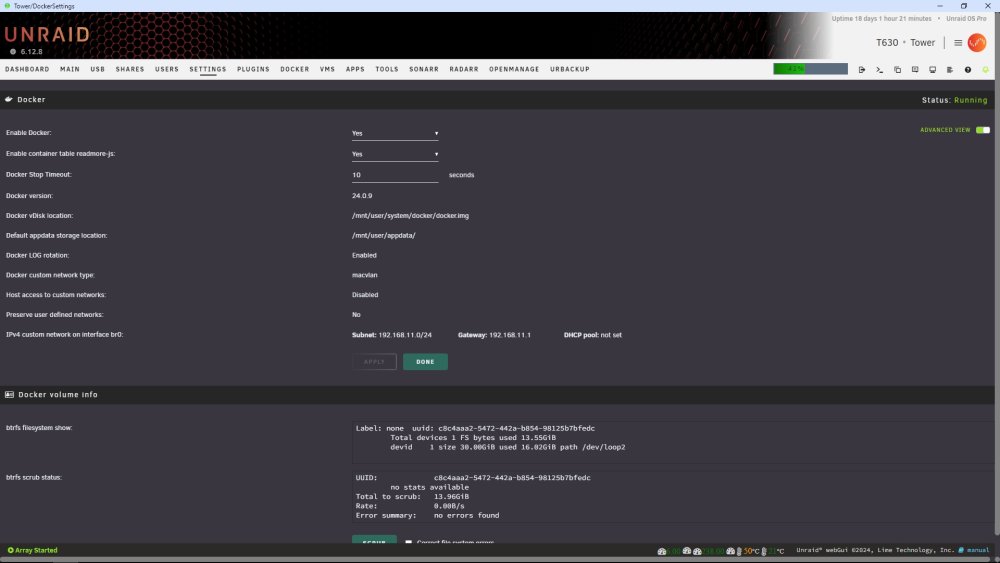
Mine looks like this... I feel like your post contains excellent, and extremely useful information, I'm just too ignorant to make use of it. lol
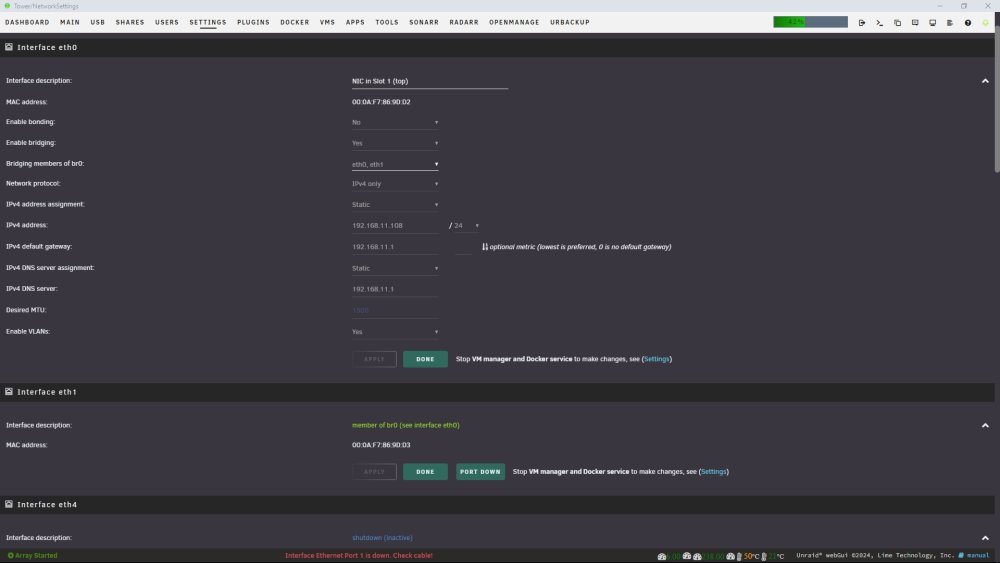
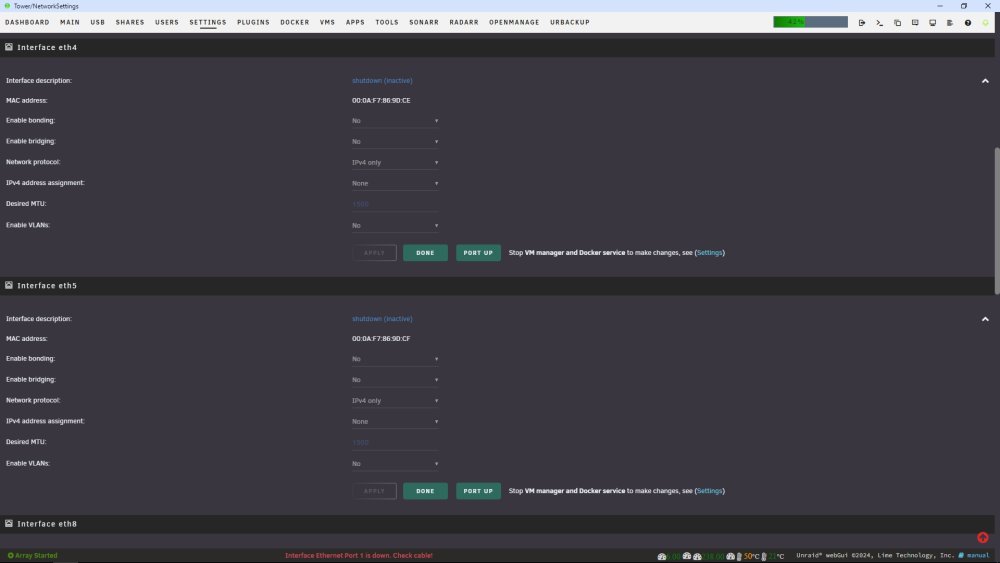
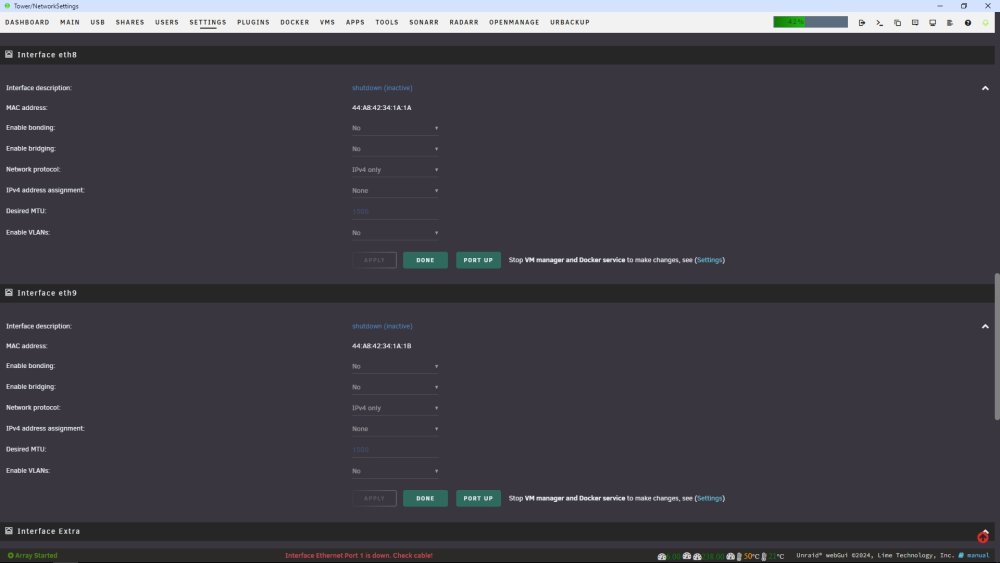
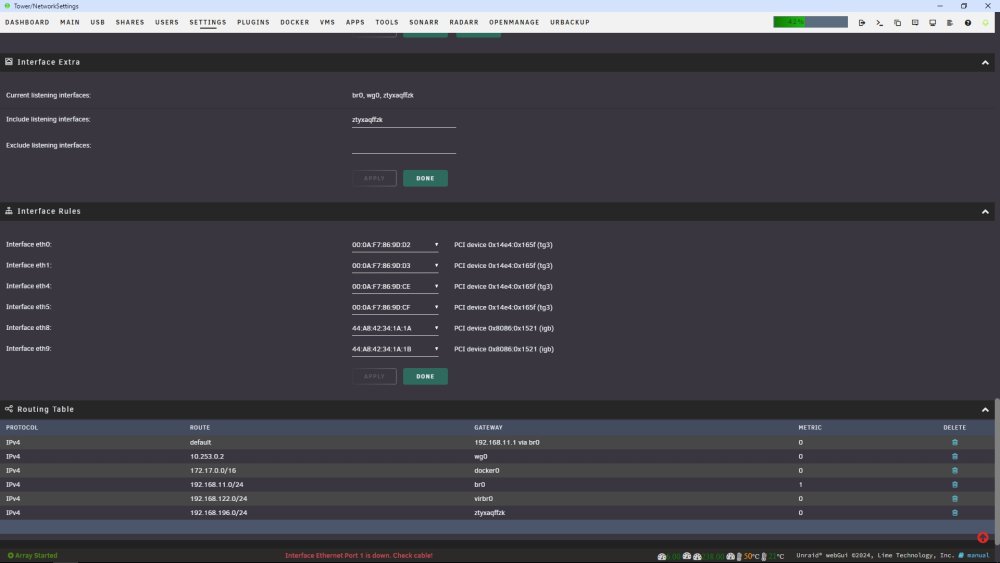
-
Okay, now I'm actually more confused. lol At least my setup is working, so I'm gonna leave it alone... Yep, that would be me!
-
So having my Network type set to "Custom: br0" is host mode, and that's bad? I have another (vital) container that is using port 8080, and I don't think there's any way around that. What would be the solution? EDIT: Sorry for the 2 msgs, it wouldn't let me edit in a 2nd quote.
-
How about that, I learned something new! Thanks @JonathanM
-
This is how I had to set mine up, for this very reason. Another docker was using port 8080. If you want to know which it is, just open the Unifi template, scroll to the bottom, and expand the "show docker allocations" section. It'll show you everything that is using ports, and which ones.
-
Yes, that's exactly what I want to do. I need to be able to connect to devices that are more inside and outside my LAN, from both inside and out my LAN. I didn't realize that NAT reflection was a thing. That sounds like a good idea. Any thoughts on how to approach said troubleshooting? I guess I can try googling 'NAT reflection pfsense', right? It sounds like that might be my problem. Maybe my pfsense isn't properly directing any 'internal' traffic back to the local server. EDIT: It's working!! It was as easy as enabling NAT reflection in the system>advanced settings of pfsense. Now I can access rustdesk from inside (LAN) or outside (cellular via my phone) and it passes the traffic correctly. Thanks for the tips, and for maintaining a fantastic container that makes this setup SO much easier!
-
I've tried my IP directly, and I get the same result. My phone tries to connect, but immediately says "connection error - remote desktop is offline". I take this to mean that it has connected to the relay server, but there's no one on the other end, because if I have it configured differently, then it just spins for a while and gives a different message, something like "connection timeout". My pfsense rule looks pretty much like yours... EDIT: I'll add that I'm confused about what server info should be put into the desktop client for rustdesk. It doesn't seem right for it to be the external IP (or FQDN if using ddns), since that would be sending the traffic outside the LAN, then back in, but maybe that's exactly what happens?

-
Thanks to @ich777's kind help, I've made good progress in setting up the rustdesk container, but I'm not quite there yet... At this point, I have the container installed and running, and all ports are forwarded in my pfsense device and confirmed open. I've installed rustdesk clients on my desktop PC and phone, as starting points for testing. If I keep everything on my local LAN (input my local server IP as the ID and relay servers in rustdesk), I can connect no problem, and control my desktop from my phone. However, that's no use to me, as I need to be able to access all my devices remotely. I've set up duckdns through my pfsense box, and confirmed that it's working, since I can access by BlueIris server from outside using my domain name. Let's call it <myhomeserver.duckdns.org> for this example. Here's where I get lost... If I put <myhomeserver.duckdns.org> in the rustdesk network fields, it seems to want to work on my phone, but my desktop just says "Not ready. Please check your connection". I'm not sure what to do from here. The rustdesk docs don't really say much about this type of config, or at least I haven't found it. They say to "Enter the hbbs host or IP Address in the ID Server input box (local side + remote side).", but not how to determine what those should be, or what's meant by that "local side + remote side" thing. I'm afraid I'll need a bit more hand-holding, sorry!
-
Read back through the past couple pages at least. You appear to be having the exact same issue as me. Hopefully someone will jump in to help us.
-
Thanks so much, very helpful! I was misunderstanding the key thing. I thought the template was asking me to input the key. I see now that it's just a parameter flag. I'll read through the docs and see if I can get the ports forwarded. I use pfsense, and haven't done any forwarding in a long time.
-
Thanks for the quick reply, but I'm afraid I'm gonna need a little more than that. Your confidence in my abilities is a little overrated, sadly. lol Forward which ports? All of them? There appear to be 6 ports listed in the template. Forward them to where? What private key? Do I start the container, look at the log to get the key, then stop it, edit the template, and start it again? That doesn't seem likely, but it's all I can think of right now... This is all probably quite obvious to some folks, but I feel like I'm still learning the basics after 3+yrs of running unraid.
-
Interested in RustDesk server. Not super sure where to start. Reading this 148 page thread doesn't seem like the best use of my time.... lol Any suggestions on a good walkthrough on using this docker to set up RustDesk self-hosted?
-
How do I go about tracking down what that activity might be? Is there a tracer app that will tell me what processes access which devices? If so, that sounds like it might be something a little beyond my abilities to interpret... lol
-
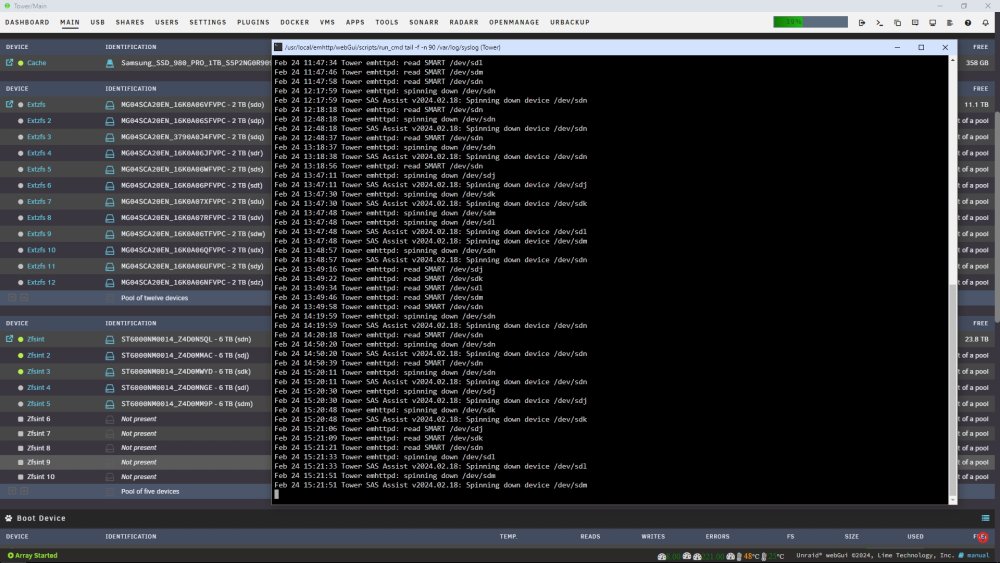
Indeed. root@Tower:~# sdparm -C sense /dev/sdn /dev/sdn: SEAGATE ST6000NM0014 MB84 Additional sense: Standby condition activated by command They spin down, but you see in the attached screen that sdj, sdk and sdn have already spun right back up!
-
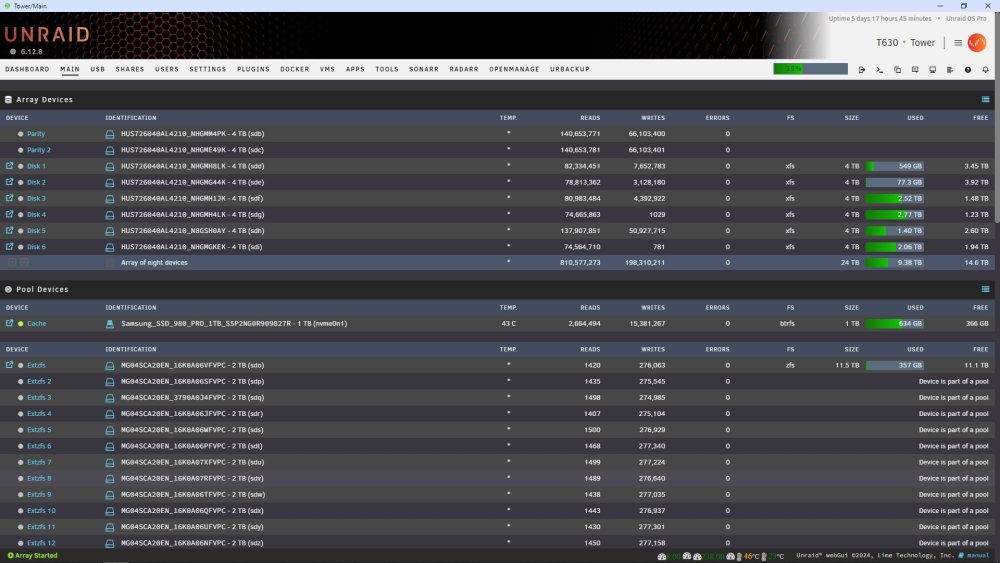
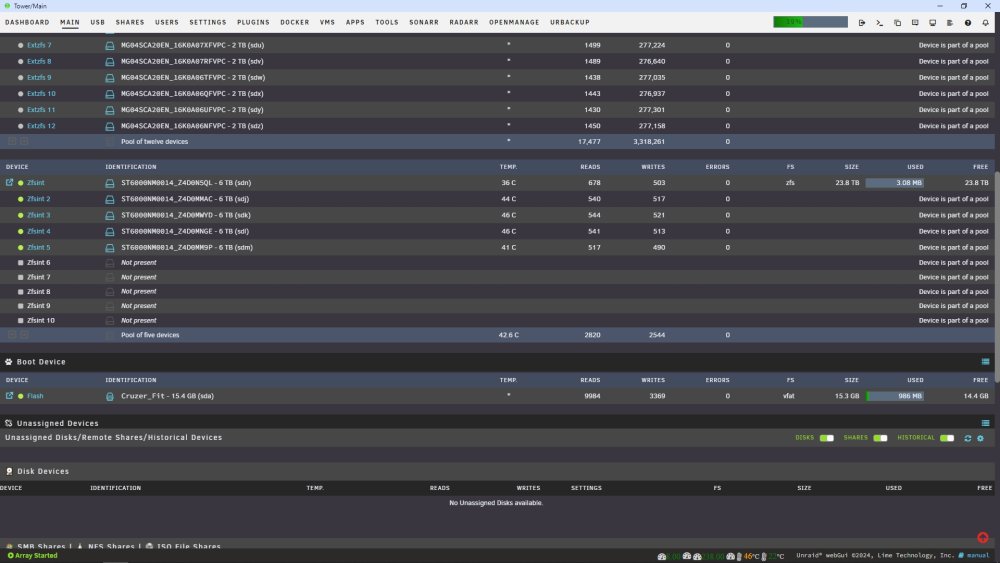
SDJ-SDN are the ZFS pool that won't seem to stay down. SDO-SDZ are also a ZFS pool, but those are in an external enclosure, and oddly seem to be working fine. The difference, I think, is that the first pool are Seagate drives. Bummer about the SMART, I thought I had it figured out... lol Here's the whole rundown, if that helps...
-
1. Yes, I do appear to be seeing some of those. Not sure which drives those msgs apply to, though. I can track them down by dev code if you want. Feb 24 08:41:52 Tower SAS Assist v2024.02.18: Spinning down device /dev/sdk Feb 24 08:42:11 Tower emhttpd: spinning down /dev/sdl Feb 24 08:42:11 Tower SAS Assist v2024.02.18: Spinning down device /dev/sdl Feb 24 08:42:30 Tower emhttpd: spinning down /dev/sdm Feb 24 08:42:30 Tower SAS Assist v2024.02.18: Spinning down device /dev/sdm Feb 24 08:43:33 Tower emhttpd: read SMART /dev/sdj Feb 24 08:43:46 Tower emhttpd: read SMART /dev/sdk Feb 24 08:43:58 Tower emhttpd: read SMART /dev/sdl Feb 24 08:44:10 Tower emhttpd: read SMART /dev/sdm Feb 24 08:48:21 Tower emhttpd: spinning down /dev/sdn Feb 24 08:48:22 Tower SAS Assist v2024.02.18: Spinning down device /dev/sdn Feb 24 08:49:20 Tower emhttpd: read SMART /dev/sdn Feb 24 09:19:22 Tower emhttpd: spinning down /dev/sdn Feb 24 09:19:22 Tower SAS Assist v2024.02.18: Spinning down device /dev/sdn Feb 24 09:19:40 Tower emhttpd: read SMART /dev/sdn 2. Yes, I see the SAS assist line there as well. And I see that it's the same devices as above. I guess that means it's working, but something is waking up the pool? There's absolutely nothing on those drives yet, I wonder what could be waking it...? Feb 24 09:43:06 Tower emhttpd: spinning down /dev/sdn Feb 24 09:43:06 Tower SAS Assist v2024.02.18: Spinning down device /dev/sdn Feb 24 09:43:24 Tower emhttpd: spinning down /dev/sdj Feb 24 09:43:24 Tower SAS Assist v2024.02.18: Spinning down device /dev/sdj Feb 24 09:43:43 Tower emhttpd: spinning down /dev/sdk Feb 24 09:43:43 Tower SAS Assist v2024.02.18: Spinning down device /dev/sdk Feb 24 09:44:01 Tower emhttpd: spinning down /dev/sdl Feb 24 09:44:01 Tower SAS Assist v2024.02.18: Spinning down device /dev/sdl Feb 24 09:44:20 Tower emhttpd: spinning down /dev/sdm Feb 24 09:44:20 Tower SAS Assist v2024.02.18: Spinning down device /dev/sdm AHA!! I just watched the log, and when it read the SMART codes for those drives, they woke up. That appears to be the culprit...maybe? Feb 24 09:44:57 Tower emhttpd: read SMART /dev/sdj Feb 24 09:45:10 Tower emhttpd: read SMART /dev/sdk Feb 24 09:45:22 Tower emhttpd: read SMART /dev/sdl Feb 24 09:45:34 Tower emhttpd: read SMART /dev/sdm Feb 24 09:45:46 Tower emhttpd: read SMART /dev/sdn 3. Sure... root@Tower:~# ls -la /dev/disk/by-path total 0 drwxr-xr-x 2 root root 1080 Feb 18 17:10 ./ drwxr-xr-x 7 root root 140 Feb 18 17:09 ../ lrwxrwxrwx 1 root root 9 Feb 18 17:10 pci-0000:00:1d.0-usb-0:1.4:1.0-scsi-0:0:0:0 -> ../../sda lrwxrwxrwx 1 root root 10 Feb 18 17:10 pci-0000:00:1d.0-usb-0:1.4:1.0-scsi-0:0:0:0-part1 -> ../../sda1 lrwxrwxrwx 1 root root 9 Feb 18 17:10 pci-0000:03:00.0-scsi-0:0:0:0 -> ../../sdb lrwxrwxrwx 1 root root 10 Feb 18 17:10 pci-0000:03:00.0-scsi-0:0:0:0-part1 -> ../../sdb1 lrwxrwxrwx 1 root root 9 Feb 18 17:10 pci-0000:03:00.0-scsi-0:0:10:0 -> ../../sdl lrwxrwxrwx 1 root root 10 Feb 18 17:11 pci-0000:03:00.0-scsi-0:0:10:0-part1 -> ../../sdl1 lrwxrwxrwx 1 root root 9 Feb 18 17:10 pci-0000:03:00.0-scsi-0:0:11:0 -> ../../sdm lrwxrwxrwx 1 root root 10 Feb 18 17:11 pci-0000:03:00.0-scsi-0:0:11:0-part1 -> ../../sdm1 lrwxrwxrwx 1 root root 9 Feb 24 04:40 pci-0000:03:00.0-scsi-0:0:12:0 -> ../../sdn lrwxrwxrwx 1 root root 10 Feb 18 17:11 pci-0000:03:00.0-scsi-0:0:12:0-part1 -> ../../sdn1 lrwxrwxrwx 1 root root 9 Feb 18 17:10 pci-0000:03:00.0-scsi-0:0:1:0 -> ../../sdc lrwxrwxrwx 1 root root 10 Feb 18 17:10 pci-0000:03:00.0-scsi-0:0:1:0-part1 -> ../../sdc1 lrwxrwxrwx 1 root root 9 Feb 18 17:10 pci-0000:03:00.0-scsi-0:0:2:0 -> ../../sdd lrwxrwxrwx 1 root root 10 Feb 18 17:10 pci-0000:03:00.0-scsi-0:0:2:0-part1 -> ../../sdd1 lrwxrwxrwx 1 root root 9 Feb 18 17:10 pci-0000:03:00.0-scsi-0:0:3:0 -> ../../sde lrwxrwxrwx 1 root root 10 Feb 18 17:10 pci-0000:03:00.0-scsi-0:0:3:0-part1 -> ../../sde1 lrwxrwxrwx 1 root root 9 Feb 18 17:10 pci-0000:03:00.0-scsi-0:0:4:0 -> ../../sdf lrwxrwxrwx 1 root root 10 Feb 18 17:10 pci-0000:03:00.0-scsi-0:0:4:0-part1 -> ../../sdf1 lrwxrwxrwx 1 root root 9 Feb 18 17:10 pci-0000:03:00.0-scsi-0:0:5:0 -> ../../sdg lrwxrwxrwx 1 root root 10 Feb 18 17:10 pci-0000:03:00.0-scsi-0:0:5:0-part1 -> ../../sdg1 lrwxrwxrwx 1 root root 9 Feb 18 17:10 pci-0000:03:00.0-scsi-0:0:6:0 -> ../../sdh lrwxrwxrwx 1 root root 10 Feb 18 17:10 pci-0000:03:00.0-scsi-0:0:6:0-part1 -> ../../sdh1 lrwxrwxrwx 1 root root 9 Feb 18 17:10 pci-0000:03:00.0-scsi-0:0:7:0 -> ../../sdi lrwxrwxrwx 1 root root 10 Feb 18 17:10 pci-0000:03:00.0-scsi-0:0:7:0-part1 -> ../../sdi1 lrwxrwxrwx 1 root root 9 Feb 18 17:10 pci-0000:03:00.0-scsi-0:0:8:0 -> ../../sdj lrwxrwxrwx 1 root root 10 Feb 18 17:11 pci-0000:03:00.0-scsi-0:0:8:0-part1 -> ../../sdj1 lrwxrwxrwx 1 root root 9 Feb 18 17:10 pci-0000:03:00.0-scsi-0:0:9:0 -> ../../sdk lrwxrwxrwx 1 root root 10 Feb 18 17:11 pci-0000:03:00.0-scsi-0:0:9:0-part1 -> ../../sdk1 lrwxrwxrwx 1 root root 9 Feb 18 17:10 pci-0000:84:00.0-sas-exp0x500c04f2715fe43f-phy24-lun-0 -> ../../sdo lrwxrwxrwx 1 root root 10 Feb 18 17:11 pci-0000:84:00.0-sas-exp0x500c04f2715fe43f-phy24-lun-0-part1 -> ../../sdo1 lrwxrwxrwx 1 root root 9 Feb 18 17:10 pci-0000:84:00.0-sas-exp0x500c04f2715fe43f-phy25-lun-0 -> ../../sdp lrwxrwxrwx 1 root root 10 Feb 18 17:11 pci-0000:84:00.0-sas-exp0x500c04f2715fe43f-phy25-lun-0-part1 -> ../../sdp1 lrwxrwxrwx 1 root root 9 Feb 18 17:10 pci-0000:84:00.0-sas-exp0x500c04f2715fe43f-phy26-lun-0 -> ../../sdq lrwxrwxrwx 1 root root 10 Feb 18 17:11 pci-0000:84:00.0-sas-exp0x500c04f2715fe43f-phy26-lun-0-part1 -> ../../sdq1 lrwxrwxrwx 1 root root 9 Feb 18 17:10 pci-0000:84:00.0-sas-exp0x500c04f2715fe43f-phy27-lun-0 -> ../../sdr lrwxrwxrwx 1 root root 10 Feb 18 17:11 pci-0000:84:00.0-sas-exp0x500c04f2715fe43f-phy27-lun-0-part1 -> ../../sdr1 lrwxrwxrwx 1 root root 9 Feb 18 17:10 pci-0000:84:00.0-sas-exp0x500c04f2715fe43f-phy28-lun-0 -> ../../sds lrwxrwxrwx 1 root root 10 Feb 18 17:11 pci-0000:84:00.0-sas-exp0x500c04f2715fe43f-phy28-lun-0-part1 -> ../../sds1 lrwxrwxrwx 1 root root 9 Feb 18 17:10 pci-0000:84:00.0-sas-exp0x500c04f2715fe43f-phy29-lun-0 -> ../../sdt lrwxrwxrwx 1 root root 10 Feb 18 17:11 pci-0000:84:00.0-sas-exp0x500c04f2715fe43f-phy29-lun-0-part1 -> ../../sdt1 lrwxrwxrwx 1 root root 9 Feb 18 17:10 pci-0000:84:00.0-sas-exp0x500c04f2715fe43f-phy30-lun-0 -> ../../sdu lrwxrwxrwx 1 root root 10 Feb 18 17:11 pci-0000:84:00.0-sas-exp0x500c04f2715fe43f-phy30-lun-0-part1 -> ../../sdu1 lrwxrwxrwx 1 root root 9 Feb 18 17:10 pci-0000:84:00.0-sas-exp0x500c04f2715fe43f-phy31-lun-0 -> ../../sdv lrwxrwxrwx 1 root root 10 Feb 18 17:11 pci-0000:84:00.0-sas-exp0x500c04f2715fe43f-phy31-lun-0-part1 -> ../../sdv1 lrwxrwxrwx 1 root root 9 Feb 18 17:10 pci-0000:84:00.0-sas-exp0x500c04f2715fe43f-phy32-lun-0 -> ../../sdw lrwxrwxrwx 1 root root 10 Feb 18 17:11 pci-0000:84:00.0-sas-exp0x500c04f2715fe43f-phy32-lun-0-part1 -> ../../sdw1 lrwxrwxrwx 1 root root 9 Feb 18 17:10 pci-0000:84:00.0-sas-exp0x500c04f2715fe43f-phy33-lun-0 -> ../../sdx lrwxrwxrwx 1 root root 10 Feb 18 17:11 pci-0000:84:00.0-sas-exp0x500c04f2715fe43f-phy33-lun-0-part1 -> ../../sdx1 lrwxrwxrwx 1 root root 9 Feb 18 17:10 pci-0000:84:00.0-sas-exp0x500c04f2715fe43f-phy34-lun-0 -> ../../sdy lrwxrwxrwx 1 root root 10 Feb 18 17:11 pci-0000:84:00.0-sas-exp0x500c04f2715fe43f-phy34-lun-0-part1 -> ../../sdy1 lrwxrwxrwx 1 root root 9 Feb 18 17:10 pci-0000:84:00.0-sas-exp0x500c04f2715fe43f-phy35-lun-0 -> ../../sdz lrwxrwxrwx 1 root root 10 Feb 18 17:11 pci-0000:84:00.0-sas-exp0x500c04f2715fe43f-phy35-lun-0-part1 -> ../../sdz1





