Lonewolf147
Members
-
Joined
-
Last visited
Everything posted by Lonewolf147
-
On a different note, nothing seems to happen when I run ClamAV. I set the scan folder to one that only has two files in it to be able to test this. I've both started it manually, and using the aforementioned script (along with IronBeardKnight's extra line). The app starts, and just sits there. I tried waiting it out, starting it before I went to bed, but 8 hours later and it was still 'running'. I pulled the logs for it and it shows: Starting Freshclamd Starting ClamAV Socket for clamd not found yet, retrying (0/1800) ...ClamAV update process started at Tue Aug 29 11:47:19 2023 daily.cld database is up-to-date (version: 27015, sigs: 2040076, f-level: 90, builder: raynman) main.cvd database is up-to-date (version: 62, sigs: 6647427, f-level: 90, builder: sigmgr) bytecode.cvd database is up-to-date (version: 334, sigs: 91, f-level: 90, builder: anvilleg) Socket for clamd not found yet, retrying (17/1800) ...Tue Aug 29 11:47:36 2023 -> Limits: Global time limit set to 120000 milliseconds. Tue Aug 29 11:47:36 2023 -> Limits: Global size limit set to 419430400 bytes. Tue Aug 29 11:47:36 2023 -> Limits: File size limit set to 104857600 bytes. Tue Aug 29 11:47:36 2023 -> Limits: Recursion level limit set to 17. Tue Aug 29 11:47:36 2023 -> Limits: Files limit set to 10000. Tue Aug 29 11:47:36 2023 -> Limits: MaxEmbeddedPE limit set to 41943040 bytes. Tue Aug 29 11:47:36 2023 -> Limits: MaxHTMLNormalize limit set to 41943040 bytes. Tue Aug 29 11:47:36 2023 -> Limits: MaxHTMLNoTags limit set to 8388608 bytes. Tue Aug 29 11:47:36 2023 -> Limits: MaxScriptNormalize limit set to 20971520 bytes. Tue Aug 29 11:47:36 2023 -> Limits: MaxZipTypeRcg limit set to 1048576 bytes. Tue Aug 29 11:47:36 2023 -> Limits: MaxPartitions limit set to 50. Tue Aug 29 11:47:36 2023 -> Limits: MaxIconsPE limit set to 100. Tue Aug 29 11:47:36 2023 -> Limits: MaxRecHWP3 limit set to 16. Tue Aug 29 11:47:36 2023 -> Limits: PCREMatchLimit limit set to 100000. Tue Aug 29 11:47:36 2023 -> Limits: PCRERecMatchLimit limit set to 2000. Tue Aug 29 11:47:36 2023 -> Limits: PCREMaxFileSize limit set to 104857600. Tue Aug 29 11:47:36 2023 -> Archive support enabled. Tue Aug 29 11:47:36 2023 -> AlertExceedsMax heuristic detection disabled. Tue Aug 29 11:47:36 2023 -> Heuristic alerts enabled. Tue Aug 29 11:47:36 2023 -> Portable Executable support enabled. Tue Aug 29 11:47:36 2023 -> ELF support enabled. Tue Aug 29 11:47:36 2023 -> Mail files support enabled. Tue Aug 29 11:47:36 2023 -> OLE2 support enabled. Tue Aug 29 11:47:36 2023 -> PDF support enabled. Tue Aug 29 11:47:36 2023 -> SWF support enabled. Tue Aug 29 11:47:36 2023 -> HTML support enabled. Tue Aug 29 11:47:36 2023 -> XMLDOCS support enabled. Tue Aug 29 11:47:36 2023 -> HWP3 support enabled. Tue Aug 29 11:47:36 2023 -> Self checking every 600 seconds. Tue Aug 29 11:47:36 2023 -> Set stacksize to 1048576 socket found, clamd started. Tue Aug 29 11:58:20 2023 -> SelfCheck: Database status OK. Tue Aug 29 12:08:20 2023 -> SelfCheck: Database status OK. Tue Aug 29 12:18:21 2023 -> SelfCheck: Database status OK. Tue Aug 29 12:28:21 2023 -> SelfCheck: Database status OK. . . . Tue Aug 29 20:08:46 2023 -> SelfCheck: Database status OK. Tue Aug 29 20:18:46 2023 -> SelfCheck: Database status OK. If I run it via the script, the script never finishes. I have to manually abort. Any ideas?
-
I do have email notifications set up for Array Status. But I'd like to get an email for ClamAV only if possible.
-
Thanks for this script @Squid I was wondering if there is a way to add in an email notification of the scan results?
-
Thank you! I didn't realize there was a popup help section for each line. LOL
-
Sorry for a noob question.... how do I assign a specific icon to a folder? I see the line in the edit screen, but what do I put there? A web address to something online, or do I have to create a local folder on my system to keep them in? And then do I have to create that path in the docker file?
-
OMG! You just got rid of all my frustration over this with my Gigabyte Z390 UD Adding those two lines to my startup files fixed it!
-
So I just found another post that actually solved my issue! unraid isn't recognizing the pwm sensor module, and I needed to change the ID of it to trick it into recognizing it.
-
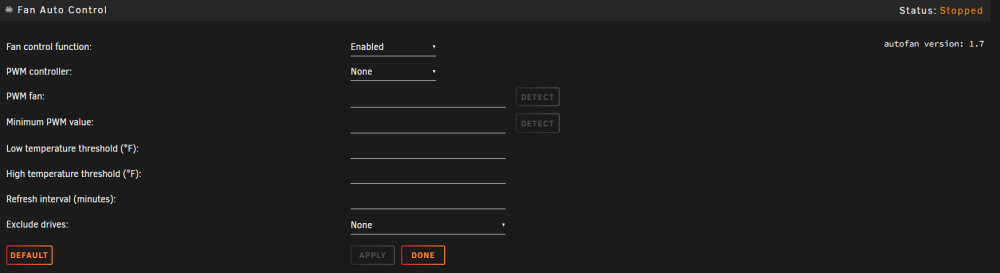
I know the autofan plugin is still a work in progress and won't detect everything. Can someone confirm if my system should be detectable or not? I've seen many other posts with people asking pretty much the same thing. I found this quoted post from many years ago, and tried running that find command. It returned nothing. I have a Gigabyte Z390 UD motherboard. It has 3 system fans and 1 CPU fan. I'm running unraid 6.12.3. I also just found out about the pwmconfig command, so I ran it and here are the results: # pwmconfig version 3.6.0 This program will search your sensors for pulse width modulation (pwm) controls, and test each one to see if it controls a fan on your motherboard. Note that many motherboards do not have pwm circuitry installed, even if your sensor chip supports pwm. We will attempt to briefly stop each fan using the pwm controls. The program will attempt to restore each fan to full speed after testing. However, it is ** very important ** that you physically verify that the fans have been to full speed after the program has completed. /usr/sbin/pwmconfig: There are no pwm-capable sensor modules installed
-
I started this thread on the Plex forum https://forums.plex.tv/t/unraid-nvidia-gpu-hw-transcoding-issue/846328 Feel free to join in on it. So far I don't have a solution.
-
I did indeed get the crypto hack a while back. I thought it was all cleaned out... I'll fix those items.
-
My logs are filling up with an error that something wants to send an email notification. It tries every ten minutes, and fails, because it is trying to send to 'root'. The email settings in SMTP are correct, I can send the test message successfully. I've turned off every notification I can find in settings. I've turned off all my docker apps, and it still occurs. If I 'break' my SMTP settings, I get a different error, but still get them every ten minutes. I've done reboots, and just upgraded to 6.12.3 a few hours ago, and it is still happening. Here's the error in the logs when SMTP is correct: Jul 14 10:50:17 Valaskjalf sSMTP[2599]: Creating SSL connection to host Jul 14 10:50:17 Valaskjalf sSMTP[2599]: SSL connection using TLS_AES_256_GCM_SHA384 Jul 14 10:50:20 Valaskjalf sSMTP[2599]: 550 5.2.254 InvalidRecipientsException; Sender throttled due to continuous invalid recipients errors.; STOREDRV.Submission.Exception:InvalidRecipientsException; Failed to process message due to a permanent exception with message [BeginDiagnosticData]Recipient 'root' is not resolved. All recipients must be resolved before a message can be submitted. InvalidRecipientsException: Recipient 'root' is not resolved. All recipients must be resolved before a message can be submitted.[EndDiagnosticData] [Hostname=SN7PR06MB9281.namprd06.prod.outlook.com] and this is when SMTP is broken: Jul 14 11:00:16 Valaskjalf sSMTP[7332]: Unable to locate Jul 14 11:00:16 Valaskjalf sSMTP[7332]: Cannot open :0 How do I find what is trying to send this notification? valaskjalf-diagnostics-20230715-0603.zip
-
Thanks. It does seem to be a Plex/unRaid issue that is being worked on.
-
Been having an issue for a few weeks now, Plex isn't using my NVIDIA GPU for transcoding anymore. I haven't made any hardware changes, or any changes to the Plex configuration. It is still transcoding, but it is using my CPU instead. Anyone else having this issue, or any ideas how to fix it?
-
Recently I got this error twice from Fix Common Problems. Since I'm running 6.11+ I can't use mcelog, so I've attached my diagnostics files. Can anyone provide some insight into the issue? valaskjalf-diagnostics-20230326-0700.zip
-
I'm having one of those days. After my cache drive crashed, i found I lost all my CA Backup/Restore files. So, I've had to reinstall all my apps from scratch. Now I'm working on URBackup. Since I've installed a new server, it doesn't recognize my clients. I've tried following these choices per the help page: *Click on the popup that asks if you want to use the new UrBackup server *Delete the server_idents.txt on the client, stop the UrBackup client back-end service, wait 5min, and start the service again. *Uninstall the UrBackup client, wait 5min and then install it again. You loose your settings if you do this. *Get the server identity from the server (It is shown on the admin page for server administrators) and add it to the client's server_idents.txt. 1, I don't get a popup asking to use the new server. 2, I deleted the idents file, stopped it, waited, restarted. Nothing. It says it can't communicate with the server, and my client is now missing from the client list on the server. I added the idents file back, but it didn't change anything, client still doesn't show. 3, - haven't tried this yet, because I'm still hoping to get the clients resynced so I can access all my backups again 4, logging into the server, I checked every tab available in settings and there is no Admin Page, nor a server ident visible. The server version is the latest one pulled from the repository today. Client versions are 2.5.21 Any ideas to try before I uninstall and probably lose access to my old backups?
-
Yeah.... I looked, it's gone. Damn. Well, lesson learned. Thanks for taking the time for me. I guess I just have to rebuild the apps. Thankfully my Plex server is being stored on its own drive, so nothing was lost for it. Mostley it is all my *arr apps and qbittorrent that I have to rebuild. Easy, but time consuming.
-
Sorry, I don't remember what it was set to. I didn't look at that screen often enough to memorize them. Diag attached valaskjalf-diagnostics-20230210-0942.zip
-
Currently, no, I don't see a backups share. I know it has been running... I actually posted asking a question yesterday about it (getting it to restart apps in a specific order, that wasn't answered yet). I've actually used it in the past to restore stuff too. But it seems after this cache drive crash, things have disappeared.
-
Just the default location when it installed, /mnt/user/backups When I browse into the user directory there is no backups subdirectory showing.
-
Hey all. So I think I may be out of luck here, but, I can still ask. My cache drive crashed on me this morning. I ended up having to reformat it. I've been running CABackup regularly.... using all the default settings. Am I to assume that the backups were being saved on the cache drive, not the array? So I've pretty much lost them and need to rebuild all my docker apps settings?
-
Is there a way to set to order that apps are restarted after they are backed up? I have a specific order needed because I'm running a bunch of my apps through a VPN app. the VPN app needs to start first so the other apps can see it. If it doesn't, they all fail to start.
-
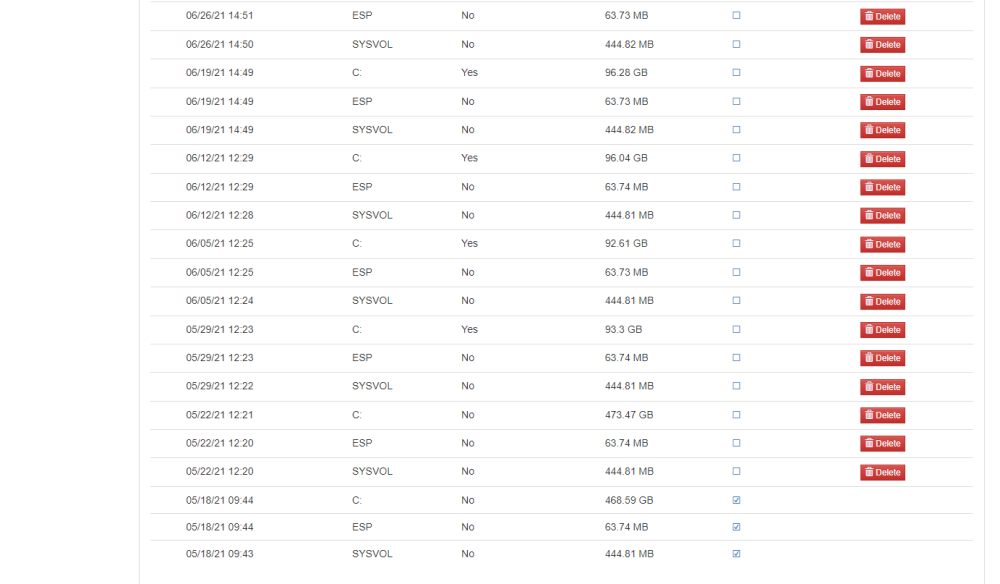
I'm positive this is a user error issue, but I'm hoping there is a way to fix it. Before I realized I could delete old backup files from within the program itself, I manually deleted a bunch. Now that I know where to find the list to delete them from within the app itself, all those deleted backups are still showing there, and when I try to delete them again I get the error that the files don't exist. Is there a way to refresh this list to remove all non-existent backups?
-
I kept playing around with it and it started to work now. I found that local host has to go in the download client settings of *arr apps. I have a new problem though. I have two instances of Lidarr running (to monitor two different music libararies). Each on has it's own port, but the container is still 8686 for each. When I try to set up the second instance of Lidarr with qbvpn, it doesn't let me log in to the Lidarr webui. I can log into the primary instance of it though. Any ideas?
-
Speaking on the VPN_INPUT_PORT key... @binhex following your guide in the FAQ you wrote, I've been able to get Lidarr (my test container before I do this to all my *arr containers) to use qbtvpn's network. I can bash it and pull up the IP and it is the correct VPN IP. But, I've had no luck getting it set to be able to log into the web ui for Lidarr. I've tried a few different things. One, I've added the port 8686 to the VPN_INPUT_PORT key. When I go to the IP:Port, it fails to load. I've tried both leaving the Host Port 1 port (8686) in Lidarr, as well as removing it (as you say in your FAQ). In that same FAQ you talk about using localhost instead of IP, but don't really explain where I'm supposed to add that change. Can you help with this at all please?
-
Version 4.5.0, i have some broken images in the download screen. All the images for Queued items don't show. I know this is minor, but I wanted to report it.