





SirCadian
Members
-
Joined
-
Last visited
Everything posted by SirCadian
-
I'm feeling foolish now. Just realised I have configured static DNS on Unraid itself to point to 1.1.1.1 and 1.0.0.1. Issue must have been related to something else.
-
Is there a requirement for functioning network when upgrading to 7.3? I run a Pihole docker and this usually means the network (more specifically, DNS) is unavailable when Unraid is rebooting. I backed up the flash and then upgraded from 7.2.6 to 7.3. Unraid booted to the OS selection screen but failed shortly after that. I left it for a 1600s or so while I went to get lunch but it was still unresponsive when I got back so I powered it down manually. I repointed the network to use 1.1.1.1 for DNS and tried to boot Unraid again and it booted without issue. Just posting here in case anyone else has seen similar behaviour?
-
Pretty excited about this, solid notifications support is something that has been missing from Unraid for a while, imo. Is the plan to include this as part of a future core Unraid release or will it become a plugin? Do you have an ETA for a stable/tested release? Thanks!
-
Just to follow up on this. The drive was confirmed as DOA and I returned it. Currently pre-cleared a new replacement drive and am in the process of rebuilding parity using the new drive. I'm doing this in maintenance mode so that the old parity drive remains valid in case there are any issues. Quick supplementary question. Once the parity sync completes, I will want to add the old parity drive back into the array as a data drive. Do I need to format it first, or do I just stop the array, add the old parity drive back in as a data drive and allow Unraid to do its thing (I'm assuming here that it will format the drive and that clear/pre-clear will be un-necessary)? Thanks!
-
I'm having some issues with a new drive that arrived today, a Western Digital 12Tb Red Plus. My array (3x8Tb Data + 1 8Tb Parity) is running short of space and I decided to upgrade the parity drive with a larger model and re-use the old parity drive as a data drive. I shut down my server, installed the drive and then rebooted. The drive appears in the BIOS but, unusually, the capacity shows as 0Gb. When I boot to Unraid, the new drive doesn't appear in Unassigned devices at all. I've tried the following: Updated to latest BIOS (Asus WS C246 Pro). Same problem. I've swapped the 12Tb drive out for an old 6Tb I had lying around. This was instantly picked up by unassigned devices and I was given the option to format it. I've installed the drive in my desktop PC. It appears in Windows 11 Disk Manager and I'm prompted to initialise it but when I try that I get "request could not be performed because of an I/O device error". I'm pretty sure the disk is DOA and I need to return it. Is there anything I'm missing here? It's a larger drive than I've used before but I can't find any reports of compatibility issues with larger SATA drives for my motherboard or Unraid. Thanks for any help or info.
-
Still no issues here. It's looking like the issue was either something to do with the Unbalanced plugin being installed (I didn't use it at any point) or possibly the Unassigned Devices plugin which I re-installed. Either way, I'm happily sitting at 41 days uptime and counting.
-
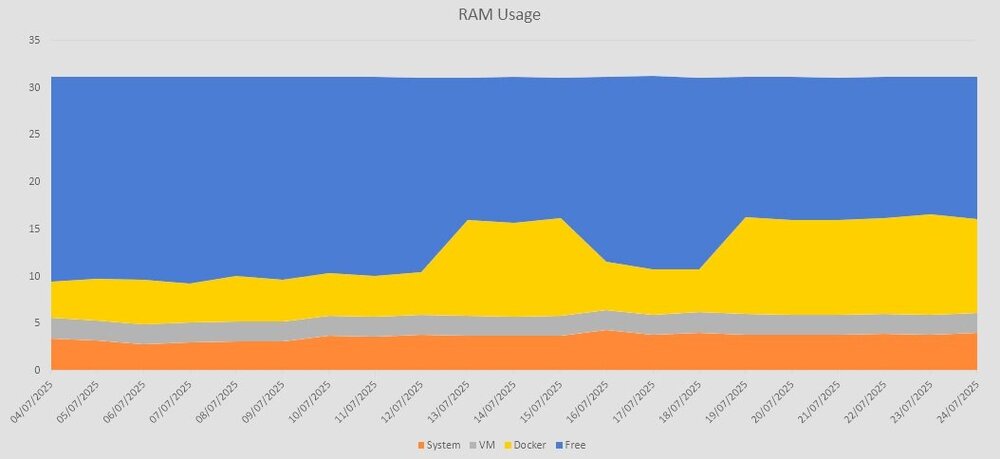
@Harb Sorry for the tardy response, I've had a busy couple of weeks. I removed Unbalanced and did a re-install of Unassigned Devices. Happily I'm in the same boat as you and have had no issues since then. I didn't really use Unbalanced anyway, it was more of a just-in-case plugin, so I've not re-installed that. I believe there's functionality in the mover now that can move the contents of a disk to other disks in the array, so I'll stick with the official tool in the event I need that capability. I think it seems to be fixed but I'll need a longer test period before I'm fully confident. Prior to this issue I was seeing uptimes measured in months, not weeks. I only really had to bounce the server for upgrades. I'll keep reporting back. As an aside, I also started tracking RAM consumption over time in the event that the issue was some kind of memory leak. I grab the stats from the homepage at the same time every day. Nothing much to see, big jump in docker usage is a new Ark Server I deployed for my kid (which Studio Wildcard borked with an update a couple of days later and I had to manually rollback) otherwise the dockers/vms are stable with no other changes. There's slight creep in system memory usage but nothing concerning. I'll keep logging the stats just for interest's sake.
-
OK, cool. I'll also re-install the unassigned devices plugins. See how it goes. I'll keep you posted.
-
I'm having exactly this issue. It has been driving me mad since I first installed 7.x. Based on the above, I've uninstalled Unbalance as I don't ever use it. I have occasional use for the Unassigned Devices plugins though so will leave them enabled for now. If I encounter the issue again, I'll post about it here. @Harb I'd appreciate it if you could post again if you encounter any further issues. I'm really not a fan of having to physically power off my server, so am keen to get to the bottom of this issue.
-
Sorry to necro this, but did you find a solution to this? I mapped the path to my unraid disks and set up the disks in the widgets yaml as mentioned. Ended up getting the same thing as you, a blank set of disks widgets. Not sure why. **EDIT** **Note: Discovered that the solution below causes Unraid to map user shares directly to disk1, etc. Whilst the solution works, it also generates warnings from the 'Fix Common Problems' plugin. Still looking for a solution that works around that issue** Found the solution on reddit. I mapped container paths to each disk individually: /disk1 = /mnt/disk1/ /disk2 =/mnt/disk2/ etc. You can map the whole array at '/mnt/user/' and the system/boot drive at '/boot/'. I mapped them all as read-only...seemed sensible.
-
I am. I'd completely forgotten I could use localhost. I feel quite foolish, thanks for the help!
-
I have a (hopefully) quick question. I have binhex PrivoxyVPN set up as network type "bridge". I have a number of other containers that route traffic through it using the "--net=container:binhex-privoxyvpn" extra parameter and have port mappings set up appropriately. This all works fine. I have one docker that both routes its traffic through the binhex-privoxyvpn container and needs to talk to other dockers using that container's network. I achieve this by using the binhex-privoxyvpn assigned ip and the relevant port. The issue is that, on reboot of Unraid or (sometimes) update of the binhex privoxyvpn container, that IP address changes and I have to change the dependant docker config. Is there any way I can fix the IP address or refer to the binhex-privoxyvpn container by name?
-
Afraid I don't. I think I may have identified the issue though. Docker wouldn't start after I posted my last update. It looks like the docker img was corrupt. I deleted it and re-added all my containers. I still saw some CPU spikes that seem to be related to the Dynamic Cache Directories plugin (high 'find' and 'shfs' CPU usage) so I've disabled. Things seem stable now. I'll live with it for a while and see if the issue is resolved. If not, i'll grab a diagnostics and issue timestamp and post here. Thanks for your help so far.
-
Yes. Although I had stopped Docker and VMs at that point as it was the only way I could get the diags. I can try to get everything up and running again and grab some diags then if it will help?
-
I use a user script to create persistent syslog. It's still an issue, I can't seem to run anything on it without the system becoming unstable. I've attached the diags. If you need earlier syslogs than the one in the diag zipfile, I can attach those. Thanks for looking at this. falcon-diagnostics-20240626-1557.zip
-
My Unraid server has been running fine for a few years now. I ran into problems yesterday where the server has become increasingly unresponsive. The GUI windows take a long time (minutes) to load or won't load at all. The terminal won't load. I tried to identify the issue but am not any clearer as to what is causing it. I'm seeing IOWAIT kick in periodically and shfs seems to frequently take up to 75% CPU. Things I have tried include: - Rebooting the server. - Disabling all the dockers. - Disabling all the vms. At one point I had all dockers and vms stopped and had a parity check running. I tried to grab a diagnostics and this failed while trying to download the 132k zipfile. I managed to cancel the parity check and then re-ran the diagnostics. It completed the second time and downloaded. I'm currently leaving dockers and vms disabled whilst I try to run a parity check but I've no idea what to try next. I'm surprised the issue is happening when dockers and vms are disabled. Any suggestions as to what I can try to diagnose and fix?
-
Excellent. Thanks for the help. Much appreciated.
-
Thanks. I've just taken another backup as I made some changes to one of my VMs recently. I might create a user script to a weekly backup of it. Do all the VMs need to be stopped for me to back it up? It looks like the file isn't locked, so I should just be able to rsync it to my backups location?
-
I have a quick couple of questions that I can't find answers to in the forums. I use the vmbackup plugin to backup my VMs. This is backing up a .fd, .qcow2/img and .xml file for each vm. I have one manual backup of libvirt.img from some time ago, does this file change regularly and should I be running a scheduled backup of it? Is there anything else I need to backup in order to be able to restore my vms? Thanks!
-
OK. Last night's backup went through as expected. 2024-02-07 06:45:58.617 INFO BACKUP_STATS Files: 65 total, 81,341M bytes; 65 new, 81,341M bytes 2024-02-07 06:45:58.617 INFO BACKUP_STATS File chunks: 12739 total, 81,341M bytes; 792 new, 4,772M bytes, 3,009M bytes uploaded 2024-02-07 06:45:58.617 INFO BACKUP_STATS Metadata chunks: 4 total, 943K bytes; 4 new, 943K bytes, 723K bytes uploaded 2024-02-07 06:45:58.617 INFO BACKUP_STATS All chunks: 12743 total, 81,342M bytes; 796 new, 4,773M bytes, 3,010M bytes uploaded 2024-02-07 06:45:58.617 INFO BACKUP_STATS Total running time: 00:15:55 Duplicacy is definitely de-duplicating and only uploading changed chunks. Upload last night was around 4% of the total backup size. Duplicacy is also compressing the uncompressed data on upload so it takes ~50% less space in the remote bucket. I'll likely still only run this once a week as I have copies held both locally on the array and on my local PC (once daily, a user script waits until it sees Unraid mount a remote share on my PC and then copies the local backups across). Now I just need to have a think about VM backup, particularly my Home Assistant instance...really don't fancy having to rebuild that from scratch in the event of a catastrophic failure.
-
Not testing untared vs tared but am testing that tarfiles get deduped properly (see post above). Looks to work but want to double check.
-
I'm in the process of testing that now and will let you know. Local uncompressed backups are about double the size of the compressed backups. Duplicacy has built in compression which reduces the remote backup size down to around half the size of the local backups. It seems to have de-duplicated properly as it only transferred around 10% of the appdata backup chunks during the backup process. I want to run another backup overnight to double check this though.
-
I didn't, I had just assumed Duplicacy wouldn't look in the tar files. After your comment I dug around in the Duplicacy forums and came across this post. Thanks for the pointer, I'll give things a whirl without compression and see how it goes.
-
I'm running Unraid 7.12.6. I've been a happy user of unraid for a few years now. I'm thinking about re-organising my data and had a couple of questions: 1. If I create a user share and map it to a number of disks, do those disks only spin-up individually rather than as a group when a file is accessed? i.e. I have usershare1 allocated to disk1 & disk2, and I have the Dynamix Cache Directories plugin installed and set to cache usershare1. If I read a file through usershare1 that is physically on disk 2, will only disk 2 spin up? 2. Do hard-links work for user shares? i.e. Can a hard-link be created on disk1 in usershare1 that links to a file on disk2 in the same user share? I understand that I don't get to decide which disks these reside on...just trying to understand if hard-links will only work intermittently in a user share context (depending on whether unraid decides to locate the hard link and file on the same disk). Thanks in advance for any help. ----------------------------------- Update I found a good explainer on hard-links and how they work here -https://www.redhat.com/sysadmin/linking-linux-explained I used that to run a quick experiment in the terminal to look at hard-links and if/how they work in an Unraid user share context. Hard links do seem to work in user shares. If you attempt to create a hard link to a file in a user share, a hard link will be created to the file on the same physical disk as the file, even if your allocation method would ordinarily put any new files on a different disk. e.g. I have a "Backups" share set to high-water allocation between disk1 and disk3. disk1 is 89% full, disk3 is 17% full. All new files in the share are normally allocated to disk3. I created a file directly on disk1 (by creating it in /mnt/disk1/Backups) and then created a hard link to that file through the user share (by creating it in /mnt/user/Backups). The hard link winds up sitting in disk1, not disk3. As hard links take very little space (they report to be the same size as the file they link to but in practice are just the size of the filename plus a few bytes that point to the actual file) this would make sense...they're not going to fill up the disk. ------------------------------------- Update 2 Ran some tests to work out spin up/down behaviour. I span down disk2 & disk3 and did a recursive directory listing of disk2 in a terminal (ls -alR /mnt/disk2). Neither disk spun up so I'm guessing that Dynamix Cache Directories is doing its job. I then accessed a file that is physically located on disk2 via a user share that is allocated to both disk2 and disk3. Only disk2 spun up, disk3 stayed in standby. Hopefully this will be of use further down the line to someone else who has similar questions.
-
I've been trying this. The current version of appdata backup will create a seperate tar file for each container's appdata. It will also backup the container config XML as a separate file. So for example, for Nextcloud I have: nextcloud.tar.gz my-nextcloud.xml I have similar file pairs for every container. You'll also have a timestamped flash-backup tar file if you've selected the option to do a flash backup. Word of warning regarding rclone (assume you mean rclone rather than rsync?) to cloud. As the tar files are subtly different each time you take a backup, every tar file will be uploaded every time you rclone. The benefits of deduplicating and only synchronising changes is lost. For me this means approximately 70Gb of upload every time I run the remote copy to cloud. I've settled on a remote copy to an SMB share on another local machine for now. What I'd like to see in the future is the ability to backup into separate directories without tar/gzip so that tools like rclone and duplicacy can synchronise only small changed files up to the cloud rather than entire appdata directory tarfiles.




