





FreeMan
Members
-
Joined
-
Last visited
Everything posted by FreeMan
-
I'd guess that you can't prove ownership of duckdns.org, therefore the attempt to prove your ownership is failing. Domain Name = Yourdomain.duckdns.org Sub domains = www,ftp,etc
-
I've run into a problem similar to @Frostyfruit mentioned here. It seems that I can get .mp4 video files recorded on my cell phone to play, but AVIs, MKVs & MP4s from ripped DVDs or TV captures won't play. I get the " No compatible streams are currently available. Please try again later or contact your system administrator for details." error message. I get loads of ffmpeg-transcode-* log files in //nas/cache/appdata/binhex-emby/logs, so it doesn't seem to be a permissions issue on ffmpeg. I'm attaching a transcode log for an MP4 and an MKV file - I don't see any obvious errors, but I'm not an expert. Both of the files that produced these logs play just fine in VLC on my Win10 box or on my Kodi box, just not in Emby. I'm sure there's something that I've configured wrong in the Emby setup, but I haven't a clue as to what it might be. You've seen evidence of my entire experience with Emby in the posts in this thread - I'm no expert! I'm not sure what config or log info might be helpful, but I'm happy to respond to prompting! ffmpeg-transcode-MP4.txt ffmpeg-transcode-MKV.txt Update: I'm getting the failure to play on Win7 with Chrome and Win10 with Firefox. However, it plays just fine on my phone via the Emby app. This works, except that the kids are not going to be connecting via an app due to the inability to work through a password-protected reverse-proxy on the apps... Further Update: If I connect to Emby locally in my browser, I can play movies just fine. If I try to connect via my external domain name, it doesn't work. This probably explains why the Emby app would play - it's connected via internal IP address
-
I'll accept responsibility, but I have no recollection whatsoever of ever having changed that setting. Weird...
-
I fully appreciate all the work & support you and @CHBMB , in particular, put into supporting all the lsio containers and answering all our questions. I, for one, meant no implication that you guys broke things - it's just that the symptoms of the LE change didn't show up for us mere-mortal users until the updated, fixed version rolled out to us and we tried to revalidate our sites using configuration for the old methods. Since I don't keep a finger on the pulse of the latest security issues, my two data points were A) LE updated, and B) I can't get the container to start. That, therefore, led to my conclusion - it's broken. Again - there's no way I could manage to get through all these fantastic bits working without you wizards behind the curtain. Thank you!
-
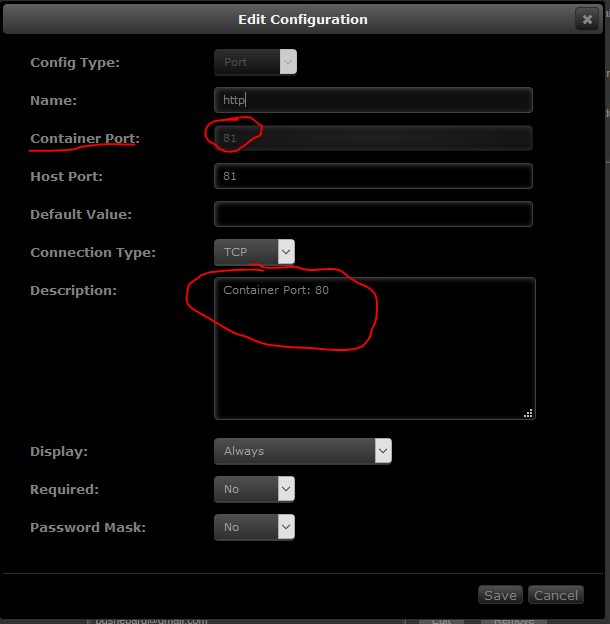
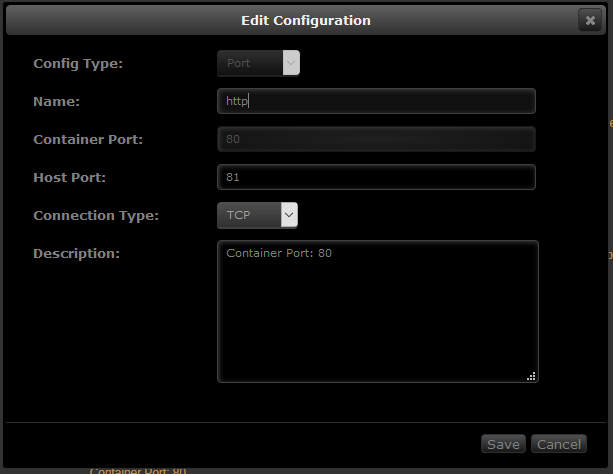
I deleted the default HTTP port mapping: and created a new one: and winner, winner, chicken dinner I'm back in business! Is there something wrong with the template that it's mapping internally to port 81, or is that in preparation for v6.4 and I need to change my port forward at the router, or...?
-
psst... read the last 4 pages or so... Heck, just read my 2 posts above yours...
-
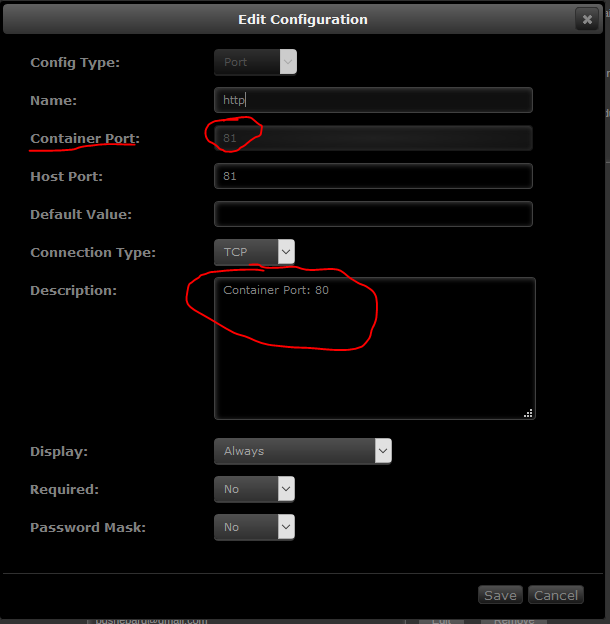
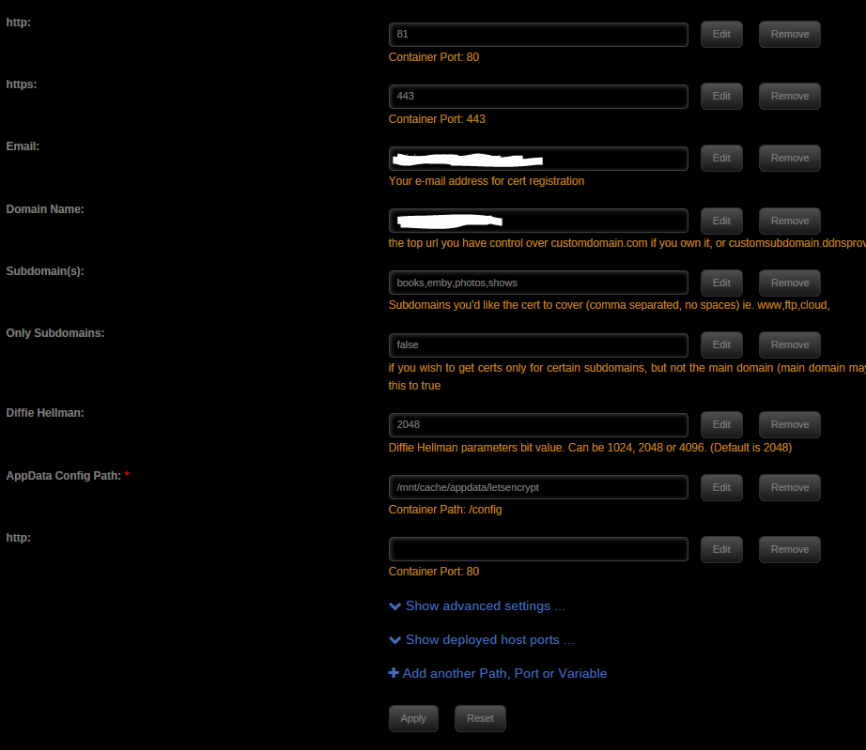
Like this? That's how it's currently set (and hasn't been changed), but it is yielding this run command: When I clicked on the Edit button from the first picture, it shows me this: Which looks very much borked! Time for a reinstall?

-
OK, so what's causing these errors in the log and causing me not to be able to access my server? Failed authorization procedure. photos.bds.mydomain.us (http-01): urn:acme:error:connection :: The server could not connect to the client to verify the domain :: Fetching http://photos.mydomain.us/.well-known/acme-challenge/MnhfHpAVNOCCW7o1D8UMwqy5AzUUNr9QPfjbhwl-k1M: Connection refused, cp.mydomain.us (http-01): urn:acme:error:connection :: The server could not connect to the client to verify the domain :: Fetching http://cp.mydomain.us/.well-known/acme-challenge/Flk3oN3gS8SyH--pD6pnLawz4Ukf0cE0Xq-lcia-N_8: Based on the lack of other feedback, I'd presume that all the configuration info I showed appears to be correct. Like I said, I've read through several pages of posts and tried to put it all together. This is the best I've come up with and it's still not working. You may have to break out the crayons and color me a picture 'cause I'm missing something.
-
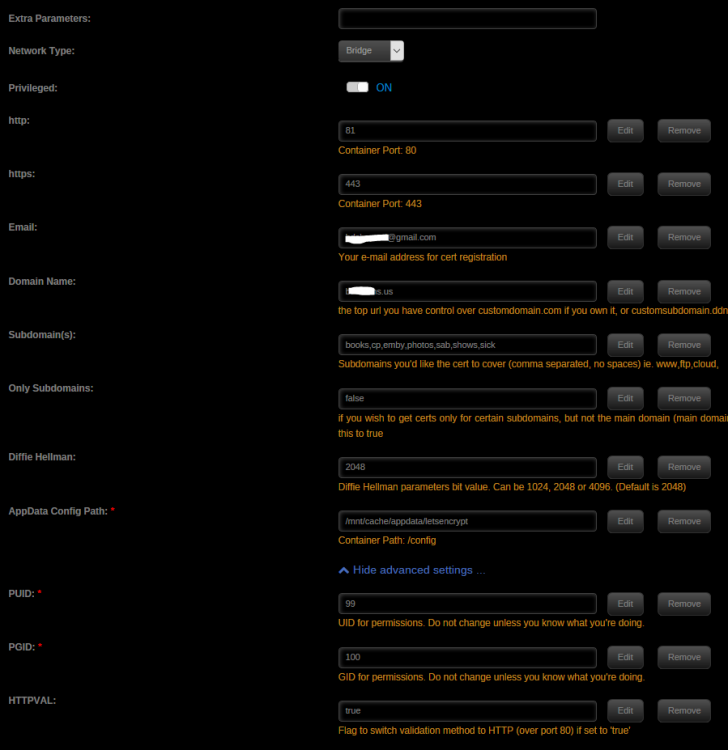
Thanks - the penny dropped when you said that... I believe I've got everything set correctly , but I'm still getting errors and not getting access via the domain, while internally via the IP works fine. My docker settings: I hit the "advanced view" and put the "-e "HTTPVAL"="true"" in there while not hitting the "Advanced settings" to realize that it had been added to the container - that's why I had 2 conflicting settings in the run command. I've rectified that and now my run command is: I'm confused by the port mapping of 81:81 - I thought it should be 80:81 (or vice versa) since I'm forwarding external port 80 to internal port 81 and LE should be listening on that. Here's the router settings showing that: And yet the LE log shows: In my ...\nginx\site-confs\default I have: to redirect HTTP to HTTPS. Do I now need to remove this section in blue in order to make validation work? If so, do I need to do it only in "default" since that's the only one of the config files that listens on 80? (All the rest only have a server { listen 443 ssl; ...} section.) I've read and re-read the last 4 pages or so of complaints, attempts, and fixes, I've thought they made sense and I've attempted to apply what I learned, but I'm still stuck...

-
Well, maybe I jumped the gun, too... The container will start, but it doesn't seem to be redirecting to my emby container. i.e. I get "Unable to connect" when I point my browser at "emby.mydoinain.com". This was working a few days ago prior to the kerfuffle about the LE docker and was working fine while trying to get the Android emby app to connect through a secured RP. I looked at the docker config: and I seem to have an extra "http" variable down there at the bottom. I have no recollection if this is a default path or if I'd manually added it for some reason. I've reviewed the last 12-15 pages for issues I've posted and none of the resolutions seemed to indicate me adding this as an extra variable, so this really has be cornfoosed... I'd like to get confirmation that this shouldn't be there before I go and delete it
-
Sorry, mate, I'm fresh outta ideas... After it magically stopped working, I just hung on long enough for it to magically start working again...
-
If you added the extra container parameter, consider removing it? I'd never added it in the first place, so maybe that's the difference. /SWAG
-
and now, on to the next issue... Yesterday at 17:50 local time, the docker shut down and now I can't get it to restart. This is the last bit of the log file: I can provide more if needed. To be fair, there's no need for the .7z file to be there (and I'm going to remove it to see what happens), but this file was at /Sport/V8 Supercars/2010/... and emby processed it just fine. Because of the way it lists directories, I moved it to /Sport/V8 Supercars/V8 2010/... and now it seems to be throwing this error. The 7z archive is fine - I just extracted it to a test directory without error. I don't, however, feel that this is the issue causing the docker to not start... Any suggestions? TL;DR: And... problem solved before posting - I'll put this up in case anyone else runs into a similar issue: In my attempts to get emby to work behind the secured nginx reverse-proxy, I'd added an extra container variable to the emby config: /certs -> .../appdata/letsencrypt/keys/<somewhere> That <somewhere> doesn't exist now after the most recent le update and key file rebuild. Final Resolution: There was a bug discovered in one of the authentication routines used by LetsEncrypt, so their devs shut off that method and released an update. The LSIO devs grabbed the latest version & released a docker update. That update required some minor configuration changes to make things work again. There are about 5-6 pages of discussion on the lsio-le/nginx support thread in these boards covering it. Since LE wasn't working right, the path pointed to above didn't exist.
-
I guess I haven't been clear enough - I've been doing that a lot lately... I want to use nginx as the reverse proxy, LE for security and an emby app and that seems to be a combination that doesn't work. I guess your points about emby's built in security are valid - the drawback is that I have to create a good, strong password for my users (since none of them are at my house to enter their own password), or have them pick one and send it to me. With LE, I had them pick their own passwords and encrypt them, then send me the encrypted results which I put in .htaccess. I guess this isn't a major crisis, that's how I'd been running services for them before emby came along (well, before I switched to emby...), I was just hoping that le/nginx would be a one-stop, single password front door behind which everything else could run password free.
-
Once again, huge thanks got the gents (and ladies?) at lsio! There was an update overnight and this morning my letsencrypt container started without any issues or changes at my end.
-
Sadly, it seems you can't. :(
-
I seem to be having issues with the docker starting since last night's update: What is the recommended next step? I was playing around with some configuration last night, but it did start when I left it last night.
-
I'm working my way through some of the support threads on the emby boards and one of them recommends some tweaks to the nginx.conf. I'd like to get some input from the folks here, as I trust them more than the people on the emby forum. (Nothing against emby users, but I've been there for about 15 minutes and I've been hanging out here for years.) This is recommended server_tokens off; because "This removes the version of NGINX from being visible outside your network and less chances of attackers being able to exploit version weaknesses." He's added these items as "further security tweaks", but doesn't indicate what they do: add_header X-Xss-Protection "1; mode=block" always; add_header X-Content-Type-Options "nosniff" always; add_header Strict-Transport-Security "max-age=2592000; includeSubdomains" always; add_header X-Frame-Options "SAMEORIGIN" always; proxy_hide_header X-Powered-By; add_header 'Referrer-Policy' 'no-referrer'; add_header Content-Security-Policy "frame-ancestors mydomain.com emby.mydomain.com;"; Are these legitimate things to consider adding to my config file or are they more security theater (particularly the server_tokens off; setting)?
-
Next step - does anyone know how to get the various Emby apps (Android, XBOX, TV) working through a reverse proxy? (he asks hopefully...)
-
Yeah, I think the real issue was all those files that filebot had spirited away in the background... My cache drive went from > 70% used to about 35% where it's sitting now. I don't think it was all in those files, but there were quite a few gig chewed up there. off to google du & df - thanks for the tip!
-
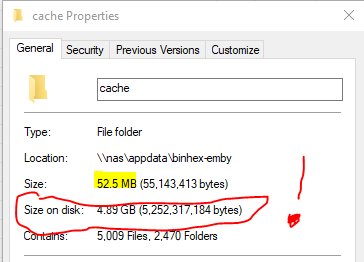
OK, so I've run into one minor issue... My cache disk is filling up quite rapidly. I have /config mapped to /mnt/cache/appdata/binhex-emby, which is the default and is as all my other containers are mapped. Within Emby, I do not have a custom cache path set up, which is what I believe I should do. However... I SSH into my unRAID box and I'm seeing .../appdata/binhex-emby/cache in both /mnt/cache and /mnt/user. My appdata share is set to "Use cache disk = prefer", so it can overflow onto the array if necessary. So I think what I need to do is add a mapping to the docker config something like: /cache -> /mnt/user/embycache, then tell emby to use /cache as its cache path. Does that make sense? Also, the big issue with the cache dir is this: 5009 itty bitty cache files only account for 52 MB of data, but because of sector sizes they're taking up 4.9GB of actual disk space! Long story short... does the additional host path in the container pointing to somewhere specifically on the array and not on the cache disk sound like the right way to fix this? Am I the only one running into this issue? Granted my cache disk is only 240GB, but none of my shares are set to use it (other than appdata) - it's really only hosting my docker.img and docker config files at this point. Update: on the other hand, I just discovered a big pile of movies that the filebot docker had tucked away that I didn't know existed... That didn't help cache disk utilization. I'll keep an eye on it, but I think that I should be OK for now... I guess I just have to stop NZBGet any time I fire up the fileget docker to ensure it's not stealing away freshly downloaded items.
-
Gotta say, I installed this, added my Movies share & was playing a movie on my phone in about 15 minutes. Heck, I even got the reverse proxy (thanks to the lsio LetsEncrype/NGINX docker) set up and working in no time. I think this is going to replace [Sub/Libre/Air]sonic, COPS, and Piwigo in a flash - just need to get the kid on the other side of the country to test it out and I'll be good to go! Of course, it still has to pass the "can my mom use it" test, but I think she'll manage. Thanks, @binhex!!
-
I've got the docker setup and working great. It works well with radarr and sonarr, so, of course, it's time to start tinkering! My usenet provider (newshosting.com) offers a free VPN service (as "documented" here and also here and several other pages that I haven't yet read all of). How do I configure NZBGet to access their VPN sites? Most of the things I've seen indicate that I need to download their software (which appears to be the OpenVPN client). I suppose I could DL it, then figure out how to install it in the container and get NZBG to run through it... It looks like the L2TP would be the best option for this, but I don't believe my Netgear WNR3500Lv2 supports L2TP pass-through.
-
And... I just checked this evening and it's working fine. A couple of seconds slower than I'd have though, but working fine.
-
Mine's been working for a while but now I'm having issues connecting as well. Unfortunately, I didn't wait long enough for it to actually time out. I hit the disconnect button (even though it hadn't actually connected). Now is telling me I've exceeded my 2 connection limit... I presume these will time out eventually and it will drop them. Or do I have to restart the container to get it to drop then? Sent from Tapatalk Edit: I just confirmed that I can connect to my home win 10 machine via teamviewer. From there I connected to the WebGUI and was able to confirm that the docker is still running.


