





FreeMan
Members
-
Joined
-
Last visited
Everything posted by FreeMan
-
I am running LetsEncrypt on my main server, but I was playing /trying to connect to my new backup server which has nothing but a couple of Dynamix plug ins on it right now. I'll send the log when I get home this evening. Sent from Tapatalk
-
The only way I can get the ControlR app to add my server is to use port 80 and have the secure switch off, despite the fact that the 'Use SSL/TLS' setting on the server is set to "Auto". If I try adding it on port 443 with the secure switch on, it doesn't find the server at all. Any other suggestions?
-
Sorry, I didn't think about posting there. Thanks! Sent from Tapatalk
-
I've been having issues with the app not showing me the logs from my server. I have the ControlR plugin installed on the server and enabled, but it's still says logs aren't available. I'm in the process of building a backup server and installed the plugin fresh on that box. I connected to it with the app, but it's not showing logs for my brand new backup box, either. Diagnostics from both boxen attached. nas-diagnostics-20180917-2003.zip backup-diagnostics-20180917-2003.zip
-
Thanks for the reassurance, j.b I don't think these drives will be long for this server. As I upgrade drives in the main server, the replaced drives will be moved to the backup and the backup drives will be retired. This is just all I've got to work with at the moment, so it'll have to do.
-
I've also noticed on another of these older drives that it has 1 "Reported Incorrect" and a very high "Raw read error rate" and "Seek error rate". How critical does this look? backup-smart-20180916-1049.zip
-
I don't see anything here that looks like it would have caused a pause, but I'm no expert. Your thoughts? There's literally nothing running on this server. I put the hardware together, booted it into unRAID, installed CA and used that to install pre-clear. That's it. No disks are assigned to the array, no dockers, no VMs, no parity, no cache, nothing. Here's the diagnostics to prove it! (Not that anyone's doubting me...) Here's the log specifically for the preclear on sdf: (note - this was from a stop/start after the above preclear log was pulled) and from sdd (this was from the same attempt as the log at the top): backup-diagnostics-20180916-1040.zip
-
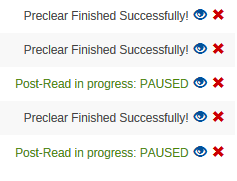
Weird. I stopped the "paused" pre-clear and restarted it. I also stopped/restarted the one that had said "MBR signature correct" (or something to that effect) for the last 30 min or so. Almost immediately after restarting, both pre-clears are now paused. Suggestions?
-
Thank you sir! I'll do just that.
-
A big thanks to @gfjardim for adding the disk temp to the page footer! Great turnaround time - the kind of fantastic support we're spoiled with here! A pre-clear question. This is my report from a pre-clear on an older drive: I pulled this drive from my main server because of the 8 reallocated sectors. It got mixed into a bunch that I just replaced and pulled due to age. I'm planning on putting these drives into my off-site backup server. Since the reallocated sector count didn't change during the pre-clear, is that a generally good sign that the drive will be OK, or should I just disassemble it to ensure I don't accidentally ever use it again? Full SMART report attached backup-smart-20180916-0708.zip Also - I've got another drive pre-clearing and the status is "PAUSED". I'm not sure how it got paused or how to get it restarted. Should I just hit the red "X" to stop the preclear then restart it to pick up where it left off? How would it have been paused?
-
While pre-clearing is no longer necessary, I greatly appreciate you continuing to support this as it's a great way to test a new drive prior to installation. I love the little icon in the status bar of the WebGUI - one small request for that. If you could add the drive temp to that display, it would be perfect! It would be especially handy for those of us doing preclear testing of USB drives prior to shucking them. There's so little airflow through those external cases, drive temps can easily skyrocket and being able to monitor them at a glance would be fantastic. Thanks again!
-
Changing the cores='' to match my CPU and removing the name='invtsc' because my CPU doesn't seem to support it got the VM started. Thanks!
-
I do have the actual osk key, I removed it from my post because that seems to be the thing to do. If I use FakeSMC.kext well that fix the issue? Sent from Tapatalk
-
When I try to start my VM, I'm getting this error from unRAID: I saw this on the first page of the thread: and I do have that in my XML file: However, I'm actually running an AMD CPU - does that mean that I cannot run a MacOS VM on this hardware at all?
-
Wow... Never saw that. Thanks! Sent from Tapatalk
-
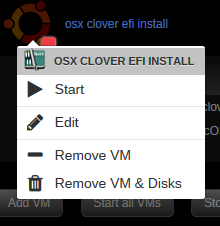
I'm new to running VMs on my unRAID machine. I was following along with the VM Guide Installing OS X using seabios that is in the FAQ and hit a wall when it said I needed to edit the XML for the VM. When I click on my "osx clover efi install", I don't get an "edit XML" option, I only have an "Edit" which takes me back into the setup menu. I'm running unRAID 6.5.3, what the heck have I missed? If the answer is somewhere in the previous 32 pages, a link will be more than sufficient, but I haven't read through it all... Thanks for all your work putting these videos together, @gridrunner - it's greatly appreciated!
-
Except for the fact that the drive was throwing errors prior to me being able to get it replaced. I think parity was good beforehand and that the new parity drive has valid data on it, but I have no way of being sure. Plus, I was going through pictures and I've already found one that Photoshop says has bad headers so it won't open it.
-
I had a failing drive (since replaced), and now I'm running a Check on that drive. It's already reported 295 corruptions after about ~42k of ~256k files have been checked. I have backups (CrashPlan) which I hope haven't picked up any corrupted files. Once the check has completed and I know how many files are corrupted, how do I go about finding out which ones are corrupted so I know what to restore from CP? -- I did reread the OP and didn't see anything about it there. My apologies for not reading all 28 pages of the thread. If this has been answered, a pointer to where will be sufficient and I'll happily read the already written response.
-
Gave it a month, was coming here to poke the sleeping bear, glad to see I can quietly tip-toe away. Thanks for keeping on top of it!
-
Coolio! Thanks for the quick response!
-
I ran the Update Assistant (which I believe is a part of CA and/or written by @Squid), and it gave me this somewhat amusing feedback: I find it amusing since I installed ProFTPd through CA just a couple of weeks ago, and Also, the ssh.plg appears to be this one: Which was also installed via CA. Are there any actual known errors with these 2 plugins in 6.5.1 or is there a glitch in the matrix script? I'm currently running both under 6.5.0 and having no issues. Thought I'd check before I pulled the trigger.


-
Thanks very much for the links. I think that the ssh scripting is the way I'll go, but I want to use duplicati for the backups, retention periods, etc. duplicati has provision for a pre- and post-backup script, so I think this will work.
-
I've got this running on my main server and everything's going great there. I'm planning to build a 2nd server to use for backups and have it located off-site. I'd like to install openvpn-as on it, and I'm sure that will go smoothly. My question is how do I get my main server to connect via OVPN to the backup server so the backups can run through the tunnel? Is there a linux client that I would have to install on the main server? Would it have to be installed into the docker container that I'm using to run the backups from (lsio's duplicati container)? What would be my methodology here? I don't mind doing some searching, but I'm not entirely sure where to start.
-
CrashPlan has done away with their cheap "Home" plan, and now I have to pay quite a bit more for my backups. My plan is to dump them and create my own off-site backup plan using duplicati. However, I'm a bit perplexed by the security aspects of it all. I plan to build a new unRAID server and locate it at my in-laws house. To connect to this new server (once it's off-site), I plan on using the ProFTP plugin on the backup server, then having duplicati on my main server connect via FTP. Obviously, security is an issue. I noted a post in the ProFTP support thread where there were some pretty good directions on how to get SFTP set up, so if I go this way, I'll read through that. My questions: Does duplicati login to the SFTP server each time it needs to start a backup? If I create security certificates for access (which I believe was part of the process), what do I do with them so duplicati has access to them from the source server? One of the other suggestions in the ProFTP support thread was to use a VPN for the connection. This seems to me to be an even better option - I can either mount the remote server using UD, once the VPN is established, or run FTP (w/o the S) to make it simple. Is there a mechanism within duplicati or some sort of scripting I could use to establish the VPN connection prior to the kick off of a scheduled backup?
-
It appears that it is, but that one of the devs is planning on doing something about it: https://forum.duplicati.com/t/optimizing-load-speed-on-the-restore-page/3185


