





FreeMan
Members
-
Joined
-
Last visited
Everything posted by FreeMan
-
Is it? I thought it was still a plug-in until WireGuard was out of beta. Or is that what you meant by "built in"?
-
I take that back. It's just kinda slow and looks like it's not working... It gets there eventually

-
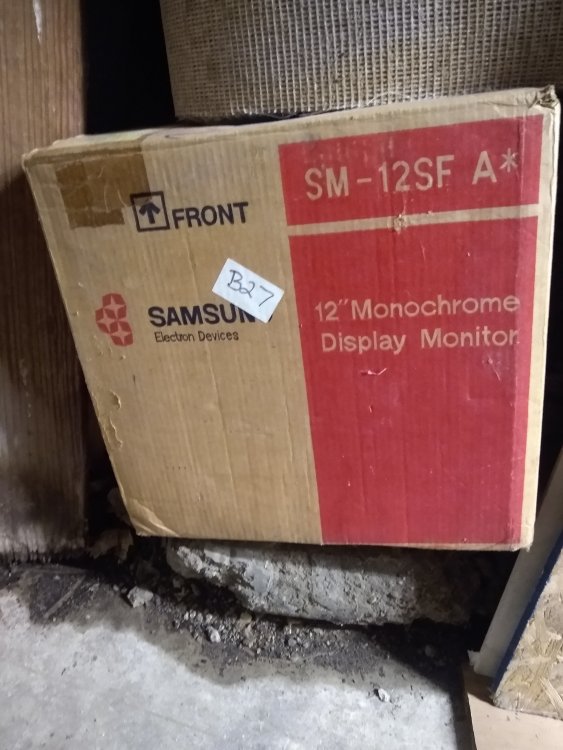
@JasonJoel I've got a 12" monochrome CRT in my garage I'm willing to part with. Cheap! Just can't bring myself to part with it quite yet. If you say no to it, I might just have to toss it in the bin...
-
Hmmm... Looks like this isn't quite ready for prime-time. Maybe not even ready for late-night TV... I'm hitting what seems to be a known error, only I'm only getting to 70% scanned, not the 85% reported in the bug report. I'll leave it installed and wait for some updates...
-
About to install and looking forward to it!
-
I reinstalled each plugin one at a time, followed by each docker one at a time, with a reboot between each install (only 6 minutes to reboot this server...). I got a GUI at each reboot without having to boot into GUI mode on the server. Not really sure what happened but it seems to have been resolved by rebuilding everything. The one thing I have not done was reinstall all the individual CLI tools I had turned on in Nerd Pack. I'm not really sure I need any of them, so I'm going to leave everything (Nerd Pack) uninstalled for now.
-
Shortly after getting the diagnostics, I issued "powerdown" from the command prompt. Booted in GUI mode & logged in at the console. After ~30 minutes, I still couldn't get access to the GUI from my desktop machine. I've made notes on all the plugins and dockers I've got installed. I'm going to start with a fresh OS install on my USB stick with the only change being the server name. I'll add in one thing at a time until it breaks or decides to work. *Note: this is as much for my note taking purposes as anything else. If, however, anyone cares to chime in with something that they see, please feel free! Note #2: I'm not taking a new backup of the flash drive before I start this - I've already got a backup from before I started messing around with things, and I'm considering that my "gold standard" of where I'd like to be. Though, there are a few things on that server that it really doesn't need that I will probably only install for testing purposes.
-
Adding WireGuard was the most recent setup change I made to the server. I updated WireGuard to the 2019.12.30 release, it still wouldn't give me a GUI without booting the server in GUI mode. Interestingly, booting the server into console GUI mode is not sufficient - I actually have to log in at the terminal in order to be served the login page at another machine on the network. I thought this was the case, but that machine boots so slowly and takes so long to time-out that I was getting bored and doing something else and forgot where I was. I definitely confirmed it just now, though. Next trouble shooting steps taken: Uninstalled WireGuard, rebooted, no GUI Attempted to uninstall ZeroTier docker, the green arrows spun and spun and spun. Finally the browser timed out and gave me the "backup took too long to respond." error message. I was able to login via SSH and grab attached diagnostics. backup-diagnostics-20191231-1332.zip
-
Started with a fresh install on a totally different USB stick. It came up with no problem with the GUI - must be something config related. The only changes I made recently was the installation of the WireGuard plugin, and it continued to work just fine for several days before the GUI disappeared on the 28th when I started this thread.
-
Nope, still no dice. I recreated the flash drive as @johnnie.black suggested, booted and got no GUI. I undid the USE_SSL change that @Squid recommended, just to get back toward my "standard" setup. Rebooted, selected the "with GUI" option on the console when I booted and I get GUI on the console and via the network. That's a workable solution, but it's certainly not ideal nor where it was just a couple of days ago. Fresh diagnostics, just for fun. Any other ideas/suggestions? backup-diagnostics-20191230-1422.zip
-
Win10's "Tools | Error Checking" reported no issues. Just for giggles, I ran HD Tune Pros' Error scan on it too - no reported issues. It reports it as a "Patriot Memory 7gB" drive (marketing size: 8GB) but doesn't give any model number. It's a tiny little thing, with no writing on the drive itself, that's almost impossible to get out of the USB plug. Perfect for leaving in a laptop except I'm not using it in a laptop . I figured this would be good for off-site use since it's out of the way and nearly unnoticable so less likely to be messed with by my son's college roommates. (Note, it is plugged directly into a MoBo port, not a front port.) I'm copying my entire config directory back and will be rebooting shortly. While waiting for the HD Tune error scan to run, I was thinking... a dying flash drive should not impact Unraid operations except at boot time, should it? Everything's loaded into memory once the OS has booted and it almost never writes anything back to the drive except a "clean powerdown" flag (and config changes, which I haven't have been making as I've set up WireGuard...) when I shut it down, right?
-
I'm heading down this route for now. Making a backup of my entire flash drive to my SSD on my desktop Win10 machine and this: That speed! Granted, it's USB2, but still!!! It did pick up to MB/s shortly after the screen grab, but I'll also run a full chkdsk on the drive while I'm at it. Maybe the flash is dying.
backups@C__.png.3ddbf34039392f9d39eb1b6733d3c9a9.png)
-
Anyone have any additional thoughts or suggestions? The WebGUI has failed to start after several reboots. It did come up with the GUI on the console when booting safe mode w/GUI, but it hung. It comes up with the GUI on the console when booting in regular mode w/GUI. I'm seeing no hang yet - I kicked off the Mover (it needed it). Just for kicks, I refreshed the browser tab on my desktop, and I was presented with the login screen for this server! I'm able to log in and move around the GUI, at least for now. Fresh diagnostics (including a drive error that's just popped up - I'll post about that separately) attached. I'm still open to input or suggestions on how to resolve this so that I don't have to fiddle to get it to work. I'd like to resolve in the next day or two before my son takes it back to college where it'll serve as my off-site backup. backup-diagnostics-20191229-1224.zip
-
I just booted into GUI safe mode. I logged in (managed to get the password right the first time! ) and I do get a full GUI and it's reporting the same IP address that it had before I sent it off-site, so I'm not sure why it wasn't responding to a ping via IP... Maybe it didn't like just being a number? I don't have a mouse plugged into the server, so I'm a bit limited to what I can do, though I'm pretty sure I can scrounge up a mouse from somewhere. Once again, the server will respond to a ping from my desktop when I call by name, but not by number. I can also access shares from my Win10 machine. (Never had to use safe mode before, so I'm not 100% certain what will/won't work. I guess everything but Dockers & plugins, like it says on the tin, eh?) Recommendation for next steps? I found a mouse, plugged it in, ran diagnostics and the WebUI froze up on the console. I SSH'd in and ran diagnostics from the command line. backup-diagnostics-20191228-1928.zip
-
Updated network.cfg: USE_DHCP6[0] = "no" Left ident.cfg: USE_SSL="no" Still no GUI access. I believe it would respond to a ping prior to the network.cfg update - I had tried pinging by name and by IP. It has responded every time I've tried via name, but it won't respond via IP. I had it set with a static IP address, but changed that back to DHCP before shipping the server to the off-site location. (I brought it back to do the initial backup instead of chewing up my bandwidth allocation and the (non-commercial) host site's.) Since then it's responded to a ping by name, but it only reports the IPv6 address, not the IPv4. I tried pinging with the last known IPv4 addresss - it seems it's not home there, but it is responding now by name. I have not tried safe mode, will do that next. Any other suggestions?
-
I'm not sure why it's on IPv6 exclusively, TBH. I didn't intentionally set it that way, and was going to ask how to enable IPv4. The web browser has always come up telling me the site is 'not secure'. Enabling HTTPS was going to be a follow up question. The keys are so my two servers (this is to be my offsite backup) can talk to each other. I had it set up and working via ZeroTier, but with the release of the WireGuard plugin, I'm switching to that. I know which ones I generated, should I delete all the rest, set it back to "auto" and try again?
-
Edited the file (used Notepad++ on my Win10 machine - it is set to preserve line endings, so I did not overwrite LF with CRLF) and rebooted. I can still access it via SMB from Win10 and can SSH in, but still no GUI, but now I can't ping it and it's not responding to ControlR. Fresh diagnostics (just to be 100% that I didn't botch the file edit - nothing looked weird on a 'cat ident.cfg' from a command line). backup-diagnostics-20191228-1811.zip
-
I had to shut the server down for a bit. When I brought it back up, I still cannot reach the WebGUI. I can connect via PuTTY and it responds to a ping. My rsync backups will write to it with no issue. I can browse the server with Win Explorer (which is how I go the diagnostics file attached), I can even connect to it from my phone using ControlR via the ZeroTier docker. I just cannot connect to the web server. Any suggestions? backup-diagnostics-20191228-1728.zip
-
Note that in linux "Cache" is not the same as "cache" in the file system. It is very case sensitive.
-
Full diagnostics are always best. It's a tiny file, so not an issue if not needed. I'm not the expert to parse that and identify the issue, but someone will be along soon who can.
-
Describe "random freezes". Does the GUI become unresponsive, but dockers/VMs/SSH sessions remain available? Do Dockers stop but the GUI remains available? Does the whole server hang and nothing but pushing the power button works to get it back up and running? If you have terminal access, but the GUI has frozen, from the terminal type "diagnostics" and hit enter. It will create a full diagnostics file that will be stored in /root/logs. You can access that remotely (if you've shared your flash drive) at \\server\flash\logs\<servername>-diagnostics-<date>-<time>.zip. Post that. Also, you can go to Settings | Network Services | Syslog Server and set "Mirror syslog to flag" to "Yes" so that your syslogs will persist after a reboot. Posting both diagnostics and a full syslog from the time leading up to the "freeze" will help the experts diagnose your issues.
-
This is the second time I've had this happen in the last week. I recently upgraded both my servers to 6.8.0 and first my primary server and now my backup server have given me this error when attempting to reach the WebGUI: This site can’t be reached backup took too long to respond. Try: Checking the connection Checking the proxy and the firewall Running Windows Network Diagnostics ERR_CONNECTION_TIMED_OUT I did have the GUI open in my browser, I've had a tab open to each browsers GUI for years, just refreshing it when I want to take a quick look. For my main server, it wouldn't powerdown from an SSH connection, nor from a short press on the power button. For my backup server, it did respond to a powerdown command from SSH. After it rebooted (because I completely forgot to do it before I rebooted), it also responded very quickly to diagnostics from SSH, but the WebUI is still unreachable. I get that I shouldn't have a browser window open to the server at all times. I guess this is something new with 6.8, because I've had one open almost continuously since my first unRAID build on 4.5 (or so). Any practical solutions on how to reach the GUI on my freshly rebooted backup server since it's not responding now? backup-diagnostics-20191228-0947.zip
-
I figured that would be misinterpreted - my bad. Somehow, somewhere, the server can tell that the tunnel is active and that traffic is moving over it - it's reported on the dashboard. If that reporting mechanized could set a flag that the settings page can read, then the settings page would know that things must be working correctly and could remove the notification to port forward. It would be a one-time set at the dashboard and each time the settings page comes up, it checks the flag to see if it should display the notice. The flag should be reset if the port is changed in the settings because, of course, you now have to forward a new port. Just a thought. Sent from Tapatalk
-
It doesn't go away. As noted in the OP (or somewhere on the first page) if you do not have uPNP enabled, unRAID cannot set up the port forward for you, so it puts up the "nag" reminder and it stays. If it doesn't do the work for you, it can't tell that you've done it, so it just leaves it there. That said, maybe in some future version, it might be able notice a successful connection and remove the nag assuming that a connection means you got the port forward set up right.
-
Is there any reason to actively disconnect a laptop VPN connection back home to the server (for a remote to LAN connection)? I want to be able to have automatic backups running from a laptop to my server, and it seems that the easiest way to be to have the connection always active. If not, is there a "simple" way to activate the connection, say from a Win10 PowerShell script so I could automatically connect, launch the backup, then disconnect? Or is this appropriate for a whole new thread somewhere...


backups@C__.png.3ddbf34039392f9d39eb1b6733d3c9a9.png)
