FreeMan
Members
-
Joined
-
Last visited
Everything posted by FreeMan
-
I've just picked up a new USB dock (because it's a pain to get drives into my server since I don't have any hot-swap bays), and when I execute preclear_binhex.sh -f /dev/sdn, I get this: Pre-Clear unRAID Disk /dev/sdn ################################################################## 1.22 smartctl may not be able to run on /dev/sdn with the -d ata option. however this should not affect the clearing of a disk. smartctl exit status = 2 smartctl 7.0 2018-12-30 r4883 [x86_64-linux-5.10.21-Unraid] (local build) Copyright (C) 2002-18, Bruce Allen, Christian Franke, www.smartmontools.org Read Device Identity failed: Invalid argument A mandatory SMART command failed: exiting. To continue, add one or more '-T permissive' options.$ Do you wish to continue? (Answer Yes to continue. Capital 'Y', lower case 'es'): I, of course, aborted out of an abundance of paranoia. I've done preclears via USB doc before. As a matter of fact, I've done it on Seagate IronWolf drives before (this is another). I presume that this is a failing of this particular dock? Is it safe/recommended to continue with the preclear, especially since I'm only doing this as a pre-install test? If so, what are the '-T permissive' options, and which one(s) might I want to add?
-
Well, carp. It appears that my front-of-case USB3 ports are non-functional. I plugged the dock into the USB2 port and it showed right up. Now to wriggle around behind the case and plug it in the back - I am not waiting for an 8TB drive to preclear via USB2...
-
Updating my PuTTY client from 0.62 to 0.74 seems to have done the trick. I guess that makes the SSH updates a GoodThing™.
-
Close, but no cigar. I had keys to connect to my backup server stored in /root/.ssh/ along with a few lines to move them on boot, and I did move them per the linked instructions. Unfortunately, PuTTY is still throwing the same error when I try to connect to my server.
-
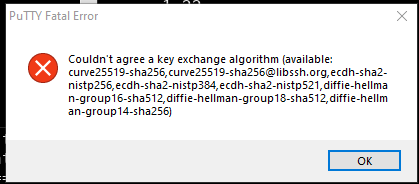
Updated my main server to 6.9.0 then 6.9.1 and have run into 2 issues that only make sense in relation to the upgrade: 1) Unassigned Devices and PreClear don't seem to be able to recognize drives plugged in via USB. I've connected both a brand new 8TB drive that I want to preclear (for testing purposes only, I know it's not required), and an older 4TB drive that's known to be good, but has been retired. It recognizes neither. UD doesn't show any devices and preclear_binhex.sh -l reports "No unassigned disks detected". I've confirmed that the USB dock I'm using works by plugging it into my Win10 machine and both of them show up in windows management, so the dock & and both drives are functional. 2) In an attempt to double check the preclear results, I tried to open a PuTTY terminal and was presented with this error message: I don't know if my version of PuTTY is seriously out of date (I haven't a clue when I last updated it) or if there's something that I need to add back in to UNRAID to get it to accept a PuTTY connection, but this is mildly frustrating. nas-diagnostics-20210311-1428.zip This is the first issue I've had with an upgrade since I transitioned to 6.x, so I'm certainly NOT complaining! I'm the one who wants you guys to fix the Windows Update process! I'm just mildly disappointed and a bit frustrated because I've got this new drive to get installed...
-
Just saw the notes on the IP leak, fixes, and required config changes. I've gotta say, I was expecting to wrestle with it for a bit, but it was quick and easy to get things changed and get everything back working. Thanks for all your efforts @binhex!
-
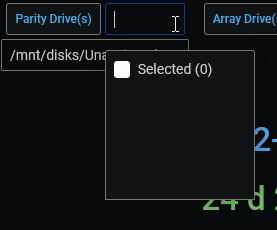
OK, it seems I shouldn't have taken that exactly literally gives me an error that the repository name must be lower case and leaves me with an orphaned image. However does work. Unfortunately, before I saw SpencerJ's post, I'd fiddled with the drive dropdowns and have lost some variable settings so I'll have to reset them. Better than having to completely start from scratch. Hrmm... Maybe I spoke too soon: I get the same missing drives... Then I stopped all three dockers and restarted Influxdb > Telegraf > Grafana and all is good now. Whew!
-
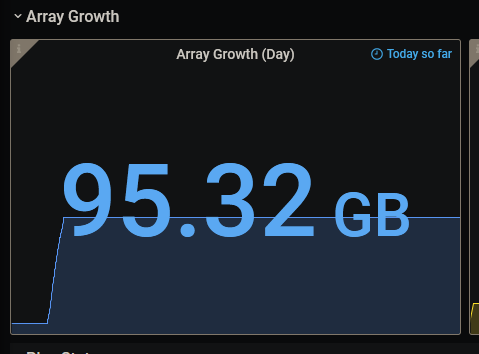
Ah! That makes perfect sense and, yeah, I knew that. This makes sense - that's yesterday's growth, since it was all written to cache and the mover ran around 01:30 today.
-
Is the `Array Growth (Day)` chart designed to show new data added since midnight <My timezone>? If so, I don't think mine's working right. Here's what it's showing currently: And here's my TZ setting: I can only account for about 3GB of data added since midnight. I've checked my backup directory and have had very little added there of late. As I was typing this, I got to wondering if this shows the data added in the previous 24 hours, as noted in the TZ settings screen shot. If that's the case, why does the growth graph start at zero for a little while before climbing? Does that not show growth over the time period?

-
I had this working in the LE days, and seem to have successfully updated to SWAG (my certificates are updating), however, my reverse proxy setup doesn't seem to be working in one specific instance. Since originally installing LE, I've added a VPN. I have a connection for my primary desktop machine, and I have a connection that I use with my binhex-delugevpn client and I have several dockers accessing the outside world using that docker as a proxy. When I try to connect to https://emby.myddns.com, I get the default "Welcome to our server page". However, when I disconnect the VPN [i]on my desktop machine[/i] and try to access it from there, I get the login page as I would expect. If I reconnect the VPN, again, I simply get the default page again. Why would the VPN connection running on my desktop machine impact SWAG's forwarding of the connection to the server? I have confirmed that port 80 is forwarded to port 81 on my server (not 100% certain why I'd changed that originally, but all I've done is transfer my LE config files to the SWAG config directory, and it does work when the VPN connection is down). As soon as I posted the question, it decided to start working properly. I don't know if it took some time after adding the emby config file in (I'd missed doing that originally) and restarting the SWAG docker, or what, but now I'm getting my login prompt again. Now, to reset all my passwords because I'm sure nobody remembers theirs, it's been down a while.
-
Genius! This has been bugging me for months! I even went into the settings and told it to use the previous session and it didn't restore the selected directories. Thanks!
-
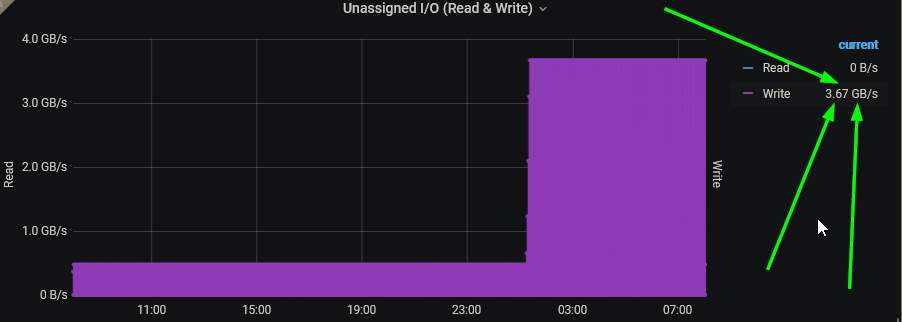
I simply cleared cache and did a ctrl-F5 hard reload of the page. Too bad, I was getting some decent write speeds on that drive! 🤣🤣🤣
-
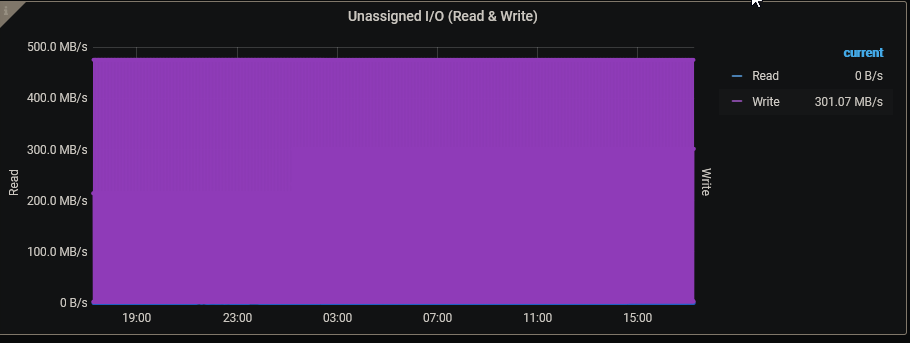
Just updated from 1.4 to 1.5 to confirm that I'm still having this odd issue. I had replaced an older 4TB drive with a new 8TB drive, but left the old drive in the server when I booted it back up. Yes, this was a silly idea and I'm not sure why I did it, but I went ahead and added that drive to the Unassigned Drive(s) variable. I just upgraded a different 4TB to 8TB and removed both of the now unused 4TB drives (including the one that had been listed in Unassigned Drives). However, the dashboard, under both 1.4 and now 1.5 are showing a constant 301.07MB/s read rate on the Unassigned I/O graph. As I understand it, with no devices assigned to the Unassigned Drives variable, nothing should be showing here. What would you recommend I do to trouble shoot? The only customization I've done to my 1.5 install so far is to assign drives to the proper categories. I've yet to delete all the Plex stuff (I don't run it) or do any of my drive overrides to make nice names on the I/O and temp graphs. Thanks, once again, for all your efforts on this!

-
Of course, this is the Christmas season and it's entirely reasonable that @housewrecker has decided to take some well deserved (I'm sure) time off from developing this project, and, possibly, the internet itself, to spend some time not being a marriage wrecker (another assumption, I know). I hope we'll hear back in the next few weeks, as everyone's lives resume, and get some good news that an Emby version is in the works, but if not, well, I've lived without this thus far, and will continue to live without it in the future.
-
I think this is all good, but it never hurts to double check: ATTRIBUTE NEW_VAL OLD_VAL FAILURE_THRESHOLD STATUS RAW_VALUE Raw_Read_Error_Rate = 80 100 44 ok 90993936 Seek_Error_Rate = 73 68 45 ok 21274715 Spin_Retry_Count = 100 100 97 near_thresh 0 End-to-End_Error = 100 100 99 near_thresh 0 Airflow_Temperature_Cel = 58 55 40 near_thresh 42 Temperature_Celsius = 42 45 0 ok 42 Hardware_ECC_Recovered = 6 100 0 near_thresh 90993936 No SMART attributes are FAILING_NOW My only real concern is the Hardware ECC Recovered because I don't recall seeing that on drives previously. Does that look like an issue at all? I'd presume that the Raw_Value for that is somewhat meaningless...
-
You know, I read that and though, "that can't be the problem - this worked last time I used it and I haven't changed it at all!" binhex-krusader uses port 6080, and I rarely used it. I've got that docker running now though, so of course it's currently in use. I changed preclear to use 6081 and all is good
-
I, too, am getting that error. I made a change to the config, undid the change, then hit Apply. Here's what it's telling me: root@localhost:# /usr/local/emhttp/plugins/dynamix.docker.manager/scripts/docker run -d --name='binhex-preclear' --net='bridge' --privileged=true -e TZ="America/New_York" -e HOST_OS="Unraid" -e 'WEBPAGE_TITLE'='Preclear' -e 'VNC_PASSWORD'='' -e 'UMASK'='000' -e 'PUID'='0' -e 'PGID'='0' -p '6080:6080/tcp' -v '/boot/config/disk.cfg':'/unraid/config/disk.cfg':'ro' -v '/boot/config/super.dat':'/unraid/config/super.dat':'ro' -v '/var/local/emhttp/disks.ini':'/unraid/emhttp/disks.ini':'ro' -v '/usr/local/sbin/mdcmd':'/unraid/mdcmd':'ro' -v '/dev/disk/by-id':'/unraid/disk/by-id':'ro' -v '/mnt/cache/appdata/binhex-preclear':'/config':'rw' 'binhex/arch-preclear' 20695879e2e6b63b4345067e4cb215f0a0ecdd76d103c7510e215a1bb92c4311 /usr/bin/docker: Error response from daemon: driver failed programming external connectivity on endpoint binhex-preclear (cec6aaf9c6ccd771777e2f6eaf09640fe4eecfff58e1ae3b3300f231bd42c4ec): Bind for 0.0.0.0:6080 failed: port is already allocated. The command failed. I'm up for any pointers, as I've a new 8TB drive I'm itching to throw into the array. I have CA set to automatically update all docker containers, and I tried to force an update, so I'm pretty sure I've got whatever the latest version of the docker container is. Since there's no real configuration to worry about, I'm happy to uninstall/reinstall if that's recommended.
-
@housewrecker any progress on either an Emby/JellyFin version or the scan directories version? This looks fantastic, but as an Emby user, the Plex integration is, well, useless (to me).
-
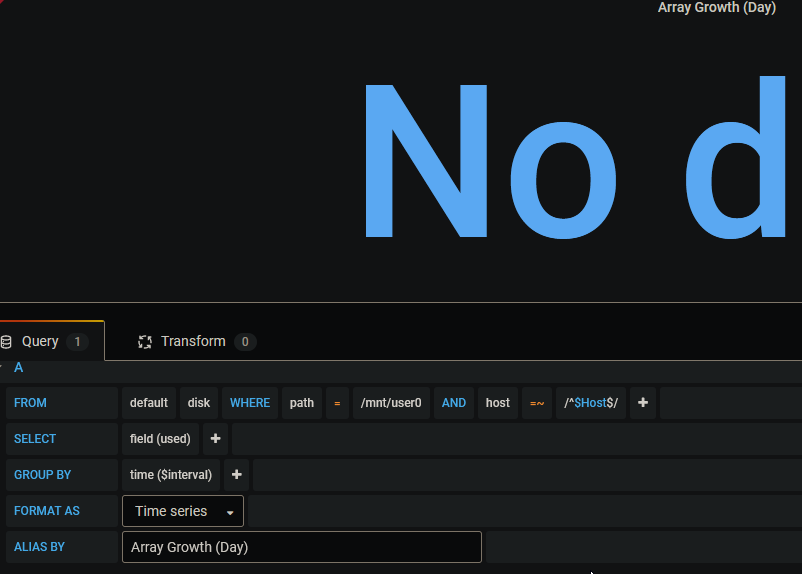
I just don't think it likes me... I removed the Group By, then clicked to add it back in, now I get `time ($interval)` but it shows No Data: For now, at least, I'll live with some curvy transitions and some sharp transitions...
-
Well... sorta... For my (Day) query, where I've got the squared off graphs, I have this: SELECT last("used") FROM "disk" WHERE ("path" = '/mnt/user0' AND "host" =~ /^$Host$/) AND $timeFilter GROUP BY time($__interval) Note the group by ($__interval) (there are 2 underscores there) The (Week) query has: SELECT last("used") FROM "disk" WHERE ("path" = '/mnt/user0' AND "host" =~ /^$Host$/) AND $timeFilter GROUP BY time($interval) with no underscores in it. I tried editing the (Day) query, but it automatically changes it back. If I edit in "text editor" mode, then hit "Apply", it applies the change, but makes no change in what I see. When I go back in to edit, it's still in text edit mode and still shows no underscores. As soon as I go back to "graphic" editor mode, it shows it with the 2 underscores.
-
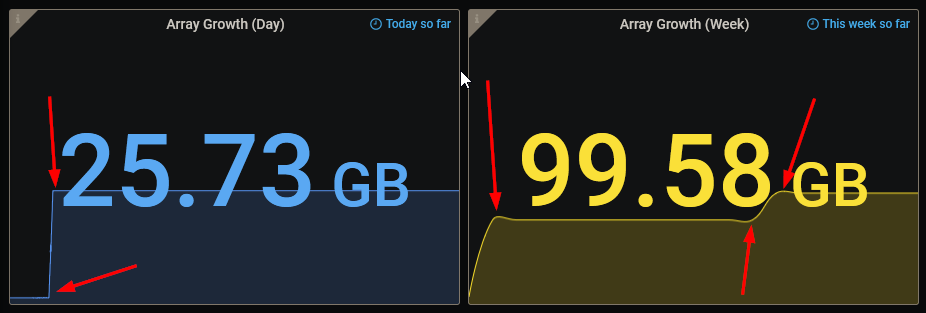
On my array growth graphs, the Weekly growth shows rounded edges, while all the others seem to show pretty sharp corners. I took a look through the options and didn't see anything that looked like it should control this. Am I hallucinating, is my data growth for the week actually rounded like that, or did I miss some sort of obvious (to everyone else) setting?
-
Or, you could post the code here and some of us n00bs could try getting it implemented ourselves!
-
I noticed that my Array I/O (Read) and (Write) were showing data from drives from both of my servers no matter which HOST I'd selected in the variable up top. Not exactly what I was after. I tracked it down to a misplaced close paren in the query. Original: SELECT non_negative_derivative(last("read_bytes"), 1s) FROM "diskio" WHERE ("ID_SERIAL" =~ /^$Drives_Array$/ OR "ID_SERIAL" =~ /^$Drives_Parity$/ AND "host" =~ /^$Host$/) AND $timeFilter GROUP BY time($__interval), "ID_SERIAL" Fixed: SELECT non_negative_derivative(last("read_bytes"), 1s) FROM "diskio" WHERE ("ID_SERIAL" =~ /^$Drives_Array$/ OR "ID_SERIAL" =~ /^$Drives_Parity$/) AND "host" =~ /^$Host$/ AND $timeFilter GROUP BY time($__interval), "ID_SERIAL" Note the paren moved to after the "ID_SERIAL" condition to group the OR conditions on "ID_SERIAL" separate it from the AND conditions to get the order of operation correct. The original includes the 'and "host"...' in the parens and it essentially gets ignored. This may be an issue elsewhere, as well, but I haven't looked through all the queries yet to be sure.
-
Hey, this is spiffy! I installed telegraph on my backup server and copied the telegraph.conf file from my primary to the backup. Now, I'm getting data for both, and all I have to do is change the "Host" name to switch! I guess I need to go through all the drive graphs and add overrides for the backup server's drives to map the serial numbers to names, eh? Sadly, it seems that I have to designate which "Drive 1" is which myself, since it shows legend info for all drives in the array whether there's data for them on this host or not. There's worse things, I suppose... Any other tips on using the 1 Grafana display for 2 servers? Update: The cache I/O graph is showing only the single drive for the backup machine but the array I/O graph is showing all drives from both machines, even though it's showing nothing for the primary machine. Also, of note, it's impossible to assign the boot drive for both machines at the same time. In general, this makes perfect sense, since a machine can have only one boot drive, but for those monitoring multiple machines, it's a tad inconvenient.
-
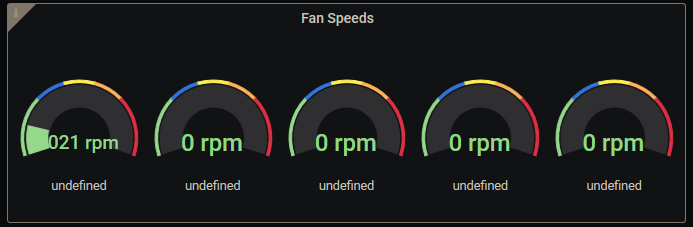
Excellent! Works a treat on my AMD A10 CPU. Now, I just need to plug the fans into the MoBo headers instead of the case header. Maybe it'll recognize more than 1 fan and show some different speeds... Interesting... I updated the "fan speed dials" panel With that query. When I did, I noted that there's a disabled query in there: SELECT last("value") FROM "sensors" WHERE ("feature" = 'select tag value') AND $timeFilter GROUP BY time($__interval) I enabled it and it doesn't seem to make any difference. What's it supposed to do?