





FreeMan
Members
-
Joined
-
Last visited
Everything posted by FreeMan
-
I'm not really sure you'd want to run the canary build - based on their site, that sounds like an alpha/early-beta test stage. Personally, I wouldn't want to have my backups relying on that level of code. On another note - it seems that really slow backups are just the way this works? I'm seeing the same 5-50KB/s speeds everyone else is reporting. Granted, I've got my compression set to max because I need to get more pics onto a drive than there's room for, but this is painful! I'm backing up to an external USB2 device and it's... slooooow.
-
How did you get multiple, dated runs in your graphs??
-
Note how I was quick to pick up on that... Thanks for putting this together for us @Djoss!
-
Yeah, would have been nice of me to mention that, eh? This was in the log: [04.04.18 01:40:30.072 INFO 11193_AUTH-5 backup42.service.peer.Authorizer] AUTH:: CPCLoginResponseMessage@-1542240028[ authDate=1474246489116, userId=<userid>, license=CPLicense@<CPLicense>[ PRO, key=<key> permissions=[admin.backup.sets, admin.cpd.adfree, admin.backup.backup, admin.backup.high_encryption, admin.backup.hosted, admin.backup.advanced_settings, admin.backup.realtime, admin.cpd.restore, admin.backup.restore], expireDate=2018-03-17T00:59:59:999 EXPIRED, continueDate=2018-03-24T00:59:59:999 CONTINUATION EXPIRED, baseLicense=License@<License>[ PRO, permissions=[admin.backup.sets, admin.cpd.adfree, admin.backup.high_encryption, admin.backup.realtime, admin.backup.advanced_settings] ]; CPLicense@<CPLicense> PRO, permissions=[admin.backup.sets, admin.cpd.adfree, admin.backup.high_encryption, admin.backup.realtime, admin.backup.advanced_settings] ] ], secureDataKeyUpdateRequired=false, orgName=<orgName>, passwordExists=false, reauthorizeInterval=86400000, configDate=1522816883912, hasConfigXml=false, social=null, externalAuthenticatorSessionKey=null, keepDataKeyThroughReassign=false, stsUrl=, super=CPCLoginResponseMessage@-1542240028[remoteId=<remoteId>, session=<session>, remoteGuid=4200] ] Also, I find this setting from that string keepDataKeyThroughReassign=false interesting. That feels like it's going to disconnect me from my existing backup, and may have been why I couldn't just pick up the Pro backup where my Home backup left off - I ended up having to completely rebackup all 2.2TB of data. Maybe you can find some way to parse the log, look for the "expireDate=" setting and display it to us users as a courtesy to make up for Code42's lack of communication... Annoyingly, I've got an account page at Code42, but there's nowhere on their page that will let me enter new credit card info to pay for another year. It's almost as though they don't want to keep their customers. Heck, now I login and it takes me to a page that says "login to continue" with a login link. I click, login, and it takes me right back there. The "My Subscriptions" page shows nothing. The Order History page shows nothing. Rapidly losing faith in you, Code42! I'm going to have to get them on the phone to get this sorted out. I did manage to find where my account was originally created in October, but I accepted the "transfer" to Pro in September. On the 17th, actually. Exactly 6 months later, my account expired, so I only got 5 months free because I accepted the offer too soon. I was going to use that 6 months to investigate some other options, but, you know, life got in the way, so here I am with 2 options - pay up now! or go with no backup until I figure something else out. At the minimum, I'm plugging that 1TB external in and making copies of all the totally irreplaceable stuff. Right now!
-
That was the trick. My account expired on 3/17/2018!!!! Hmmm... maybe that was the 6 (or so) months of free service they gave because they killed the Home program. Well, I know what the problem is. Now we just need them to bring the Home program back and it'll all be good! You'd have thought some sort of courtesy email saying "Hey, your account will expire in 30 days" would have been nice...
-
Honestly, it could be related to the mce's I've been having. I've got to get the CPU replaced. I should probably stop worrying about anything until that's taken care of first. I always do my best to come up with the weird situations, though!
-
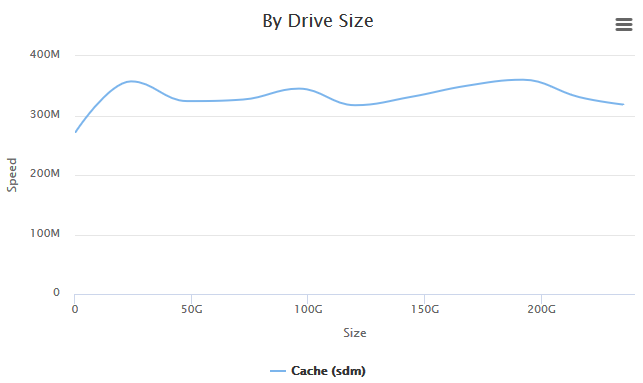
Are speed variations like this normal in an SSD? Suddenly becomes a drive hypochondriac!
-
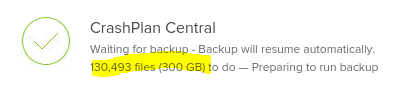
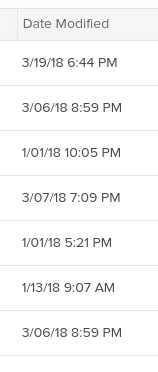
I've had this running since the whole "home/Pro" fiasco. However, I've just received an email from Code42 saying that my server hasn't backed up for 10 days! Is anyone else having issues with this? The main CrashPlan screen shows this : Clicking "View details" gives me this: Clicking "Run backup now" gives me this: It's been "Preparing to run backup" for at least an hour now. The CrashPlan History shows this: So it seems that the container update did its job (update downloaded & applied - maybe). I don't see much other logging information in the app, so I'm not sure where to look to find out what's going wrong. EDIT: 15 minutes later, it shows this: and there's nothing new in the History. Doing some more digging, I looked at restoring files, and this is what it shows me for dates: That top one is my appdata directory. I know it's been updated more recently than March 19th...



-
I'm not sure who PIA is, but, well, that's your business... Thanks mate!
-
Success yet? he asks, hopefully...
-
Thank you sir!
-
I'm guessing no word yet? (BTW- they're up to 3.3.1.0 now.)
-
I've been running the container for a while - Thank you! All of my reverse proxies are set up as destination.mydomain.com, and everything is working, except for one user who can't get access. It's telling her that the site can't be reached and/or it's taking too long. (don't have the exact message.) The only thing that makes any sense to me is that she's tried logging in too many times with the wrong password and hit fail2ban. However, some quick googling seems to indicate that my jail.local config is what should be running and it shows the default "bantime = 600", so she should only be banned for 10 minutes, so the ban shouldn't be lasting for days/weeks. I'm very much a fail2ban noob, so any pointers on where to look to see if she's been banned and instructions on how to unban her would be greatly appreciated. If this isn't the issue (and, based on the config file, I'm not so sure it is), does anyone have any indication on why 1 user out of 8 can't get a connection established to even try to log in?
-
Any reaction to the poking or is the bear still hibernating?
-
Totally passing the buck - I didn't see that one coming! As I said, no big deal. Just thought I'd mention it.
-
That's genius! hangs head in shame for not having thought of that himself any time in the last... 6 years
-
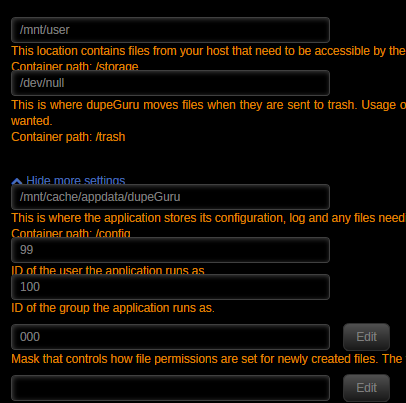
I just installed this and noticed something odd - the text underlaps the data entry boxes (or the entry boxes overlap the text, if you prefer). I'm not sure if it's related to dupeGuru or CA I looked at several other dockers and didn't see the issue there, so my suspicion is that it's related to dupeGuru, but I'd imagine that you just fill in some boilerplate and @Squid builds the input screen on the fly, so my suspicion is that it's CA's fault. So, I'll just post this here and mention him and let the two of you point fingers at each other. Not a crisis situation by any means and I was able to read the text quite well enough to know I wasn't going to change any of the default settings and got it installed just fine. Looking forward to giving it a go - thanks for putting the container together!
-
I'm sure there's a setting in MC, but with the lengths of my paths & file names, MC just doesn't show enough for me to be sure I'm working with the right file sometimes. I need an over/under window split instead of side-by-side.
-
Nope, that's not it but you got me looking in the right places. Under Shares | Disk | Security. There's "Public", "Secure" & "Private". Mine look to be set to "Secure". For simplicity, I'll set a disk to "Public", do the clean up then set it back to "Secure". Once I'm done with this clean up, I'll turn off disk shares anyway, so that should be sufficient. I decided to play for about 30 seconds and figured out the proper share settings. I've got myself as a user now and have granted myself the proper access. thanks again!
-
Default... I've rummaged for a minute and I'm not sure where to change it, so I'm pretty sure I haven't changed it from default. @trurl - tips on fixing this one?
-
I thought I had permissions set correctly (radarr/sonarr), but I must have missed. I was thinking about running DSNP, glad I was thinking along the right lines. Thanks for the help!
-
Default... I've rummaged for a minute and I'm not sure where to change it, so I'm pretty sure I haven't changed it from default. so it's safe to ignore the 0640 warning then? I've not had any issues with video playback on my Kodi box or in Emby and those are the critical items.
-
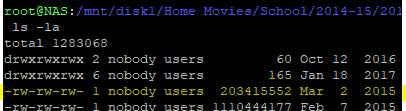
I just ran an extended test in FCP and it's telling me 2 things: Is that telling me that the file should be 0666 instead of 0640? The other is that it's got a laundry list of files that exist on two disks (ugh). I've just enabled disk shares so I can do the clean up on Windows (I understand not mixing disk & user shares - I want to be able to compare the 2 disk shares directly) because it's easier to see the full file names and navigate paths with spaces in Win than in a shell or even Dolphin. However, when I attempt to delete the "wrong" version of a file, Win tells me "File Access Denied - You require permission from NAS\nobody to make changes to this file", but the file itself is 0666. Is this because I'm attempting to delete from a disk share instead of a user share?
-
According to Wikipedia it looks like the goal is to get your server power requirement at about 50% of what the PSU is rated for in order for you to get the maximum benefit of the 80 PLUS rating. So based on that assumption, I should calculate my power need, then double it to find the target wattage of PSU I'm looking for. Does this sound right? Now that this is settled and it seems it's time to replace my Corsair TX, I'm willing to upgrade to a higher end Corsair or a Seasonic. Corsair nicely divides their supplies into ranges (TX, HX, CX, etc.) Does Seasonic do so as well? Their website is a bit... underwhelming... when it comes to organization. There seems to be no rhyme or reason to their naming schemes.
-
I've been using FCP in trouble shooting mode trying to identify why my server is rebooting itself. (There's a whole tread in general support if you're interested in chipping in.) I just noticed this in FCPsyslog_tail.txt: Feb 28 10:04:01 NAS root: Fix Common Problems Version 2018.02.18 Feb 28 10:04:11 NAS root: Fix Common Problems: Error: unclean shutdown detected of your server Feb 28 10:04:17 NAS root: Fix Common Problems: Error: Machine Check Events detected on your server Feb 28 10:04:17 NAS root: mcelog: ERROR: AMD Processor family 21: mcelog does not support this processor. Please use the edac_mce_amd module instead. Feb 28 10:04:17 NAS root: CPU is unsupported Is there something I can/should do to use the `edac_mce_amd` module, or is that something that needs to be baked in at the @Squid level? I'm not entirely sure what a Machine Check Event might even be, but I suppose it's possible that this is a cause of, or at least related to, my reboot issues.


