





FreeMan
Members
-
Joined
-
Last visited
Everything posted by FreeMan
-
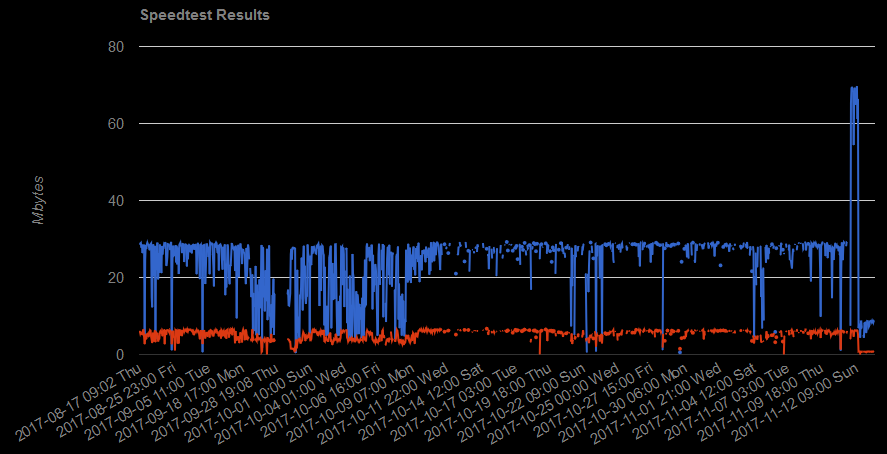
Noticed an interesting artifact... I went into settings and changed "Save speed values as" from bits to bytes. My graph now shows: You'll note the nice jump where Comcast/Xfinity took us down unannounced on Sat night for 6 hours, but, when service resumed, my speed approximately doubled! I can give up 6 hours of access for that... However, on Sunday, I decided to change from bits to bytes and now, my speed looks rather wimpy... Is it possible to save the results in one format (your choice), but display them according the choice I made in settings? In the meantime, I'm reverting back to bits. I appreciate this fine tool (yes, you can see just how crappy my connection was in October), and I'll live with it either way. Thanks!
-
This sounds like the issue I'm seeing. Empty directories aren't always deleted, I get RC 23. But, it doesn't always error out. Sent from Tapatalk
-
You can even move it to a different SATA port on the MB or an add-in controller!
-
Glad to hear it! The way I figure it (says the guy who hasn't poked at your code at all:) it should be reasonably easy!
-
As I'm going through my rather large collection of movies, trying to clean things up and get each movie's folder to reside on a single disk, a lovely new feature for this plug-in came to mind. It would be great if I could select the entire Movies share, then (based on some settings parameters) have it move each movie to the lowest numbered disk that it's currently occupying that also has enough space to hold it. For example, if I have -- 2001 A Space Odyssey occupies space on: disk1, disk3, disk5, disk11 Check each disk in increasing number order to see where there's enough space for all of it, then move it there. If there's enough space on disk1, move all the pieces there, if there's not, check disk3, etc. Configuration options could include disks to exclude from consideration (maybe disk5 is getting pretty old and I don't want anything moved there) disks to include for consideration (I want to move all movies to disks 1-5 and 10-12, but skip 6-9) search disks from lowest number to highest number (or vice-versa) move to the disk that will require the smallest amount of data movement disk1: 100MB, disk3: 5GB, disk5: 950MB - move it to disk3 if there's enough room, otherwise move to disk5 if there's enough room, etc. move to the disk that has the least free space that will hold the files to be moved no matter how many GB have to be moved move to the disk that has the least free space even if all the files have to be moved to get it there. (Disk packing) move to the disk that has the most free space available no matter how many GB have to be moved (optionally even if it's moving all the files). I realize that there's a fair bit of logic involved there, but it seems that all the pieces exist, they just need to be called in a different order, and, potentially, multiple times (make all the checks on a per-directory basis, instead of a per-move basis as it does now). This could work for TV shows, as well. If I select "Seinfeld", then each sub-folder would be processed the same way "2001" was described above. That would put each season on a single disk. If I wanted an entire show on a single disk, I could select the "TV" share and it would attempt to put "Seinfeld" on a single disk somewhere. There would, of course, have to be some logic to handle the case where the directory (Seinfeld), in its entirety, won't fit on any existing disk. That could be skipped, or cause an abort (that could possibly be a configurable option). If it's skipped, I might just clear up enough space moving the rest of the data around that Seinfeld will now fit on a single disk. Yes, I can absolutely do this now, but it takes me manually moving and selecting for each movie or TV show/season. Having an automated process is precisely what computers are for, isn't it? Just a suggestion and an item for the Christmas wish list - it you say it's not doable or you're not interested, no worries - it's your baby, and I'm glad to be able to use it as is.
-
Thanks for looking into this! Looking forward to seeing the fix soon. annnnd... that's how people end up quoting entire long posts for no logical reason... Tapatalk! Sent from Tapatalk
-
NO: Edge 40.15063.674.0 (ugh, I felt dirty using that. Had to rummage around in the Start menu for a while to find it...) YES: Chrome 61.0.3163.100 (Official Build) (64-bit) YES: Chrome 62.0.3202.75 (Official Build) (64-bit) - since it updated itself while I was checking the version Neither Edge nor Firefox even show the scroll bar that Chrome shows for the "Shares Explorer". When I scroll down the Selected & Location portions roll off the screen, too.
-
Done. Thanks! Also, when you get a chance, you may want to take a look at the floating bottom bar - it doesn't seem to float too well. Firefox 56.0.1 64-bit on Win10 64-bit. AdBlock Plus installed but disabled on entire unRAID IP address
-
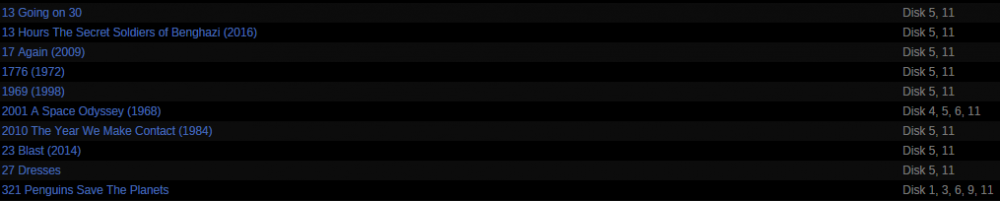
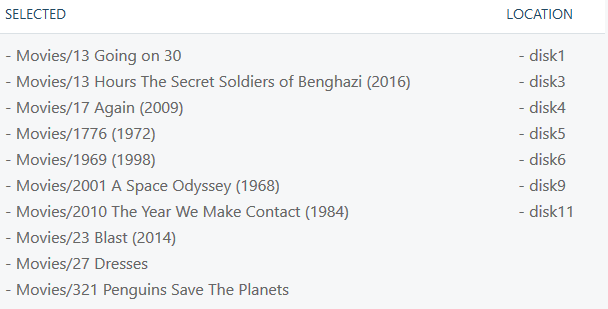
OK, so now I seem to be having a real issue. For the most part, this seems to be working very well, however, it's leaving some files behind on the disk(s) it's supposed to be moving files off of. Here's a snippet of my Movies share showing poor disk organization I selected these files to be Gathered. It showed what it was going to process, but the display didn't seem quite right (note single disks - some of which don't match what was listed in the unRAID GUI share locations - listed in Location, and some Locations are blank). I boldly went forward. I selected disk5 as my target - it looks like there will be plenty of space left there when it's done. (I've adjusted the min-free to be 5GB, just for some breathing room.) and hit move. It stopped with this error W: 2017/10/24 20:14:02 core.go:1016: Command Interrupted: rsync -avPRX "Movies/2010 The Year We Make Contact (1984)/.actors" "/mnt/disk5/" (exit status 23 : Partial transfer due to error) which I noticed was mentioned by someone else, above. I've not researched it yet, but I'll be fair and not include that one in this "complaint". Oddly, though, the ../2010.../.actors directory doesn't exist on disk11 any more. The directory Movies/2010 does exist there, but it's empty (according to MC). Movies/2001 did get completely moved from disk11 to disk5, but it left the empty top-level directory behind so unRAID still shows that there's usage on disk11 (since I failed to include that in my screen shot). For the directories it was supposed to have moved ("13 Going on 30" through "1969"), here's what the unRAID GUI is showing for share disk usage now. 4 out of the 5 it should have completed are showing that they have data still on 2 disks. I've confirmed that in MC by going to the /mnt/diskx directories and noted that these folders exist, though they are empty now. (After the first shot at this, there were some files left in some of them, though I don't recall which ones.) Here is the complete log as shared via the GUI when unBalance completed its tasks I: 2017/10/24 20:12:05 unraid.go:471: Id(11); Name(disk11); Path(/mnt/disk11); Device(sdd); Type(Data); FsType(xfs); Free(1.95 TB); NewFree(1.90 TB); Size(4.00 TB); Serial(HGST_HMS5C4040ALE640_PL2331LAG6W5WJ); Status(DISK_OK); Bin(&{43043129538 [0xc4202c2100 0xc4202c2140 0xc4202c2180 0xc4202c21c0 0xc4202c2200 0xc4202c22c0 0xc42004c280 0xc42004c2c0 0xc42004c300 0xc42004c340 0xc42004c380 0xc42004c400 0xc42004c440 0xc42004c480 0xc42004c4c0 0xc42004c500 0xc42004c540 0xc42004c580 0xc42004c5c0 0xc42004c600 0xc42004c640 0xc42004c700 0xc42004c740 0xc42004c780 0xc42004c7c0 0xc42004c840 0xc42004c880 0xc42004c8c0 0xc42004c980 0xc42004c9c0 0xc42004ca40 0xc42004ca80 0xc42004cb00 0xc42004cb40 0xc42004cb80 0xc42004cbc0 0xc42004cc00 0xc42004ccc0 0xc42004cd00 0xc42004cd80 0xc42004cdc0 0xc42004cec0 0xc42004cf00 0xc42004cf40 0xc42004d040 0xc42004d0c0 0xc42004d100 0xc42004d200 0xc42004d240 0xc42004d280 0xc42004d300 0xc42004d340 0xc4202c2440 0xc4202c24c0 0xc4202c2540 0xc4202c2580 0xc42004d4c0 0xc42004d500 0xc42004d580 0xc42004d5c0 0xc42004d600 0xc42004d680 0xc42004d6c0 0xc42004d700 0xc42004d740 0xc42004d780 0xc42004d7c0 0xc42004d800 0xc42004d840 0xc42004d880 0xc42004d8c0 0xc42004d900 0xc42004d940 0xc42004d980 0xc42004d9c0 0xc42004da00 0xc42004da80 0xc42004dac0 0xc4202c2680 0xc4202c26c0 0xc4202c2700 0xc4202c2740 0xc4202c2800 0xc4202c2880 0xc4202c28c0 0xc4202c2900 0xc4202c2940 0xc4202c2980 0xc4202c29c0 0xc4202c2a00 0xc4202c2a40 0xc4202c2a80 0xc4202c2ac0 0xc4202c2b00 0xc4202c2b40 0xc4202c2040 0xc4202c2080 0xc4202c20c0 0xc42004c1c0 0xc42004c200]}) I: 2017/10/24 20:12:05 unraid.go:471: Id(12); Name(disk12); Path(/mnt/disk12); Device(sdf); Type(Data); FsType(xfs); Free(2.00 TB); NewFree(1.96 TB); Size(4.00 TB); Serial(HGST_HMS5C4040ALE640_PL1331LAHE2R0H); Status(DISK_OK); Bin(&{43043129610 [0xc4202c2100 0xc4202c2140 0xc4202c2180 0xc4202c21c0 0xc4202c2200 0xc4202c22c0 0xc42004c280 0xc42004c2c0 0xc42004c300 0xc42004c340 0xc42004c380 0xc42004c400 0xc42004c440 0xc42004c480 0xc42004c4c0 0xc42004c500 0xc42004c540 0xc42004c580 0xc42004c5c0 0xc42004c600 0xc42004c640 0xc42004c700 0xc42004c740 0xc42004c780 0xc42004c7c0 0xc42004c840 0xc42004c880 0xc42004c8c0 0xc42004c980 0xc42004c9c0 0xc42004ca40 0xc42004ca80 0xc42004cb00 0xc42004cb40 0xc42004cb80 0xc42004cbc0 0xc42004cc00 0xc42004ccc0 0xc42004cd00 0xc42004cd80 0xc42004cdc0 0xc42004cec0 0xc42004cf00 0xc42004cf40 0xc42004d040 0xc42004d0c0 0xc42004d100 0xc42004d200 0xc42004d240 0xc42004d280 0xc42004d300 0xc42004d340 0xc4202c2440 0xc4202c24c0 0xc4202c2540 0xc4202c2580 0xc42004d4c0 0xc42004d500 0xc42004d580 0xc42004d5c0 0xc42004d600 0xc42004d680 0xc42004d6c0 0xc42004d700 0xc42004d740 0xc42004d780 0xc42004d7c0 0xc42004d800 0xc42004d840 0xc42004d880 0xc42004d8c0 0xc42004d900 0xc42004d940 0xc42004d980 0xc42004d9c0 0xc42004da00 0xc42004da80 0xc42004dac0 0xc4202c2680 0xc4202c26c0 0xc4202c2700 0xc4202c2740 0xc4202c2800 0xc4202c2880 0xc4202c28c0 0xc4202c2900 0xc4202c2940 0xc4202c2980 0xc4202c29c0 0xc4202c2a00 0xc4202c2a40 0xc4202c2a80 0xc4202c2ac0 0xc4202c2b00 0xc4202c2b40 0xc4202c2040 0xc4202c2080 0xc4202c20c0 0xc42004c1c0 0xc42004c200 0xc4202c2300 0xc4202c2380 0xc4202c23c0 0xc4202c2400 0xc4202c2600 0xc4202c2640 0xc4202c2840 0xc42004d400]}) I: 2017/10/24 20:12:05 unraid.go:471: Id(30); Name(cache); Path(/mnt/cache); Device(sdh); Type(Cache); FsType(btrfs); Free(150.06 GB); NewFree(107.01 GB); Size(240.06 GB); Serial(PNY_CS1311_240GB_SSD_PNY3916219312020272B); Status(DISK_OK); Bin(&{43043129610 [0xc4202c2100 0xc4202c2140 0xc4202c2180 0xc4202c21c0 0xc4202c2200 0xc4202c22c0 0xc42004c280 0xc42004c2c0 0xc42004c300 0xc42004c340 0xc42004c380 0xc42004c400 0xc42004c440 0xc42004c480 0xc42004c4c0 0xc42004c500 0xc42004c540 0xc42004c580 0xc42004c5c0 0xc42004c600 0xc42004c640 0xc42004c700 0xc42004c740 0xc42004c780 0xc42004c7c0 0xc42004c840 0xc42004c880 0xc42004c8c0 0xc42004c980 0xc42004c9c0 0xc42004ca40 0xc42004ca80 0xc42004cb00 0xc42004cb40 0xc42004cb80 0xc42004cbc0 0xc42004cc00 0xc42004ccc0 0xc42004cd00 0xc42004cd80 0xc42004cdc0 0xc42004cec0 0xc42004cf00 0xc42004cf40 0xc42004d040 0xc42004d0c0 0xc42004d100 0xc42004d200 0xc42004d240 0xc42004d280 0xc42004d300 0xc42004d340 0xc4202c2440 0xc4202c24c0 0xc4202c2540 0xc4202c2580 0xc42004d4c0 0xc42004d500 0xc42004d580 0xc42004d5c0 0xc42004d600 0xc42004d680 0xc42004d6c0 0xc42004d700 0xc42004d740 0xc42004d780 0xc42004d7c0 0xc42004d800 0xc42004d840 0xc42004d880 0xc42004d8c0 0xc42004d900 0xc42004d940 0xc42004d980 0xc42004d9c0 0xc42004da00 0xc42004da80 0xc42004dac0 0xc4202c2680 0xc4202c26c0 0xc4202c2700 0xc4202c2740 0xc4202c2800 0xc4202c2880 0xc4202c28c0 0xc4202c2900 0xc4202c2940 0xc4202c2980 0xc4202c29c0 0xc4202c2a00 0xc4202c2a40 0xc4202c2a80 0xc4202c2ac0 0xc4202c2b00 0xc4202c2b40 0xc4202c2040 0xc4202c2080 0xc4202c20c0 0xc42004c1c0 0xc42004c200 0xc4202c2300 0xc4202c2380 0xc4202c23c0 0xc4202c2400 0xc4202c2600 0xc4202c2640 0xc4202c2840 0xc42004d400]}) I: 2017/10/24 20:12:59 core.go:1366: {"id":5,"name":"disk5","path":"/mnt/disk5","device":"sdi","type":"Data","fsType":"xfs","free":11572387840,"newFree":9141918081,"size":3998833471488,"serial":"HGST_HDN724040ALE640_PK1338P4GT2D9B","status":"DISK_OK","src":false,"dst":false} I: 2017/10/24 20:12:59 core.go:811: Running Move operation ... I: 2017/10/24 20:12:59 core.go:827: dry-run OFF I: 2017/10/24 20:12:59 core.go:944: Command Started: (src: /mnt/disk1) rsync -avPRX "Movies/321 Penguins Save The Planets/321 Penguins Save The Planets-fanart.jpg" "/mnt/disk5/" I: 2017/10/24 20:12:59 core.go:1026: Command Finished I: 2017/10/24 20:12:59 core.go:1032: Current progress: 0.00% done ~ 10h38m36s left (0.06 MB/s) I: 2017/10/24 20:12:59 core.go:1054: Removing: rm -rf "/mnt/disk1/Movies/321 Penguins Save The Planets/321 Penguins Save The Planets-fanart.jpg" I: 2017/10/24 20:12:59 core.go:1072: Running find "/mnt/disk1/Movies/321 Penguins Save The Planets" -type d -empty -prune -exec rm -rf {} \; I: 2017/10/24 20:12:59 core.go:944: Command Started: (src: /mnt/disk1) rsync -avPRX "Movies/321 Penguins Save The Planets/321 Penguins Save The Planets.fanart.jpg" "/mnt/disk5/" I: 2017/10/24 20:12:59 core.go:1026: Command Finished I: 2017/10/24 20:12:59 core.go:1032: Current progress: 0.00% done ~ 5h18m14s left (0.12 MB/s) I: 2017/10/24 20:12:59 core.go:1054: Removing: rm -rf "/mnt/disk1/Movies/321 Penguins Save The Planets/321 Penguins Save The Planets.fanart.jpg" I: 2017/10/24 20:12:59 core.go:1072: Running find "/mnt/disk1/Movies/321 Penguins Save The Planets" -type d -empty -prune -exec rm -rf {} \; I: 2017/10/24 20:12:59 core.go:944: Command Started: (src: /mnt/disk1) rsync -avPRX "Movies/321 Penguins Save The Planets/321 Penguins Save The Planets.mkv" "/mnt/disk5/" I: 2017/10/24 20:14:01 core.go:1026: Command Finished I: 2017/10/24 20:14:01 core.go:1032: Current progress: 99.99% done ~ 0s left (37.02 MB/s) I: 2017/10/24 20:14:01 core.go:1054: Removing: rm -rf "/mnt/disk1/Movies/321 Penguins Save The Planets/321 Penguins Save The Planets.mkv" I: 2017/10/24 20:14:02 core.go:1072: Running find "/mnt/disk1/Movies/321 Penguins Save The Planets" -type d -empty -prune -exec rm -rf {} \; I: 2017/10/24 20:14:02 core.go:944: Command Started: (src: /mnt/disk1) rsync -avPRX "Movies/321 Penguins Save The Planets/321 Penguins Save The Planets.tbn" "/mnt/disk5/" I: 2017/10/24 20:14:02 core.go:1026: Command Finished I: 2017/10/24 20:14:02 core.go:1032: Current progress: 99.99% done ~ 0s left (36.67 MB/s) I: 2017/10/24 20:14:02 core.go:1054: Removing: rm -rf "/mnt/disk1/Movies/321 Penguins Save The Planets/321 Penguins Save The Planets.tbn" I: 2017/10/24 20:14:02 core.go:1072: Running find "/mnt/disk1/Movies/321 Penguins Save The Planets" -type d -empty -prune -exec rm -rf {} \; I: 2017/10/24 20:14:02 core.go:944: Command Started: (src: /mnt/disk1) rsync -avPRX "Movies/321 Penguins Save The Planets/Thumbs.db" "/mnt/disk5/" I: 2017/10/24 20:14:02 core.go:1026: Command Finished I: 2017/10/24 20:14:02 core.go:1032: Current progress: 99.99% done ~ 0s left (36.65 MB/s) I: 2017/10/24 20:14:02 core.go:1054: Removing: rm -rf "/mnt/disk1/Movies/321 Penguins Save The Planets/Thumbs.db" I: 2017/10/24 20:14:02 core.go:1072: Running find "/mnt/disk1/Movies/321 Penguins Save The Planets" -type d -empty -prune -exec rm -rf {} \; I: 2017/10/24 20:14:02 core.go:944: Command Started: (src: /mnt/disk3) rsync -avPRX "Movies/321 Penguins Save The Planets/.actors" "/mnt/disk5/" I: 2017/10/24 20:14:02 core.go:1026: Command Finished I: 2017/10/24 20:14:02 core.go:1032: Current progress: 100.00% done ~ 0s left (36.60 MB/s) I: 2017/10/24 20:14:02 core.go:1054: Removing: rm -rf "/mnt/disk3/Movies/321 Penguins Save The Planets/.actors" I: 2017/10/24 20:14:02 core.go:1072: Running find "/mnt/disk3/Movies/321 Penguins Save The Planets" -type d -empty -prune -exec rm -rf {} \; I: 2017/10/24 20:14:02 core.go:944: Command Started: (src: /mnt/disk6) rsync -avPRX "Movies/321 Penguins Save The Planets/321 Penguins Save The Planets.nfo" "/mnt/disk5/" I: 2017/10/24 20:14:02 core.go:1026: Command Finished I: 2017/10/24 20:14:02 core.go:1032: Current progress: 100.00% done ~ 0s left (36.51 MB/s) I: 2017/10/24 20:14:02 core.go:1054: Removing: rm -rf "/mnt/disk6/Movies/321 Penguins Save The Planets/321 Penguins Save The Planets.nfo" I: 2017/10/24 20:14:02 core.go:1072: Running find "/mnt/disk6/Movies/321 Penguins Save The Planets" -type d -empty -prune -exec rm -rf {} \; I: 2017/10/24 20:14:02 core.go:944: Command Started: (src: /mnt/disk6) rsync -avPRX "Movies/321 Penguins Save The Planets/fanart.jpg" "/mnt/disk5/" I: 2017/10/24 20:14:02 core.go:1026: Command Finished I: 2017/10/24 20:14:02 core.go:1032: Current progress: 100.00% done ~ 0s left (36.48 MB/s) I: 2017/10/24 20:14:02 core.go:1054: Removing: rm -rf "/mnt/disk6/Movies/321 Penguins Save The Planets/fanart.jpg" I: 2017/10/24 20:14:02 core.go:1072: Running find "/mnt/disk6/Movies/321 Penguins Save The Planets" -type d -empty -prune -exec rm -rf {} \; I: 2017/10/24 20:14:02 core.go:944: Command Started: (src: /mnt/disk6) rsync -avPRX "Movies/321 Penguins Save The Planets/movie.tbn" "/mnt/disk5/" I: 2017/10/24 20:14:02 core.go:1026: Command Finished I: 2017/10/24 20:14:02 core.go:1032: Current progress: 100.00% done ~ 0s left (36.46 MB/s) I: 2017/10/24 20:14:02 core.go:1054: Removing: rm -rf "/mnt/disk6/Movies/321 Penguins Save The Planets/movie.tbn" I: 2017/10/24 20:14:02 core.go:1072: Running find "/mnt/disk6/Movies/321 Penguins Save The Planets" -type d -empty -prune -exec rm -rf {} \; I: 2017/10/24 20:14:02 core.go:944: Command Started: (src: /mnt/disk9) rsync -avPRX "Movies/321 Penguins Save The Planets/backdrop.jpg" "/mnt/disk5/" I: 2017/10/24 20:14:02 core.go:1026: Command Finished I: 2017/10/24 20:14:02 core.go:1032: Current progress: 100.00% done ~ 0s left (36.43 MB/s) I: 2017/10/24 20:14:02 core.go:1054: Removing: rm -rf "/mnt/disk9/Movies/321 Penguins Save The Planets/backdrop.jpg" I: 2017/10/24 20:14:02 core.go:1072: Running find "/mnt/disk9/Movies/321 Penguins Save The Planets" -type d -empty -prune -exec rm -rf {} \; I: 2017/10/24 20:14:02 core.go:944: Command Started: (src: /mnt/disk9) rsync -avPRX "Movies/321 Penguins Save The Planets/movie.xml" "/mnt/disk5/" I: 2017/10/24 20:14:02 core.go:1026: Command Finished I: 2017/10/24 20:14:02 core.go:1032: Current progress: 100.00% done ~ 0s left (36.42 MB/s) I: 2017/10/24 20:14:02 core.go:1054: Removing: rm -rf "/mnt/disk9/Movies/321 Penguins Save The Planets/movie.xml" I: 2017/10/24 20:14:02 core.go:1072: Running find "/mnt/disk9/Movies/321 Penguins Save The Planets" -type d -empty -prune -exec rm -rf {} \; I: 2017/10/24 20:14:02 core.go:944: Command Started: (src: /mnt/disk11) rsync -avPRX "Movies/17 Again (2009)/.actors" "/mnt/disk5/" I: 2017/10/24 20:14:02 core.go:1026: Command Finished I: 2017/10/24 20:14:02 core.go:1032: Current progress: 100.00% done ~ 0s left (36.40 MB/s) I: 2017/10/24 20:14:02 core.go:1054: Removing: rm -rf "/mnt/disk11/Movies/17 Again (2009)/.actors" I: 2017/10/24 20:14:02 core.go:1072: Running find "/mnt/disk11/Movies/17 Again (2009)" -type d -empty -prune -exec rm -rf {} \; I: 2017/10/24 20:14:02 core.go:944: Command Started: (src: /mnt/disk11) rsync -avPRX "Movies/2010 The Year We Make Contact (1984)/extrafanart" "/mnt/disk5/" I: 2017/10/24 20:14:02 core.go:1026: Command Finished I: 2017/10/24 20:14:02 core.go:1032: Current progress: 100.00% done ~ 0s left (36.32 MB/s) I: 2017/10/24 20:14:02 core.go:1054: Removing: rm -rf "/mnt/disk11/Movies/2010 The Year We Make Contact (1984)/extrafanart" I: 2017/10/24 20:14:02 core.go:1072: Running find "/mnt/disk11/Movies/2010 The Year We Make Contact (1984)" -type d -empty -prune -exec rm -rf {} \; I: 2017/10/24 20:14:02 core.go:944: Command Started: (src: /mnt/disk11) rsync -avPRX "Movies/2010 The Year We Make Contact (1984)/.actors" "/mnt/disk5/" W: 2017/10/24 20:14:02 shell.go:176: rsync:exit:(exit status 23) W: 2017/10/24 20:14:02 core.go:1016: Command Interrupted: rsync -avPRX "Movies/2010 The Year We Make Contact (1984)/.actors" "/mnt/disk5/" (exit status 23 : Partial transfer due to error) I: 2017/10/24 20:14:02 core.go:1162: unBALANCE - MOVE operation INTERRUPTED Started: Oct 24, 2017 20:12:59 Ended: Oct 24, 2017 20:14:02 Elapsed: 1m3.909s Command Interrupted: rsync -avPRX "Movies/2010 The Year We Make Contact (1984)/.actors" "/mnt/disk5/" (exit status 23 : Partial transfer due to error) Transferred 2.43 GB at ~ 36.27 MB/s I: 2017/10/24 20:14:04 unraid.go:458: Unraid Box Condition: &{NumDisks:13 NumProtected:0 Synced:2017-10-01 02:30:01 -0400 EDT SyncErrs:0 Resync:0 ResyncPos:0 State:STARTED Size:28231945736192 Free:4832802639872 NewFree:4832802639872} I: 2017/10/24 20:14:04 unraid.go:471: Id(1); Name(disk1); Path(/mnt/disk1); Device(sdn); Type(Data); FsType(xfs); Free(31.60 GB); NewFree(31.60 GB); Size(999.72 GB); Serial(WDC_WD10EARS-00Y5B1_WD-WCAV5U070002); Status(DISK_OK); Bin(<nil>) I: 2017/10/24 20:14:04 unraid.go:471: Id(2); Name(disk2); Path(/mnt/disk2); Device(sdo); Type(Data); FsType(xfs); Free(23.24 GB); NewFree(23.24 GB); Size(2.00 TB); Serial(ST32000542AS_5XW27ZVJ); Status(DISK_OK); Bin(<nil>) I: 2017/10/24 20:14:04 unraid.go:471: Id(3); Name(disk3); Path(/mnt/disk3); Device(sdj); Type(Data); FsType(xfs); Free(12.01 GB); NewFree(12.01 GB); Size(999.72 GB); Serial(Hitachi_HDT721010SLA360_STF604MH0EN8XB); Status(DISK_OK); Bin(<nil>) I: 2017/10/24 20:14:04 unraid.go:471: Id(4); Name(disk4); Path(/mnt/disk4); Device(sdl); Type(Data); FsType(xfs); Free(10.19 GB); NewFree(10.19 GB); Size(2.00 TB); Serial(ST32000542AS_5XW2EWWX); Status(DISK_OK); Bin(<nil>) I: 2017/10/24 20:14:04 unraid.go:471: Id(5); Name(disk5); Path(/mnt/disk5); Device(sdi); Type(Data); FsType(xfs); Free(9.14 GB); NewFree(9.14 GB); Size(4.00 TB); Serial(HGST_HDN724040ALE640_PK1338P4GT2D9B); Status(DISK_OK); Bin(<nil>) I: 2017/10/24 20:14:04 unraid.go:471: Id(6); Name(disk6); Path(/mnt/disk6); Device(sdc); Type(Data); FsType(xfs); Free(16.94 GB); NewFree(16.94 GB); Size(2.00 TB); Serial(WDC_WD20EARX-00PASB0_WD-WCAZAJ031431); Status(DISK_OK); Bin(<nil>) I: 2017/10/24 20:14:04 unraid.go:471: Id(7); Name(disk7); Path(/mnt/disk7); Device(sde); Type(Data); FsType(xfs); Free(591.87 GB); NewFree(591.87 GB); Size(2.00 TB); Serial(ST2000DM001-1CH164_W2418WLL); Status(DISK_OK); Bin(<nil>) I: 2017/10/24 20:14:04 unraid.go:471: Id(8); Name(disk8); Path(/mnt/disk8); Device(sdk); Type(Data); FsType(xfs); Free(8.65 GB); NewFree(8.65 GB); Size(2.00 TB); Serial(WDC_WD20EFRX-68AX9N0_WD-WMC1T0990614); Status(DISK_OK); Bin(<nil>) I: 2017/10/24 20:14:04 unraid.go:471: Id(9); Name(disk9); Path(/mnt/disk9); Device(sdm); Type(Data); FsType(xfs); Free(4.75 GB); NewFree(4.75 GB); Size(999.72 GB); Serial(ST1000DM003-1CH162_S1DE5H8K); Status(DISK_OK); Bin(<nil>) I: 2017/10/24 20:14:04 unraid.go:471: Id(10); Name(disk10); Path(/mnt/disk10); Device(sdg); Type(Data); FsType(xfs); Free(29.20 GB); NewFree(29.20 GB); Size(3.00 TB); Serial(WDC_WD30EZRX-00D8PB0_WD-WMC4N0533589); Status(DISK_OK); Bin(<nil>) I: 2017/10/24 20:14:04 unraid.go:471: Id(11); Name(disk11); Path(/mnt/disk11); Device(sdd); Type(Data); FsType(xfs); Free(1.95 TB); NewFree(1.95 TB); Size(4.00 TB); Serial(HGST_HMS5C4040ALE640_PL2331LAG6W5WJ); Status(DISK_OK); Bin(<nil>) I: 2017/10/24 20:14:04 unraid.go:471: Id(12); Name(disk12); Path(/mnt/disk12); Device(sdf); Type(Data); FsType(xfs); Free(2.00 TB); NewFree(2.00 TB); Size(4.00 TB); Serial(HGST_HMS5C4040ALE640_PL1331LAHE2R0H); Status(DISK_OK); Bin(<nil>) I: 2017/10/24 20:14:04 unraid.go:471: Id(30); Name(cache); Path(/mnt/cache); Device(sdh); Type(Cache); FsType(btrfs); Free(150.06 GB); NewFree(150.06 GB); Size(240.06 GB); Serial(PNY_CS1311_240GB_SSD_PNY3916219312 Again, I'll read the posts on the "Exit status 23", but the rest of this is a bit confusing. If there's anything else I can provide to help trouble shoot, please let me know.


-
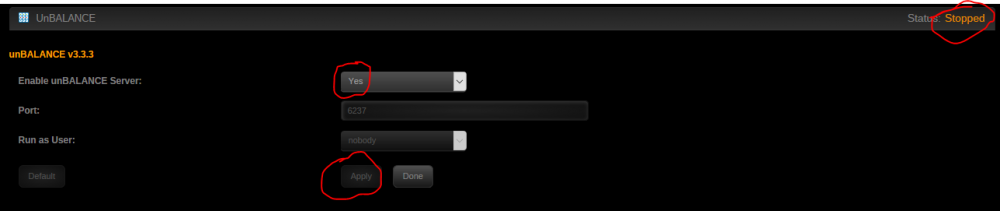
Hi. I installed this quite a while ago, had it working, but haven't played with it for a long time. Now, I can't seem to get it to start. As you can see in the screen shot, the server is running, the "Apply" button is disabled (because I just clicked it), but it still says the server is stopped. I've enabled & disabled several times, refreshed the page, and attempted to go to tower:6237. Clicking on Settings > Utilities > unBalance brings me to the settings screen you see here, as does Plugins > Installed Plugins > unBalance. Neither of these gives me a docker-style drop-down menu with an option to Open Web UI. On a whim, I decided to uninstall/reinstall, and now it's started properly. I know I've had this installed for probably a year or so, and it seems that something got a little wonky during all the updates. Nothing really for you to "fix", just something to be aware of. Let it rattle around at the back of the brain, and maybe you'll notice something at some point when you're digging in the code.
-
There are several different skins you can choose from, somewhere in the config. You can get back to the old UI if you prefer it. I do. Sent from my Moto G (5) Plus using Tapatalk
-
I've noticed my speed varying all over the place since I first started using CrashPlan, whether it was running on Win7 or on my unRAID box, so if you were getting nice, steady speeds, I'm jealous! There are settings in the UI for "foreground" and "background". I would notice speed fall off when it was running on my Win 7 box when I woke the screens up. I'm not entirely sure how these settings impact things when running in a docker, but you may want to look at those. I don't remember the exact terms for the fields, and don't have access to the box at the moment. You may also have to figure out where to set them in the xml to keep them set. Sent from my Moto G (5) Plus using Tapatalk
-
Thanks, @bonienl. I've followed your instructions and I've got my verifications scheduled again. I'll continue to monitor to see if I get any additional issues. If anything, I would guess that it's the CA-Backup that's not properly opening/closing files, because all the issues are in my Backups share on the CA backups path. I've had them excluded with "/mnt/user/Backups/CommunityApplicationsAppdataBackup", and that doesn't seem to have excluded these files from the verification, so I just changed it to "/mnt/user/Backups/CommunityApplicationsAppdataBackup/*" (with the /* at the end) in the hopes that would do it. I've excluded other directories, as well, and comma separated them - is that the proper way of doing it? I believe I also had spaces after the comma between the paths, maybe that was breaking things - I've eliminated that now, too.
-
Sadly, I'm still getting notification of errors on files that should be excluded, so either the exclude logic is broken or I don't understand how to use it. It seems that the "how to use it" part is a big secret, since I've asked about it twice and nobody's felt it was appropriate to share. I'm also getting 2 types of notifications from FIP: and English is difficult (even though it's my native language) and the semantics can be particular. I'm not sure whether a "warning" is more or less important than an "alert", though I would think that "corruption" is worse than a "mismatch". However, I'm not sure what the difference between the two of those really is, either. In what way can the hash key be mismatched if not due to corruption?
-
Anyone have any ideas?
-
Correct - no issues from 192.168.1.5:4040. Also, no issues and speedy response when accessing the Libresonic server via the Ultrasonic (so many sonics!) client app on my phone either on the home network or away from home (when I've opened the port at the router). Attaching the access.log, in which I see the following lines that give me pause: I don't know enough about these logs to know if I should be seriously concerned, since they're in the access.log. This one: "sysscan/1.0 (https://github.com/robertdavidgraham/sysscan)" occurs several times. There doesn't appear to be a "robertdavidgraham" on github, but there are 4 results for sysscan. I didn't look into any of the 4, so I'm not sure what's there. I don't think any of my family would be shopping at nike.com - none of us are big fans of Nike, but, of course, those are inbound attempts, not outbound. Also attaching error.log and error.log.1 - there's not much in either for the last 2 weeks or so. All assistance is appreciated! Anything further I can provide? access.log error.log error.log.1
-
Default and specific shows configs attached. URL: shows.bds.ddns.us It started out being reachable but slow - I've been able to access via my phone & desktop machine at home via WiFi & wired networks. I've also been able to access via phone & work computer from off the home network. For the last couple of weeks, it's been totally unreachable - a timeout every time. This is what I'm getting from my wired PC on the home network and on my phone via cell service (WiFi off). default shows
-
Poke. Poke poke...
-
Whew! Working for me now, too. Thanks for the quick fix!!
-
I'm getting very slow response times from my LE/NGINX server. Slow to the point that it times out. I have shows.mydomain.ddns.us pointed at my binhex-libresonic docker on port 4040. That times out before I ever get the NGNIX login. However, when I reopen port 4040 at the router and direct it to my server, I get near instant access to my music/video library on my phone with WiFi turned off (i.e., ensuring I'm accessing externally) or with the phone on WiFi. Therefore I believe that it's an issue with the LE/N container, not with my internet connection in general (though Comcrap has been less than reliable the last couple of weeks), my internal network, or the server itself. I have it working (some installation issues were resolved around pages 30-32ish), and I've accessed it via my phone and my computer at work, however, it's always been sluggish. I'm not sure what you might need for diagnosis, so I'm attaching Diagnostics, let me know what else might be needed for trouble shooting. nas-diagnostics-20171009-1808.zip
-
@SSD (who I note has changed his name but not avatar) made the point I was going to make. I'll add that I believe that root level folders on the cache drive may also cause a share to reappear - you may want to check that, too.
-
Yeah, well, after a flawless conversion from gfjardim's docker to this one, there was one minor issue... I screwed up my setting for the backup path so the backups didn't start. Then I started messing around trying to figure out why everything was listed as missing and started a prune. When that finishes, I think I'll end up with an empty backup set at code42 and get to start over. Totally my fault, but be sure to learn from my mistake!
-
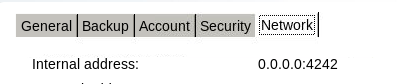
I looked at run.conf and it had "-Xmx1024m", so I deleted run.conf, set memory to "2.5G" and restarted. Again I couldn't bring up the UI. Stopped the container, cleared the memory setting from the WebGUI settings. It didn't start the container, so I edited the run.conf to read "-Xmx2560m" and started the container. The UI will come up now, but it's still not starting the backup, and the internal address is still showing 0.0.0.0:4242. I could uninstall/reinstall the whole container if you think that would be a good next step.
-
I initially set it (to 2560) by using the "click on the app" method I described and it was fine. Then, you mentioned the setting in the container settings, so I edited the settings and set it there to "2.5G". When I restarted the container, I couldn't get the WebGUI to come up. I cleared the field in the container settings and restarted again, and it came up. Contents of run.conf: SRV_JAVA_OPTS="-Dfile.encoding=UTF-8 -Dapp=CrashPlanService -DappBaseName=CrashPlan -Xms20m -Xmx2560m -Dsun.net.inetaddr.ttl=300 -Dnetworkaddress.cache.ttl=300 -Dsun.net.inetaddr.negative.ttl=0 -Dnetworkaddress.cache.negative.ttl=0 -Dc42.native.md5.enabled=false" GUI_JAVA_OPTS="-Dfile.encoding=UTF-8 -Dapp=CrashPlanDesktop -DappBaseName=CrashPlan -Xms20m -Xmx512m -Dsun.net.inetaddr.ttl=300 -Dnetworkaddress.cache.ttl=300 -Dsun.net.inetaddr.negative.ttl=0 -Dnetworkaddress.cache.negative.ttl=0 -Dc42.native.md5.enabled=false" After restarting, it will come up, but it cannot connect to the server, and I see this in the settings: I'll stop fiddling with it until I get some advice. (Which has been quite good so far, if only I'd slow down some!)
-
And... now I've unset the change there. It wouldn't start properly with it set in both places.




