





FreeMan
Members
-
Joined
-
Last visited
Everything posted by FreeMan
-
Thanks for the quick updates, gf! Maybe I spoke too soon. I got this email this morning: Not sure if this is explicitly because of the pre-clear updates, but I'm pretty these started showing up on the day of the pre-clear update.
-
Great additional work, gfjardim! I've been puzzled by the emails I've been getting the last couple of days but between work, Christmas preparations, and kids visiting, I haven't had time to research it. When I finally did, the answer is already here! The real prompt for figuring out what the heck was going on, though, was the prompt to install the Statistics Plugin with a mention of TOR. Having no recollection of ever having unRAID prompt me to install anything before (as opposed to the auto-update, which is awesome), I was quite concerned. The good news is that a search for "statistics" in the plugin support forum brought me directly to the answer. I'd suggest that you may want to modify the pop-up for future users to tell them that this is coming from the pre-clear plugin and add a link to the pop-up itself that takes users directly to the support page.
-
I had to do a force update, but that fixed it. TYVM for the quick attention!
-
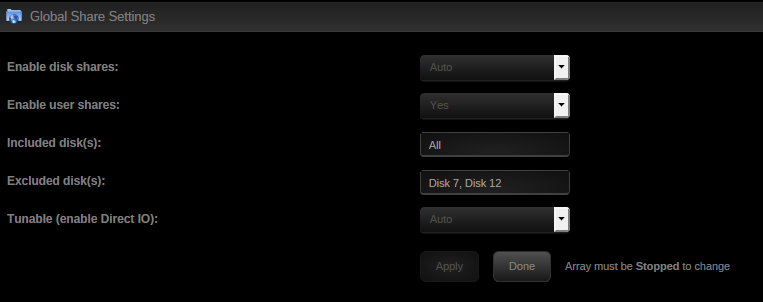
I updated to 6.2.4 2 days ago. When I rebooted, SAB started right up. I just stopped the array so I could adjust a couple of global share settings (in the middle of migrating to XFS format), and when I started the array, I can't get SAB to start now. appdata is on my cache drive, and that was not a part of the share exclusions I made. (see attached for proof!! ) I click the icon, then click start from the pop-up menu. The WebGUI page refreshes, but SAB doesn't start. Here are the last few lines of the supervisord.log: Created by... ___. .__ .__ \_ |__ |__| ____ | |__ ____ ___ ___ | __ \| |/ \| | \_/ __ \\ \/ / | \_\ \ | | \ Y \ ___/ > < |___ /__|___| /___| /\___ >__/\_ \ \/ \/ \/ \/ \/ https://hub.docker.com/u/binhex/ 2016-11-09 19:37:16.878748 [info] Host is running unRAID 2016-11-09 19:37:16.927184 [info] System information Linux 18268a8575dd 4.4.30-unRAID #2 SMP PREEMPT Sat Nov 5 12:09:05 PDT 2016 x86_64 GNU/Linux 2016-11-09 19:37:16.984877 [info] PUID defined as '99' 2016-11-09 19:37:17.040157 [info] PGID defined as '100' 2016-11-09 19:37:17.243657 [info] Permissions already set for volume mappings chown: cannot access '/usr/lib/couchpotato': No such file or directory chown: cannot access '/usr/bin/couchpotato': No such file or directory couchpotato is, in fact, missing from both /usr/lib and /usr/bin, but I have no idea why. I can only assume that it was there when the server was rebooted for the 6.2.4 update 2.5 days ago... I used the Docker Buttons Stop All button to stop the dockers, in case that might be a hint. Do I need to remove the container & reinstall?
-
Like others, I'm in the midst of migrating from reiserfs to xfs and I'm looking forward to using this now. I've been doing the moves manually, and this does look like it will make life much easier. I've been doing my file moves manually, following this forum message, and one of the things bjp999 specifically mentions (in his step 8 ) is confirming that everything copied correctly. Is that build in to this script? Based on my reading of rsync docs I'm not sure that I'm seeing that, but I'm certainly no rsync expert. I'm currently in the midst of a 3TB manual move, but will switch to using this as soon as that one finishes up!
-
I just got a notification that the plugin found 1 file with hash key corruption. I'm not terribly worried as I just re-formatted the disk from reiserfs to xfs, and I'm copying data to it, so I have the full set of original files. However, I'm wondering if the corruption could have come from DFI calculating and storing a hash on a partially copied file, and the check calculating the hash on the fully copied file. On the bright side, I do really appreciate this plug in and the fact that my Pushover message specified the file that failed (even though the WebGUI pop-up doesn't, and I'm OK with that)!
-
I have the norco equivalent on my main desktop. They work, stay cool with the fan, but the one big caveat with them (and tbh pretty non-hotswap solution) is that its damn near impossible to get a drive out of them and replace it without disturbing the cabling to the other drives. Safest way to change / add a drive to them is to remove all the cabling to the other drives so that you are forced to plug them back in (and in the process pretty much guarantee they are making a decent connection rather than a so-so one if you happen to just touch the adjacent sata cables the wrong way) You haven't seen the rat's nest that is my server. If I'm doing anything to any drive I've got to pull cables, so I'm not going to take that as a negative. Thanks for the feedback. I think I'll order 3 - that should fill up my Zalman MS800 case quite nicely. I promise to take a couple of before/after pictures just so y'all can get a good chuckle. Just curious... 3 bays high is shorter than 1 drive wide, so there's extra space on top. These racks, though, look like they take up all of the 3 bays height. What happens to all the extra space?
-
I saw these bare-bones 5-in-3 cages in the Tower Cases thread. Has anybody used them? Have any comments on them? They don't have a back plane of any sort, they're not hot swap and they don't come with a fan, but... Hot swap would be a nifty whiz-bang feature, but my server isn't so vital that it can't be down for 10-20 minutes. I've got all the SATA & power cables I need already, so sharing connections would only reduce clutter in the box (which is good). And I've already got some quiet fans for a home-grown solution I was working on (but haven't finished).
-
Holy Cow! modDIY.com is still selling those cages at the same $40!! Has anyone used them? Any comments on quality, reliability of the site, etc?
-
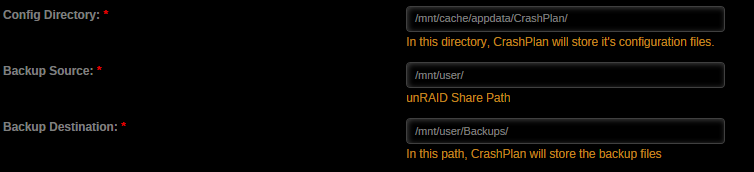
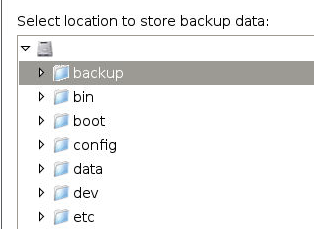
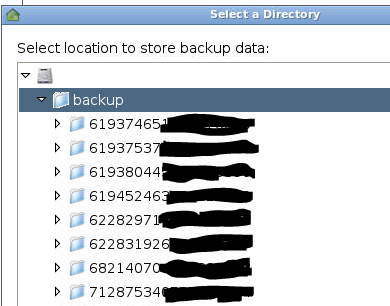
After migrating from running CrashPlan on my Windows machine to running it on unRAID (thanks for the great docker!), I've got my server fully backed up to the cloud. I'm now attempting to get other people's backups to me running, and I have 2 questions: 1) I want to confirm that I'm not backing up to my docker.img file again. I had issues with this before, even though I though everything was good. Attachment 1 shows how I've got the docker configured Attachment 2 shows the default backup location Attachment 3 shows where that location is Attachment 4 shows what's already on disk at that location. (The previous CP backup folders. Don't know if the numbers are globally meaningful, so I obfuscated). Based on the 4th image, it appears to me that the mapping is correct, but, then, I'm pretty sure this is what it looked like previously... Do these settings look correct to get the backup onto my protected array instead of into the docker.img? 2) I've run into some difficulty getting difficulty getting the incoming connections to work I installed the CP docker with all the default port usage - it's listening on 4242. I've got 4242 being forwarded for both TCP & UDP to my server. I was on Skype with my daughter, and her setup looks to me to be correct, she's got my backup code entered, but it says it cannot connect. We ran through these steps from Code42 for debugging the issue, and everything seems to be working. The only issue that I can't 100% confirm is AV software on her machine - she's running a Mac and I just don't know much about them. She had a backup running to my machine previously when the backup engine was running on my Win7 machine (with it following hard links to the server. Yay!), so I know the software was working previously. She did just update the CP client to the latest on her laptop, but I would presume that wouldn't break anything... Any suggestions on what else to check to figure out why she can't get connected? I will be working with my son (on Win7) tomorrow night, so I'll have another data point to see what's going on. I'm pretty sure that I had incoming connections working previously, but had the docker configured incorrectly - it was filling my docker.img file almost instantly. I don't know if it was her machine or one of the several other family members who backup to my server who was making the connection, though.

-
Won't help you now, but going forward, this weekend's update will have this in there (optional, defaults to preserving the date/time of the folder) (Actually an awesome idea as I work with my shares the same way, and it never really popped into my head) Sweet! Looking forward to it!
-
This is looking awesome, Squid! Is there any way to preserve the date/time stamp in the directory structure when you write the bait files? I often sort by date/time because I'm looking for the newest directories that have been added by SB or CP, and at the moment, almost all of my directories have a 10/16 date stamp (the last time I launched the plugin).
-
You know, I saw that part and it just didn't make much sense to me. I didn't want different configs for each person, I want everyone to have the same access. Guess I'm just not into my *nix enough for it to have sunk in. This seems to be working now, thanks! Hope you're still enjoying your holiday instead of worrying about us. Potentially dumb question, though... Now that I can pull this up on my phone & the epbureader seems to bring it up in Firefox mobile on my Android, how do I get it to turn pages? I've tried tapping on the page number, tapping in general on the right side of the screen, swiping right to left, bottom to top... I just seem to be stuck on page 1 of whatever book I open. I guess I just wasn't tapping in the right place... sigh...
-
I don't know if it's got anything to do with it, but the 6.2.2 release notification came while this preclear was running. It was either the 6.2 or 6.2.1 release notification that showed up when my last preclear hung, too. Maybe there's something in the update detection/notification routine that's breaking the preclear? I dunno, just a possibility. I did reboot the server (with no issues this time), installed all updated updates, and my preclear is running along just fine, now.
-
This is also the second time that the log has been full of this: tput: unknown terminal "screen" tput: unknown terminal "screen" tput: unknown terminal "screen" tput: unknown terminal "screen" tput: unknown terminal "screen" tput: unknown terminal "screen" tput: unknown terminal "screen" tput: unknown terminal "screen" tput: unknown terminal "screen" tput: unknown terminal "screen" tput: unknown terminal "screen" tput: unknown terminal "screen" tput: unknown terminal "screen" tput: unknown terminal "screen" tput: unknown terminal "screen" tput: unknown terminal "screen" tput: unknown terminal "screen" tput: unknown terminal "screen" That's only part of it, but that's the only thing in the log. And, I cannot get the preclear to stop, clicking on the x doesn't do anything but force a page reload.
-
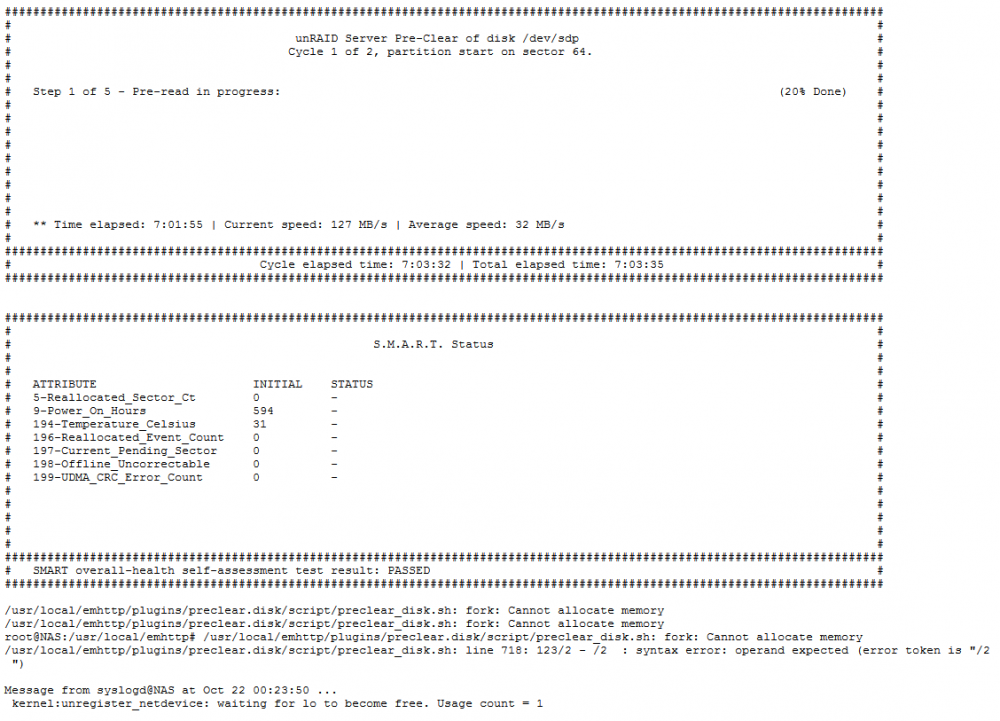
Preclear just doesn't seem to like me much lately... I've launched a preclear on a drive that, admittedly, I've had other trouble with. This time, I've started the preclear with the drive attached to a USB3.0 -> SATA adapter, and the drive is outside the case. I started the preclear on 10/21 at 06:41 local, and it seems to have hung after 7 hours of processing at 20% complete (first attachment). I kept seeing that it was running at 32MB/s and thought that was insanely slow, but didn't register that it was also only reporting 7 hours of processing time when it's been nearly 36 hours since I launched the preclear, therefore, I've just left it running while doing other stuff. The log reports that it couldn't allocate memory and, therefore, there was a script error (second attachment). I've got 8GB of RAM in the box, but I do have a bunch of dockers running (see .sig). A) It would be nice if the script could be made a bit more robust to capture these errors and not just hang. Easier said than done, I understand. B) Is is possible to copy text from the log window? Firefox just doesn't seem to want to let me do that, hence the screen cap instead. C) What do I need to do now? I presume that I need to just stop the preclear (though I had issues with that previously and ended up having to power off the machine with a long-press of the power button, and would like to avoid that again if possible). Do I simply not have enough RAM to support the configuration I'm attempting to run? I readily acknowledge that there could simply be issues with the drive, having had a bit of a smoke (see first link), but it does seem to have passed SMART testing. I'd like to make a rather thorough test of the drive before giving up on it, since it's passed HGST's tests, they won't RMA it, even through it's still under warranty.

-
Hmmm... may have spoken too soon... It seems I can successfully start COPS with multiple users defined, but that it will only allow me to log in as one user - whoever logs in first is the winner, nobody else can. here's what's in the log file: ------------------------------------- _ _ _ | |___| (_) ___ | / __| | |/ _ \ | \__ \ | | (_) | |_|___/ |_|\___/ |_| Brought to you by linuxserver.io We gratefully accept donations at: https://www.linuxserver.io/index.php/donations/ ------------------------------------- GID/UID ------------------------------------- User uid: 99 User gid: 100 ------------------------------------- [cont-init.d] 10-adduser: exited 0. [cont-init.d] 20-config: executing... [cont-init.d] 20-config: exited 0. [cont-init.d] 30-keygen: executing... using keys found in /config/keys [cont-init.d] 30-keygen: exited 0. [cont-init.d] 40-config: executing... [cont-init.d] 40-config: exited 0. [cont-init.d] done. [services.d] starting services [services.d] done. [s6-init] making user provided files available at /var/run/s6/etc...exited 0. [s6-init] ensuring user provided files have correct perms...exited 0. [fix-attrs.d] applying ownership & permissions fixes... [fix-attrs.d] done. [cont-init.d] executing container initialization scripts... [cont-init.d] 10-adduser: executing... ------------------------------------- _ _ _ | |___| (_) ___ | / __| | |/ _ \ | \__ \ | | (_) | |_|___/ |_|\___/ |_| Brought to you by linuxserver.io We gratefully accept donations at: https://www.linuxserver.io/index.php/donations/ ------------------------------------- GID/UID ------------------------------------- User uid: 99 User gid: 100 ------------------------------------- [cont-init.d] 10-adduser: exited 0. [cont-init.d] 20-config: executing... [cont-init.d] 20-config: exited 0. [cont-init.d] 30-keygen: executing... using keys found in /config/keys [cont-init.d] 30-keygen: exited 0. [cont-init.d] 40-config: executing... [cont-init.d] 40-config: exited 0. [cont-init.d] done. [services.d] starting services [services.d] done. error: Ignoring nginx because of bad file mode - must be 0644 or 0444. error: stat of /var/log/messages failed: No such file or directory [s6-init] making user provided files available at /var/run/s6/etc...exited 0. [s6-init] ensuring user provided files have correct perms...exited 0. [fix-attrs.d] applying ownership & permissions fixes... [fix-attrs.d] done. [cont-init.d] executing container initialization scripts... [cont-init.d] 10-adduser: executing... ------------------------------------- _ _ _ | |___| (_) ___ | / __| | |/ _ \ | \__ \ | | (_) | |_|___/ |_|\___/ |_| Brought to you by linuxserver.io We gratefully accept donations at: https://www.linuxserver.io/index.php/donations/ ------------------------------------- GID/UID ------------------------------------- User uid: 99 User gid: 100 ------------------------------------- [cont-init.d] 10-adduser: exited 0. [cont-init.d] 20-config: executing... [cont-init.d] 20-config: exited 0. [cont-init.d] 30-keygen: executing... using keys found in /config/keys [cont-init.d] 30-keygen: exited 0. [cont-init.d] 40-config: executing... [cont-init.d] 40-config: exited 0. [cont-init.d] done. [services.d] starting services [services.d] done. [s6-init] making user provided files available at /var/run/s6/etc...exited 0. [s6-init] ensuring user provided files have correct perms...exited 0. [fix-attrs.d] applying ownership & permissions fixes... [fix-attrs.d] done. [cont-init.d] executing container initialization scripts... [cont-init.d] 10-adduser: executing... ------------------------------------- _ _ _ | |___| (_) ___ | / __| | |/ _ \ | \__ \ | | (_) | |_|___/ |_|\___/ |_| Brought to you by linuxserver.io We gratefully accept donations at: https://www.linuxserver.io/index.php/donations/ ------------------------------------- GID/UID ------------------------------------- User uid: 99 User gid: 100 ------------------------------------- [cont-init.d] 10-adduser: exited 0. [cont-init.d] 20-config: executing... [cont-init.d] 20-config: exited 0. [cont-init.d] 30-keygen: executing... using keys found in /config/keys [cont-init.d] 30-keygen: exited 0. [cont-init.d] 40-config: executing... [cont-init.d] 40-config: exited 0. [cont-init.d] done. [services.d] starting services [services.d] done. [s6-init] making user provided files available at /var/run/s6/etc...exited 0. [s6-init] ensuring user provided files have correct perms...exited 0. [fix-attrs.d] applying ownership & permissions fixes... [fix-attrs.d] done. [cont-init.d] executing container initialization scripts... [cont-init.d] 10-adduser: executing... ------------------------------------- _ _ _ | |___| (_) ___ | / __| | |/ _ \ | \__ \ | | (_) | |_|___/ |_|\___/ |_| Brought to you by linuxserver.io We gratefully accept donations at: https://www.linuxserver.io/index.php/donations/ ------------------------------------- GID/UID ------------------------------------- User uid: 99 User gid: 100 ------------------------------------- [cont-init.d] 10-adduser: exited 0. [cont-init.d] 20-config: executing... [cont-init.d] 20-config: exited 0. [cont-init.d] 30-keygen: executing... using keys found in /config/keys [cont-init.d] 30-keygen: exited 0. [cont-init.d] 40-config: executing... [cont-init.d] 40-config: exited 0. [cont-init.d] done. [services.d] starting services [services.d] done. [s6-init] making user provided files available at /var/run/s6/etc...exited 0. [s6-init] ensuring user provided files have correct perms...exited 0. [fix-attrs.d] applying ownership & permissions fixes... [fix-attrs.d] done. [cont-init.d] executing container initialization scripts... [cont-init.d] 10-adduser: executing... ------------------------------------- _ _ _ | |___| (_) ___ | / __| | |/ _ \ | \__ \ | | (_) | |_|___/ |_|\___/ |_| Brought to you by linuxserver.io We gratefully accept donations at: https://www.linuxserver.io/index.php/donations/ ------------------------------------- GID/UID ------------------------------------- User uid: 99 User gid: 100 ------------------------------------- [cont-init.d] 10-adduser: exited 0. [cont-init.d] 20-config: executing... [cont-init.d] 20-config: exited 0. [cont-init.d] 30-keygen: executing... using keys found in /config/keys [cont-init.d] 30-keygen: exited 0. [cont-init.d] 40-config: executing... [cont-init.d] 40-config: exited 0. [cont-init.d] done. [services.d] starting services [services.d] done. [s6-init] making user provided files available at /var/run/s6/etc...exited 0. [s6-init] ensuring user provided files have correct perms...exited 0. [fix-attrs.d] applying ownership & permissions fixes... [fix-attrs.d] done. [cont-init.d] executing container initialization scripts... [cont-init.d] 10-adduser: executing... ------------------------------------- _ _ _ | |___| (_) ___ | / __| | |/ _ \ | \__ \ | | (_) | |_|___/ |_|\___/ |_| Brought to you by linuxserver.io We gratefully accept donations at: https://www.linuxserver.io/index.php/donations/ ------------------------------------- GID/UID ------------------------------------- User uid: 99 User gid: 100 ------------------------------------- [cont-init.d] 10-adduser: exited 0. [cont-init.d] 20-config: executing... [cont-init.d] 20-config: exited 0. [cont-init.d] 30-keygen: executing... using keys found in /config/keys [cont-init.d] 30-keygen: exited 0. [cont-init.d] 40-config: executing... [cont-init.d] 40-config: exited 0. [cont-init.d] done. [services.d] starting services [services.d] done. [s6-init] making user provided files available at /var/run/s6/etc...exited 0. [s6-init] ensuring user provided files have correct perms...exited 0. [fix-attrs.d] applying ownership & permissions fixes... [fix-attrs.d] done. [cont-init.d] executing container initialization scripts... [cont-init.d] 10-adduser: executing... ------------------------------------- _ _ _ | |___| (_) ___ | / __| | |/ _ \ | \__ \ | | (_) | |_|___/ |_|\___/ |_| Brought to you by linuxserver.io We gratefully accept donations at: https://www.linuxserver.io/index.php/donations/ ------------------------------------- GID/UID ------------------------------------- User uid: 99 User gid: 100 ------------------------------------- [cont-init.d] 10-adduser: exited 0. [cont-init.d] 20-config: executing... [cont-init.d] 20-config: exited 0. [cont-init.d] 30-keygen: executing... using keys found in /config/keys [cont-init.d] 30-keygen: exited 0. [cont-init.d] 40-config: executing... [cont-init.d] 40-config: exited 0. [cont-init.d] done. [services.d] starting services [services.d] done. I'm gonna say y'all could do with some date/time stamping... All in all, it looks like everything is loading up ok - I think the error in there may have been from when I missed a couple of commas between users - I wasn't checking the logs at that time, so I don't know which container restart that pertains to. I am confused, however, the last entry (at the bottom, I presume that's the most recent), does not say that it's "making user provided files available at...". However, I stopped & restarted many, many times, and was able to get access to it from at least one user each time, so I'm not sure if that's related. Is there any sort of log from COPS itself indicating what it's served and to whom? Here is how I've got my users defined: $config['cops_basic_authentication'] = array('username' => 'a', 'password' => 'a' ,'username' => 'b', 'password' => 'b' ,'username' => 'c', 'password' => 'c' ,'username' => 'd', 'password' => 'd' ,'username' => 'e', 'password' => 'd' ); Anyone see any errors or typos in there? Y'all want my IP address now that you know how easy my passwords are to crack? Any other suggestions on getting this to work, or should I just scrap it and start figuring out an HTTPS solution that will cover all my externally exposed dockers?
-
Enjoy yourself, thanks for answering while holidaying, now stop it and enjoy yourself! Sucked and seen, that format does seem to allow for multiple logins. One of these days, I'm going to have to figure out the apache/nginx server and an SSL certificate. That sounds more difficult, but much, much more comforting.
-
OK, life is slowing down a bit, I've got the fires put out (literally), etc., so it's time to get back to this. How do I get to said file to edit indicated line? If I'm reading the "here" document correctly, htpasswd is the preferred method, but (if I'm reading your comments correctly) it requires an https browser be built into the container to deal with it, therefore PHP password protection is much easier. If I wanted to create 2 users, I think I would do this: $config['cops_basic_authentication'] = array('username' => 'chbmb', 'password' => 'sparklyballsisgrumpy', 'username' => 'sparkly', 'password' => 'chbmbisthebaldest'); Is that correct?
-
Ah! Got it! Thanks, Squid!
-
Thanks for the response. Unfortunately, that's what I thought - "Ignore" will ignore this issue in the future, but doesn't remove the error from the list. How do I now "unignore" the error? I'd like to be notified about unclean shut downs in the future, but I wanted to acknowledge the fact that there was one (I know, I caused it as a last resort), and get it off the list of problems, since I've dealt with the issue.Thank you, thank you very much! I've hit 0 bytes when running 5.x, so I may have something not set correctly.I received a "disk out of space" warning from FCP upon a reboot. It's quite legitimate as the drive was down to 270Kb (Yes, Kb) of free space. Do I hit "Ignore" to make it go away? I had another error about the machine not being powered down cleanly (holding down the power button because nothing else is responding will do that), and it had an "Acknowledge" button to click. "Ignore" seems rather drastic, and makes me wonder whether it's ignoring it for now, or forever. A tad bit of clarity would be fantastic. Thanks!Some sort of disk space checking to ensure you're not filling a disk or share would be fantastic! I've got one share dedicated to one disk (2TB drive) that was down to 270Kb of free space. Don't think it was the fault of the plugin, but my syslog was flooded with "out of disk space" errors trying to move stuff there.


