





FreeMan
Members
-
Joined
-
Last visited
Everything posted by FreeMan
-
That's so disgusting I'm tempted to report the post. shudder...
-
16GB as noted in .sig Seeing how much others have, I'm a tad jealous, but really, I don't know that I need it. CrashPlan backing up nearly 1 million files at 2.7TB ran me out of room when I had only 8GB. Everything's been smooth since the upgrade.
-
@bonienl first of all, thank you for all your great plugins and the fantastic job you've done with the WebGUI (even back in the 5.x days)! After installing my first SSD cache drive, I got a warning from Squid's excellent FCP that I didn't have Trim installed. After doing so, I had 2 observations: 1) I had NO idea where to go to find the settings for it. Some of your plugins very conveniently have a clickable button that takes you to the config page, some don't. Not all of them set up their config pages in the same section of the menus, so it's not particularly obvious (at least to me) where to go for each individual batch of settings. Would it be possible to make them all have the "button click takes you to the config page" functionality? I searched this thread for "trim", and, fortunately, saw that I'm not the only one with this issue. I was able to follow the directions in response to other's requests to find it. 2) Once I found the config, I had no idea what kind of settings to provide. Some more searching in this thread lead me to these three messages: (sorry, couldn't seem to get the last one to embed with the quotes from the previous two ) this is great info for those of us who aren't yet that familiar with SSDs and Trim operations. I think it would be a great service to all of us less knowledgeable types if you were to include a link to John_M's comment (it includes quotes of all the rest), and/or include some info along these lines in your description of the plug-in in your OP. It would also probably save you and/or Squid (or others) having to answer these questions time after time. Again, thanks for all your excellent work! (You, too, Squid!)
-
Yes, I see that now. I've started a new thread in the General Support section instead of cluttering up Squid's RP thread any more. Thanks, all!
-
Ding! Ding! Ding! You win the prize, Cache drive says "Read Only Mode. Restore normal settings via <a href='/Settings/Ransomware'>Ransomware Protection Settings</a>" However, I don't see anything in RP to enable it. I tried disabling RP then reenabling, but the cache share is still RO. I guess I could try locking then unlocking via RP, but, if I recall correctly, unlock resets things to they way they were, not the way I want them to be. ACTUALLY, all the disks are mounted RO, not the shares.
-
I don't think this is RP's fault, but it was my first thought... I'm trying to write some files to a directory on my server and it's reporting that it can't because it's a "read-only file system". Of course RP was my immediate thought, however, RP is showing the lock icon with the text " Click The Lock To Immediately Set SMB/AFP to Be Read-Only" immediately under it, so it doesn't look like it's been triggered. There is nothing at all in the Ransomeware Log, and the Attack History shows the one accidental "attack" I did on myself back in January. (Proved the system works! :D) Every single one of my shares, except flash, seem to be locked, but I don't know why. I don't see anything in the share settings or SMB settings that would have disabled this. As I said, it doesn't look like it's RP's fault, but I figured you'd have a good idea what may have happened. I'm happy to post this as a general support issue if you'd prefer, Squid. Diagnostics attached. nas-diagnostics-20170422-1541.zip
-
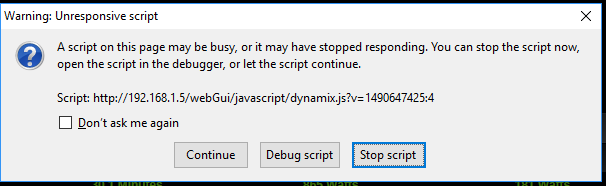
I frequently have the unRAID Dashboard running in a tab in FireFox, and if it's been sitting for a while (a loose definition of no absolute value), I will an "unresponsive script" error message in FF (see attached). This usually seems to happen when there's a notification of some sort (like a plugin/docker update), but not always. Clicking "Stop script" will, it seems, do so and returns responsiveness to FF and I can go on my merry way with whatever else I was going to do. Any thoughts on causes/fixes for this? I know, I'm weird and probably don't need to leave the page up all the time, but I'm also lazy, so it's there for convenience.
-
OK, I got this installed & running mostly fine. I pointed it at my directory where I've been collecting the last 7-8 years worth of .torrent files & it slurped them all in and now lists 3000+ plus torrents. (I may or may not go back through and connect them up with the appropriate files...) When it did that, it deleted every single one of my .torrent files! I'm assuming that it just moved them somewhere, but I haven't a clue where it put them. Any tips? I did docker exec -i -t rutorrent bash and I've rummaged about a bit, but I'm not finding any .torrent files I was running into issues with it picking things up via RSS, so I temporarily reverted to my Win10-based uTorrent machine to do the DL/seeding. I restarted uTorrent, and all my torrents are now marked with a big X and it says that it can't open the .torrent file.
-
Great job of answering your own question, giving a step-by-step, and posting the warning about the settings being cleared on container update! The internet would be a far better place if there were more posts like this!
-
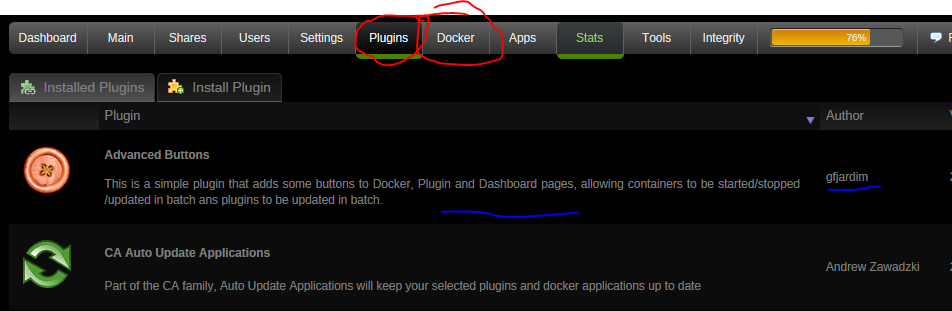
I knew what I meant, I just didn't say it well. I'm referring to the actual Plugin or Docker pages of the menu, not within CA itself. Something like this
-
I have a product suggestion for ya', Squid. Add a link to the forum support post for each docker/plugin, so I can, from the appropriate page, go get help directly. Additionally, allow the author to add additional links to his personal/team's web support page, and maybe even a link to the product page (for dockers). I often spend very frustrating time rummaging about in the forums trying to find the support thread, and not everyone has a link to it from the config page, and not every plugin/docker has a config page. (Advanced Buttons I'm looking at you!) Beyond that, CA has been fantastic, and if I had any issues with it when I first upgraded to 6.0, they've been long since forgotten - it just works like a charm!
-
This is obviously a bug, but it's harmless. It's symptom of some leftover files on your system. I'll investigate as soon as possible, ok? Thanks for reporting. No problem! Thanks again for keeping up the good work!
-
gfjardim- I've been having other issues with my server, so I've been keeping a close eye on the syslog. In doing so, I ran across a line in my syslog that preclear was running on a disk that doesn't exist in my system as reported here. As suggested by RobJ, I'm reporting it here as a possible bug in the preclear plugin. Essentially, I have drives sda - sdo, yet the syslog reported that preclear was running on sdp. I'm attaching diagnostics.zip as pulled from my system a bit earlier this morning. Let me know if there's any other information you might want/need to help diagnose the situation. And, another hearty THANKS! for continuing to support this great tool! nas-diagnostics-20170129-1047.zip
-
my syslog is filling up with hundreds to thousands of lines like this: Jan 28 08:06:39 NAS bunker: error: no export of file: /mnt/disk6/TV/Star Trek The Next Generation/Season 01/Star Trek The Next Generation S01E23 Skin of Evil.mkv When I do an export of a disk, it is reporting that 'x thousand files were skipped'. Why is this? I'm not running out of space, at the moment, the two most recent drives I attempted to export both have over 250MB free space. Suggestions?
-
Wow, weird. I tried it on my phone and it works just fine in Chrome. I've been a Firefox user for years, occasionally jumping to Chrome for short periods. Firefox seems to be getting rather heavy and bloated, and I've been contemplating switching again - this might be the impetus. When you say "using the opds feed" does that mean the feed from Calibre itself running on the server? Is it possible to pwd secure it as I've managed to do with COPS? If not, I'll probably put that off until I've managed to get some better security set up. Thanks, CHBMB!
-
I don't think this technically falls under docker support for COPS, but maybe somebody here has a clue... I'm having an interesting annoying issue. I can go to my COPS server from my PC (Win10), browse to a book, then either download it or (using the little eye icon) or read it in my browser. However, from a browser on my Android phone (Samsung Galaxy S5, Android 5.0) or tablet (ASUS Transformer, Android 4.x), when I click on either the epub or mobi link, it launches the download and I get a notification with the download icon and text that says "fetch", however, it stays at 0%. Anybody have any idea why it won't download on Android when it does just fine on Windows? I've tried on my home WiFi, via 4G LTE, via work WiFi - it never downloads. I've left it running on both devices for the last 2 hours+ while I've been reading a different book, and neither has moved past 0%.
-
And that is something that I hadn't really realized. I would think that protecting the server against Windoze based attacks is the #1 priority, and anything else is just gravy on top.
-
That sounds pretty slick! It would absolutely have to have scripted signaling so people using CouchPotato, SickBeard, torrents or any of the other automated downloaders could function. It would also need to be hooked into the Mover somehow so it can do its job without bringing the whole system down. I think the password protected 'Please' method would work well for scripted activities from desktop machines. For example, I run SyncBack to do backups to the server - I can have it execute a batch file to copy/create the key file before the backup starts, then another (or, gasp! the same one with parameters!) to remove it when the backup finishes.
-
Got it! Thought so, just wanted to confirm Would have been an interesting experiment... Wow... I think I turned that off at one point not realizing that it effected everything, then completely forgot about it. Well, I can say that categorically, this system works! I was running a mirror backup from a project I'm working on on my desktop machine to the server. I didn't have the bait files on my desktop, so the moment the backup software deleted A bait file, everything came to a screeching halt! Clicking the big button to reset permissions followed by copying the bait files to my local directory got things working again with no issues. Thanks again, Squid!!
-
Wow, Squid! I jumped in early on this, but uninstalled it while I was migrating my drives from ReiserFS to XFS. I've been following development, but not paying really close attention. I gotta say, this looks fantastic now! I was all kinds of prepared to ask a bunch of configuration questions, but everything is covered very clearly in your help section and the whole thing looks really professional! I do have a few questions for you: Dracula? Why does he get credit? Yes, I read all of the help .mp3 files. If I wanted to add an mp3 file as a bait target, would I just create /config/plugins/ransomware.bait/bait/squidbait.mp3 and all is good? Protecting other computers. If I were to use Unassigned Devices to remote mount the root of my local machine's hard drive as an SMB share, share that from unRAID, then set RP to protect that share too, what do you think the odds are that it would actually work and detect a file deletion? I realize that shutting down the share from the server would NOT protect the local machine from the ransomware running locally on that machine, but it would likely serve to protect the server that much earlier (possibly before the nasty gets to a share), and would be very explicit as to which machine the attack originated from. Obviously, there would be a lot of work to explicitly exclude machine-local directory structures that get updated frequently (\temp, for example - others based on the OS). Your warnings about RP not protecting local machines got me thinking about this. Tabs. What happened to the nice tabbed interface shown in your screen grabs from the OP? I think they're quite a bit nicer than the long scrolling list of options that are available in the 2017.01.01 version I just pulled today. It would bring the help page much closer to the relevant options, as well, thus making it easier to relate the help to the option (minimizing scrolling), and might minimize questions that are covered in the help files (especially if help is always displayed on the tab). Again - FANTASTIC job with this!
-
I've just finished migrating all drives from ReiserFS to XFS, so it's not a Reiser issue. I didn't implement DFI on the drives until they'd been migrated to XFS, either, as that's against the big red recommendation in the first post. I'll do some manual adjusting to free up some space on each drive and see if things settle down.
-
Thanks, trurl. Would freeing up space on the drives help with this DFI issue? Since, as I read it in the OP, the hashes are being added to the files, I can see where the additional disk space requirement might be exceeding what's physically available and thus preventing the hashes from being added. I can see where DFI would then think there were significantly fewer files on the disk since only a few have hashes added to them.
-
OK, so it's been 2 weeks, but I'm back on this now. in /boot/config/plugins/export/disk1.export.hash, I have 41 files listed. Now, a couple of these are movies, but none of them are big enough to account for a 1TB drive with 20.5kb free. Is the 20.5kb free the issue? Also, the export.hash file claims that it has a hash for a file that doesn't exist on that disk. It seems that the disks that are having issues are the ones with about 1MB or less free space. I'm not entirely sure how all my disks have gotten this full, since all the shares are set to a minimum of 1GB. Would I be best served by manually rebalancing the disk usage to free up some space, then force all disks to rebuild & reexport?
-
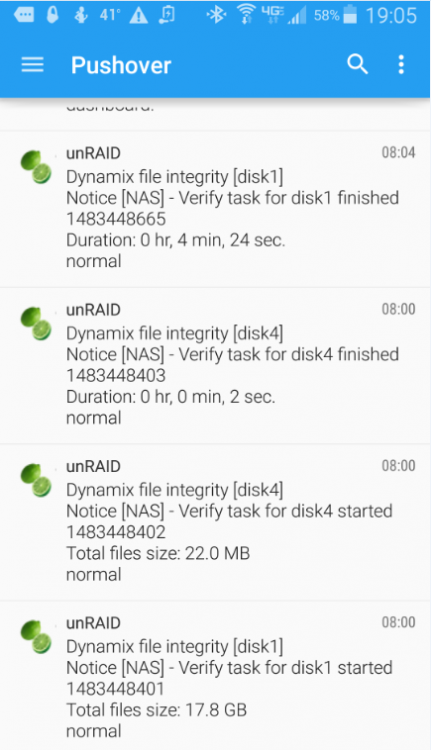
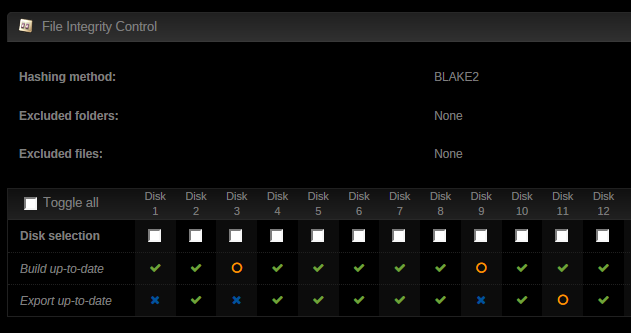
I've come across a strange issue where File Integrity is showing my disks as barely used, running the checks within seconds to minutes, then claiming to be done (attachment 1), while the disks (1 & 2 TB in this particular case) are stuffed to within an inch of their lives (attachment 2). The third attachment shows that the build for both of these disks is currently up to date (just noticed that Disk1 needs to be exported, so I'm doing that now). The fourth attachment shows my current DFIT config - it's set to run daily with 3 groups (which may be overkill to check that often, I get that, but it's how I've got it for now...). Disks 3 & 9 have not been converted from ReiserFS to XFS yet, so they're excluded from the checks. Is there something in the config that might be throwing this off? Do you need to see a log from somewhere to track it down? These are not the only 2 disks this is happening to. There are a couple of others, but I don't remember which ones off the top of my head, so I'll have to wait for the daily scans to come around again to see which ones they are.

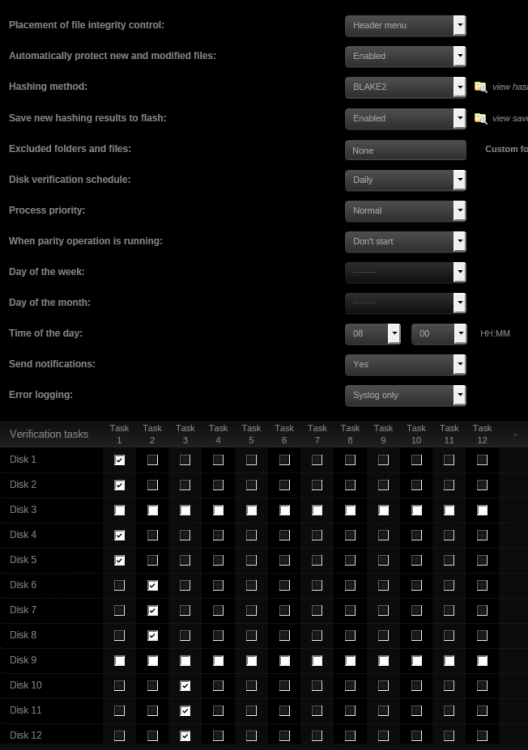
-
Not sure if this is explicitly because of the pre-clear updates, but I'm pretty these started showing up on the day of the pre-clear update. Any thoughts on this? root@NAS:/usr/bin# ls -la run* -rwxr-xr-x 1 root root 1036 May 10 2016 run-parts* lrwxrwxrwx 1 root root 16 Nov 5 18:29 runcon -> ../../bin/runcon* root@NAS:/etc/cron.daily# ls -la total 8 drwxr-xr-x 2 root root 80 Dec 30 10:24 ./ drwxr-xr-x 48 root root 2600 Dec 25 00:03 ../ -rwxr-xr-x 1 root root 3912 Nov 7 06:36 exportrotate* -rwxr-xr-x 1 root root 129 Apr 17 2015 logrotate* None of the permissions on any of these is 644 or 444 - are they supposed to be? Neither of the two files in /etc/cron.daily contains the text "tor", so it doesn't appear to be something that is being called from there, and the only reference to "tor" in run-parts is in the word "directory". I'm a bit lost...




