





gevsan
Members
-
Joined
-
Last visited
-
Hello, Im trying to install SparkyFitness and wondering if anyone else got it to work? I'm not very good with postgress on how to set it up. BR/ Emil
-
This is why I love this community so much! Thank you!!!
-
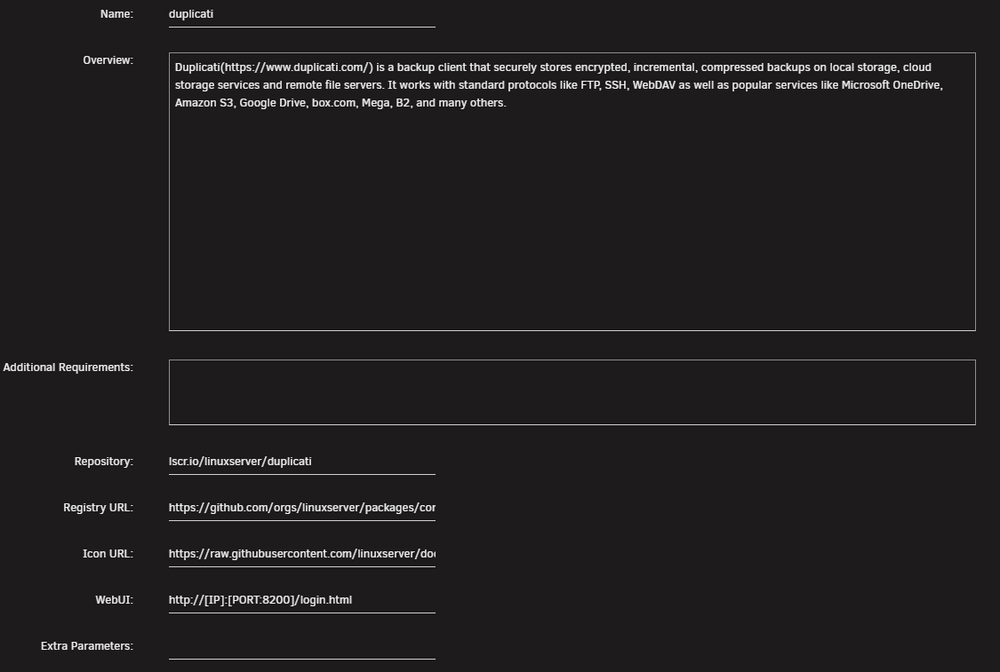
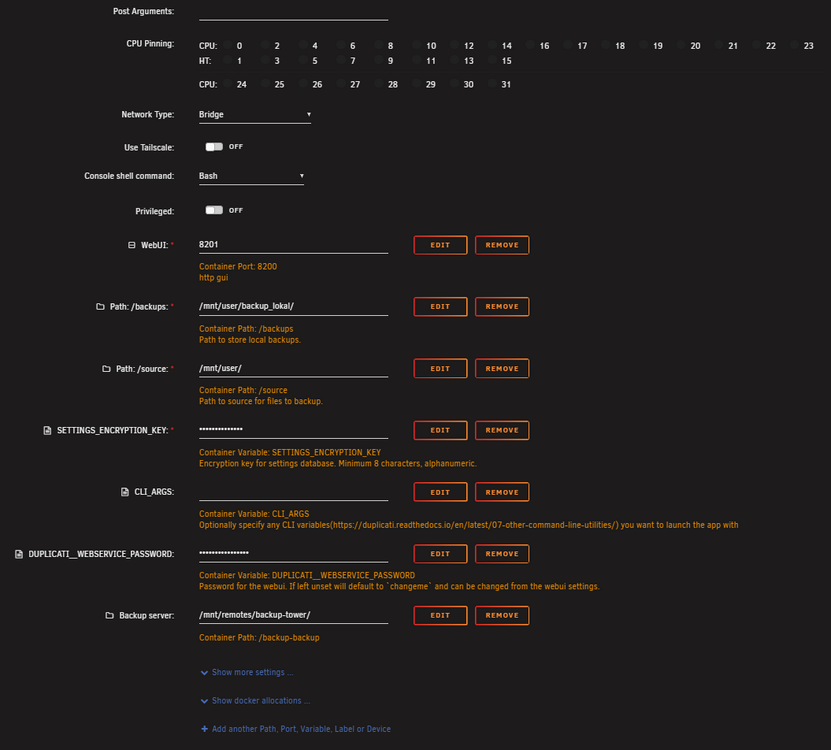
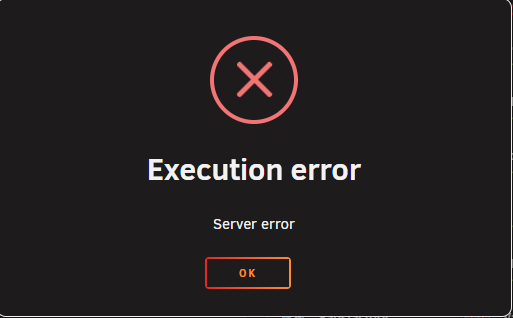
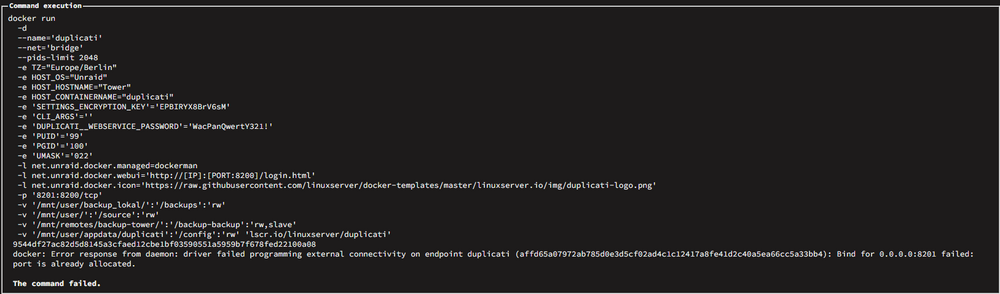
Hello, I've installed Duplicati but I found a problem.. If im restarting Duplicati I cannot access it anymore. This is the error im getting. It says that my port is already allocated. It's only Duplicati that uses it. I have to change the port between 8200 and 8201 each and everytime i start it. Does anyone have a clue why? This is my template: tower-diagnostics-20251013-1055.zip
-
Hello, I have this Error on FCP. How do i fix this? tower-diagnostics-20251002-1141.zip

-
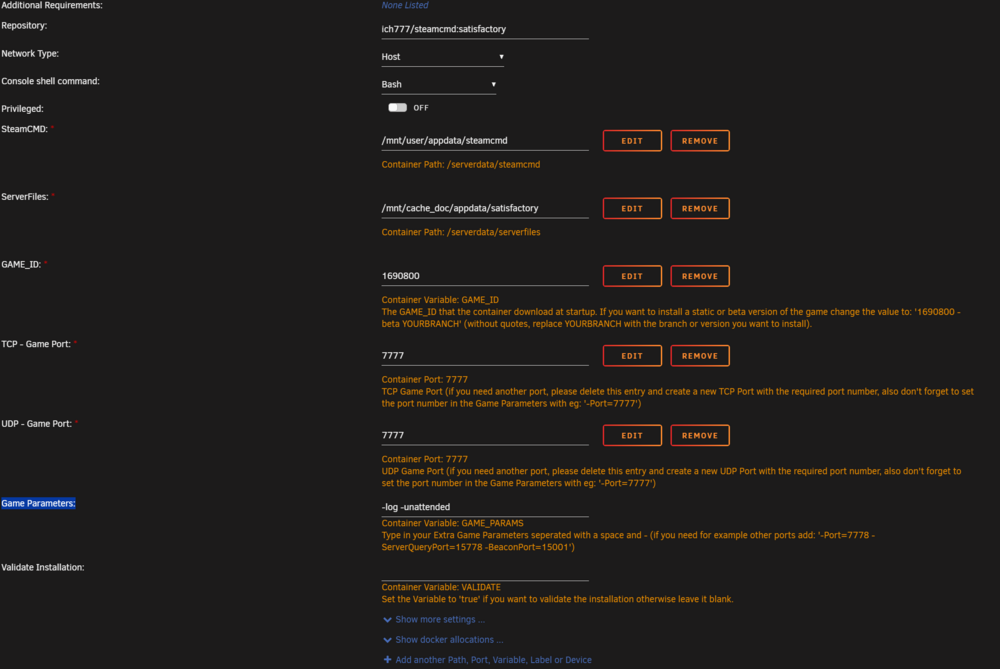
Not working for me either. I only have 1 nic in the system and before I was using a Custom network. Now I have tried to delete the container and re-installed it again. Changed to Host and removed -multihome 0.0.0.0 from the Game Parameters: Still not working tho
-
Yes, i changed to Host Command execution docker run -d --name='Satisfactory' --net='host' -e TZ="Europe/Berlin" -e HOST_OS="Unraid" -e HOST_HOSTNAME="Tower" -e HOST_CONTAINERNAME="Satisfactory" -e 'GAME_ID'='1690800' -e 'UDP_PORT_7777'='7777' -e 'GAME_PARAMS'='-log -unattended' -e 'VALIDATE'='' -e 'UID'='99' -e 'GID'='100' -e 'UMASK'='0000' -e 'USERNAME'='' -e 'PASSWRD'='' -l net.unraid.docker.managed=dockerman -l net.unraid.docker.icon='https://raw.githubusercontent.com/ich777/docker-templates/master/ich777/images/satisfactory.png' -v '/mnt/user/appdata/steamcmd':'/serverdata/steamcmd':'rw' -v '/mnt/cache_doc/appdata/satisfactory':'/serverdata/serverfiles':'rw' --restart=unless-stopped 'ich777/steamcmd:satisfactory' da8788fdafcd7620ca82fd393b03797819c0a7512ccd002e1a42f0e4402b79d2 The command finished successfully! Im still getting the "Failed to connect to the Server API"
-
Removing multihome did not work for me either.
-
Okay, so If anyone got the same issue.. I saved the 7d2d /user folder and my "renamed" serverconfig.xml then deleted the whole docker and image from the disk. Reinstalled, started and waited for everything to download. The stopped and changed the serverconfig file in the container and replaced the existing /user folder with the one I saved before. Now it's back on v.1.0
-
Okay I now have a renamed config file and it stays unedited. Thanks! But the problem with my server still being on version 1.1 persists. Im using 294420 and validate:true What am I doing wrong?
-
Yes, i restarted and it did redownload the files. after i put "true" in validation it redownload a new serverconfig everytime. If I Edit something in the config and restart the container i get a new "default" serverconfig. How do I keep my serverconfig?
-
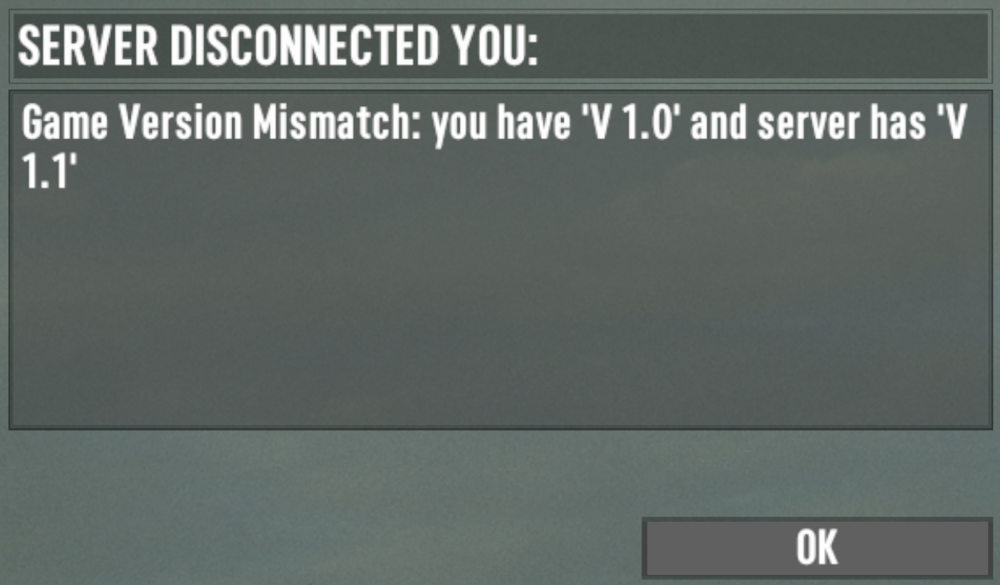
Hey Spectral Force, Thanks for the reply. I'm using 294420 right now and this is what i get ingame: Any ideas?
-
Hey Ich777. I have a small problem with 7d2d. There was an update recently, so my server updated to version 1.1 which is experimental. But I want to stay on version 1.0 I was using GAME_ID: 294420 So if i want to stay on version 1.0 I should use the GAME_ID below? GAME_ID: 294420 -beta stable_v1.0 But in the logs it says: ERROR! Failed to set beta 'stable_v1.0' Command execution docker run -d --name='7DaysToDie' --net='lokarna' -e TZ="Europe/Berlin" -e HOST_OS="Unraid" -e HOST_HOSTNAME="Tower" -e HOST_CONTAINERNAME="7DaysToDie" -e 'GAME_ID'='294420 -beta stable_v1.0' -e 'SERVERCONFIG'='serverconfig.xml' -e 'GAME_PARAMS'='-logfile 7DaysToDie_Data/output_log.txt $@' -e 'VALIDATE'='' -e 'ENABLE_BEPINEX'='false' -e 'USERNAME'='' -e 'PASSWRD'='' -e 'UID'='99' -e 'GID'='100' -l net.unraid.docker.managed=dockerman -l net.unraid.docker.icon='https://raw.githubusercontent.com/ich777/docker-templates/master/ich777/images/7dtd.png' -p '26900:26900/tcp' -p '26900:26900/udp' -p '26901:26901/udp' -p '26902:26902/udp' -p '26903:26903/udp' -p '8383:8080/tcp' -p '8082:8082/tcp' -p '27015:27015/udp' -v '/mnt/user/appdata/steamcmd':'/serverdata/steamcmd':'rw' -v '/mnt/cache_doc/appdata/7dtd':'/serverdata/serverfiles':'rw' --restart=unless-stopped 'ich777/steamcmd:7dtd' e90b77a48defa3e1453acd8ab98c7bb7f70a927377a7d9a88773ff998d9522eb The command finished successfully! LOGS: ---Ensuring UID: 99 matches user--- ---Ensuring GID: 100 matches user--- ---Setting umask to 000--- ---Checking for optional scripts--- ---No optional script found, continuing--- ---Taking ownership of data...--- ---Starting...--- ---Update SteamCMD--- Redirecting stderr to '/serverdata/Steam/logs/stderr.txt' Logging directory: '/serverdata/Steam/logs' [ 0%] Checking for available updates... [----] Verifying installation... UpdateUI: skip show logoSteam Console Client (c) Valve Corporation - version 1721172922 -- type 'quit' to exit -- Loading Steam API...OK Connecting anonymously to Steam Public...OK Waiting for client config...OK Waiting for user info...OK ---Update Server--- Redirecting stderr to '/serverdata/Steam/logs/stderr.txt' Logging directory: '/serverdata/Steam/logs' [ 0%] Checking for available updates... [----] Verifying installation... UpdateUI: skip show logoSteam Console Client (c) Valve Corporation - version 1721172922 -- type 'quit' to exit -- Loading Steam API...OK Connecting anonymously to Steam Public...OK Waiting for client config...OK Waiting for user info...OK ERROR! Failed to set beta 'stable_v1.0' ---Prepare Server--- ---UserDataFolder location correct--- ---UserDataFolder location found--- ---Server ready--- ---Start Server--- [UnityMemory] Configuration Parameters - Can be set up in boot.config "memorysetup-bucket-allocator-granularity=16" "memorysetup-bucket-allocator-bucket-count=8" "memorysetup-bucket-allocator-block-size=4194304" "memorysetup-bucket-allocator-block-count=1" "memorysetup-main-allocator-block-size=16777216" "memorysetup-thread-allocator-block-size=16777216" "memorysetup-gfx-main-allocator-block-size=16777216" "memorysetup-gfx-thread-allocator-block-size=16777216" "memorysetup-cache-allocator-block-size=4194304" "memorysetup-typetree-allocator-block-size=2097152" "memorysetup-profiler-bucket-allocator-granularity=16" "memorysetup-profiler-bucket-allocator-bucket-count=8" "memorysetup-profiler-bucket-allocator-block-size=4194304" "memorysetup-profiler-bucket-allocator-block-count=1" "memorysetup-profiler-allocator-block-size=16777216" "memorysetup-profiler-editor-allocator-block-size=1048576" "memorysetup-temp-allocator-size-main=4194304" "memorysetup-job-temp-allocator-block-size=2097152" "memorysetup-job-temp-allocator-block-size-background=1048576" "memorysetup-job-temp-allocator-reduction-small-platforms=262144" "memorysetup-allocator-temp-initial-block-size-main=262144" "memorysetup-allocator-temp-initial-block-size-worker=262144" "memorysetup-temp-allocator-size-background-worker=32768" "memorysetup-temp-allocator-size-job-worker=262144" "memorysetup-temp-allocator-size-preload-manager=262144" "memorysetup-temp-allocator-size-nav-mesh-worker=65536" "memorysetup-temp-allocator-size-audio-worker=65536" "memorysetup-temp-allocator-size-cloud-worker=32768" "memorysetup-temp-allocator-size-gfx=262144"
-
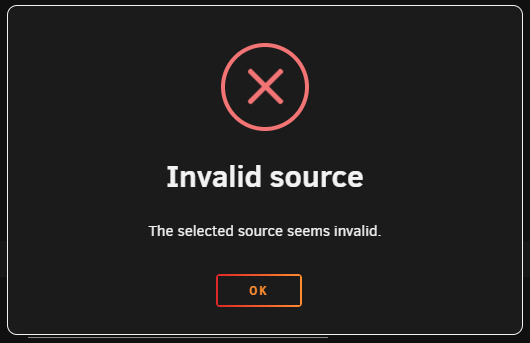
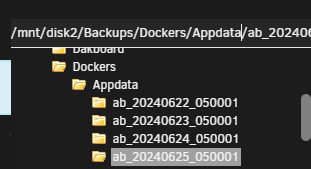
Hey, I tried to restore a folder but im getting "The selected source seems invalid." Debug ID: 22b8f4c9-bf51-451b-842b-c62a9226fccb
-
Thanks!
-
Hello! I have a problem with KillingFloor 2. Says in log "ERROR! Failed to install app '232130' (No subscription)" What can I do? This is the LOG: ---Prepare Server--- ---Start Server--- ---Ensuring UID: 99 matches user--- usermod: no changes ---Ensuring GID: 100 matches user--- usermod: no changes ---Setting umask to 000--- ---Checking for optional scripts--- ---No optional script found, continuing--- ---Taking ownership of data...--- ---Starting...--- ---Update SteamCMD--- Redirecting stderr to '/serverdata/Steam/logs/stderr.txt' Logging directory: '/serverdata/Steam/logs' [ 0%] Checking for available updates... [----] Verifying installation... Steam Console Client (c) Valve Corporation - version 1718305764 -- type 'quit' to exit -- Loading Steam API...OK Logging in user '???' to Steam Public...OK Waiting for client config...OK Waiting for user info...OK ---Update Server--- Redirecting stderr to '/serverdata/Steam/logs/stderr.txt' Logging directory: '/serverdata/Steam/logs' [ 0%] Checking for available updates... [----] Verifying installation... Steam Console Client (c) Valve Corporation - version 1718305764 -- type 'quit' to exit -- Loading Steam API...OK Logging in user '???' to Steam Public...OK Waiting for client config...OK Waiting for user info...OK ERROR! Failed to install app '232130' (No subscription) Template: docker run -d --name='KillingFloor2' --net='bridge' -e TZ="Europe/Berlin" -e HOST_OS="Unraid" -e HOST_HOSTNAME="Tower" -e HOST_CONTAINERNAME="KillingFloor2" -e 'GAME_ID'='232130' -e 'GAME_PARAMS'='kf-bioticslab' -e 'VALIDATE'='VALIDATE' -e 'USERNAME'='???' -e 'PASSWRD'='???' -e 'UID'='99' -e 'GID'='100' -l net.unraid.docker.managed=dockerman -l net.unraid.docker.icon='https://raw.githubusercontent.com/ich777/docker-templates/master/ich777/images/killingfloor2.png' -p '8888:7777/udp' -p '27016:27015/udp' -p '8083:8080/tcp' -p '20560:20560/udp' -v '/mnt/user/appdata/steamcmd':'/serverdata/steamcmd':'rw' -v '/mnt/cache_doc/appdata/killingfloor2':'/serverdata/serverfiles':'rw' --restart=unless-stopped 'ich777/steamcmd:killingfloor2' da8cb987d55dae0917672de49ff9589231cf116eb6f10997ee0afd5350d01771 The command finished successfully!


