





SShadow
Members
-
Joined
-
Last visited
Everything posted by SShadow
-
@JLKunka as long as you have a backup you should eventually be ok. From terminal in Unraid run this command: ls -la /boot/config/plugins/disklocation/backup/ This should show if you have backups. During testing today I was deleting the file I listed along with some others to test like a new install. I was able to restore from backup every time successfully. If you don't have a backup then I apologize you would need to recreate the config. I did not run into your exact issue only having the dashboard and information tabs. @FlamongOle might need to assist with the issue you are having.
-
@JLKunka not sure, is this a new install or an existing one with backups?
-
Gotcha, I think I did this to my system testing this morning. In one of the tests I forgot to run Force Smart+DB very first thing. I ended up deleting the file below: /boot/config/plugins/disklocation/groups.json After I deleted the file all the tabs came back and then I made sure I ran Force Smart+DB before doing anything else. 😁
-
@JLKunka do you mean the dashboard tab in the plugin itself? Like the picture below?

-
@FlamongOle downloaded update 2025.02.16 the system tab is fixed for a fresh install or for a plugin reset wipe. These PHP errors show in the log though after either option: [15-Feb-2025 12:10:28 America/New_York] PHP Warning: Undefined array key 0 in /usr/local/emhttp/plugins/disklocation/pages/page_system.php on line 246 [15-Feb-2025 12:10:28 America/New_York] PHP Warning: Trying to access array offset on null in /usr/local/emhttp/plugins/disklocation/pages/page_system.php on line 246 On a side note, on the configuration tab/Common Configuration/Change background colors the default is heat map. Not sure which users use more disk type or heat map but wanted to make you aware. Everything else looks great!
-
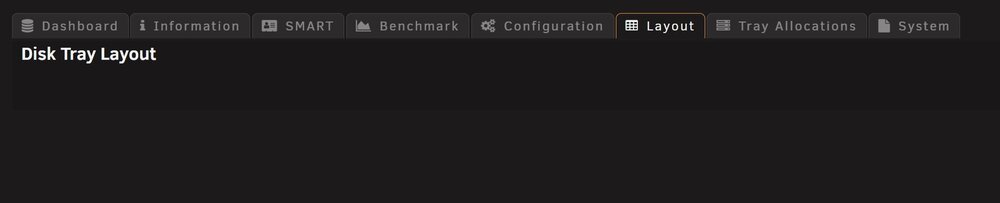
@FlamongOle I updated both my systems to the latest stable branch, looks like everything works as expected after the conversion including dynamic LEDs 😁. Awesome job with the rewrite and new features! I was retesting what I tested yesterday on this version and when I did a plugin reset all I am getting the same thing as @pacnpal no button to add a tray layout. I don't think it was like that yesterday when I tested but I might have missed it. Sorry.
-
@FlamongOle Yes, the Unraid dashboard hover and backup issues are fixed! Thank you! To simulate a new conversion I uninstalled 2025.02.13-1433 RC2. Deleted the devices.json, groups.json, locations.json, settings.json files, and json backup, then installed 2025.02.13-1433 RC2. I retested the items below: - Disk Location dashboard tab custom formatting: Good - Disk Location dashboard tab input variables: Good - Unraid Dashboard on hover custom formatting: Good - Unraid Dashboard on hover input variables: Good - Dynamic LEDs: Not working after conversion, waited for 7 hours after disks spun down. Same fix as before clicked the Smart button from the system tab and started working almost instantly. - System tab Smart button: Good - System tab Force Smart button: Good - System tab Force Smart+DB button: Good - System tab Backup button: Good creates JSON backup file - System tab Restore button: Good - System tab Delete button: Good - System tab Undelete All Devices button: Good I did some additional testing that I didn't do before, I do not think these are show stoppers for the release: - System tab plugin reset configuration: wipes the config custom colors, Sorting of Tables section is blank, not sure if this is expected behavior - System tab plugin reset layout: wipes layout appears to work as expected - System tab plugin reset tray allocation: wipes tray allocation keeps config appears to work as expected - System tab plugin reset devices: created a SQLite backup file, custom formatting is set to default, and drives are still listed like they were before the reset, not sure if this is expected behavior - System tab plugin reset all: created a SQLite backup file, custom formatting is set to default, and drives are still listed like they were before the reset, not sure if this is expected behavior - System tab plugin reset wipe: created a SQLite backup file, custom formatting is set to default, dashboard blank had to run Smart+DB, drives shown like they were before the reset, not sure if this is expected behavior When running the reset devices and reset all (I tried each twice) there were some PHP errors afterward in the log: [13-Feb-2025 09:13:02 America/New_York] PHP Warning: unlink(/boot/config/plugins/disklocation/locations.json): No such file or directory in /usr/local/emhttp/plugins/disklocation/pages/page_system.php on line 244 [13-Feb-2025 09:14:55 America/New_York] PHP Warning: unlink(/boot/config/plugins/disklocation/locations.json): No such file or directory in /usr/local/emhttp/plugins/disklocation/pages/page_system.php on line 244 [13-Feb-2025 09:51:56 America/New_York] PHP Warning: unlink(/boot/config/plugins/disklocation/locations.json): No such file or directory in /usr/local/emhttp/plugins/disklocation/pages/page_system.php on line 244 [13-Feb-2025 09:54:38 America/New_York] PHP Warning: unlink(/boot/config/plugins/disklocation/locations.json): No such file or directory in /usr/local/emhttp/plugins/disklocation/pages/page_system.php on line 244 I appreciate your receptiveness to feedback and keep up the great work!
-
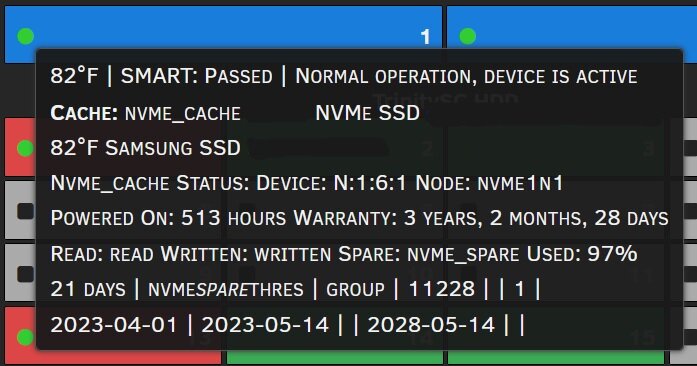
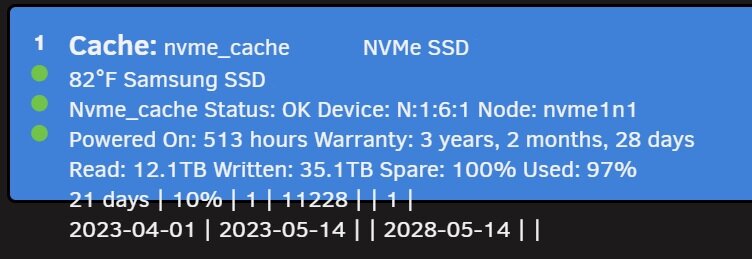
@FlamongOle I downloaded 2025.02.12-2205 RC2. Good news! All the input variables for the dashboard formatting work on the Disk Location dashboard tab. Dynamic LEDs continue to work. On the main Unraid dashboard I did notice not all the input variables that worked on the Disk Location dashboard are resolving. I cleared cache and tried multiple browsers, but it still looks like below. I still have the issue with the backup not working. I get the same "This page isn't working right now" screen. On the flash drive running the command you listed I have two backups which match what I see in the system tab: /boot/config/plugins/disklocation/backup/20250211-102353: total 48 drwx------ 2 root root 16384 Feb 11 10:23 ./ drwx------ 4 root root 16384 Feb 11 18:25 ../ -rw------- 1 root root 3510 Feb 11 10:23 disklocation.sqlite.gz /boot/config/plugins/disklocation/backup/20250211-134742: total 48 drwx------ 2 root root 16384 Feb 11 13:47 ./ drwx------ 4 root root 16384 Feb 11 18:25 ../ -rw------- 1 root root 3510 Feb 11 13:47 disklocation.sqlite.gz I did happen to see some errors in the PHP log on my system, the log was empty before I installed the latest version: [12-Feb-2025 16:13:57 America/New_York] PHP Warning: Undefined variable $benchmark_backup in /usr/local/emhttp/plugins/disklocation/pages/page_system.php on line 321 [12-Feb-2025 16:13:57 America/New_York] PHP Fatal error: Uncaught TypeError: implode(): Argument #1 ($array) must be of type array, string given in /usr/local/emhttp/plugins/disklocation/pages/page_system.php:321 Stack trace: #0 /usr/local/emhttp/plugins/disklocation/pages/page_system.php(321): implode(',', NULL) #1 {main} thrown in /usr/local/emhttp/plugins/disklocation/pages/page_system.php on line 321 [12-Feb-2025 16:31:14 America/New_York] PHP Warning: Undefined variable $benchmark_backup in /usr/local/emhttp/plugins/disklocation/pages/page_system.php on line 321 [12-Feb-2025 16:31:14 America/New_York] PHP Fatal error: Uncaught TypeError: implode(): Argument #1 ($array) must be of type array, string given in /usr/local/emhttp/plugins/disklocation/pages/page_system.php:321 Stack trace: #0 /usr/local/emhttp/plugins/disklocation/pages/page_system.php(321): implode(',', NULL) #1 {main} thrown in /usr/local/emhttp/plugins/disklocation/pages/page_system.php on line 321 The 16:13 lines are when I installed the latest version and the 16:31 lines are when I clicked the backup button. I don't have any benchmarks yet. I appreciate your efforts and quick turnaround. Thanks!!
-
Hopefully the last thing I find. When I press the Backup button from the System tab I get this browser screen: If I press the browser's back button it takes me back to the System tab. Checking the flash drive I don't see any new files in the disklocation directory or disklocation/backup to show a backup file was created.

-
Yes, that was after I came from the 2024 edition. I stared today on non-devel 2025.02.08 updated to devel 2025.02.10-2201 RC2 got the blank dashboard, went back to non-devel 2025.02.08, then updated to 2025.02.11-1751 RC2 ran SMART+DB as the plugin said. Waited 2 hours no dynamic LEDs. By chance I pressed the SMART button to see what it would do and within minutes dynamic LEDs started working. Dynamic LEDs have been working since and I am now on 2025.02.11-2218 RC2. Sorry for the wordiness, but I wanted to be clear on what happened when.
-
I understand. I did press the help button but did not scroll all the way down to see all of the input variable section. Doh! 🫣 I did a quick format with a bunch of the variables to see what happens. My Dashboard formatting looks like this: [medium]*pool*[/medium] name capacity cache rotation formfactor [color:FFFFFF]*[serial]*[/color] manufacturer model temp comment device node powerontime | powerontime_hours | nvme_spare | nvme_spare_thres | read | written | Used: endurance | Wty: expires The dashboard after I save looks like this: Are all the input variables supposed to be usable in the dashboard layout? I can make it work with the days format but I liked the power on hours better. I appreciate your patience.

-
@FlamongOle I waited 2 hours and the dynamic LEDs did not change. I did accidentally find a fix. I pressed the smart button under the system tab, then a few mins later the dynamic started working. I did run the smart+db when I first installed the plugin. Hope this helps.
-
Sorry @FlamongOle just noticed a separate issue. Looks like the dynamic LEDs in standby is not working for me on 2025.02.11-1751 RC2. I upgraded from non-dev 2025.02.08 to 2025.02.11-1751 RC2. I tried different browsers, cleared cache, I tried switching to static, saving, then switched back, saved but still not dynamic like in the 2024 version. Thanks!
-
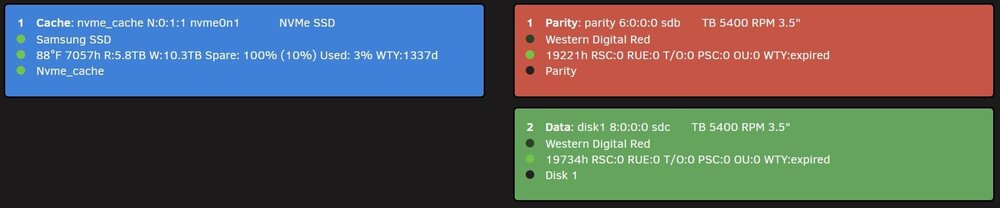
@FlamongOle the update to 2025.02.11-1751 RC2 worked fine for me, thank you. I like the changes so far especially where I can format the dashboard layout. Do you have plans on adding the parameters from the 2024 version of the plugin to 2025? Specifically these: Spare, Percentage Used, Power On Time, Data Read, Data Written, Load Cycles, Reallocated Sector, Reported Uncorrectable, Command Timeout, Current Pending Sectors, Offline Uncorrectable. In the 2024 version I had almost every option checked as I liked the dashboard to be like a one stop shop for all important drive info. Where I could see everything on one page instead of having to look at the individual drives. The 2024 layout on my one server server: The 2025 Overhaul layout on my other server: If I had all the options from 2024 to customize the layout for 2025 that would be perfect for my use case. Keep up the great work on the plugin!

-
@mergahtrern good to hear. Hope you are enjoying Unraid. There are some SMB network tweaks I had to do on my system to get better network performance. In the SMB Extras section of the SMB Settings page and after some trial and error I added: [global] server min protocol = SMB3_11 client ipc min protocol = SMB3_11 aio read size = 1 aio write size = 1 The aio read/write settings gave me similar performance to a Windows PC to Windows PC transfer. I also enabled SMB Multi-Channel but the aio read/write I think made the biggest difference. I run my server with bonded NICs running LACP. If you are running anything MAC on your network that needs to be SMB shared to the Unraid server don't add the server and client min protocol lines. Those lines just force the connection protocol to the highest version. Not sure if it will help you with your system and hardware setup but might be worth some testing. Good luck.
-
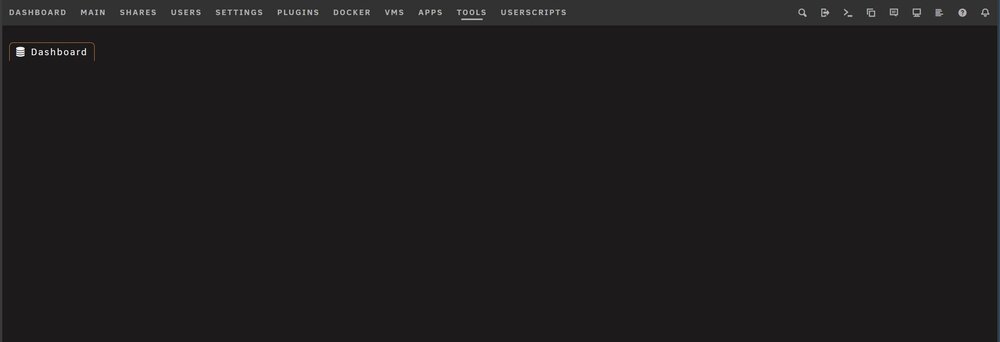
Similar to @PeterHS but I updated from the non-devel 2025.02.08 to devel 2025.02.10-2201 RC2 and I also have a blank dashboard and Tools/Disk-Location page. Spun up the array, dashboard remained blank (appears to be different than the dashboard crash issue of 7/2023). Cleared cache and cookies, dashboard remained blank. Tried different browsers, dashboard remained blank Reverted back to stable 2025.02.08 everything came back normal. Running Unraid 7.0.0.
-
Under the Tools tab there is a Preclear Disk option. You can click on the blue play box icon (the first option in the row of icons on the upper right side) to start multiple sessions at the same time. I tried to run multiple preclears on some old drives last year and one of them froze during the preclear. I also ran my server normally as these were old drives not part of the system, which might have had something to do with it. I ended up just doing them one at a time without any issues. I have read about others running multiple preclears on drives without a problem. I would give it a try running all three at the same time since the system won't be doing anything else.
-
From others on the forums UDMA CRC errors can be caused by a loose SATA cable. You can try re-seating the cable at both ends, if that does not make a difference try a different cable. Did you run a preclear on the 3 WD22 Reds before adding them to the array? If you didn't I would try a preclear (clear and erase disk) after your long SMART test completes. You will need to take drive 2 out of your array to run the preclear on that drive. Since you just started and if you don't mind copying your data again I would run a preclear on all your drives. It takes time but it is worth it to stress test the drives before adding them to the array. I had one of my drives show a single smart error once. The drive corrected and reset itself after I ran a preclear on it, not sure if you will be that lucky. In my case I think it was caused by a network issue during a file copy. I see timeout errors in your log for your network share, that might have been caused by the network or the drive, no way to know for sure. I hope this helps.
-
@FlamongOle I updated to 2025.01.27. The LED changes look great! The fade and timing for standby are spot on. Thank you!
-
@FlamongOle This is going to be really nit-picky and I apologize. I like the idea of the standby blink for a hard drive but the flash rate in my opinion is too fast. It looks like it is on for 1 second and off for 1 second. Is it possible for you to change it to on for 2 seconds and off for 3 seconds. I think that might look better, if not I understand. Thank you for you work on this plugin I have been using it for years on my systems. Keep up the great work!
-
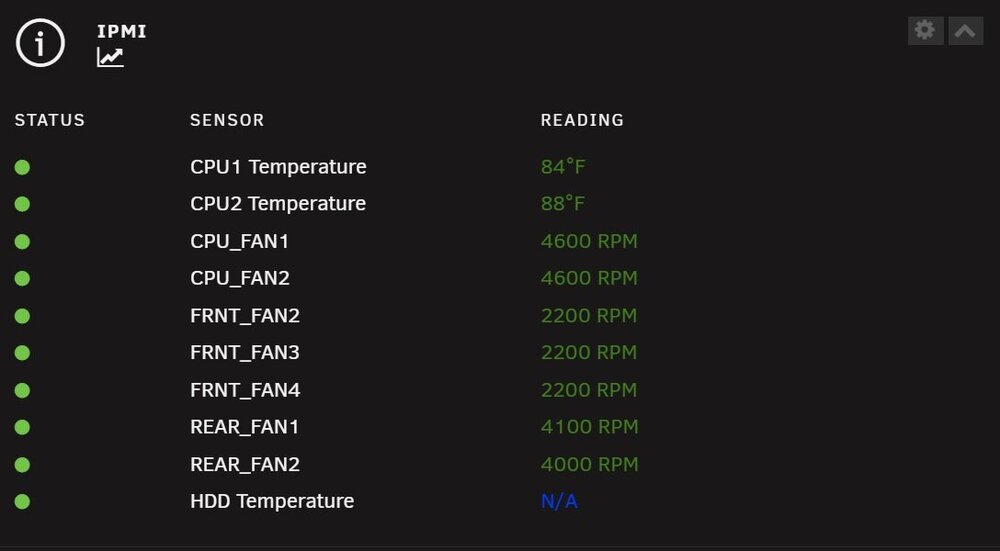
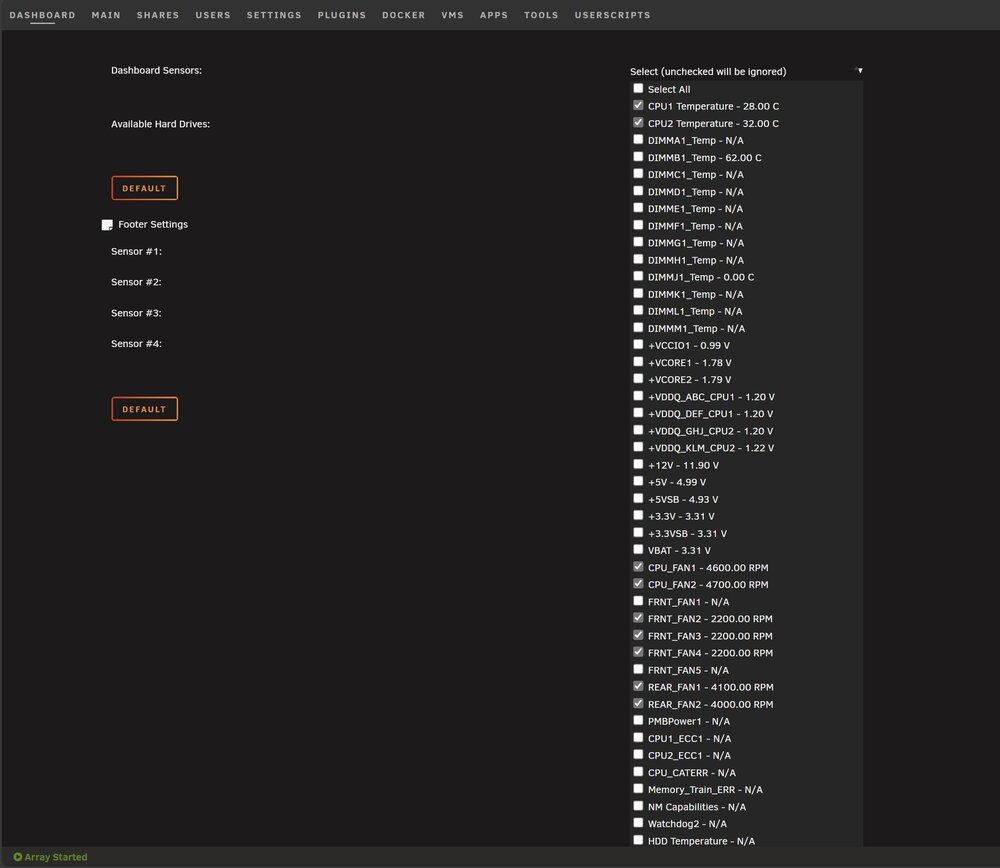
I updated to the 2025.01.21 version of the plugin from 2023.12.12. After the update there is a harddrive showing in the dashboard even though all harddrives are unchecked in the plugin settings. I have tried Edge, Chrome, and Firefox browsers with removing cookies / cache and it still persists. Please let me know if you need anymore info. Thank you.
-
@binhex Exactly like you said, bookmarking the url works fine. I will do that for now. Thanks!
-
Updated my container this morning to the latest version (2.9.0-1-01) clicked on the webgui link and got a blank page. I then noticed on the docker page the container never gets assigned an IP address, the IP addresses are blank. The container was up and running, using the console I can see all the directories but no way to access the GUI. I manually set my IP for the container if that makes a difference. I rolled back to 2.8.1-1-07 and everything works like before. 2.9.0-1-01 2.8.1-1-07 Minor request, please update the support link. Looks like it is pointing to: "https://unraid.net/forums/topic/71764-support-binhex-krusader/" and needs to point to: "https://forums.unraid.net/topic/71764-support-binhex-krusader/". Thanks!


-
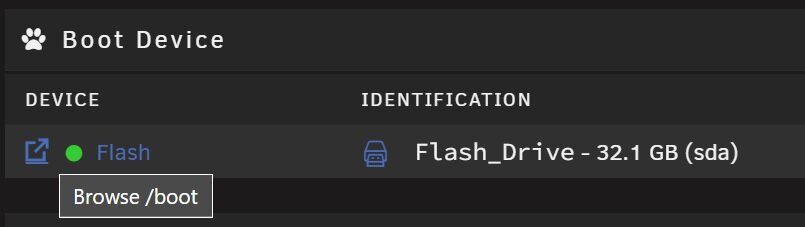
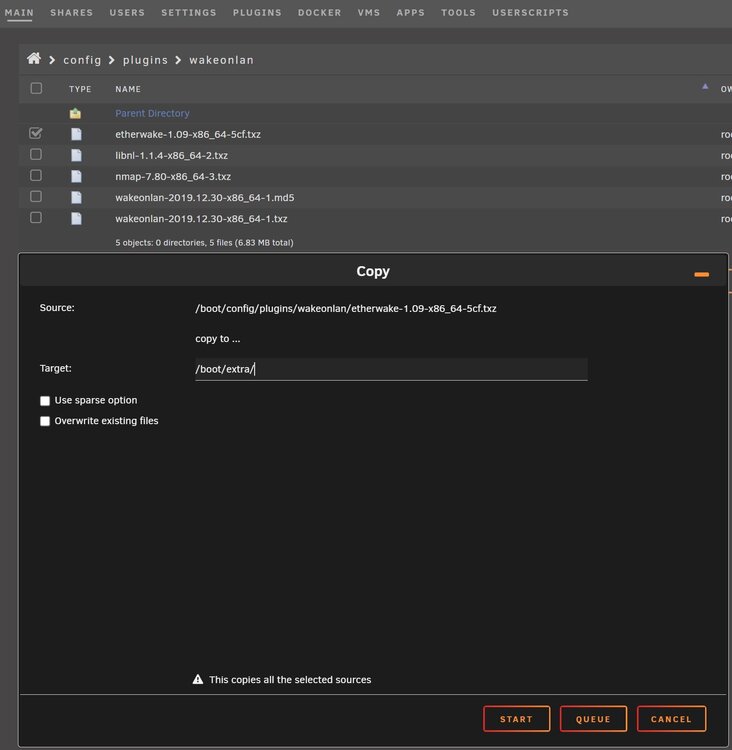
I noticed when I logged into my Unraid servers today that the Wake On LAN plugin from dmacias72 was labeled deprecated by Fix Common Problems. I don't like running any deprecated software on my servers but I use the etherwake feature of the plugin everyday to run backups from different PC's to the Unraid servers. I may have found a possible workaround until someone else finds a more eloquent solution. From the MAIN tab click on the box to the left of Flash to browse the flash drive. *** If you don't already have an extra folder you will need to create one from the GUI, or from a terminal window run mkdir /boot/extra. *** Browse to /boot/config/plugins/wakeonlan and copy the file etherwake-1.09-x86_64-5cf.txz to /boot/extra. Go to the PLUGINS tab and remove the Wake On LAN plugin, then reboot your server. Once the server reboots you should still be able to run the etherwake command from a user script like @SpaceInvaderOne shows in his videos. I followed these steps on both my servers and my etherwake user scripts run like they did before. I hope this helps.
-
Updated to 6.12.9 and experienced the same no iGPU and remote KVM. My combo is a 12th gen Intel and WS W680M-ACE SE. I also updated to the latest BIOS (3401) with no difference. I disabled the iGPU again in the BIOS after testing.






