





Inch
Members
-
Joined
-
Last visited
Everything posted by Inch
-
Hi folks, Unsure the correct path for help around this issue. I'm running the following mobo https://www.gigabyte.com/Enterprise/Server-Motherboard/ME03-CE0-rev-10 and I'm unable to get fan control or system temp to detect anything. when running sensors-detect i get: Driver `to-be-written': * ISA bus, address 0xca2 Chip `IPMI BMC KCS' (confidence: 8) Any help would be appreciated.
-
This was indeed the fix, thank you very much.
-
Was already disabled, I'm still wondering why the share won't load under the user within unraid itself per my screenshot. Still not working.
-
Thanks i've tried enabling SMB signing by adding ntlm auth = Yes to the SMB settings section. Didnt help I guess. Will try disable it on the Windows side now.
-
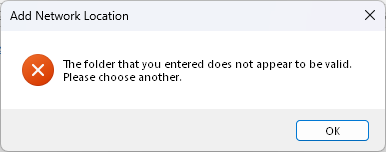
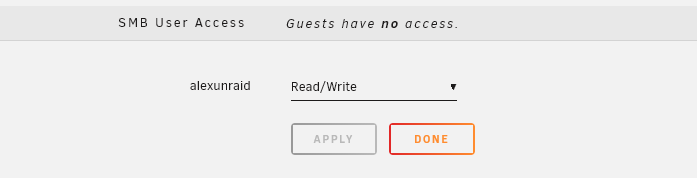
Hi folks, Might've run into a bug im not sure, I just cannot get SMB working with windows and Unraid. I've had zero issues with Synology units in the past fwiw. I keep getting the below error when i attempt to map the share. What I've done: 1. Created another user (not trying with root) gone to the share, and granted that user R/W access Screenshot: I have however noticed when i go to users, select the user, it doesn't show under the user that it has access to anything: Is this a known bug, any workarounds? Its driving me mad lol. Thanks in advance.

-
Hi there, Getting this weird loop on startup... Start Loop Connecting to URL: http://localhost:8086 verify_ssl= False Connected successfully to InfluxDB Connecting to NUT host 192.168.10.10:3493 Connected successfully to NUT *Error connecting to InfluxDB.* Exit status not 0 Sleep 120 The fact it says that its connecting and then throws an error on the 6th line is odd. It doesn't seem to be dropping any data into my seperate instance of influx
-
Np, thanks for trying!
-
I've tried plain bridge mode and custom network with the same results. I've just switched back to bridge, readded the sonarr port (specified 8989 in both) and it still doesn't work yet Radarr does still.
-
Tried that, still doesn't show it. The same applies to the 7878 port that i added to the container for Radarr and thats working fine. It is showing container port under it though.

-
Advanced view for the VPN image.
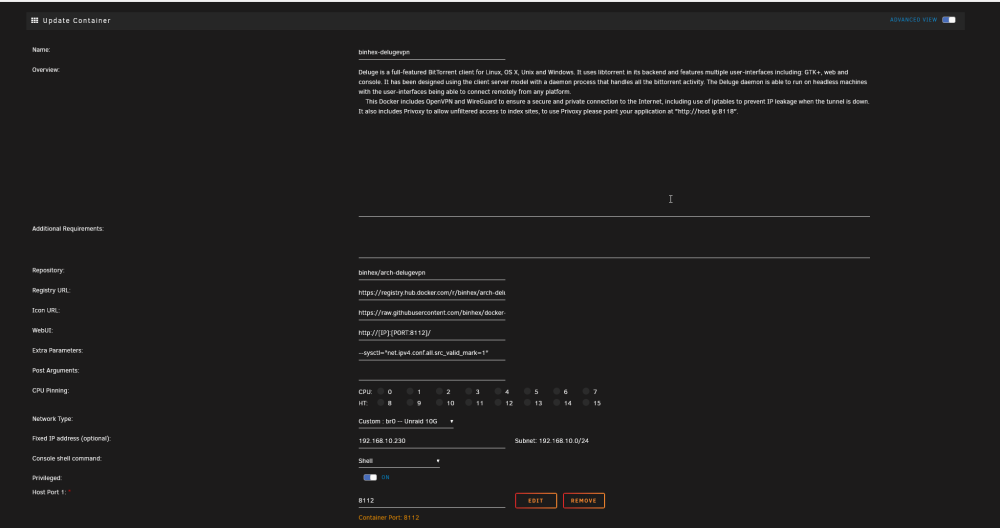
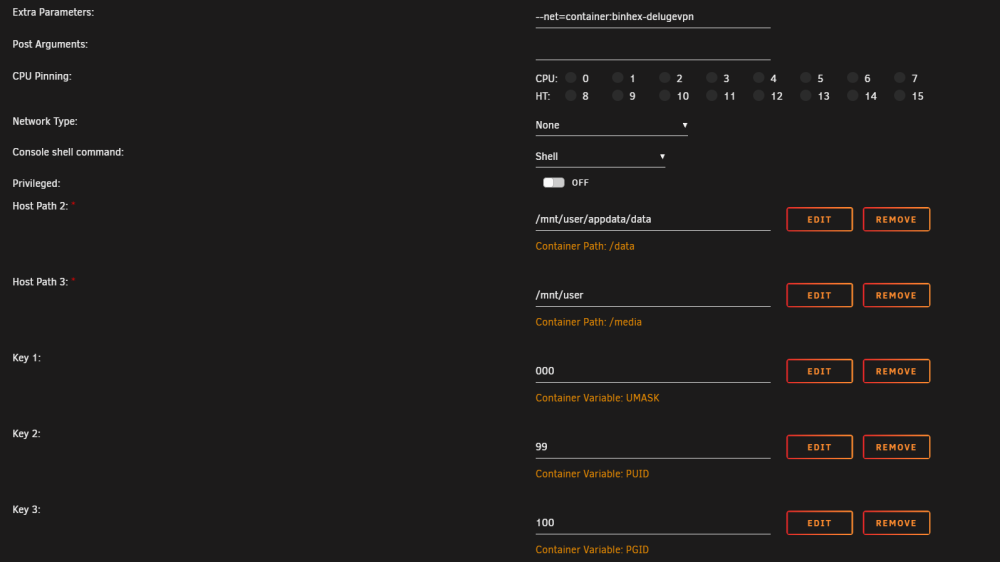
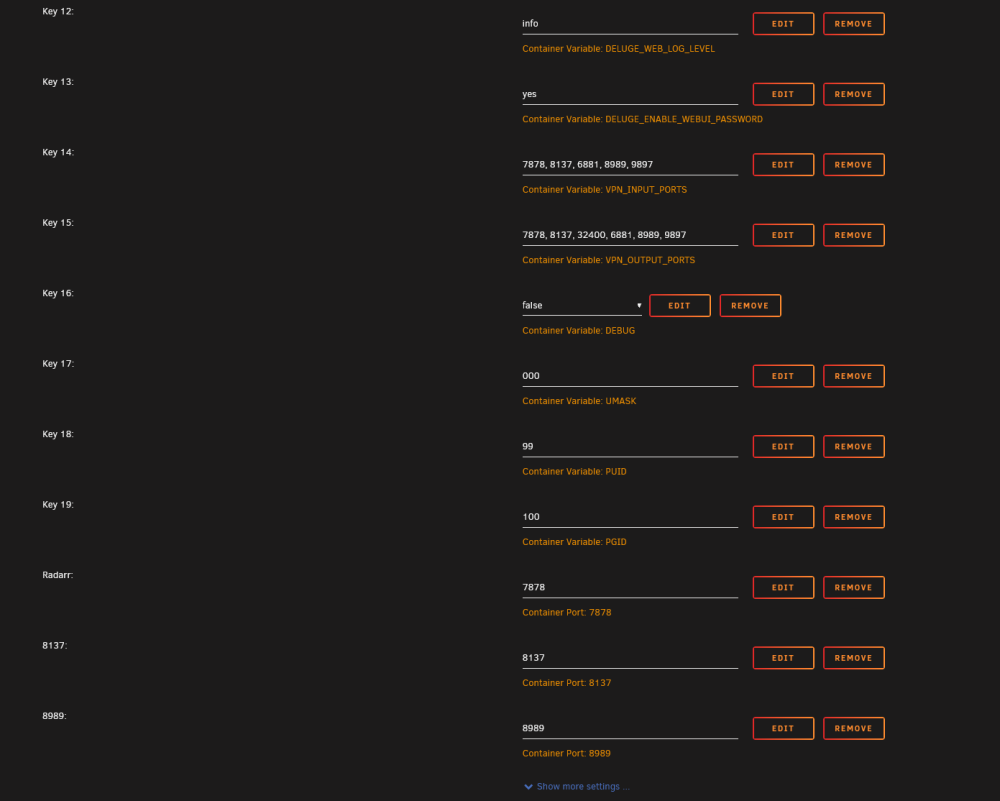 Hi Yes when i removed `--net=container:binhex-delugevpn`, and set the network to bridge, it works fine and goes through the first time setup.Hi! I had this issue last year but fell sick so sadly had to drop troubleshooting. For that please forgive me. For some reason that I cannot fathom I'm unable to get Sonarr to route through Deluge VPN however, I've managed to get Radarr working through it fine. Below are steps that i've done. 1. Gone to the Sonarr docker image, and under extra params added `--net=container:binhex-delugevpn` 2. Under the same Sonarr docker image, I've set the network type to `none` 3. Gone to the deluge vpn docker image, edited it and added port `8989` under `VPN_INPUT_PORTS` & `VPN_OUTPUT_PORTS` 4. Added another port for `TCP` under the same deluge vpn docker for port `8989` When i visit the deluge vpn image ip address followed by `:8989`, it simply refuses to load. But when i do `:7878` (used by Radarr) for which i've followed the same process for as the above four steps it works. Its simply Sonarr that doesn't want to talk to the vpn image. FWIW I'm of-course using all binhex images for sonarr, radarr and deluge-vpn. Any help would be appreciated. Thank you!@Roxedus are you able to update unifi poller please? Its recieved a bunch of new updates to support new unifi releases.Hi there, For some reason I'm unable to change the default eth0 mapping at the bottom of the network interface screen. I've installed a two port 10G network card. When i try changing Eth0 to its Mac address, and reboot it just reverts back to the onboard (original eth0) not the one i changed it to. The correct MAC address assignment is: However, when I reboot Eth0 changes from the Mac ending 8C back to the one ending E6. Please let me know if any logs would help. P.S. I'm currently on 6.12.0-RC6 10gig card - with ip switched from eth0 ready for it to become the "new" eth0. Original eth0 that's just not budging.Thank you so much! RE NPM - this is just an old docker, i've added this to the excludes also. Thanks againHi there, Keep getting backup failures. I'm still learning a lot here, so please forgive me. Attached is the debug file. Thanks in advance! backup.debug.logCorrect, sorry. The webui isn't responding, whereas Radarr is. Docker img settings:
 Thank you the only bit i was missing, was to remove the port on a container that I wanted to run through the VPN container. I've now got your Radarr container working without issue, for some reason and for the life in me i cannot get Sonarr running on port 8989 via the VPN container. Thanks in advance! ___. .__ .__ \_ |__ |__| ____ | |__ ____ ___ ___ | __ \| |/ \| | \_/ __ \\ \/ / | \_\ \ | | \ Y \ ___/ > < |___ /__|___| /___| /\___ >__/\_ \ \/ \/ \/ \/ \/ https://hub.docker.com/u/binhex/ 2023-04-21 14:52:27.763745 [info] Host is running unRAID 2023-04-21 14:52:27.776590 [info] System information Linux d5fb88195af9 6.1.23-Unraid #1 SMP PREEMPT_DYNAMIC Fri Apr 7 11:30:48 PDT 2023 x86_64 GNU/Linux 2023-04-21 14:52:27.791207 [info] OS_ARCH defined as 'x86-64' 2023-04-21 14:52:27.805291 [info] PUID defined as '99' 2023-04-21 14:52:27.821230 [info] PGID defined as '100' 2023-04-21 14:52:27.855866 [info] UMASK defined as '000' 2023-04-21 14:52:27.869802 [info] Permissions already set for '/config' 2023-04-21 14:52:27.884844 [info] Deleting files in /tmp (non recursive)... 2023-04-21 14:52:27.900617 [info] Starting Supervisor... 2023-04-21 14:52:27,994 INFO Included extra file "/etc/supervisor/conf.d/sonarr.conf" during parsing 2023-04-21 14:52:27,994 INFO Set uid to user 0 succeeded 2023-04-21 14:52:27,995 INFO supervisord started with pid 7 2023-04-21 14:52:28,997 INFO spawned: 'sonarr' with pid 58 2023-04-21 14:52:28,997 INFO reaped unknown pid 8 (exit status 0) 2023-04-21 14:52:29,239 DEBG 'sonarr' stdout output: [Info] Bootstrap: Starting Sonarr - /usr/lib/sonarr/bin/Sonarr.exe - Version 3.0.10.1567 2023-04-21 14:52:29,385 DEBG 'sonarr' stdout output: [Info] AppFolderInfo: Data directory is being overridden to [/config] 2023-04-21 14:52:29,432 DEBG 'sonarr' stdout output: [Info] Router: Application mode: Interactive 2023-04-21 14:52:29,512 DEBG 'sonarr' stdout output: [Info] MigrationLogger: *** Checking database for required migrations data source=/config/sonarr.db;cache size=-10000;datetimekind=Utc;journal mode=Wal;pooling=True;version=3 *** 2023-04-21 14:52:29,591 DEBG 'sonarr' stdout output: [Info] MigrationLogger: *** Checking database for required migrations data source=/config/logs.db;cache size=-10000;datetimekind=Utc;journal mode=Wal;pooling=True;version=3 *** 2023-04-21 14:52:29,683 DEBG 'sonarr' stdout output: [Info] OwinHostController: Listening on the following URLs: 2023-04-21 14:52:29,684 DEBG 'sonarr' stdout output: [Info] OwinHostController: http://*:8989/ 2023-04-21 14:52:29,876 DEBG 'sonarr' stdout output: [Info] SonarrBootstrapper: Starting Web Server 2023-04-21 14:52:30,876 INFO success: sonarr entered RUNNING state, process has stayed up for > than 1 seconds (startsecs)Hi Binhex, First, thank you for all the effort you've put into this. I've setup the delugevpn docker container, I can even see it connecting to the vpn provider i use, when i login to console and run ifconfig.io etc. I'm having issues running Radar and Sonarr through it, it seems to just not be routing the ports properly (getting timeouts when i go to the <serverip>:port), and I've added them to input/output port fields. Is the issue I'm running into related to the above mention of a library fix being needed? Attached the log file with debug enabled. P.S. I've already ran: /sbin/modprobe iptable_mangle. supervisord.logThank you for this, I'm going to go away and make changes per this threads reccomendation! Really appreciate the help here, what i suspect was happening is since my docker img file was so large, it was creating it, and then maybe reducing the size (to the actual needed size) vs. trimming? Unsure though. Also RE SSD Trim: https://www.reddit.com/r/unRAID/comments/xog67u/dynamix_ssd_trim/
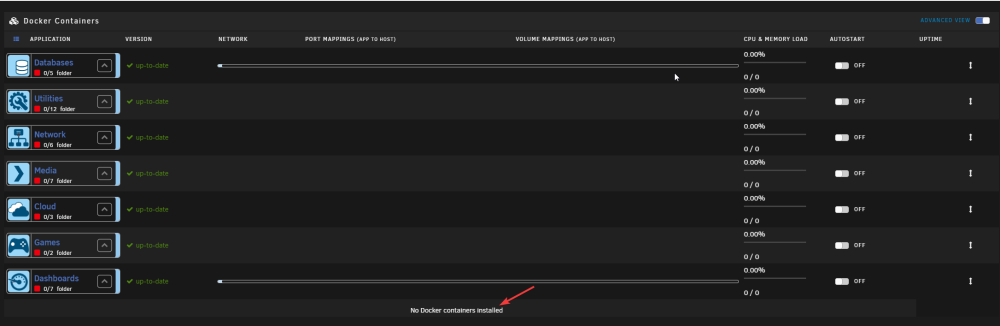
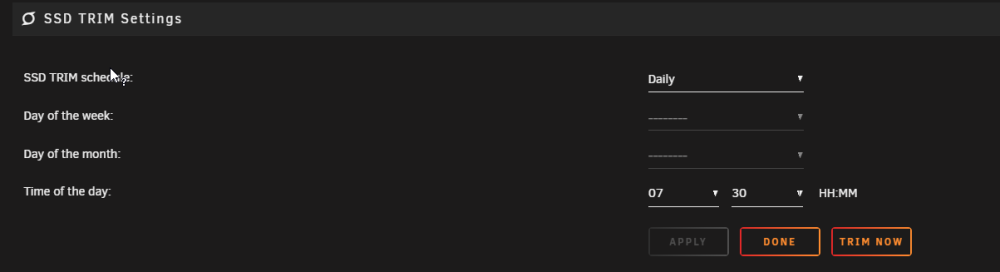 Hi thanks for this, i think i figured it out from a good old google! Looks like it was realted to the docker img being located in /user/ vs. /volume/ aka disk1. So when the parity disk was trimmed, (it seems they do support trimming now btw). It was cleaning up the docker img from the parity and causing loads of issues, seems like two steps forward and one step back sometimes with Unraid changes I also use a large docker image as sometimes i work with huge datasets and need the space, haven't in a while but saves me stopping all dockers to bump up the img size. Post changing the location of the docker img, i did a restore from "previous apps" under the App section.Hi folks, I'm having an issue starting or more importantly finding docker containers that i had running after a reboot. I had quite a lot of containers as you can see in this screenshot, and as i said they've "vanished". I've also attached my diagnostics file. tower-diagnostics-20230111-0059.zip
 Hi folks, I'm wondering if anyone would be able to lend a hand packaging this https://hub.docker.com/r/atomictorch/cryofall-server for unraid? Running into some headaches with it, specifically it not playing nice with the unraid docker manager. Thanks in advanceI know this is a bit of an old thread, but i've been banging my head against a wall with a UPS that I have. I picked up the "SMC1500IC", also known as a "Smart-UPS 1500", wondering if the above conversation about Firmware would work on it too? Running into exactly the same issue with not being able to report usage.


