





queeg
Members
-
Joined
-
Last visited
Everything posted by queeg
-
Is the webgui-master on github now? While the webgui what came in 5.04 is working, the process dies after a while so it becomes unavailable. Unmenu continues to work however.
-
Thanks so much for all the detailed pictures. I was actually suprised a bit by the Norco being so blocky in the rear. And it's trays are somewhat massive compared to the Icy Docks and the Supermicros. I hope they are aluminum? And the individual walls between slots are very interesting. I'm sure I'll be looking at the pictures many times during the next week as new questions pop into my head.
-
Fry's does have some bargains at times. Lately they are matching online prices. Just took an Amazon price in and they would have matched it (if they had stock). Guess I'll call before I go next time.
-
That's an interesting way to calc Raj. Just subtracting 2 drives. That leaves 4A on the first calc and 6A on the second for overhead. The 4A feels a little bit tight to me. I'm shooting for 8A to 10A for overhead on a 15 drive server with green drives so I'd be choosing a 38A to 40A psu for that. Do you think I'm being too conservative? For a 13 green drive system I'd use a 34A psu. And drop down to the 30A for 12 green drives.
-
It's a fan speed controller for the case fan. I slowed it down to make it inaudible. Still no effect on the cooling ability.
-
Dimensions(L x W x H) 15.00" x 7.50" x 13.80" It looks cramped but really it's not. It was easy to work inside the case. The camera doesn't show the depth of the case very well. The sata cables are above the cpu fan by 3 inches. There's lots of air movement, no fans are blocked. I haven't see the drives go above 36c in the Icy's. It's very quiet, quieter than the case I migrated from. I used the Biostar A760G M2+ (8.6" x 7.9" ) but I think my slightly bigger Asus M4A78L-M (9.6" x 8.8" ) might have fit.
-
I finally got around to using my TinyTen case. I migrated to the Biostar A760G M2+ motherboard so it would all fit better in the case. [/url]
-
Sorry - what would the benefit of that be from a speed perspective? Is unRAID a little slower or would I be able to use Dual Lan outside the array? I was talking about transferring any existing media you might have.
-
It might not be the bottleneck you are concerned with. How are you planning on using unRAID? For home use. As a general NAS and for use with a distributed Media centre. I am using LinuxMCE http://linuxmce.org/ and currently have 2 media directors that may be drawing HD content from it at the same time. That should all be fine with a single Gbit connection though. Mainly I wanted Dual LAN just to make transferring large files / ISOs across a little quicker.... If you have a collection of ISO files on one or more hard drives you can mount those drives in the unRAID system outside of the array and transfer disk to disk.
-
It might not be the bottleneck you are concerned with. How are you planning on using unRAID?
-
Thanks queeg. I noted that in the other post I referred to above, but assumed this could be turned off in BIOS. I guess I better make sure that is the case. If it was off in BIOS - this shouldn't be an issue right? I'm a big fan of gigabyte. Just not for raid systems. What happens if the bios battery dies? The best advice is avoid the problem altogether.
-
Gigabyte motherboards can potentially cause a big corruption problem. It's known simply as HPA and it occurs when they backup up the bios to a hard drive. The HPA is a small partition created by the motherboard on one of the data disk or even on the parity disk.
-
I wish Gigabyte would drop the HPA feature. I love their boards but too afraid of losing data to use one for unRAID. Here's a link to the board at newegg. http://www.newegg.com/product/product.aspx?Item=N82E16813128435
-
A little testing and here is what I see. It seems that even though explorer defaults to Tile it actually does request file info unless you manually set it to Tile. Open explorer browse top level folder: works browse any subdir: spins up drive. Open explorer Change view from Tiles to List browse top level folder: works browse any subdir: works change view from List back to Tiles browse other subdirs: continues to work. In any case, cache_dirs is working correctly with the added -a parameter so I'm happy and thanks Joe.
-
The (Win7) explorer is set to Titles which is the default I think. Edit: Tiles (not Titles)
-
What I meant to say was I spun up the drives, ran the cache_dirs command, allowed the drives to spin down (actually just came back 7 hours later) and from windows I explored the directories while also watching the drives on the unRAID menu. After browsing down past the first directory the drive spun up. So I don't think cache_dirs with those parameters is working.
-
It doesn't seem to be working. The drive spins up going down the first directory leve. /boot/cache_dirs -w -u -d 3 -a '-noleaf \( -name "ftproot" -prune -o -name "lost+found" -prune -o -name "iTunes" -prune \) -o -print'
-
That sounds easier. I had added a new -x parameter but trying to put it into all the find's get me tangled up. This is what I'm going to use. /boot/cache_dirs -w -u -d 3 -a '-noleaf \( -name "ftproot" -prune -o -name "lost+found" -prune -o -name "iTunes" -prune \) -o -print'
-
What about -prune option? Would that work to exclude sub dirs? EDIT: Here's an example that I just figured out. It prints everything except the packages directory. find /boot/config \( -name packages -prune \) -o -name "*" -print And one that prints everything except subdirs ending in "old" or the packages directory. find /boot \( -name "*old" -prune -o -name packages -prune \) -o -name "*" -print Cool. I'll try to integrate this into it.
-
Only "Top level" directories can be excluded using the -e option. I never wrote it to be able to exclude directories further down the hierarchy. Use -e "Other Files" or you can edit the program at around line 372 is this: dir_list=`build_dir_list` change it to dir_list=`build_dir_list | grep -v "Steam"` and then you don't need to use any -e options, unless there is an additional different top level directory you wish to exclude. Make sure you use an editor that is linux friendly and does not add carriage returns to the ends of lines. (edit the file using "mc" and you'll be fine) Doing this still only excludes top level directories - right? I'm looking for a way to exclude non-top level directories. I tried hacking the script a little but didn't get too far. What's actually keeping the directories in memory? Is it just the find command causes them to be cached when it runs?
-
Only "Top level" directories can be excluded using the -e option. I never wrote it to be able to exclude directories further down the hierarchy. Use -e "Other Files" or you can edit the program at around line 372 is this: dir_list=`build_dir_list` change it to dir_list=`build_dir_list | grep -v "Steam"` and then you don't need to use any -e options, unless there is an additional different top level directory you wish to exclude. Make sure you use an editor that is linux friendly and does not add carriage returns to the ends of lines. (edit the file using "mc" and you'll be fine) Ahh, that answered something for me as well. I have multiple backup folders and iTunes folders and thought -e iTunes would skip them all. But what I see is "No iTunes directory found" or something like that anyway because it's not at the top level.
-
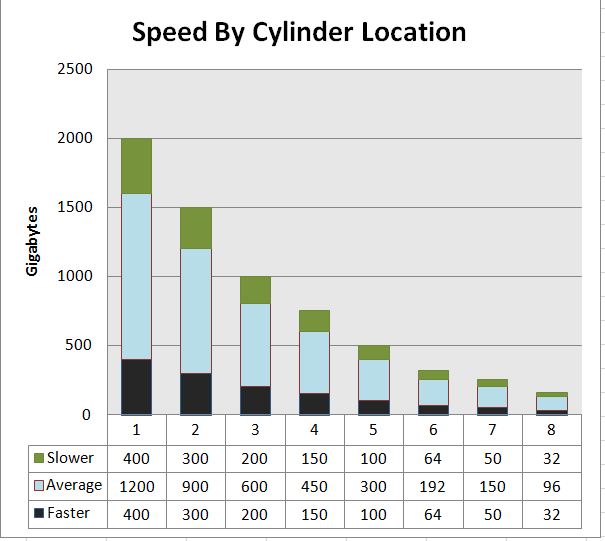
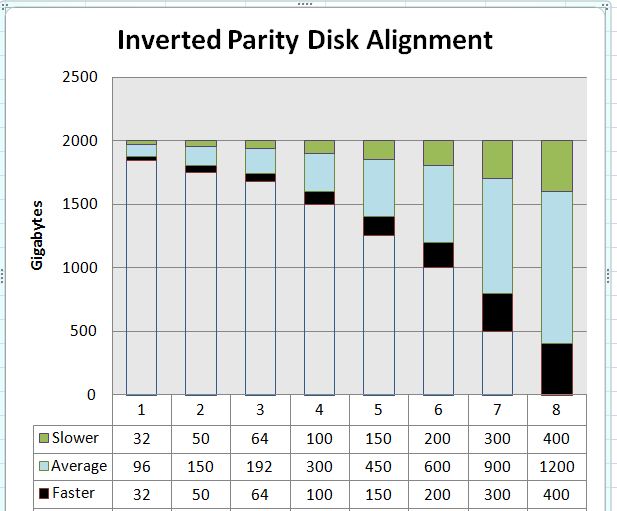
Here's a chart to help visualize how the drive speeds vary over the cylinder locations. The second chart shows how the drives would be aligned if the parity were calculated in the way the OP suggested. While it's true that the parity drive would become the only really important speed limiter, it would also mean that the fastest part of the parity drive might go unused if the data drives were all smaller. That alone seems a high price to pay, too high I think.
-
When writing parity drive: The most that the slow down can be is the difference between the write speed of the parity drive and the slowest read speed. When checking parity: The typical most for slow down would be the difference between the fastest read and the slowest read. I'm interested in the read speeds of your drives because 50% seems too big.
-
I read an article that basically said that the first 20% of the drive was very fast. The testing for that article revealed that the first 20% of a big 7200rpm drive was as fast as a WD velociRapter drive which spins at 10Krpm. So if you have a small drive like a 320GB drive then 20% of that will be fast and the rest last 40% or so will imped the parity calc if the other drives are all big, at least until you pass the small drive's size. 2TB drive 7200rpm 20% == 400GB will be uberfast. Like 10K fast. 60% = 1.2TB will be mostly average. 20% = 400GB will be slow. 320GB drive 7200rpm 20% == 64GB will be uberfast. Like probably not 10K fast but faster than 7200rpm average. 60% = 192GB will be mostly average. 20% = 64GB will be slow. Now, that's only part of the story because that uberfast can have different uber-ness depending on the actual areal density of the particular platters. But it's a general argument I think that the slow-down effect is more about the smaller drive prevent you from seeing the big uberfast-ness of a larger drive than it is about slowing the parity check down slower than the average speed of the slowest big drive. Add one more twist...if the small drive is 7200rpm and the big drives are 5400/5900rpm then the slow down is somewhat reduced even more. So I don't think the issue is as big as believed. And I'd say for sure that as a feature enhancement the priority is way down on the list. What might end up being a bigger issue: 2TB drive + 1TB drive + 750GB + 500GB + 320GB In this case, all the slow parts of each drive are offset from each other so the slow down area is enlarged. But even this problem will work itself out as you replace older drives with larger newer drives.
-
Ok, I think I see what happened. Cache_dirs browses the folders that have dups and they fill up the syslog. So if I manually browse them it would do the same - right? Are you saying that cache_dirs isn't aware that the duplicates exist and they messages are coming from unRAID or linux?

