eatoff
Members
-
Joined
-
Last visited
Everything posted by eatoff
-
This is a great script, I wish this had been around when i was looking earlier. I was using this one, but found that all drives would be spun up just to check the temperature. This one here - Another request that feel free to ignore, but would be to be able to set an additional temperature monitor and desired temperature range. As in a motherboard temperature, and be able to spin fans based on MB temp or HDD temp, whichever is higher in its range.
-
First up, great plugin, has definitely reduced the power usage on my server using this plugin and having the drives spun down. Feature request - settings per cache pool. Use case - I currently have 2 cache pools, 1 for general data ingestion, VMs, docker etc, and a second for surveillance footage. I would like to have the criteria for the mover running different between the two caches. the surveillance i just want it to run when its at say 80% full regardless of file age, but on my data cache i want to keep files on there for up to 20 days before moving them off. I get to this odd scenario where the drives will spin up every hour where there is footage there that is more than 20 days old, but the cache is under 80% full. then the drive will slowly fill up, and all data comes off the surveillance cache and its fine again.
-
I think people are scared to test, I know I am. I have 1 Unraid server and if it goes down then that's my 1 server. Still want SR-IOV to work though
-
I'm not that knowledgeable about Linux, but is the SR-IOV compatibility built into the new 6.11 RC1?
-
I'm getting the same issue. Nothing in the logs until i try to access the webUI, then i get Error : incorrect HTTP headers line The ports are all available when checking the docker allocations. I've tried network mode as host and as bridge, same result. Any ideas? UPDATE: It appears to have been cookies issue of some sort, when attempting to access the webUI from my phone it works fine.
-
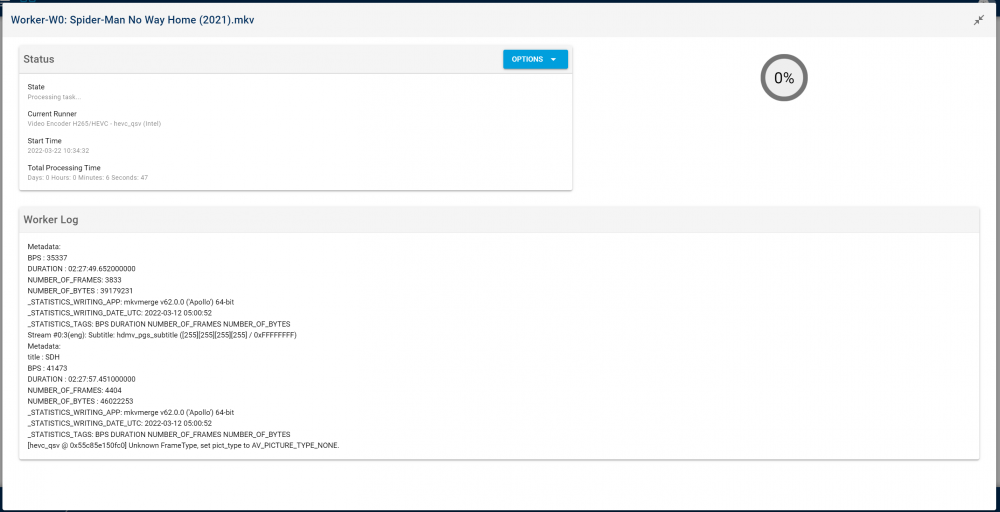
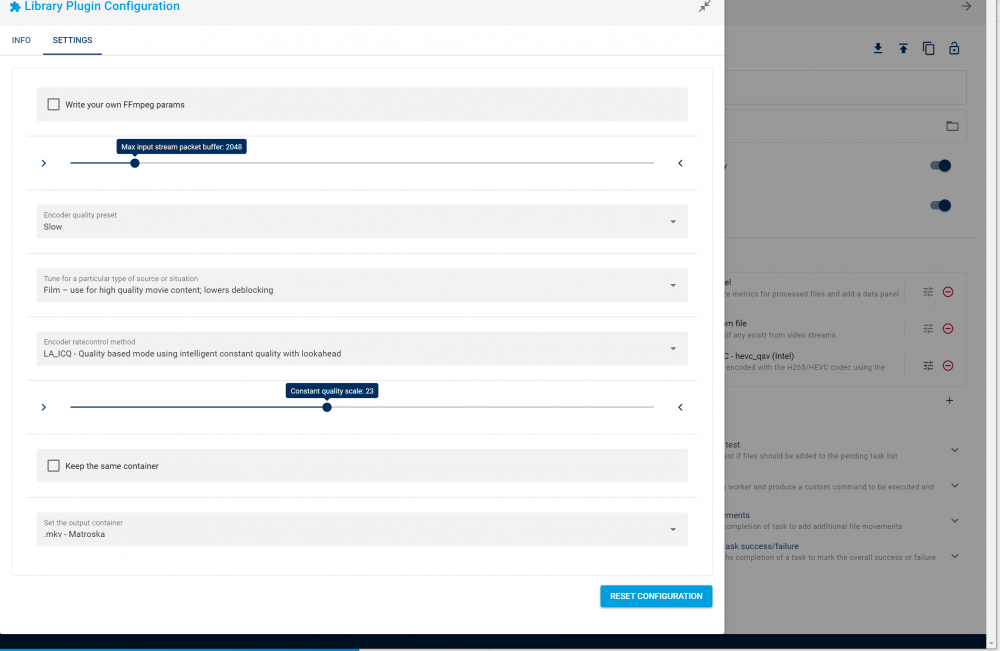
So, I've just made the switch from AMD to Intel, and am having trouble getting the Intel QSV plugin working. I was previously using the vaapi for AMD and it worked great with the iGPU. It gets stuck like this: That is the entire log too. just says "infinity hours" and doesnt seem to do anything. I cannot terminate the worker either, i have to reboot the container. Here are my settings: The new CPU is an intel 11th gen 11700 and the iGPU is the UHD 750 if any of that matters EDIT: Tried VAAPI with the Intel iGPU, and it failed instantly, with the log full of: [h264 @ 0x5572ddb63940] Failed to end picture decode issue: 23 (internal decoding error). [h264 @ 0x5572ddb63940] hardware accelerator failed to decode picture [h264 @ 0x5572ddb80440] Failed to end picture decode issue: 23 (internal decoding error). [h264 @ 0x5572ddb80440] hardware accelerator failed to decode picture
-
Would love to know this. I have a 11th gen on the way, and it would be awesome to be able to use the HDMI output for a VM, but still use the GPU for hardware transcoding in Plex. I'm running RC3 currently, but on an AMD system
-
Which 2 devices are you referring to? the 2 devices in the unassigned devices list, or the 2 devices that were in the original pool? Or just nuke all 3 SSDs and start from scratch (after moving appdata etc off the cache pool)? EDIT: I'm just moving everything off the cache now, and will run the blkdiscard on the 3 ssds and start from scatch.
-
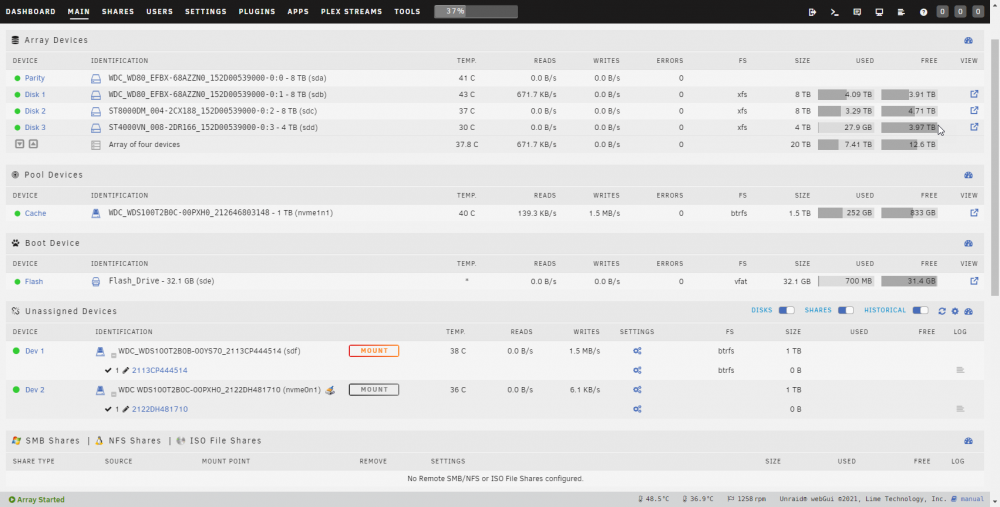
So, the result of deleting the pool and starting fresh is the exact same. Writing to the array sees data being written to both the NVME SSD and the SATA SSD in the unassigned devices section.
-
This didnt work unfortunately. I followed the steps, added all three devices to the same pool and started up the array. Let it copy everything between the devices across the pool. stopped the array. Removed the sata SSD from the pool and started the array. Unraid complained the cache was unmountable and that i should format the cache (which i declined to do since that would wipe all data that i wanted to keep). So then reverting back, i made the pool only have the 1 device (the original NVME i wanted to keep) and restarted the array. Now when writing to the array i can see the old sata ssd also being written to in the unassigned devices. I have attached the diagnostics, but i think I'm going to have to just delete the pool entirely and start it fresh. unraid-diagnostics-20220304-0853.zip
-
I mean when having 2 SSD in a pool for redundancy, so yes, RAID 1 pool. So the drive with the data I want to keep I put in slot 1 of the pool, and then whatever one I put in the second slot will be overwritten to make RAID 1?
-
Awesome, thanks for the effort writing this up. Will I need to move all the data off the cache before unassigning all pool devices? Edit: or do I just put the drive I want to keep the data from in slot 1 of the cache pool and then parity will be built from it, that's preserving that data?
-
EDIT: i have removed the second cache pool in an effort to resolve, but made no difference. the sata SSD is now an unassigned device (not mounted) and its still being written to/read from as if it were still in the original cache pool Done unraid-diagnostics-20220303-1501.zip
-
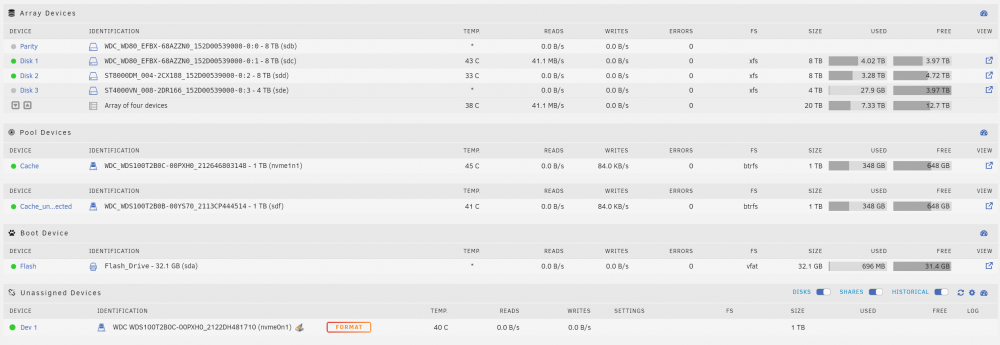
My situation: I had 1TB NVME and 1TB Sata SSDs as a cache pool. I bought an aiddtional 1TB NVME so that i could swap out the sata SSD to make a separate unprotected cache pool. So, i stopped the array, and removed the sata ssd from the cache pool, and swapped the NVME in its place. Started array and it complained that the pool could nto be started up due to too many changes. Ok, so i dropped the pool down to just 1 device (the original NVME and it started up fine. I then set the old sata SSD into its own cache (called cache_unprotected). and started the array. I saw that the cache_unprotected pool had data in it, must have been when it was being used as parity, So i went through using MC and deleted the appdata folder and a couple others. What actually happenned though was that these folders were deleted from BOTH cache pools! Cue panic and a server reboot. Nope, the appdata folders have been deleted from both pools. So i'm now restoring my appdata folder from a backup, and i can see its also restoring that folder to BOTH cache pools (screenshot) So, what is the right way to do what I was doing? and how can i "unlink" these devices? Am I going to have to move all data and everything to the array, then delete all cache pools and move it all back again (as if I only had the one cache device and was replacing it? I have gone through that once before already)
-
I just tried this, and no luck for me. All my game files were on the one disk in the array already Edit: i just re-read that, i hadnt changed the docker mapping. i'll have a go at that over the weekend and report back. Update: tried it and still same error for Left 4 Dead 2
-
Does this work with Unraid 6.10 RC2? The current status drives spun down (as of last poll) sits at 3 all the time (i have 3 drives plus a parity in my array), even when all drives are spun up, and the polling time is set very short. I can get it to activate turbo writes by setting the Disks Allowed To Be Spun Down Before Invoking Turbo Mode to 3, but I want to be able to set this to 2 or 1 so that turbo writes will only kick in if most of my drives are spun up anyway. EDIT: had a reab back about smartctl and hdparm, and looks like my USB enclosure for my drive isnt passing this info through correctly
-
I've hit this error - https://github.com/ValveSoftware/Source-1-Games/issues/1685 Looks like source games don't like xfs filesystems and there is a missing file. Source games won't load. Bioshock infinite worked just fine though. Very impressed with his this is going
-
So did you get it all working? You can use the GPU in windows? And can output via HDMI?
-
HDMI dummy plug solved all my issues. VNC is now responsive, and controller support works. Pretty good performance, very impressed. I did run into an issue though, I ran the docker safe permissions to fix some permission issues, and then couldn't launch any games. Had to manually change the permissions in my games folder. Is there a way to get the permissions working without changing them back. I run that new permissions script more often than I'd care to admit
-
Have you seen the beta Bios for the x300? https://botflakes.de/asrockwiki/docs/bios/deskmini/ Says "It contains a fix for VMWare ESXi". Not sure exactly what that means but could be fixed for virtualisation? According to this it also resolved his Linux gaming issues -
-
Ok, so i just tried again and it came u fine. I updated it to the latest version. The problems i was experiencing before was this - My problem now is that my xbox controller doesnt work. Its paired to my google TV via bluetooth. My phone with on screen controls doesnt work either. My PC running keyboard and mouse streams just fine. Running 6.10RC2, the plugin is installed too. Server has been rebooted with no effect
-
How can we get controller support for instances where we can't use network: host If you're running 2 instances then you can't be using host network for both to get controller support for both at the same time yeah? I think that's all I'm missing, I need to be able to use a controller with a custom network address due to the number of other containers I'm already running
-
Edit: NVM, full server reboot and it's working. Apart from controller support, that's not working, but that's because I'm not using host network due to port conflicts
-
What's the easiest way to check this? EDIT: yes its listed when i checked via the console in the container. But the performance I'm getting is terrible. Very laggy, and only using ~5% GPU according to radeontop. VNC is very slow too. I'm running 6.10RC2. I had to change network to br0 to avoid conflict with my other containers... but then it seems the controller isnt working (the onscreen controller when streaming to phone).
-
Trying to get this one up and running with my AMD APU, But its not starting up. Im using network:host and the only ports that are mapped in the template are 8083, 32123, 2222 which are all not used in the existing docker allocations. I removed the --runtime=nvidia from the extra params. The other nvidia variables i had to leave in otherwise the container wouldnt install at all (screenshot) Here is my docker log: **** Configure default user **** Setting run user uid=100(default) gid=99(default) usermod: no changes Adding run user to video, input and audio groups Setting umask to 000 Create the user XDG_RUNTIME_DIR path '/run/user/99' Adding default home directory template Setting root password Setting user password DONE [ /etc/cont-init.d/20-configre_sshd.sh: executing... ] **** Configure SSH service **** DONE [ /etc/cont-init.d/30-configure_dbus.sh: executing... ] **** Configure container dbus **** Container configured to run its own dbus DONE [ /etc/cont-init.d/30-configure_udev.sh: executing... ] **** Configure container to run udev management **** **** Ensure the default user has the correct permissions on input devices **** Adding user 'default' to groups: user-gid-71 [ /etc/cont-init.d/40-setup_locale.sh: executing... ] **** Locales already set correctly to en_US.UTF-8 UTF-8 **** DONE [ /etc/cont-init.d/50-configure_vnc_audio.sh: executing... ] **** Configure VNC audio **** Configure pulseaudio to pipe audio to a socket DONE [ /etc/cont-init.d/80-configure_gpu_driver.sh: executing... ] /etc/cont-init.d/80-configure_gpu_driver.sh: line 16: nvidia-smi: command not found **** No NVIDIA device found **** DONE [ /etc/cont-init.d/90-configure_xorg.sh: executing... ] **** Generate default xorg.conf **** Configure container as primary the X server DONE **** Starting supervisord **** Logging all root services to '/var/log/supervisor/' Logging all user services to '/home/default/.cache/log/' 2022-02-03 09:05:32,556 INFO Included extra file "/etc/supervisor.d/dbus.ini" during parsing 2022-02-03 09:05:32,556 INFO Included extra file "/etc/supervisor.d/desktop.ini" during parsing 2022-02-03 09:05:32,556 INFO Included extra file "/etc/supervisor.d/pulseaudio.ini" during parsing 2022-02-03 09:05:32,556 INFO Included extra file "/etc/supervisor.d/sshd.ini" during parsing 2022-02-03 09:05:32,556 INFO Included extra file "/etc/supervisor.d/steam.ini" during parsing 2022-02-03 09:05:32,556 INFO Included extra file "/etc/supervisor.d/udev.ini" during parsing 2022-02-03 09:05:32,556 INFO Included extra file "/etc/supervisor.d/vnc-audio.ini" during parsing 2022-02-03 09:05:32,556 INFO Included extra file "/etc/supervisor.d/vnc.ini" during parsing 2022-02-03 09:05:32,556 INFO Included extra file "/etc/supervisor.d/xorg.ini" during parsing 2022-02-03 09:05:32,556 INFO Set uid to user 0 succeeded Error: Another program is already listening on a port that one of our HTTP servers is configured to use. Shut this program down first before starting supervisord. For help, use /usr/bin/supervisord -h After stopping all other containers i got further through the logs, but still not starting up. when starting the webUI the VNC wont connect. EDIT: running all containers again, my MQTT container was not starting until i stopped the steam container. the MQTT container is using ports 1883 and 9001 [ /etc/cont-init.d/90-configure_xorg.sh: executing... ] **** Generate default xorg.conf **** Configure container as primary the X server DONE **** Starting supervisord **** Logging all root services to '/var/log/supervisor/' Logging all user services to '/home/default/.cache/log/' 2022-02-03 10:20:05,460 INFO Included extra file "/etc/supervisor.d/dbus.ini" during parsing 2022-02-03 10:20:05,460 INFO Included extra file "/etc/supervisor.d/desktop.ini" during parsing 2022-02-03 10:20:05,460 INFO Included extra file "/etc/supervisor.d/pulseaudio.ini" during parsing 2022-02-03 10:20:05,460 INFO Included extra file "/etc/supervisor.d/sshd.ini" during parsing 2022-02-03 10:20:05,460 INFO Included extra file "/etc/supervisor.d/steam.ini" during parsing 2022-02-03 10:20:05,460 INFO Included extra file "/etc/supervisor.d/udev.ini" during parsing 2022-02-03 10:20:05,460 INFO Included extra file "/etc/supervisor.d/vnc-audio.ini" during parsing 2022-02-03 10:20:05,460 INFO Included extra file "/etc/supervisor.d/vnc.ini" during parsing 2022-02-03 10:20:05,460 INFO Included extra file "/etc/supervisor.d/xorg.ini" during parsing 2022-02-03 10:20:05,460 INFO Set uid to user 0 succeeded 2022-02-03 10:20:05,467 INFO RPC interface 'supervisor' initialized 2022-02-03 10:20:05,468 CRIT Server 'inet_http_server' running without any HTTP authentication checking Unlinking stale socket /run/supervisor.sock 2022-02-03 10:20:05,770 INFO RPC interface 'supervisor' initialized 2022-02-03 10:20:05,770 CRIT Server 'unix_http_server' running without any HTTP authentication checking 2022-02-03 10:20:05,771 INFO supervisord started with pid 1 2022-02-03 10:20:06,774 INFO spawned: 'audiostream' with pid 144 2022-02-03 10:20:06,776 INFO spawned: 'audiowebsock' with pid 145 2022-02-03 10:20:06,777 INFO spawned: 'dbus' with pid 146 2022-02-03 10:20:06,778 INFO spawned: 'pulseaudio' with pid 147 2022-02-03 10:20:06,780 INFO spawned: 'sshd' with pid 148 2022-02-03 10:20:06,781 INFO spawned: 'udev' with pid 149 2022-02-03 10:20:06,783 INFO spawned: 'xorg' with pid 150 2022-02-03 10:20:06,785 INFO spawned: 'novnc' with pid 151 2022-02-03 10:20:06,787 INFO spawned: 'x11vnc' with pid 152 2022-02-03 10:20:06,791 INFO spawned: 'desktop' with pid 155 2022-02-03 10:20:06,792 INFO exited: audiostream (exit status 111; not expected) 2022-02-03 10:20:07,814 INFO spawned: 'audiostream' with pid 271 2022-02-03 10:20:07,815 INFO success: audiowebsock entered RUNNING state, process has stayed up for > than 1 seconds (startsecs) 2022-02-03 10:20:07,815 INFO success: dbus entered RUNNING state, process has stayed up for > than 1 seconds (startsecs) 2022-02-03 10:20:07,815 INFO success: pulseaudio entered RUNNING state, process has stayed up for > than 1 seconds (startsecs) 2022-02-03 10:20:07,815 INFO success: sshd entered RUNNING state, process has stayed up for > than 1 seconds (startsecs) 2022-02-03 10:20:07,815 INFO success: udev entered RUNNING state, process has stayed up for > than 1 seconds (startsecs) 2022-02-03 10:20:07,815 INFO success: xorg entered RUNNING state, process has stayed up for > than 1 seconds (startsecs) 2022-02-03 10:20:07,815 INFO success: novnc entered RUNNING state, process has stayed up for > than 1 seconds (startsecs) 2022-02-03 10:20:07,815 INFO success: x11vnc entered RUNNING state, process has stayed up for > than 1 seconds (startsecs) 2022-02-03 10:20:07,816 INFO success: desktop entered RUNNING state, process has stayed up for > than 1 seconds (startsecs) 2022-02-03 10:20:07,823 INFO exited: audiostream (exit status 111; not expected) 2022-02-03 10:20:10,014 INFO spawned: 'audiostream' with pid 280 2022-02-03 10:20:10,019 INFO exited: audiostream (exit status 111; not expected) 2022-02-03 10:20:10,019 INFO reaped unknown pid 278 (exit status 0) 2022-02-03 10:20:10,581 INFO reaped unknown pid 340 (exit status 1) 2022-02-03 10:20:13,614 INFO spawned: 'audiostream' with pid 496 2022-02-03 10:20:13,622 INFO exited: audiostream (exit status 111; not expected) 2022-02-03 10:20:13,623 INFO gave up: audiostream entered FATAL state, too many start retries too quickly Last edit I promise. Took a while to come up (Had to shut down the MQTT container for it to work), but i can now connect via the webUI, but it is painfully slow. and I get this in the middle of the image: