





sjtuross
Members
-
Joined
-
Last visited
Everything posted by sjtuross
-
Would it be possible to support custom rclone source? For example, I would like to install this mod version https://github.com/wiserain/rclone/releases.
-
No, actually the trigger I need is when docker daemon is started. A workaround solution was provided in the post below. I'm just thinking it would be useful to more users if this docker_started event is supported by user scripts add-on. . I
-
I have 2 use cases - 1. Set up policy routing for my custom docker bridge network, so its network traffic can go through my 2nd physical network interface. 2. I have a docker that mounts multiple cloud drives, and then I run a mergerfs script to merge them. I think the best trigger of both scripts is docker_started. I think this event would be useful to all others and it could be much easier to set up with this event in user scripts add-on if possible.
-
Thank you for the information. I persisted my script under /usr/local/emhttp/plugins/user.scripts/event/docker_started/ and it worked as expected. Any special reason to put it under the dynamix plugin folder in your example?
-
I'm wondering if this plugin could inject a hook in /usr/local/etc/rc.d/rc.docker, so whenever docker daemon (re)starts, it calls some user scripts.
-
Is it possible to have docker daemon start complete trigger? My script depends on some docker network interfaces which only become available after docker daemon starts.
-
array_start_complete works as expected. Thank you!
-
Thanks for the quick response. Yes, in my case, it's the other way around because I want to merge some cloud drives which are mounted by a container. Do you happen to know if the "At Startup of Array" event in the "User Scripts" plugin would block array start?
-
I put some script in /etc/mergerfsp/array_start.sh to wait a container ready before running mergerfs. It blocks array start forever because docker won't start until array is started. Is it possible to run this array_start.sh asynchronously?
-
Can we have an option to disable Docker update check for all? It shouldn't be warning, but notice at most.
-
It can show the network name correctly in the past, at least when I upgraded to Unraid 6.12.0. Not sure when and why it started showing network id only. Everything works, but it just looks odd.
-
Thanks for this plugin. Do you think if the tools from https://github.com/trapexit/mergerfs-tools can be packaged together?
-
Is there a way to disable the autostart order check feature? I want to keep the order of my folders and containers as I like and don't care whether it aligns to the actual auto start order. However, I don't want to see a red "autostart order" icon in the top-right toolbar.
-
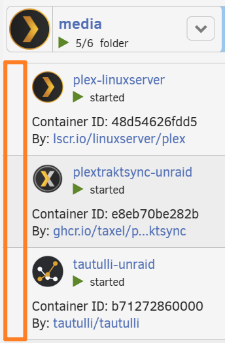
Thank you for maintaining this wonderful plugin. I really appreciate it. It works great so far. Just a small ask. Would it be possible to add some indent for containers shown under a folder? Also make the folder name bold and its icon a bit larger, like the below from the old one. When folders are expanded, I feel it's more obvious to tell the difference between folder vs. container.
-
I don't think this is possible to config in unraid, but you could achieve that through firewall rule in your router.
-
Before 6.12, nginx, samba such services listen on 0.0.0.0, so I changed rc.nginx to listen on the interface configured IP. Check "Network Improvements" from https://unraid.net/blog/6-12-0-stable. You can now include/exclude listening interfaces. Also the services now listen on IP address of each interface rather than 0.0.0.0
-
I updated the gist for 6.11.5 with very minor change. You can also compare it with the original file to see what's changed. It should work. This is no longer needed since 6.12 because management services listen on specific IP addresses by default.
-
In the recent update, orphaned image is now automatically removed. Thank you. Is it possible to also update the local sha256 hash in this file /var/lib/docker/unraid-update-status.json? Since local sha256 is different from remote sha256 there, dockerman keeps showing update ready until I manually update the local sha256 hash. "library/traefik:latest": { "local": "sha256:2e53e47b59bc9a799b6c7b0d6d65f529de478094781751f1e061516ce9ca7c68", "remote": "sha256:ac1480ce3203541705b01d6dce40ef4bf563cdb29d5b00db88cc396fa9fa9cd5", "status": "true" }
-
Every time after I update stack for new images, I need to do 2 extra steps below. Could this be automated so its behavior is more integrated with Unraid dockerman? Manually remove orphaned image. Manually update image local digest in /var/lib/docker/unraid-update-status.json (taking traefik as an example), so Unraid dockerman stops saying update ready. "library/traefik:latest": { "local": "sha256:4c388f477f5b7aa48420694d90db0ecb96b4ecede60b9b7589c87858abf87b60", "remote": "sha256:4c388f477f5b7aa48420694d90db0ecb96b4ecede60b9b7589c87858abf87b60", "status": "true" }
-
I run `docker images --digests --no-trunc` and found out the same image with 2 different digests. Most probably the same image was republished to docker hub. So I deleted the image, restart the stack and then click "check for updates" in webui. Now it says up-to-date. It's a false alarm to docker compose manager which is awesome.
-
Unraid keeps saying "update ready" for one container created by stack. I tried below but no luck. Any suggestion? Compose pull, down and then up through webui. Manually run docker pull and then restart stack. Deleted this state file /usr/local/emhttp/state/plugins/dynamix.docker.manager/docker.json
-
Sorry to hear that. I thought it's a security feature and also useful if you want to bind 80/443 to a secondary IP of the primary interface for your own service like reverse proxy. I applied the logic to the current version of /etc/rc.d/rc.nginx and it works well for myself. I just share it to my gist if someone finds it useful - https://gist.github.com/sjtuross/8b7e9d5762b92ca6459f447429c814a4 To persist the change on reboot, add a user script running at first array start. #!/bin/bash cp /boot/config/plugins/user.scripts/scripts/support_bind_mgt/rc.nginx /etc/rc.d/rc.nginx /etc/rc.d/rc.nginx restart
-
This hidden setting BIND_MGT no longer works since 6.10 because it's not used in /etc/rc.d/rc.nginx at all. It was in 6.9.2 though (I found the code here https://gist.github.com/ljm42/59749ee5495d14e1f6d0bd2f13001c06) @bonienl Is this a bug or is it intended to not support this hidden setting any more?
-
I think it would be good to follow docker ps display about ports. Don't show port mappings for containers running on custom network and host network. Rename the column header "port mappings" to "ports". If container port is mapped to host, show something like "0.0.0.0:8920->8920/tcp". If the port is not mapped but exposed by container itself, show something like "8096/tcp".
-
Is there a way to install driver version 460.91.03 on unraid 6.10.3? Because passthrough on esxi doesn’t work with drivers >=470.

