Nodiaque
Members
-
Joined
-
Last visited
Everything posted by Nodiaque
-
I've created a little FAQ on the first page, 2nd post. It should cover all the findings you guys did. I've updated the template but not the docker itself since it's not really possible because of the worldID. I also notice the template default to -dev tag. Unsure why, something badly copied. I restored the configuration properly on the template. Should be in CA in the next hours. Do validate that in your docker, repository says nodiaque/steamcmd:windrose or nodiaque/steamcmd:windrose-xvfb
-
This page might help From what I see, the WorldIslandId from serverdescription.json must match IslandId in worlddescription.json They also added more documentation, which change again the configuration! The are getting tiresome. I'm updating the guide and template, hold on
-
Ah weird, doc I found said only Udp. But it's possible, many other game did had TCP and udp
-
User preference. Some says performance is better with proton other the other one.
-
Something I saw on another thread is people put either the server on its own ip or when using bridge, they out the unraid server ip in multi home. Might worth a shot. The direct connection feature isn't updated in the doc yet (unless it happened today)
-
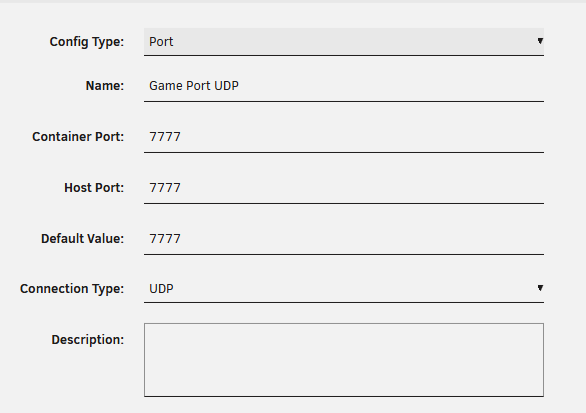
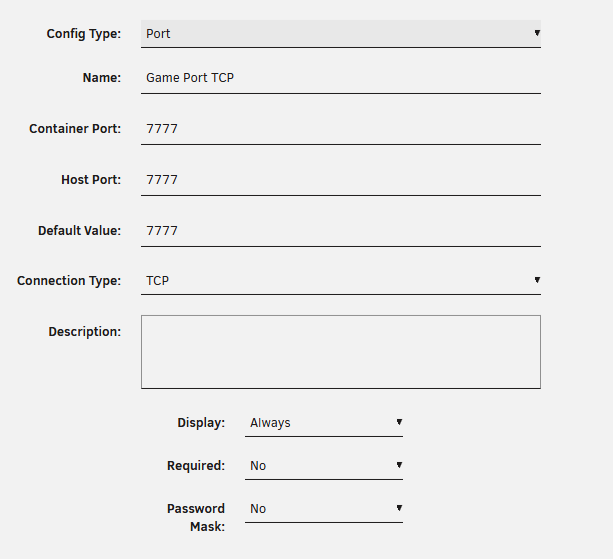
No the data won't be removed. You'll also need to delete the configuration in previous apps, else it will reuse the saved template. You can also just add them directly with the info and screenshot I put. Worst thing is they aren't added properly and it change nothing.
-
Unraid doesn't update the template.xml when you update the docker, it's a seperate entity. I just notice I made a mistake on the template though, I removed the branch. I just update the templace to fix this issue but will take sometime. Normally, if you go through the apps, you should see the template update when you click install, which mean reinstalling from scratch (you need to delete the custom template under "previous apps" after removing the docker first). But you can simply add the one I've put in the guide, whatever you find easier. edit: until the template get the update I just pushed with the branch, you might not see that it's already installed when going into apps.
-
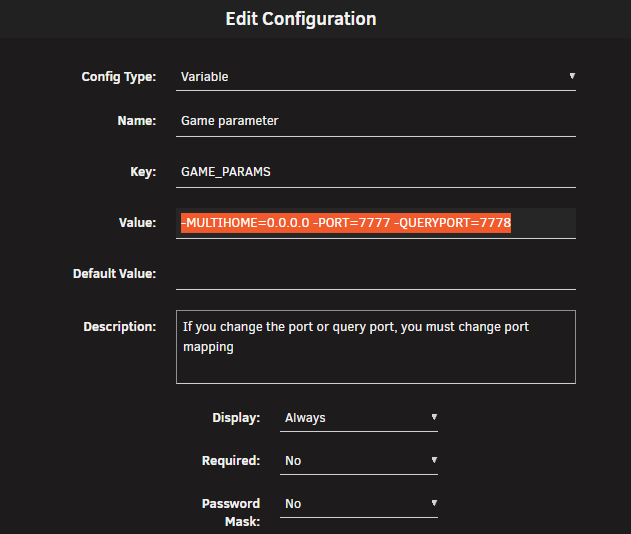
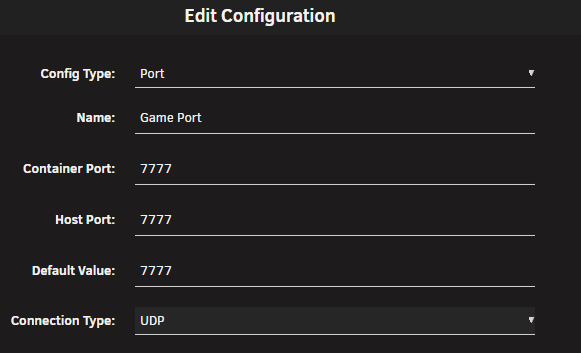
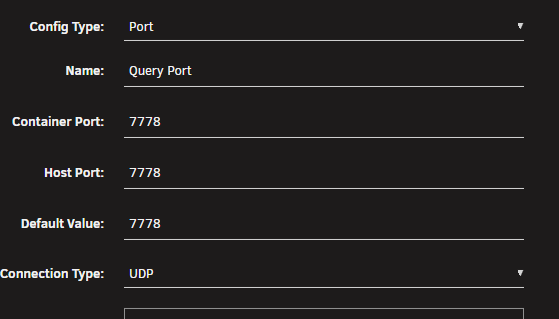
You need to update. Delete the file appmanifest_4129620 under steamapps and it will force update. STEAMCMD problem I updated the dockers and the template. If you don't change anything to the template, it will continue working as currently, which mean invite code and uPNP/Relay server. To use direct connection, you must do the following modification in the template (or wait for the template to update in unraid) TO ENABLE DIRECT CONNECT, THE FOLLOWING MUST BE DONE Add a new variable "GAME_PARAMS" with value: -MULTIHOME=0.0.0.0 -PORT=7777 -QUERYPORT=7778 u After, you must add 2 port binding, UDP 7777, TCP 7777 and 7778 (you could simply also create one at 7777:7778 but I prefer having them seperate) After in ServerDescription.json, you must configure the following: "IsPasswordProtected": true, "Password": "yourpassword", "UseDirectConnection": true, "DirectConnectionServerPort": 7777, You can then switch your network configuration to bridge instead of Host. Don't forget to set a password in the config file else anyone can join your server now. You might need to change this in the configuration. No one talk about it thus I'm unsure if it's really needed

-
I'm currently updating template and docker to implement direct port
-
You don't see this in the docker template (not in the forum)? I'll have to find out why if you don't Are you not able to connect? Mine always stopped there but I don't own the game so never tried to actually connect. Oh the direct connection info are new parameter, they weren't present before. This mean no more uPNP I guess. I'll have to check if they updated their guide to update to that. Direct is always faster then flimsy upnp.
-
Thank you. I do have a link but I don't even know if it work. I think I created it like 10 years ago. I'm doing this since I like doing it XD the link is normally in the docker application (like windrose) or on my app profile in unraid.
-
technically that reinstalled the container. Saving the config and savefile, flushing the folder and restoring only these would yield the exact same result. A bug with steamcmd that linger
-
Sometime steamcmd doesn't update. You can delete a file to force the update. Look up in the thread, inch specified a file to delete that trigger the update. Else just save the config and map, delete the rest and start a new. It's a steamcmd bug that we can't do anything about it. Happen with any game. I don't think so. You can try, but I'm pretty sure it's EA bug. This docker doesn't have ssh or FTP so sftp won't work. But maybe you can just put the file in the appdata folder directly like anything in unraid.
-
That's early access game for yeah, specially in a emulation world. If they release a native linux server, it will surely be more efficiant.
-
Ah that could be something, since in bridge mode it put the docker internal ip and this can't be resolve on local network sometime. Nice catch
-
Normally just restarting the server is enough to update. You can follow inch ways of deleting a specific file to force the update on the server if it's not enough when rebooting. This is a steamcmd issue that always existed for many game. Something it doesn't detect new version
-
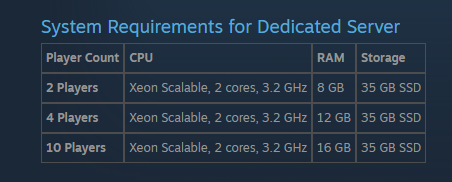
Yeah, the requirement are very high. It's not very optimized. Early access after all s
-
ah nice if only deleting that is enough
-
That'S the joy of Steam CMD. I saw that many time with other games. When that happen, I simply delete the folder (but keep savedata and config) so it force a redownload.
-
did you try switching to host network? it's also the risk with any emulation. It's not a linux native server but a Windows (poor coded) one. So Wine emulation can be a miss
-
Hello, I think no one tried the xvfb yet since I just created it. I created it because there was issue with crashing (way faster then yours) and connection error on day one and looking at other docker, people used this. But since everything was fixed by the dev by the time I created it, I doubt it's the solution. There's no reason for it to mess with your savefile but I would do a backup of the folder in case. Better ready then sorry. In the end, the only difference is xvfb is a framebuffer system to emulate a display without actually displaying it. It's like a virtual display so the game think there's a display running. It's honestly the first time I used that. Do remember it's a early access game that is 2 days old. Lots of bug can happen. I don't think the version of the docker would change that but it doesn't hurt to try. I don't own the game so I can't say the difference myself.
-
Haha, it happens ;)
-
just checked on my other unraid instance and see it. Do you see the other windrose made by someone else?
-
No it should update automatically. Let me check on my other unraid instance just in case it's my cache that's playing with me
-
weird, I see it. It's even updated to ask for which version you want