





Nodiaque
Members
-
Joined
-
Last visited
Everything posted by Nodiaque
-
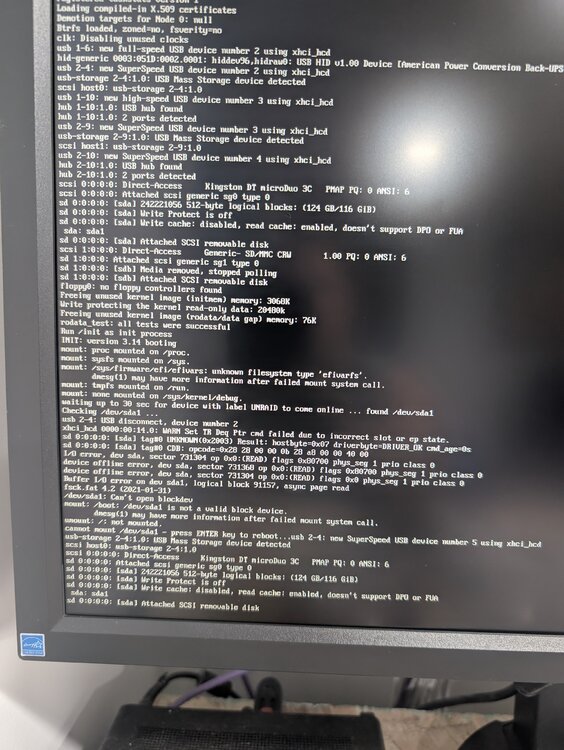
Hello, I currently have a small 2gb flash drive that I would like to upgrade. The smallest I could find is a 128gb USB-A/C flash (it has both port) from Kingston. I backup my unraid flash using the ui, download the usb creator 1.0.1, selected the flash and flash it on my usb. I just tried booting it and I get an error saying /dev/sda1 doesn't exist during the boot sequence. I tried doing it the manual way and same thing.
-
Ok, so do I just reboot to finish the upgrade to 7.1.4 without nvidia driver, backup the flash and swap the usb or do I swap before finishing the 7.1.4 upgrade? I did manage to put 360mb space by deleting old package. I do have 800mb that I could get from the previous folder but unsure if it's wise to delete that folder before finishing the upgrade to 7.1.4
-
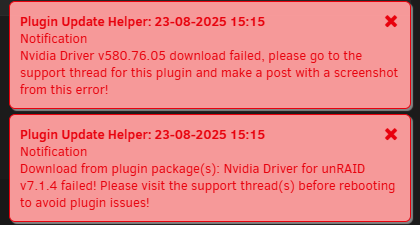
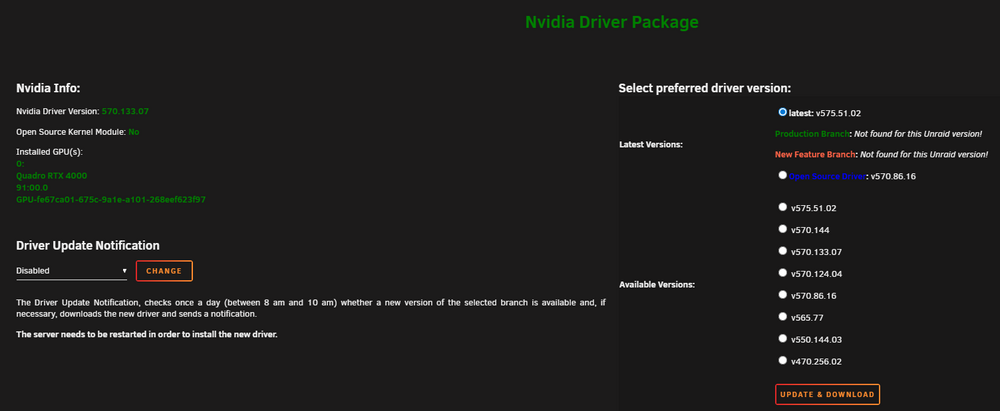
Hello, I have a quadro P4000 and I just ran the update from 7.0.1 to 7.1.4. I got two error: I haven't rebooted yet since the upgrade because of the error. I'm unsure what to do. Thank you edit: I think I found the problem but now, I'm unsure what to do. Still waiting for the reboot post upgrade, it seems my usb drive is full! I do have another usb drive that I bought about 6 months ago to replace it, never done it. Can I do it now while it's pending the reboot? What should I do?

-
Proton is simply a library on top of wine. Different approach and often make more problem then solve them. I run the standard version without any lag or anything, but I do have a beef of a server. The proton version was done cause there was rumor of performance improvement in the official forum but it's mostly placebo effect. If they release a native Linux version someday, it will be way better
-
Hello, I ran mover today cause one of my cache drive was getting full and was stunned to wait 1 hours before it reach that particular cache to move. I remember when looking at the log in the past that mover move 1 file at a time. I can understand why when we had a single cache and single parity pool. But now that we have multiple pool and cache, I though it would be nice to have parallel mover thread running. Easy way to do it would be to have a pool lock map. For exemple, in my system, I have: Array Cache AppData Cache Download download cache Cache move to array, array move to appdatacache (move appdata) and download cache move to cache. In that scenario, a simple lock table of 5 elements could be used, one for each pool. The first thread would be the cache to array which would lock cache and array pool. While lock, no thread can run on the locked one. So appdatacache won't run until array is unlock. But then, download cache to download can be run since it's using 2 unlocked pool. Thus, there would be 2 mover running while 1 job pending. I'm unsure if what I'm saying make sense or not, but that would greatly increase mover speed in a multi-pool scenario like mine. Thank you!
-
The in-game browser server list is very weird. It show like a top x number of server and that's it. It also filter by age. Sometime you see them, sometime you don't. In the end, it's all something I have no control over.
-
I don't see anything wrong in the log file. Might be the port forwarding that aren't taking in. You should be able to connect directly from your own pc to it using local network, this would remove the port forward issue. You could try the original wine version also, be sure to use a different appdata folder. There's no gain on the proton version
-
What do you see in your log file? Server can take time before appearing in the server list.
-
The value for use cloud flare bypass must be true if you don't have AA key. What is not needed is the scrapper docker. The current version of downloader have a cloud flare bypass include. If you check the information in the template, it says that if you put bypass off, it will use the AA donator key or the alternate url that you can put in another key. If you have neither of those, you must put the value to true. But the scrapper docker isn't needed. There's not even a value anymore used to point to it. Edit Also if cloud flare bypass isn't enable, you don't have a AA donator key nor alternative url, it by default tried zlib and a other website as alternative. These have way less stuff and you'll get often error.
-
I've updated the template and added a note to remove the cloudfare bypass scrapper docker. I also added the new variable now available for the docker
-
Unsure if it's the exact same but it's downloading: 2025-07-31 21:27:07,109 - backend - INFO - backend.py:68 - Book queued: The Ministry of Time 2025-07-31 21:27:09,878 - downloader - INFO - downloader.py:44 - GET: https://annas-archive.org/slow_download/a77823bd2ade21b4f83ba71a9c5eed3a/0/2 2025-07-31 21:27:09,923 - downloader - WARNING - downloader.py:64 - 403 detected for URL: https://annas-archive.org/slow_download/a77823bd2ade21b4f83ba71a9c5eed3a/0/2. Should retry using cloudflare bypass. 2025-07-31 21:27:09,924 - downloader - INFO - downloader.py:36 - GET Using Cloudflare Bypasser for: https://annas-archive.org/slow_download/a77823bd2ade21b4f83ba71a9c5eed3a/0/2 2025-07-31 21:27:09,924 - cloudflare_bypasser - INFO - cloudflare_bypasser.py:162 - SB_GET: https://annas-archive.org/slow_download/a77823bd2ade21b4f83ba71a9c5eed3a/0/2 2025-07-31 21:27:09,924 - cloudflare_bypasser - INFO - cloudflare_bypasser.py:198 - Getting driver... 2025-07-31 21:27:10,118 - cloudflare_bypasser - INFO - cloudflare_bypasser.py:204 - Display started 2025-07-31 21:27:31,401 - cloudflare_bypasser - INFO - cloudflare_bypasser.py:97 - Bypass attempt 1 / 3 2025-07-31 21:27:31,402 - cloudflare_bypasser - INFO - cloudflare_bypasser.py:102 - Waiting 0s before trying... 2025-07-31 21:27:38,925 - cloudflare_bypasser - INFO - cloudflare_bypasser.py:168 - Bypass successful. 2025-07-31 21:27:38,961 - book_manager - INFO - book_manager.py:331 - Downloading The Ministry of Time from https://momot.rs/d3/y/1754018857/10000/g3/zlib3_files/20240807/annas_archive_data__aacid__zlib3_files__20240807T222128Z--20240807T222129Z/aacid__zlib3_files__20240807T222128Z__28542083__4D4gwcaVXYxTRSiiGMLpgs~/qflLY91fU_cVO-gp9oMYOw/The%20Ministry%20of%20Time%20--%20Kaliane%20Bradley%20--%202024%20--%20Avid%20Reader%20Press%20%2F%20Simon%20%26%20Schuster%20--%20a77823bd2ade21b4f83ba71a9c5eed3a%20--%20Anna%E2%80%99s%20Archive.epub 2025-07-31 21:27:38,961 - downloader - INFO - downloader.py:84 - Downloading from: https://momot.rs/d3/y/1754018857/10000/g3/zlib3_files/20240807/annas_archive_data__aacid__zlib3_files__20240807T222128Z--20240807T222129Z/aacid__zlib3_files__20240807T222128Z__28542083__4D4gwcaVXYxTRSiiGMLpgs~/qflLY91fU_cVO-gp9oMYOw/The%20Ministry%20of%20Time%20--%20Kaliane%20Bradley%20--%202024%20--%20Avid%20Reader%20Press%20%2F%20Simon%20%26%20Schuster%20--%20a77823bd2ade21b4f83ba71a9c5eed3a%20--%20Anna%E2%80%99s%20Archive.epub Downloading: 65%|██████▍ | 2.91M/4.51M [01:18<00:42, 37.2kB/s] I'm checking the original project. The bypass is now built-in. I still have the CLOUDFLARE_PROXY_URL set and USE_CF_BYPASS to true. If USE_CF_BYPASS: is set to false, it will use alternative address (for when you are member of AA). I'll check the new config and update my template. Also, I'll remove the scrapper docker which isn't needed anymore (mine is offline currently and download work no problem)
-
Hello everyone, I currently have warning in my unifi controller that multiple device have same ip address. This is because of the vhost and ip used by docker and unraid. From what I'm reading, using ipvlan would solve this issue but I'm unsure what pro and cons this will do. I currently have multiple vlan through 2 NIC and a custom docker network. I have multiple device with fixed ip on specific docker network. Here's my docker network list: NETWORK ID NAME DRIVER SCOPE 32c74dc9aff8 bridge bridge local e7e41275fb7c eth0 macvlan local c097b48f0d65 eth0.1 macvlan local 7dbdd8d58774 eth0.2 macvlan local aa635793a94a eth0.10 macvlan local dc17271446e3 eth0.20 macvlan local 86f378f0b247 eth1.50 macvlan local 13172a8ebe7e eth1.100 macvlan local f3bfc19603bb host host local dc5700572b78 my-bridge bridge local 519a8c2b1b3b none null local Let's say tomorrow, I stop docker and flip to ipvlan. What change would it do? Thank you!
-
Weird, just tried on my side and no problem 2025-07-31 10:28:00,707 - downloader - INFO - downloader.py:44 - GET: https://annas-archive.org/search?index=&page=1&display=table&acc=aa_download&acc=external_download&ext=epub&ext=mobi&ext=azw3&ext=fb2&ext=djvu&ext=cbz&ext=cbr&q=dungeon%20crawler%20carl&lang=en 2025-07-31 10:28:04,869 - downloader - INFO - downloader.py:44 - GET: https://annas-archive.org/md5/ecc11c5da4e45a320d46a58b28c2b8eb 2025-07-31 10:28:06,594 - backend - INFO - backend.py:68 - Book queued: Dungeon Crawler Carl 2025-07-31 10:28:07,415 - downloader - INFO - downloader.py:44 - GET: https://annas-archive.org/slow_download/ecc11c5da4e45a320d46a58b28c2b8eb/0/2 2025-07-31 10:28:07,482 - downloader - WARNING - downloader.py:64 - 403 detected for URL: https://annas-archive.org/slow_download/ecc11c5da4e45a320d46a58b28c2b8eb/0/2. Should retry using cloudflare bypass. 2025-07-31 10:28:07,483 - downloader - INFO - downloader.py:36 - GET Using Cloudflare Bypasser for: https://annas-archive.org/slow_download/ecc11c5da4e45a320d46a58b28c2b8eb/0/2 2025-07-31 10:28:07,483 - cloudflare_bypasser - INFO - cloudflare_bypasser.py:162 - SB_GET: https://annas-archive.org/slow_download/ecc11c5da4e45a320d46a58b28c2b8eb/0/2 2025-07-31 10:28:07,483 - cloudflare_bypasser - INFO - cloudflare_bypasser.py:198 - Getting driver... 2025-07-31 10:28:07,665 - cloudflare_bypasser - INFO - cloudflare_bypasser.py:204 - Display started 2025-07-31 10:28:28,921 - cloudflare_bypasser - INFO - cloudflare_bypasser.py:97 - Bypass attempt 1 / 3 2025-07-31 10:28:28,921 - cloudflare_bypasser - INFO - cloudflare_bypasser.py:102 - Waiting 0s before trying... 2025-07-31 10:28:36,611 - cloudflare_bypasser - INFO - cloudflare_bypasser.py:168 - Bypass successful. 2025-07-31 10:28:36,660 - book_manager - INFO - book_manager.py:331 - Downloading Dungeon Crawler Carl from https://momot.rs/d3/y/1753979314/10000/g4/libgenli_fiction/libgenli_fiction/2821000/ecc11c5da4e45a320d46a58b28c2b8eb.epub~/Rx9L7dwouGT-iJCPYJfNeA/Dungeon%20Crawler%20Carl%20--%20Dinniman%2C%20Matt%20--%202020%20--%20Dandy%20House%20--%20ecc11c5da4e45a320d46a58b28c2b8eb%20--%20Anna%E2%80%99s%20Archive.epub 2025-07-31 10:28:36,661 - downloader - INFO - downloader.py:84 - Downloading from: https://momot.rs/d3/y/1753979314/10000/g4/libgenli_fiction/libgenli_fiction/2821000/ecc11c5da4e45a320d46a58b28c2b8eb.epub~/Rx9L7dwouGT-iJCPYJfNeA/Dungeon%20Crawler%20Carl%20--%20Dinniman%2C%20Matt%20--%202020%20--%20Dandy%20House%20--%20ecc11c5da4e45a320d46a58b28c2b8eb%20--%20Anna%E2%80%99s%20Archive.epub Downloading: 100%|█████████▉| 1.15M/1.15M [01:01<00:00, 18.7kB/s] 2025-07-31 10:29:39,598 - book_manager - INFO - book_manager.py:336 - Download finished. Writing to /tmp/cwa-book-downloader/ecc11c5da4e45a320d46a58b28c2b8eb.epub 2025-07-31 10:29:39,599 - book_manager - INFO - book_manager.py:339 - Writing Dungeon Crawler Carl successfully 2025-07-31 10:29:39,600 - backend - INFO - backend.py:143 - Moving book to ingest directory then renaming: /tmp/cwa-book-downloader/ecc11c5da4e45a320d46a58b28c2b8eb.epub -> /cwa-book-ingest/ecc11c5da4e45a320d46a58b28c2b8eb.crdownload -> /cwa-book-ingest/ecc11c5da4e45a320d46a58b28c2b8eb.epub 2025-07-31 10:29:39,603 - backend - INFO - backend.py:150 - Renaming book: /cwa-book-ingest/ecc11c5da4e45a320d46a58b28c2b8eb.crdownload -> /cwa-book-ingest/ecc11c5da4e45a320d46a58b28c2b8eb.epub 2025-07-31 10:29:39,604 - backend - INFO - backend.py:178 - Book ecc11c5da4e45a320d46a58b28c2b8eb download successful But I just made a test. I close the scraper docker and downloaded another book. And it work, even the bypass worked: 2025-07-31 10:32:46,495 - downloader - INFO - downloader.py:44 - GET: https://annas-archive.org/md5/9f03951ed3eca60c23430c21fe317007 2025-07-31 10:32:48,038 - backend - INFO - backend.py:68 - Book queued: This Inevitable Ruin: Dungeon Crawler Carl Book 7 2025-07-31 10:32:48,937 - downloader - INFO - downloader.py:44 - GET: https://annas-archive.org/slow_download/9f03951ed3eca60c23430c21fe317007/0/2 2025-07-31 10:32:48,999 - downloader - WARNING - downloader.py:64 - 403 detected for URL: https://annas-archive.org/slow_download/9f03951ed3eca60c23430c21fe317007/0/2. Should retry using cloudflare bypass. 2025-07-31 10:32:48,999 - downloader - INFO - downloader.py:36 - GET Using Cloudflare Bypasser for: https://annas-archive.org/slow_download/9f03951ed3eca60c23430c21fe317007/0/2 2025-07-31 10:32:48,999 - cloudflare_bypasser - INFO - cloudflare_bypasser.py:162 - SB_GET: https://annas-archive.org/slow_download/9f03951ed3eca60c23430c21fe317007/0/2 2025-07-31 10:32:49,000 - cloudflare_bypasser - INFO - cloudflare_bypasser.py:198 - Getting driver... 2025-07-31 10:32:59,326 - cloudflare_bypasser - INFO - cloudflare_bypasser.py:168 - Bypass successful. 2025-07-31 10:32:59,372 - book_manager - INFO - book_manager.py:331 - Downloading This Inevitable Ruin: Dungeon Crawler Carl Book 7 from https://momot.rs/d3/y/1753979569/10000/g6/zlib3_files/20241217/annas_archive_data__aacid__zlib3_files__20241217T170647Z--20241217T170648Z/aacid__zlib3_files__20241217T170647Z__40331984__aiZQucgoWg6pvqbE6tsFiG~/HFSL2VS9DoXgt7-64dyx8A/This%20Inevitable%20Ruin%3A%20Dungeon%20Crawler%20Carl%20Book%207%20--%20Matt%20Dinniman%20--%20Dungeon%20Crawler%20Carl%2C%202024%20--%20Dandy%20House%20--%209f03951ed3eca60c23430c21fe317007%20--%20Anna%E2%80%99s%20Archive.epub 2025-07-31 10:32:59,372 - downloader - INFO - downloader.py:84 - Downloading from: https://momot.rs/d3/y/1753979569/10000/g6/zlib3_files/20241217/annas_archive_data__aacid__zlib3_files__20241217T170647Z--20241217T170648Z/aacid__zlib3_files__20241217T170647Z__40331984__aiZQucgoWg6pvqbE6tsFiG~/HFSL2VS9DoXgt7-64dyx8A/This%20Inevitable%20Ruin%3A%20Dungeon%20Crawler%20Carl%20Book%207%20--%20Matt%20Dinniman%20--%20Dungeon%20Crawler%20Carl%2C%202024%20--%20Dandy%20House%20--%209f03951ed3eca60c23430c21fe317007%20--%20Anna%E2%80%99s%20Archive.epub Downloading: 34%|███▍ | 1.17M/3.46M [00:57<01:55, 19.9kB/s] When looking at the github, there's no mention of the scrapper anymore. I remember that I opened a case a long time ago and the creator was saying it was working on removing the scrapper. I must revisit the template for that docker, the scrapper seems useless now
-
What is not working? What does the log says? Do you have the 3 dockers install cause this is an add-on to calibre-web-automated
-
Exactly. I'm looking at the original website and it seems it's not used anymore. I would have to test without the container if it's still working. I know my current installation does work, but it might not be using that container anymore (the scrapper)
-
Hello everyone, My server have multiple vlan which work great. My DNS provide the proper DNS answer for the url on the network the computer or device is. But I found out something. My server main address is in 192.168.5.0/24 while my computer are on 192.168.0.0/24. When I access my server gui from my computer, I get from my DNS the answer for the server in the 192.168.0.0/24 range, which is great. But once in the docker view, if any docker are using host or bridge network that must answer at the server IP, it will put in the URL the main server ip which is into 192.168.5.0/24. While my PC can access this IP, I seems to have some network issue because I'm getting network connection problem (probably my firewall that's having a hard time) but that's beside the point. What would be great is for the GUI to actually use the current URL. I access my server not by IP but by URL so it will always give the proper IP. So instead of having a docker link putting something like http://ip:8888 it would change it for http://currenturl:8888.
-
Nice guide! I didn't think about running evcc configure in the container itself, not a bad idea. I myself just ran the windows version on my computer and copied the file over. I don't know why I never got the notification about your post
-
No, according to the documentation here, it's /root/.evcc/ Docker | evcc - Sonne tanken ☀️🚘 And, there's nothing on /.evcc/ on the container


-
How do you backup your unraid? The most used way in unraid is to use backup appdata plugins which turn off and on the container each time. This way, you have your container updating each time it backup. You could also setup a custom user script that run daily that do a docker restart command. Other way is to install another docker that add a bot usable on discord, Telegram or other so you can send him command from a chat (and also allow your friend to do so if you want) to restart the container.
-
By what I'm understanding, I thing your server is running out of ressource. Enshrouded is very unoptimized and have various performance issue, notably high cpu and high ram usage and spike usage. It might be what's happening. If it was a port issue, it would always prevent your access (unless the docker crash).
-
Sorry for late reply. Yes, there was a config change by enshrouded and that's why I discontinued the variable in unraid. The new config allow to set multiple user group and multiple password. If you start without a config file, it will generate a new file and you will see the new config. Unfortunately, something the game dev decided to do.
-
It happen sometime that steam doesn't update properly. When this happen, save the config file and world save, delete the folder and let it redownload. It's a steam issue
-
There might be a port conflict. I know that enshroud game browser was always weird. I haven't tried running multiple instance but don't forget to change port accordingly where it's required. Maybe ask on the official enshroud forum if there's other requirement. Maybe you can't run 2 from the same ip.
-
The bad understanding I had was that host and my custom bridge where tied to the non vlan ip of the first cars. But I found out that it's listening on every interface. This changed my idea on how I'm going to do all of that.
-
Hello everyone, My current setup is the following. I have a router which is connect to a switch using sfp+ and unraid is connected using another sfp+ port. In dockers, I use either a custom my-bridge I created, eth0 to have dedicated ip or host network. I have a vm on vhost3 that have it's own ip on the same network as unraid server. This all work great. Now, I have a second nic on my router and my unraid server. I plan to create a vlan on that nic and send it to unraid. I don't need unraid server to have an ip on that network, but I would like to be able to have vms and dockers on that network. Is it possible to have something like host network on that network? Right now, I see in docker even after installing a second nic: - bridge - host - container - none - custom eth0 - custom eth1.10 - custom my-bridge I guess I will have to create the network myself? Something like my-bridge2? But how do I say to docker this network goes out that nic? Thank you



