





Nodiaque
Members
-
Joined
-
Last visited
Everything posted by Nodiaque
-
So did anyone got the fix? The problem is unraid that block it. It's not a popup blocker, the link when I over clearly already send me to that block, and only for some docker. The problem is the link was blocked one time with the popup warning me that I'm opening a link to an external website. And if you don't agree, you're screwed. How do I remove the blockage?
-
Thanks for the input ich777. I don't know where I got the proton from then cause I know nothing about proton. I think I got it from another one of your docker that do have proton and fork from it. Not a big thing, it's been so long. And yeah, the docker size version and copyright are other thing to consider. As for delete the steamapps, I had weird behavior on some game that by doing only that, it created some bug. It's why I prefer the start fresh appdata and just migrate the saves.
-
I don't have the game so I cannot say. My server run with a pass and only my friend play together. As far as I know, you can set role with different permission https://enshrouded.zendesk.com/hc/en-us/articles/19191581489309-Server-Roles-Configuration Depending on the password, they get different permission. Also: Please note: all user groups have full access to the game world outside the player bases and can engage in combat, collect materials, dig for resources, solve quests etc. Yes, they can get to your base, it's a PVP game. Just like Conan Exiles and other game like it. But that's outside the scope of this thread and better discussed on the game social media platform.
-
You don't have to run proton. Go back on the first page or in the unraid app, there's 3 version. One without proton, one with proton mark experimental and one beta with another version of proton. If you go read the thread, you'll see people ask for the proton version and I delivered. Some say they have better performance on the proton version, some don't, and recently someone told me the latest version of proton deliver better performance hence the beta version that I'm waiting for confirmation (see thread). The proton version is a version from ich777. He did it with me, he did many other container with proton and it's basicly his work. Yes you don't backup everything under appdata. You only need the savegame and configuration file. You don't even need the backup, it's just a save or the savegame folder (no config). What you did is exactly what I said to do. You could have just wipe your appdata and refresh your container, then restore once it's downloaded (and stopped). It's exactly what I said to do all this time when the auto-update from the steam client doesn't work. As for the double server, tell that to the dev, it's not the docker fault. Also, the server browser is a snapshot in time, you might have ran multiple time your server in a small timeline (specially when switching docker container) which created different ID, thus server is there. Game browser on any game is never live, it take time to refresh. I remember when this game got out, people where having a hard time seeing there server in the browser cause there was too much and it took sometime hours. One of them will sooner or later disapear. Also, please use the edit button instead of doing reply on reply ;) Also, I don't know what you do but you often put underline in your text.
-
Please read the explanation and understand how the docker work. What do you want me to do? The docker does exactly this: 1) Check if steam client is installed. If not, download steam client from official source http://media.steampowered.com/client/steamcmd_linux.tar.gz, extract it 2) Run steam with command "steamcmd.sh +login anonymous +quit". This is using the official steam client and says to steam "Start, update yourself and quit". This is to be sure steam client is latest version 3) Specially for the proton image, check if proton is installed. If not, get it from the official github, extract it and create the folder for the game server 4) Start steam with command "steamcmd.sh +@sSteamCmdForcePlatformType windows \+force_install_dir ${SERVER_DIR} +login anonymous +app_update ${GAME_ID} +quit". Here, {SERVER_DIR} is the parameter from the docker where appdata is and {GAME_ID} is the steam ID for that game which is 2278520 for enshrouded server. This tell steam to download the game for windows, specify which folder to download it and quit 5) Start the server using proton " ${ASTEAM_PATH}/compatibilitytools.d/GE-Proton${GE_PROTON_VERSION}/proton run ${SERVER_DIR}/enshrouded_server.exe ${GAME_PARAMS} &" So, the docker doesn't contain any file from Steam or the game. Steam handle all the update procedure. It's not the first time that steam doesn't update under proton and under linux a windows game. What do you want me to do? It's Steam that doesn't update, not me. I do not check if the game require update, Steam does. If Steam cannot detect if the game require update, what do you want me to do?
-
I would say, it also depend on the docker itself. My game docker are from @ich777 which himself based it on someone else. I would say, it's not the docker way to be honest. Normally in docker, you have versionning. Which mean I would have built a docker container that contain enshrouded 1.2.3 and name it with a tag :1.2.3. When 1.2.4 get release, I would then have to built a new version of that docker and tag it :1.2.4 (and also :latest). This is was trigger the "new version available" in unraid. The idea is if someone want then to go to an early version for x reason, he can just change the docker tag for that version. The big problem with that is it require a maintainer as long as that software exist. It's good with software where a version can break, but with games that have steam client and where the games on the client computer are always updated, it's just tedious. So instead, with the way things are done here, you can see the docker container as a computer with and command prompt. When the computer start, it launch the script that download steam, then launch steam to check for steam update, then launch steam with a a parameter to install game 123466 (same parameter you could use launching steam on your computer). It create a very lightweight container that never require update (unless something important change).
-
that's a steam error, nothing I have to update. Try running from a new container and empty appdata folder, then migrate your setting. There is no update to the docker itself. The docker never change. The docker just launch a script that goes on the internet to download steam, then run steam that download the file. There is no version of any apps. The problem I see, and it's far from the first time I see this problem with enshrouded, is the steam client doesn't update the currently installed enshrouded binary. It's why when you recreated from scratch, it work. The game files weren't present so he was forced to download the new version. Maybe the steam client is also not updated (should also be updated automatically, it's the first thing steam does by itself). It is not something I can fix, it's a Steam Client problem.
-
what newest update? The docker download directly from steam, there's no enshrouded file in the docker. In fact, even steam is not in the docker, it download if it's not detected in the share. If launching a vanilla docker doesn't work, it means the update is not available. MAYBE, it's due to the proton version, you can try the beta version of the image (see earlier reply) with a newer version of proton.
-
Version mismatch from the server or when you try to connect to the server? This happen sometime when the server get update either before or after the new game version release. I've had that with various game. The server might not have the new version available yet. You can try just to test to make a backup of the game folder and start with an empty one. If you still get the same error, it's either because the new server version didn't get release or the game client wasn't release yet.
-
The container itself just download the file at the location specified in the first path, nothing else. If it's not using the direct mode, it will get it from the client path (there could be multiple path I guess depending on multiple client but I never tried that mode) and move it to its download path. This container does nothing else. From there, it's all depending on what you want. Do you just want book to be downloaded in a folder where you can take them to put on your ebook reader? That's what this docker does. If you already have calibre on your computer, you can manually import it from that point. If you want a calibre on the server, you'll have to spin a new container (unraid have many calibre container), set it up and then manually import it like you would do with calibre on your computer. The if you want a better webgui for calibre and a way to automate the import into it, that's when you setup calibre web automated that will both give you a new webgui (way better Imo) and also import whatever you put into its import folder automatically (which you would mount as the download path in shelfmark if you want it to be imported into calibre). So in the end, it's all a question of what you want. This container is a simple downloader tool like a qbittorrent. The difference is there a search engine built in that allow using multiple source, so it's like a Google with a downloader built-in. What you do with it is only limited by your need ;)
-
You can refer to the official doc if you need more info, it might help understanding how everything work. The downloader path is where the file will be download when you select download. In a full automated way, it would be where calibre Web automated is set to import the file. If using other method, I cannot say. Like if it's manual, it would be where you want it to download so you can fetch them on your array/share. The second path, client path, is only needed if using universal mode (default is direct mode and doesn't use that). It's when you do integration with qbittorrent, prowlarr, nzb and such. It must be the exact same path that you mount in these as the download path. Edit: the app doesn't move anything. The app download in the download mount, the first one. It's the other app you connect to it that does automation. I myself.l use calibre web automated that then import the file from that mount and then do whatever it need to do with it. If using prowlarr, nzb and such, the shelfmark docker will wait for the download complete notice. Since you mapped the exact same map as you download client (let say qbittorrent download in the docker as /download and that on unraid template its mounted to /mnt/user/download, you map the exact same thing in shelfmark), shelfmark will receive a download finish notification from those other software saying download finish at path /download/filedownloaded. Thus shelfmark will take the file from this and put it in its own download folder (the first mapping). You could say the first mapping is the ready to import folder, which is normally the import folder of CWA (as the origin of this project was to automates download and import into CWA)
-
Copy the mapping from your nzb into that one (for the book) exactly like it is in that one. I do not know how nzb work so I can't really chip in more then that, but it should be the same.
-
Hello, I'm unable to see the picture but I would suggest reaching the official support from project. My instance is using direct mode and not universal which download from AA, thus I don't know about the prowlarr or sabnzbd link unfortunatly.
-
Yes you are suppose to change the mapping. That's why I said in the template that you must follow the guide on the github to setup universal. I think I'll remove the mapping in the template to make it less confusing. I followed the github template and that's why I put it with the information to change it. That's why the mount name is /client/path (like in the doc), it's to say to put your client path there. It must match exactly what you have in prowlarr and such. You did put the information at the right place, the edit you did in the second step is what you needed to also do.
-
I'm unsure what you mean, my template doesn't have any path matching /mnt/user/data If it's the client download path, it should normally match how it is in your other docker and need to be edited. I think this is used only if using the universal mode and that require more configuration not covered in that template. I'm using direct currently as is, I've yet to try integrating with prowlarr and such.
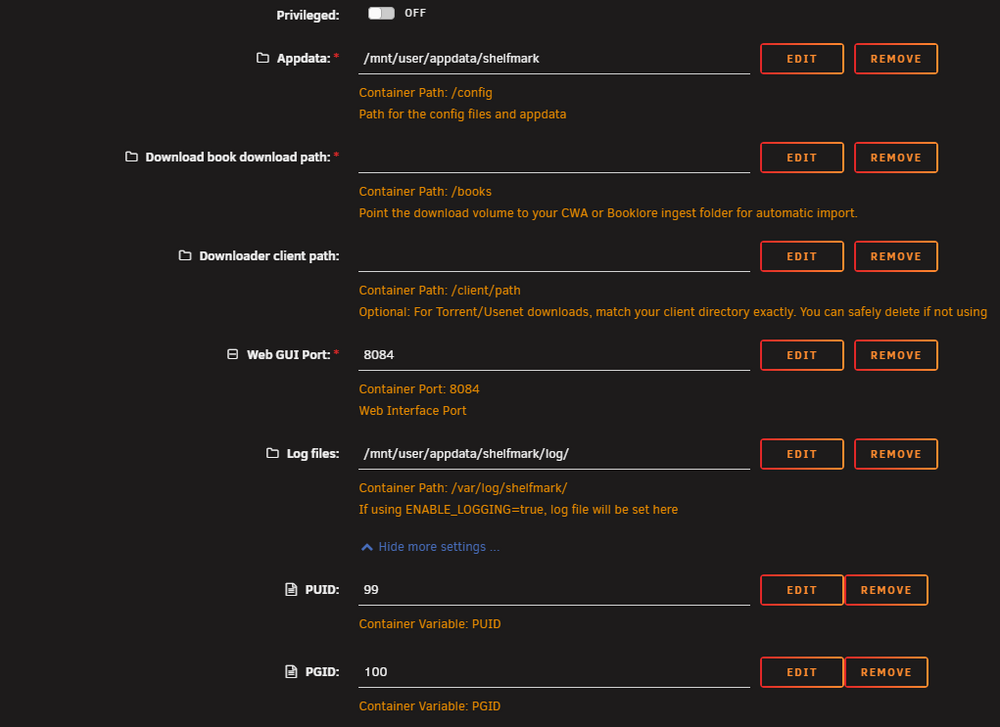
-
A new app was created called shelfmark. Support thread here: While this template is still working and supported by calibrain as a legacy configuration, I strongly suggest moving to the new template. It isn't a direct migration (while you can migrate directly and copying the env var, I suggest looking at the updated way of doing things).
-
Summary: Support Thread for Nodiaque Shelfmark Application: Shelfmark Github: https://github.com/calibrain/shelfmark This template use the official image from calibrain (ghcr.io/calibrain/shelfmark:latest) I only provide a template for the docker image, I do not maintain the image. For any issue with the software itself, please go to the official github. If you come from CWA, a lot have changed. I suggest you start fresh with the new configuration. Going forward, the project prefer using a json with all the settings that can be edited through the webgui. It is possible to use env variable to lock the settings but it isn't supported. Thus, use at your own risk and I won't support any added env variable that isn't in the template. Shelfmark support 2 mode, direct or universal mode to download. Per default, the template is configured to use direct which is using AA ways like CWA. The universal mode allow to integrate with prowlarr and might require change to the template. I haven't tested how to integrate yet, follow the instruction on the project page. If you want to use env variable to lock some settings, you must add them. The reference to them are here: https://github.com/calibrain/shelfmark/blob/main/docs/environment-variables.md
-
technically it's proton 8-30 that it's used hat What version exactly you used? I can try updating the template with the new version edit: I've updated to use 10-28 instead of 8-30. I pushed the changed on nodiaque/steamcmd:enshrouded_proton_test if someone want to try. I'll update the main one if it's good

-
I think the problem is now the file is in two disk as shown in your screenshot. This should be and there is your problem. To edit file, I suggest installing code-server docker apps instead. It will install vscode that you can then use to edit file. Setting variable in the docker template won't change anything. These are docker variable that then are environment variable for the OS inside docker. Unless a script is using them (there's none), these won't affect anything. The problem is really with the fact that right now, you have 2 different copy of the file on 2 drive (dockerconta... and cache). This shouldn't happen and is bad.
-
I'll check but I'll probably publish a new one and discontinued. Since it's another name, it require a new template. edit: technically, it still work under this name per the release doc: I do see many new features added and new mount point. I currently have my original working (it show as shelfmark 1.0.0 in my webgui) so it does update like calibrain said. I'll still make a new updated one that so it follow the new naming scheme

-
All mapping and config are in the template. What config are you trying to change that is not available in the template? This template use the environment variable to set all the available settings that was available at creation time. Edit: the reason why it's appearing and disappearing is because the path is already mounted. You need to change the first path in the template called appdata folder. This folder is used for the logging and the apps might be deleting everything in it at startup for clean log. Put it in a subfolder like you did with config instead. I think the program changed, there's was no settings file in the beginning. But using dockers with templates that use env var, you should use the env var.
-
What do you mean you cannot add the config volume?
-
First part is about the fact you said it's static, I simply say that mine is ondemand and that ondemand or dynamic won't change the problem with maximum children. Second part is about the script. So that's why you got quoted
-
All I did is provide the script people were asking some reply ago, like here https://forums.unraid.net/topic/103947-691-server-reached-max_children-setting-50/page/2/#findComment-1591393 and here https://forums.unraid.net/topic/103947-691-server-reached-max_children-setting-50/page/2/#findComment-1591499 And also, all that need to be done is to fix the process that create that file, which is something limesoft need to do since it's in the boot process. I only state what's going on.
-
Mine is set to ondemand per default. Ondemand and dynamic behave similar except that ondeman doesn't have a child process if not needed while dynamic keep some children process alive even idle. The pm.max_children is a static value, there's no way to put a dynamic value here. But, if it's overwritten at boot, it means there's a process at boot that write that value. This could be edited to allow for a calculated way of setting the max children based on ram. There's many calculation available to do that. As for your script, if it's a boot, you can create a userscript that run at array start (or at boot or whatever you desire) with this: sed -i "s/pm.max_children = 50/pm.max_children = 150/" /etc/php-fpm.d/www.conf If you also want to change to dynamic, you can put this also sed -i "s/pm = ondemand/pm = dynamic/" /etc/php-fpm.d/www.conf





